1. Introducció
Thank you for choosing the Tronsmart Onyx Ace True Wireless Bluetooth Earbuds. This manual provides detailed instructions on how to set up, operate, and maintain your earbuds to ensure optimal performance and longevity. Please read this manual thoroughly before using the product.
2. Contingut del paquet
- Tronsmart Onyx Ace True Wireless Earbuds (Left & Right)
- Estoig de càrrega
- Cable de càrrega USB-C
- Manual d'usuari
3. Producte acabatview
Familiarize yourself with the components of your Tronsmart Onyx Ace earbuds and charging case.

The Tronsmart Onyx Ace True Wireless Earbuds are shown in their open charging case, highlighting their compact design and white finish.
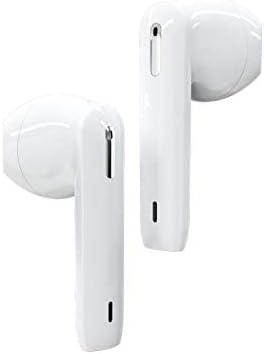
Un detallat view of the left and right Tronsmart Onyx Ace earbuds, showcasing their ergonomic design and in-ear fit.
Components clau:
- Auriculars: Auriculars esquerre (E) i dret (R) amb zones de control tàctil.
- Estoig de càrrega: Stores and charges the earbuds, with LED indicators for battery status.
- Port USB-C: Per carregar la funda.
- Micròfons: Integrated for calls and voice assistant.
4. Configuració
4.1 Càrrega inicial
Before first use, fully charge the charging case and earbuds. Connect the USB-C cable to the charging port on the case and a power source. The LED indicators on the case will show charging status.
4.2 Emparellament amb el dispositiu
- Obre la tapa de la funda de càrrega. Els auriculars entraran automàticament en mode d'emparellament.
- Al dispositiu (telèfon intel·ligent, tauleta, etc.), activeu el Bluetooth.
- Cerca "Tronsmart Onyx Ace" in the list of available Bluetooth devices.
- Select "Tronsmart Onyx Ace" to connect. Once connected, you will hear a confirmation tone.
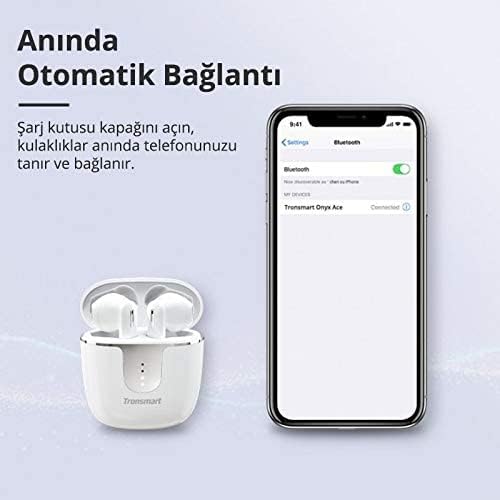
The image demonstrates the instant automatic connection feature: simply open the charging case lid, and the earbuds will automatically connect to your phone, as shown with a phone displaying a Bluetooth connection.
5. Instruccions de funcionament
The Tronsmart Onyx Ace earbuds feature intuitive touch controls for various functions.
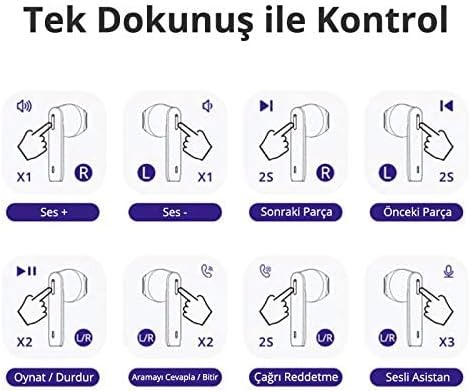
This diagram illustrates the touch controls: Single tap on R for Volume Up, L for Volume Down. Hold R for 2 seconds for Next Track, L for 2 seconds for Previous Track. Double tap U/R for Play/Pause or Answer/End Call. Hold U/R for 2 seconds to Reject Call. Triple tap U/R for Voice Assistant.
5.1 Encès/Apagat
- Encès: Obre la tapa de l'estoig de càrrega o treu els auriculars de l'estoig. S'encendran automàticament.
- Apagar: Torna a col·locar els auriculars a l'estoig de càrrega i tanca la tapa. S'apagaran automàticament.
5.2 Controls de reproducció de música
- Reproduir/pausa: Double tap either the Left (L) or Right (R) earbud.
- Pujar el volum: Single tap the Right (R) earbud.
- Baixar el volum: Single tap the Left (L) earbud.
- Pista següent: Hold the Right (R) earbud for 2 seconds.
- Pista anterior: Hold the Left (L) earbud for 2 seconds.
5.3 Gestió de trucades
- Respondre/Finalitzar la trucada: Double tap either the Left (L) or Right (R) earbud.
- Rebutja la trucada: Hold either the Left (L) or Right (R) earbud for 2 seconds.
5.4 Activació de l'assistent de veu
- Activa l'Assistent de veu: Triple tap either the Left (L) or Right (R) earbud.
5.5 Mono/Stereo Mode
Els auriculars es poden utilitzar individualment (mode mono) o junts (mode estèreo).
- Mode mono: Simply take one earbud out of the case. It will automatically connect to your device.
- Mode estèreo: Take both earbuds out of the case. They will automatically pair with each other and then connect to your device.

This image shows the flexibility of using the earbuds in either mono (single earbud) or stereo (both earbuds) mode, allowing users to feel free based on their preference.
6. Features Highlight
6.1 Superior Audio Quality
Experience stereo Hi-Fi sound with exceptional clarity, powered by Qualcomm aptX technology for CD-like audio and a 13mm driver for rich bass and clear treble.

The image highlights the audio quality features, including Stereo Hi-Fi sound with exceptional clarity, Qualcomm aptX for CD-like audio, AAC for balanced sound on iOS, and a 13mm driver for rich bass and clear treble. Lossless aptX audio is available for compatible devices.
6.2 Trucades nítides
Equipped with 4 microphones and Environment Noise Cancellation (ENC) technology, the earbuds guarantee crystal-clear and loud call quality by effectively reducing ambient noise.

This image depicts a user making a call, illustrating that the 4 microphones and Environment Noise Cancellation technology ensure crystal-clear and loud call quality by reducing ambient noise.
6.3 IPX5 Sweatproof
The IPX5 rating ensures your earbuds are protected against sweat, splashes, and rain, making them ideal for workouts and outdoor activities.

This image illustrates the IPX5 sweatproof rating, indicating the earbuds are protected against sweat, splashes, and rain, making them suitable for workouts and outdoor activities.
6.4 Pressure-Free Design
The semi-in-ear design provides a comfortable and secure fit, allowing for extended listening sessions without discomfort.
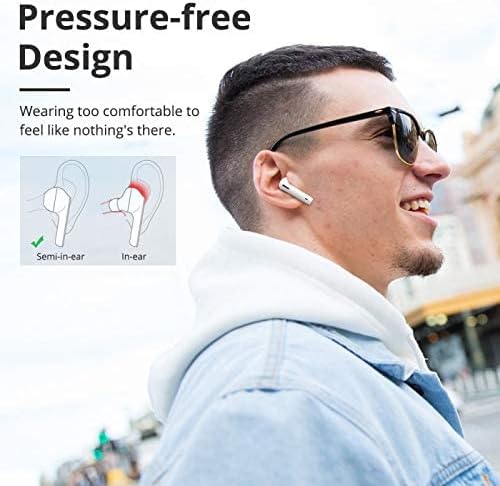
The image compares semi-in-ear and in-ear designs, highlighting the Tronsmart Onyx Ace's semi-in-ear design for a comfortable, pressure-free fit that feels almost imperceptible during wear.
6.5 Genuine Qualcomm Chip
Equipped with a genuine Qualcomm QCC3020 chip, the earbuds offer faster transmission, ultra-low latency, and low-power consumption for the most stable wireless connection.
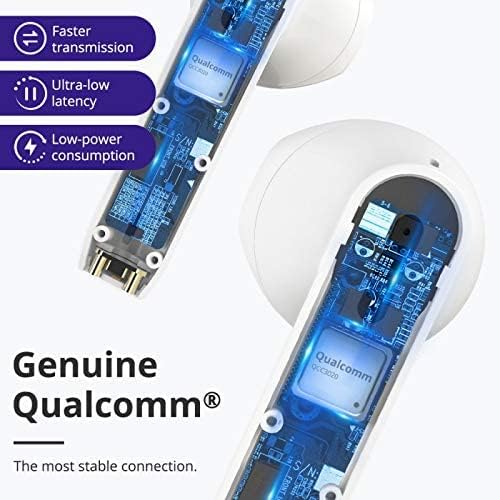
Un tall view of the earbud showing the internal Qualcomm QCC3020 chip, emphasizing faster transmission, ultra-low latency, and low-power consumption for a stable connection.
7. Càrrega
7.1 Càrrega dels auriculars
Place the earbuds into the charging case. The earbuds will automatically begin charging. The LED indicators on the earbuds will show their charging status.
7.2 Càrrega de la funda
Connect the provided USB-C cable to the charging port on the case and a USB power adapter (not included). The LED indicators on the case will light up to show the charging progress. A full charge provides up to 24 hours of total playtime with the earbuds.

This image displays the battery life capabilities: up to 5 hours on a single charge for the earbuds, and up to 24 hours total playtime with the charging case. Data is based on 50% volume.
8. Manteniment i cura
- Netegeu els auriculars i l'estoig de càrrega regularment amb un drap suau i sec.
- No utilitzeu netejadors abrasius ni dissolvents.
- Keep the charging contacts on the earbuds and in the case clean to ensure proper charging.
- Store the earbuds in their charging case when not in use to protect them and conserve battery life.
- Eviteu exposar els auriculars a temperatures extremes, humitat o llum solar directa.
9. Solució De Problemes
9.1 Auriculars que no s'emparellan/es connecten
- Assegureu-vos que els auriculars estiguin carregats i fora de l'estoig de càrrega.
- Desactiva i activa el Bluetooth al dispositiu.
- Forget "Tronsmart Onyx Ace" from your device's Bluetooth list and try pairing again.
- Try resetting the earbuds (refer to the next section).
9.2 Sense so o volum baix
- Comprova el nivell de volum tant del dispositiu com dels auriculars.
- Assegureu-vos que els auriculars estiguin connectats correctament al dispositiu.
- Netegeu qualsevol residu dels altaveus dels auriculars.
9.3 Problemes de càrrega
- Assegureu-vos que el cable de càrrega estigui connectat correctament tant a la carcassa com a la font d'alimentació.
- Check if the charging contacts on the earbuds and in the case are clean and free of obstruction.
- Proveu un cable USB-C o un adaptador d'alimentació diferent.
9.4 Restablir els auriculars
If you experience persistent issues, you may need to reset your earbuds. Consult the official Tronsmart support website or contact customer service for specific reset instructions for the Onyx Ace model, as procedures can vary.
10. Especificacions
Detailed technical specifications for the Tronsmart Onyx Ace True Wireless Bluetooth Earbuds.
| Característica | Detall |
|---|---|
| Nom de marca | Tronsmart |
| Nom del model | Onyx Ace |
| Número de model de l'article | Onyx Ace |
| Tecnologia de connectivitat | Sense fil |
| Tecnologia de comunicació sense fils | Bluetooth |
| Col·locació de les orelles dels auriculars | A l'orella |
| Factor de forma dels auriculars | A l'orella |
| Color | Blanc |
| Sensibilitat | 95 dB |
| Control de soroll | Cap |
| Conector d'auriculars | None (True Wireless Design) |
| Dimensions del producte | 4 x 9 x 11.8 cm; 150 g |
| Fabricant | Tronsmart |
| Data de primera disponibilitat | 24 de juny de 2020 |
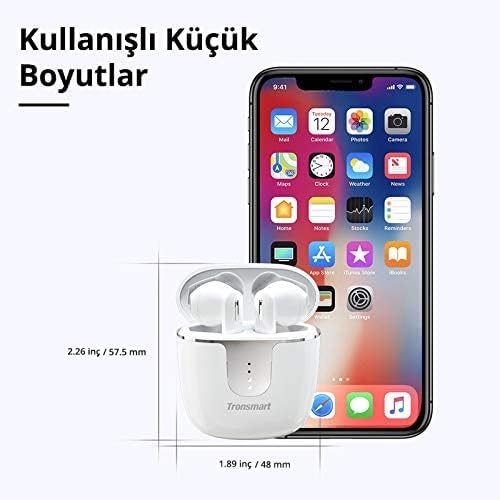
The image provides the compact dimensions of the Tronsmart Onyx Ace charging case: approximately 2.26 inches (57.5 mm) in height and 1.89 inches (48 mm) in width, demonstrating its portability.
11. Garantia i Suport
Tronsmart products typically come with a standard warranty. For detailed warranty information, product registration, or technical support, please visit the official Tronsmart weblloc web o contacteu directament amb el servei d'atenció al client. Conserveu el rebut de compra per a reclamacions de garantia.
Oficial Weblloc: www.tronsmart.com


