1. Informació important de seguretat
Please read this entire manual carefully before assembling or operating the Tunturi T20 Treadmill. Retain this manual for future reference.
- Consulteu sempre amb un metge abans de començar qualsevol programa d'exercici.
- This equipment is intended for home use only.
- Mantingueu els nens i les mascotes lluny de la cinta de córrer durant el funcionament.
- Assegureu-vos que la cinta de córrer estigui col·locada sobre una superfície plana i estable amb un espai lliure suficient al seu voltant.
- Porteu roba esportiva i calçat esportiu adequats.
- Use the safety key at all times. In an emergency, pulling the safety key will immediately stop the treadmill.
- No feu servir la cinta de córrer si està danyada o no funciona correctament.
- Pes màxim de l'usuari: 120 kg (264 lliures).
2. Muntatge i muntatge
2.1 Desembalatge
Carefully remove all components from the packaging. Verify that all parts listed in the 'Included Components' section (see Specifications) are present. Keep packaging materials until assembly is complete.
2.2 Muntatge
The Tunturi T20 treadmill requires some assembly. Follow the detailed instructions provided in the separate assembly guide included with your product. Ensure all bolts and nuts are securely tightened before use.
2.3 Col·locació i connexió d'alimentació
Place the treadmill on a level surface, ensuring at least 2 meters (6.5 feet) of clear space behind it and 0.5 meters (1.6 feet) on each side. Connect the power cord to a grounded electrical outlet. Ensure the power switch is in the OFF position before plugging in.

Imatge: Demonstrating the folding mechanism of the Tunturi T20 treadmill. The treadmill can be folded vertically for compact storage, making it suitable for home environments with limited space.
3. Instruccions de funcionament
3.1 Encès/Apagat
To power on, plug in the treadmill and flip the main power switch located near the front base to the 'ON' position. The console display will illuminate. To power off, flip the switch to 'OFF' and unplug the unit.
3.2 Consola completaview

Imatge: The Tunturi T20 treadmill console. This display shows key workout metrics such as time, distance, incline level, and current speed. It also features a visual 400-meter track and indicators for Bluetooth and heart rate connectivity.
The console features an LED or LCD display showing time, distance, incline, calories burned, and steps. Control buttons for speed, incline, program selection, start, stop, and mode are located below the display.
3.3 Clau de seguretat
Attach the safety key clip to your clothing before starting any workout. Insert the magnetic end of the safety key into the designated slot on the console. The treadmill will not operate without the safety key in place. Removing the safety key will immediately stop the treadmill.
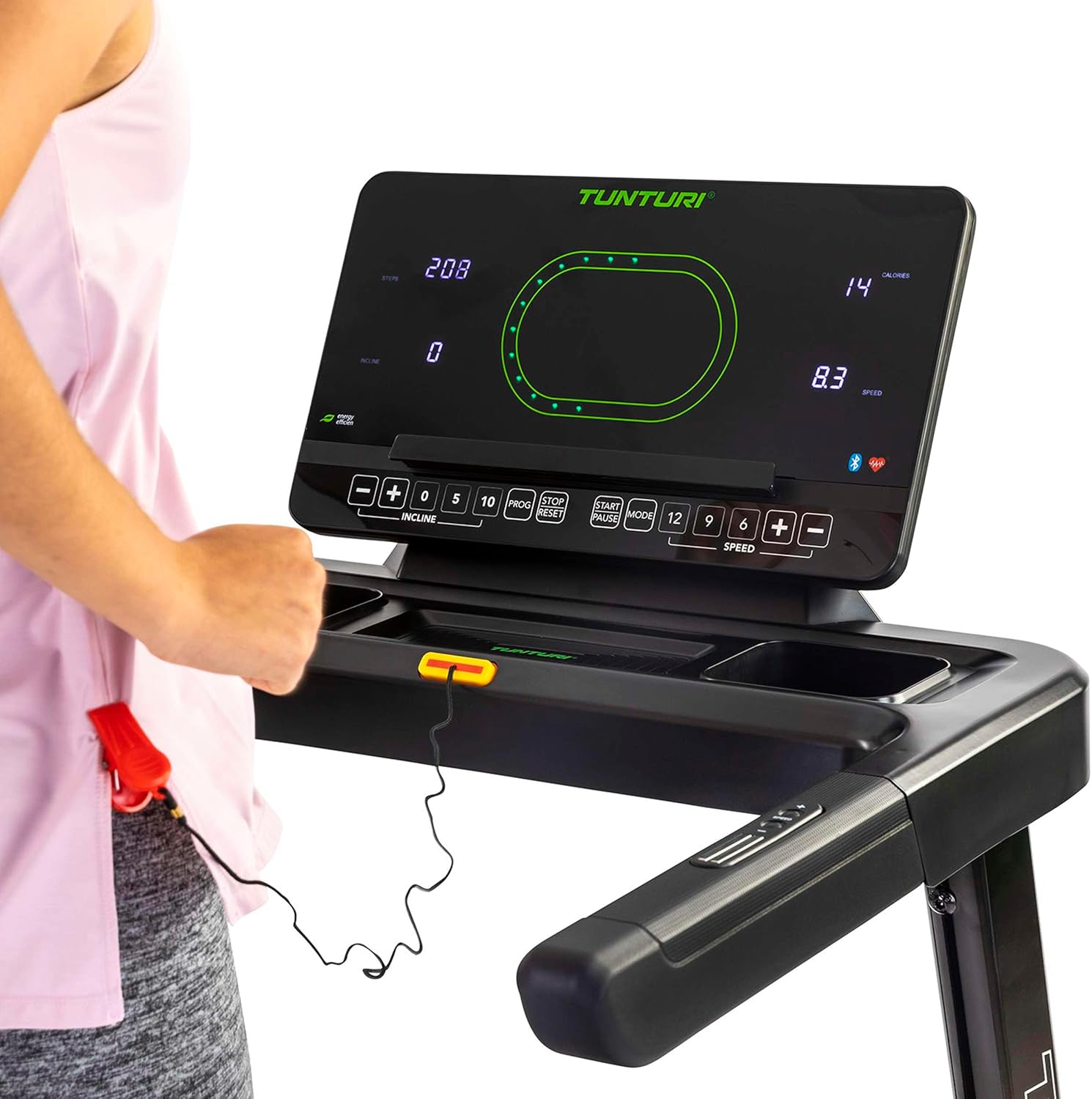
Imatge: Close-up of the Tunturi T20 console, showing the red safety key attached. The safety key is a crucial safety feature that must be engaged for the treadmill to operate.
3.4 Començar un entrenament
- Assegureu-vos que la clau de seguretat estigui correctament inserida i enganxada a la roba.
- Puja als rails laterals de la cinta de córrer.
- Premeu el botó «START». La cinta començarà a moure's a baixa velocitat.
- Carefully step onto the moving belt and adjust your speed using the '+' and '-' buttons or quick speed buttons (e.g., 5, 10 km/h).
3.5 Ajust de la velocitat i la inclinació
- Velocitat: Use the 'SPEED +' and '-' buttons to increase or decrease the belt speed. Quick speed buttons (e.g., 5, 10, 12 km/h) allow for rapid adjustments. The maximum speed is 16 km/h.
- Inclinació: Use the 'INCLINE +' and '-' buttons to adjust the electronic incline level. The treadmill offers 12 incline options. Quick incline buttons (e.g., 0, 5, 10) are also available.
3.6 Programes de formació
The Tunturi T20 offers 47 pre-set training programs. To select a program, press the 'PROG' button repeatedly until your desired program number is displayed. Follow the on-screen prompts to start the program. Each program automatically adjusts speed and incline according to its profile.
3.7 Connectivitat i aplicacions Bluetooth
The treadmill features Bluetooth connectivity, allowing you to connect to various fitness applications for an enhanced training experience.
- Rutes de Tunturi: Connect to the Tunturi Routes app to experience virtual routes from around the world. The treadmill automatically adjusts incline to match the terrain of the chosen route.
- AnyRun & Kinomap: The treadmill is also compatible with AnyRun and Kinomap applications, offering additional training videos and interactive experiences.

Imatge: A tablet displaying the Tunturi Routes application on the treadmill console. This illustrates the integration of smart fitness apps with the Tunturi T20 for interactive workouts.

Imatge: A user interacting with the Tunturi Routes app on a tablet mounted on the treadmill console. This demonstrates the ease of controlling and monitoring virtual routes during a workout.
3.8 Monitorització de la freqüència cardíaca
The Tunturi T20 treadmill supports heart rate monitoring, typically via a compatible chest strap (not always included, check product contents). Connect your chest strap via Bluetooth to the treadmill console to display your heart rate during your workout.
3.9 Aturar un entrenament
To stop the treadmill, press the 'STOP' button. The belt will gradually slow down and come to a complete stop. Alternatively, pull the safety key to immediately stop the treadmill in an emergency.
4. Manteniment
Regular maintenance ensures the longevity and safe operation of your Tunturi T20 Treadmill.
- Neteja: Netegeu la cinta de córrer després de cada ús amb un anunciamp drap per eliminar la suor i la pols. No utilitzeu productes de neteja abrasius.
- Lubricació: The running belt requires periodic lubrication. Refer to the separate lubrication instructions provided with the included lubrication tool. Frequency depends on usage.
- Ajust del cinturó: Over time, the running belt may become misaligned or loose. Consult the assembly guide for instructions on how to adjust the belt tension and centering.
- Inspecció: Inspeccioneu regularment tots els cargols, femelles i peces mòbils per comprovar si estan ben ajustades i desgastades. Estrenyeu qualsevol element de fixació solt.
5. Solució De Problemes
If you encounter issues with your Tunturi T20 Treadmill, refer to the following common solutions:
- La cinta de córrer no arrenca:
- Assegureu-vos que el cable d'alimentació estigui ben connectat a una presa de corrent amb connexió a terra.
- Check that the main power switch is in the 'ON' position.
- Verifiqueu que la clau de seguretat estigui inserida correctament a la consola.
- Belt Slipping or Hesitating:
- The running belt may require tension adjustment. Refer to the maintenance section or assembly guide.
- The belt may need lubrication. Follow the lubrication instructions.
- Sorolls inusuals:
- Comproveu si hi ha components solts i apreneu-los si cal.
- Assegureu-vos que la cinta de córrer estigui sobre una superfície plana.
- Lubricate the running belt if a squeaking noise is heard from the belt area.
- Console Display Not Working:
- Assegureu-vos que totes les connexions d'alimentació estiguin segures.
- Si el problema persisteix, poseu-vos en contacte amb el servei d'atenció al client.
For issues not covered here, please contact Tunturi customer support.
6. Especificacions del producte
| Característica | Especificació |
|---|---|
| Model | T20 (22TRN20000) |
| Marca | Tunturi |
| Potència del motor | 1.5 CV |
| Interval de velocitat | 1 - 16 km/h |
| Opcions d'inclinació | 12 (Electronic Adjustment) |
| Programes de formació | 47 |
| Superfície de córrer | 125 x 45 cm |
| Pes màxim de l'usuari | 120 kg |
| Dimensions muntades (L x A x A) | 155 x 74 x 137 cm |
| Mides plegades (L x A x A) | 87 x 74 x 139 cm |
| Pes del producte | 62 kg |
| Material del marc | Acer d'aliatge |
| Tipus de visualització | LED o LCD |
| Connectivitat | Bluetooth (Tunturi Routes, AnyRun, Kinomap compatible) |
| Components inclosos | Treadmill base, Motor housing, Safety key, Power cord, User manual, Assembly hardware, Lubrication tool, Remote control, Warranty documentation |
7. Garantia i Suport
Your Tunturi T20 Treadmill comes with a manufacturer's warranty. Please refer to the separate warranty documentation included with your product for details on coverage, terms, and conditions.
For technical support, spare parts, or any questions regarding your treadmill, please contact Tunturi customer service. Contact information can typically be found on the warranty documentation or the official Tunturi weblloc.


