1. Introducció
The Renkforce RF-CAR-100 FM Transmitter allows you to wirelessly stream audio from your smartphone or Micro SD card to your car's FM radio. This device also features two USB charging ports, providing a combined output of 3.1 Amps to conveniently charge your mobile devices while on the go. Enjoy your personal music selection and hands-free calling through your car's audio system.
2. Informació de seguretat
- Ensure the device is securely plugged into the car's 12V power socket.
- No feu servir el dispositiu de manera que us distregui de la conducció.
- Eviteu exposar el dispositiu a temperatures extremes, llum solar directa o humitat.
- No intenteu desmuntar ni modificar el dispositiu. Això anul·larà la garantia.
- Mantenir fora de l'abast dels nens.
3. Contingut del paquet
- Renkforce RF-CAR-100 FM Transmitter (1 unit)
4. Producte acabatview
Familiarize yourself with the components of your Renkforce RF-CAR-100 FM Transmitter:
- 12V Car Power Plug: Connects to your car's cigarette lighter socket.
- USB Charging Ports (x2): For charging smartphones and other USB-powered devices. One port may be designated for music playback from a USB drive (if supported) or for faster charging.
- Ranura per a targetes Micro SD: Inseriu una targeta Micro SD per reproduir música directament.
- Multi-function Knob/Button: Used for adjusting FM frequency, controlling music playback (play/pause, skip tracks), and managing calls (answer/end).
- Pantalla LED: Shows the current FM frequency.
- Micròfon: Per a trucades amb mans lliures.

Figura 1: Davant view of the Renkforce RF-CAR-100 FM Transmitter, showing the two USB charging ports and the blue LED indicator light when powered on.
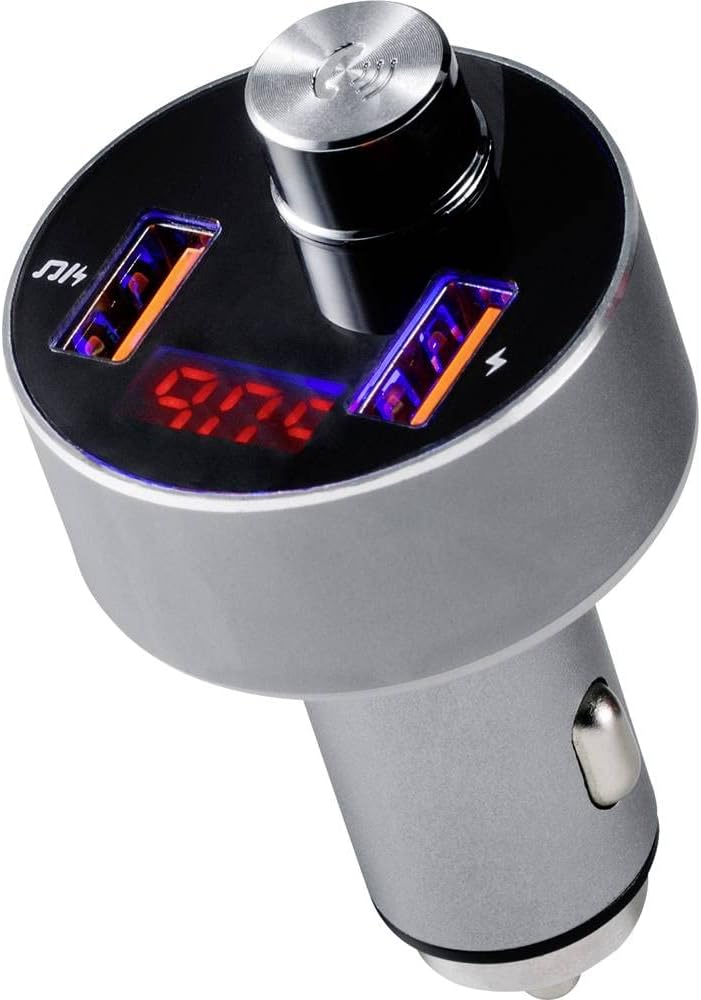
Figura 2: A dalt view of the transmitter, highlighting the digital display showing the FM frequency (e.g., 97.0 MHz) and the central multi-function control knob.

Figura 3: The FM Transmitter positioned beside a smartphone, illustrating its capability for hands-free calling. The phone screen shows an incoming call from 'Tom'.
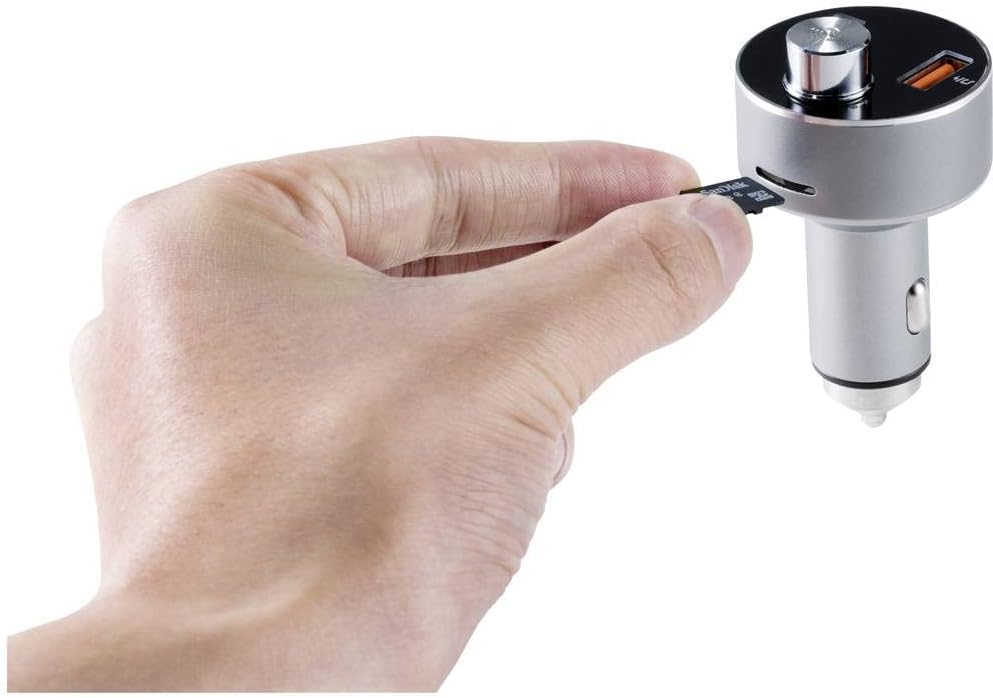
Figura 4: A hand demonstrating the insertion of a Micro SD card into the dedicated slot on the side of the FM Transmitter for direct audio playback.
5. Configuració
- Encès: Insert the Renkforce RF-CAR-100 into your car's 12V cigarette lighter socket. The device will power on automatically, and the LED display will show the current FM frequency.
- Estableix la freqüència FM:
- Tune your car's FM radio to an unused frequency (one with no strong broadcast signal, typically static).
- On the RF-CAR-100, press and hold the multi-function knob until the frequency display starts flashing.
- Rotate the knob left or right to adjust the transmitter's frequency to match the one on your car radio.
- Press the knob once to confirm the frequency setting.
- Emparellament Bluetooth:
- Al telèfon intel·ligent, activeu el Bluetooth i cerqueu els dispositius disponibles.
- Select 'RF-CAR-100' (or similar name) from the list to pair.
- Once paired, a voice prompt may confirm the connection, and audio from your phone will be transmitted to your car radio.
6. Instruccions de funcionament
6.1 Reproducció de música
- From Bluetooth Device: Once paired, open your music player on your smartphone. Audio will automatically stream through the FM Transmitter to your car radio. Use the multi-function knob to play/pause (short press) or skip tracks (rotate and press).
- From Micro SD Card: Insert a Micro SD card (formatted with MP3/WMA files) into the designated slot. The device will automatically detect the card and begin playing music. Use the multi-function knob for playback control.
6.2 Trucades de mans lliures
- Respondre una trucada: When an incoming call is received, the device will announce the number. Short press the multi-function knob to answer the call.
- Finalització d'una trucada: During a call, short press the multi-function knob to end the conversation.
- Rebutjar una trucada: Press and hold the multi-function knob to reject an incoming call.
- Remarcació: Double-press the multi-function knob to redial the last number.
6.3 Càrrega USB
Connect your USB charging cable to one of the two USB ports on the transmitter and to your mobile device. The ports provide a combined output of 3.1 Amps per a una càrrega eficient.
7. Manteniment
- Netegeu el dispositiu amb un drap suau i sec. No utilitzeu netejadors líquids ni dissolvents.
- Ensure the USB ports and Micro SD slot are free from dust and debris.
- Quan no l'utilitzeu durant períodes prolongats, guardeu el dispositiu en un lloc fresc i sec.
8. Solució De Problemes
- Sense energia:
- Check if the car's 12V socket is functioning correctly.
- Ensure the transmitter is fully inserted into the socket.
- Mala qualitat d'àudio / Estàtic:
- Adjust the FM frequency on both the transmitter and your car radio to an unused channel.
- Ensure the volume on your smartphone and car radio is set appropriately.
- Move away from areas with strong radio interference.
- Problemes de connexió Bluetooth:
- Assegureu-vos que el Bluetooth estigui habilitat al vostre telèfon intel·ligent.
- Delete 'RF-CAR-100' from your phone's paired devices list and attempt to re-pair.
- Restart both your phone and the FM Transmitter.
- La càrrega no funciona:
- Verify that the USB cable is not damaged and is properly connected.
- Ensure the device being charged is compatible with USB charging.
9. Especificacions
| Marca: | Renkforce |
| Model: | RF-CAR-100 (TWNT-V811R) |
| Dimensions del producte: | 7.2 x 4.2 x 7.2 cm |
| Pes de l'article: | 40 g |
| Interfície de maquinari: | Bluetooth, USB |
| Dispositius compatibles: | MP3 Player, Car Stereo |
| Característiques addicionals: | FM, MP3, Wireless |
| Mode de sortida d'àudio: | Transmissió FM |
| Tipus de sortida d'àudio: | Ràdio FM, Bluetooth |
| Voltage: | 12 volts (CC) |
| Tipus de font d'alimentació: | Manual Operation (car 12V socket) |
| Tipus sense fil: | Bluetooth |
| Tipus de connector: | USB |
| Tipus de suport: | Micro SD Card (MP3/WMA) |
| Sortida de càrrega USB: | 3.1 A (combined) |
10. Garantia i Suport
Renkforce products are designed for reliability and performance. For warranty information or technical support, please refer to the documentation provided at the time of purchase or contact your retailer. Keep your proof of purchase for warranty claims.


