1. Introducció
This manual provides essential information for the installation, operation, and maintenance of your Aruba CX 6300F 48G Class 4 PoE 4SFP56 Switch. The Aruba CX 6300 Switch Series is designed for enterprise network access, aggregation, and core applications, offering high performance and robust feature support for modern network environments.
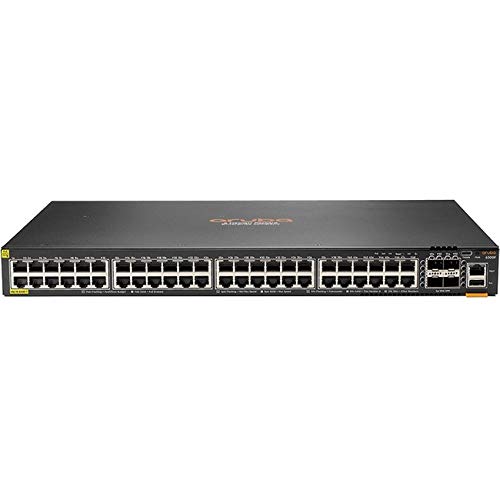
The 6300F model features 48 Gigabit Ethernet ports with Class 4 Power over Ethernet (PoE) capabilities and 4 SFP56 ports for high-speed uplinks.
Característiques clau
- Stackable Layer 3 switches with BGP, EVPN, VXLAN, VRF, and OSPF for robust security and Quality of Service (QoS).
- High performance with 880 Gbps system switching capacity, 660 MPPS of system throughput, and up to 200 Gbps stacking bandwidth.
- Compact 1U design with full density HPE Smart Rate (1/2.5/5GbE) multi-gigabit, 60W PoE, and SFP+ models.
- Built-in high-speed 10GbE/25GbE/50GbE uplinks.
- Intelligent monitoring, visibility, and remediation capabilities with Aruba Network Analytics Engine.
- One-touch deployment facilitated by the Aruba CX Mobile App.
- Aruba NetEdit support for automated configuration and verification.
- Aruba Dynamic Segmentation for secure and simplified access for users and IoT devices.
2. Contingut del paquet
Verify that all items are present and in good condition. If any items are missing or damaged, contact your vendor.
- Aruba 6300F 48-port 1GbE Class 4 PoE and 4-port SFP56 Switch
- 2-post Rack Kit
3. Configuració
Follow these steps to set up your Aruba 6300F switch.
3.1 Muntatge en bastidor
- Attach the provided 2-post rack kit to the sides of the switch using the screws provided.
- Secure the switch into a standard 19-inch equipment rack. Ensure adequate ventilation around the switch.
3.2 Connexió d'alimentació
- Connecteu el cable d'alimentació a l'entrada d'alimentació de CA del panell posterior de l'interruptor.
- Connecteu l'altre extrem del cable d'alimentació a una presa de corrent amb connexió a terra.
- Verifiqueu que el LED d'alimentació del panell frontal s'il·lumina, indicant que l'interruptor rep alimentació.
3.3 Connexions de xarxa
- Ethernet Ports (1GbE PoE): Connect network devices (e.g., computers, access points, IP cameras) to the 48 RJ-45 Ethernet ports using standard Ethernet cables. These ports support Power over Ethernet (PoE) for compatible devices.
- Uplink Ports (SFP56): Connect the 4 SFP56 ports to your core network or other switches using appropriate SFP56 transceivers and fiber optic cables for high-speed connectivity.
- Port de la consola: For initial configuration or direct management, connect a console cable from your management workstation to the console port on the switch.
4. Instruccions de funcionament
This section outlines basic operational procedures for the Aruba 6300F switch.
4.1 Encès i apagat
- Encès: Once the power cord is connected, the switch will automatically power on. Observe the system status LEDs for boot sequence completion.
- Apagueu: To power off the switch, disconnect the power cord from the electrical outlet. For controlled shutdown, refer to the command-line interface (CLI) documentation for proper shutdown procedures to prevent data corruption.
4.2 Indicadors LED
The front panel LEDs provide status information about the switch and its ports.
- LED del sistema: Indicates overall system status (e.g., power, fault).
- LEDs de port: Each port has LEDs indicating link status, activity, and PoE status (if applicable). Refer to the detailed product documentation for specific LED behavior.
4.3 Configuració inicial
For initial configuration, connect to the switch via the console port or through a network connection using the Aruba CX Mobile App or Aruba NetEdit. Refer to the Aruba CX documentation for detailed configuration guides, including IP address assignment, VLAN setup, and security policies.
5. Manteniment
Un manteniment regular garanteix un rendiment òptim i una llarga vida útil del vostre interruptor.
- Neteja: Keep the switch and its ventilation openings clean and free of dust. Use a soft, dry cloth for cleaning. Do not use liquid or aerosol cleaners.
- Actualitzacions de firmware: Periodically check the HEWLETT PACKARD support website for firmware updates. Keeping the firmware up-to-date ensures access to the latest features, performance improvements, and security patches.
- Condicions ambientals: Ensure the switch operates within the recommended temperature and humidity ranges as specified in the product's technical documentation.
6. Solució De Problemes
Aquesta secció ofereix solucions a problemes comuns que podeu trobar.
6.1 Sense poder
- Assegureu-vos que el cable d'alimentació estigui connectat correctament tant a l'interruptor com a la presa de corrent.
- Verifiqueu que la presa de corrent funciona connectant-hi un altre dispositiu.
- Comproveu si hi ha disjuntors activats.
6.2 Sense connectivitat de xarxa
- Check the link/activity LEDs on the connected ports. If they are off, ensure the cables are properly connected and not damaged.
- Verifiqueu que el dispositiu connectat estigui encès i funcioni correctament.
- Confirm that the switch's configuration (e.g., VLANs, IP addressing) is correct for your network setup.
6.3 El PoE no funciona
- Ensure the connected device is PoE-compatible and meets the power requirements of Class 4 PoE.
- Check the PoE status LEDs on the port.
- Verify that the switch's PoE budget is not exceeded.
For more advanced troubleshooting, consult the comprehensive Aruba CX 6300 Series documentation available on the HEWLETT PACKARD support weblloc.
7. Especificacions
| Característica | Detall |
|---|---|
| Número de model | 6300F |
| Marca | HEWLETT PACKARD (HPE) |
| Nombre de Ports | 48 (1GbE Class 4 PoE) + 4 (SFP56 Uplink) |
| Velocitat de transferència de dades | 48 Gigabits Per Second (per 1GbE port), up to 50GbE per SFP56 port |
| Tipus d'interfície | Stack Port, Uplink Port |
| Pes de l'article | 15.95 lliures (7.24 kg) |
| Dimensions del producte | 23.3 x 19.6 x 7.2 polzades (59.18 x 49.78 x 18.29 cm) |
| Material de la caixa | Plàstic |
| Components inclosos | 6300F 48-port 1GbE Class 4 PoE and 4-port SFP56 Switch, 2-post Rack Kit |
| Dispositius compatibles | Desktop, Laptop, Printer, Access Points, IP Cameras, etc. |
| Color | Negre |
| GTIN / UPC | 190017340296 |
8. Garantia i Suport
This HEWLETT PACKARD product is covered by a manufacturer's warranty. For detailed warranty information, including terms and conditions, please refer to the warranty statement provided with your product or visit the official HEWLETT PACKARD support weblloc.
For technical support, documentation, and software downloads, please visit the HEWLETT PACKARD support portal or contact their customer service. Ensure you have your product model number (6300F) and serial number ready when seeking support.
HEWLETT PACKARD Support Weblloc: www.hpe.com/support


