1. Introducció
Thank you for choosing the Tronsmart Onyx Ace True Wireless Earbuds. These earbuds are designed to provide a high-quality audio experience with advanced features such as Bluetooth 5.0, Qualcomm aptX audio, environmental noise cancellation, and intuitive touch controls. This manual will guide you through the setup, operation, and maintenance of your new earbuds.
2. Contingut del paquet
- Tronsmart Onyx Ace True Wireless Earbuds (L/R)
- Estoig de càrrega
- Cable de càrrega USB-C
- Manual d'usuari
- Targeta de garantia
3. Producte acabatview
Familiarize yourself with the components of your Tronsmart Onyx Ace earbuds and charging case.

Image: Earbud Internal Components. This image displays the internal structure of the Tronsmart Onyx Ace earbud, emphasizing the Qualcomm QCC3020 chip responsible for stable Bluetooth connectivity and efficient performance.
- Auriculars: Left and Right earbuds with touch control areas and microphones.
- Estoig de càrrega: Houses the earbuds for charging and storage, with LED indicators for battery status and a USB-C charging port.
- Micròfons: Each earbud features multiple microphones for clear call quality and environmental noise cancellation.
4. Configuració
4.1. Càrrega dels auriculars i l'estoig
Abans del primer ús, carregueu completament els auriculars i l'estoig de càrrega.
- Col·loca els auriculars a l'estoig de càrrega. Assegura't que estiguin correctament col·locats.
- Connect the USB-C charging cable to the charging port on the case and to a power source (e.g., USB wall adapter, computer USB port).
- The LED indicators on the charging case will illuminate to show charging status.
- Charging time for earbuds is approximately 1 hour 20 minutes. The charging case takes approximately 1 hour 30 minutes to fully charge.
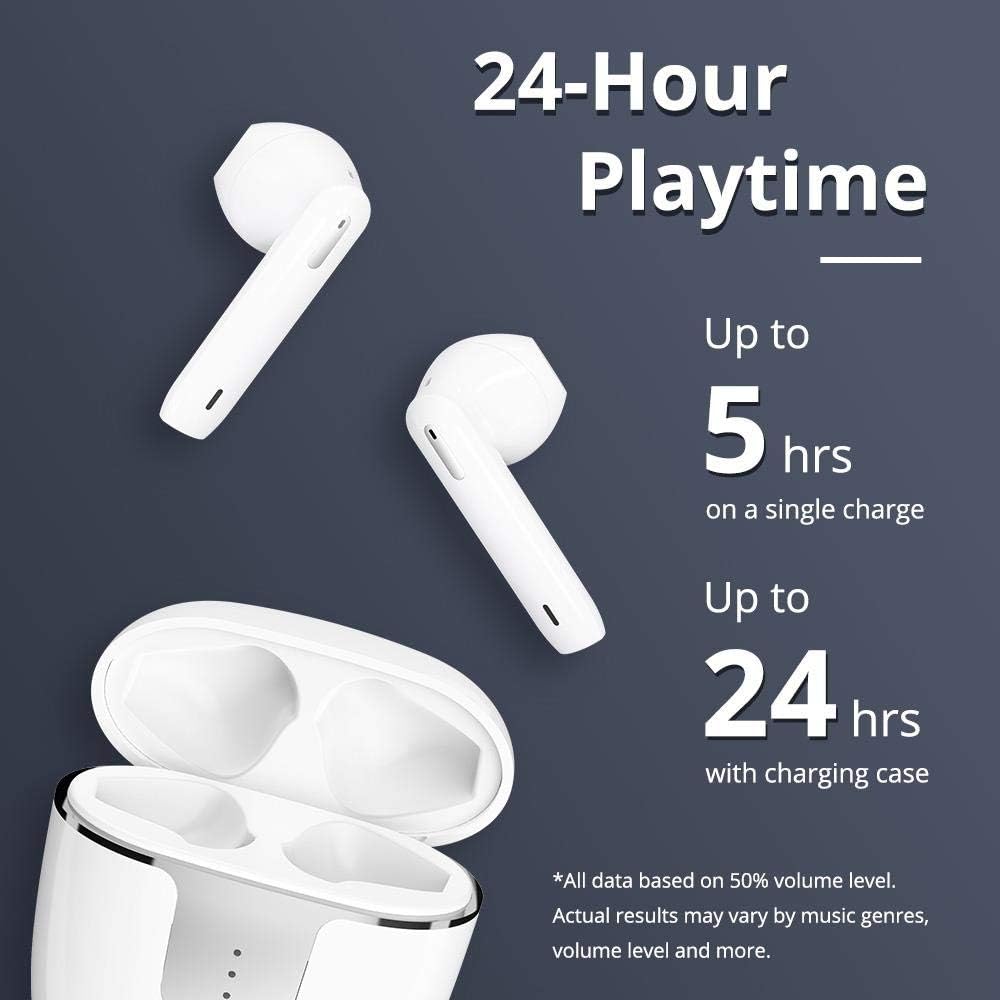
Image: Charging and Playtime. This image highlights the extended playtime of the Onyx Ace earbuds, offering up to 5 hours on a single charge and up to 24 hours with the charging case.
4.2. Emparellament amb el dispositiu
Els auriculars entraran automàticament en mode d'emparellament quan es treguin de l'estoig de càrrega.
- Open the charging case. The earbuds will power on and enter pairing mode.
- Al dispositiu (telèfon intel·ligent, tauleta, etc.), activeu el Bluetooth.
- Cerca "Tronsmart Onyx Ace" in the list of available Bluetooth devices.
- Select "Tronsmart Onyx Ace" to connect. Once connected, you will hear an audible confirmation.
- Els auriculars es tornaran a connectar automàticament a l'últim dispositiu emparellat quan es treguin de l'estoig, si el Bluetooth està activat al dispositiu.
5. Instruccions de funcionament
5.1. Encendre/apagar
- Encès: Open the charging case, or press and hold the touch panel on either earbud for 3 seconds.
- Apagar: Place the earbuds back into the charging case and close the lid, or press and hold the touch panel on either earbud for 5 seconds.
5.2. Posar-se els auriculars
The Onyx Ace earbuds feature a semi-in-ear design for comfortable wear.

Image: Pressure-Free Design. This image demonstrates the comfortable semi-in-ear design of the earbuds, which reduces pressure and allows for extended wear without discomfort.
Gently insert the earbuds into your ears. Adjust them for a secure and comfortable fit. The semi-in-ear design allows for some ambient sound awareness.
5.3. Toqueu Controls
The earbuds feature intuitive touch controls for various functions.
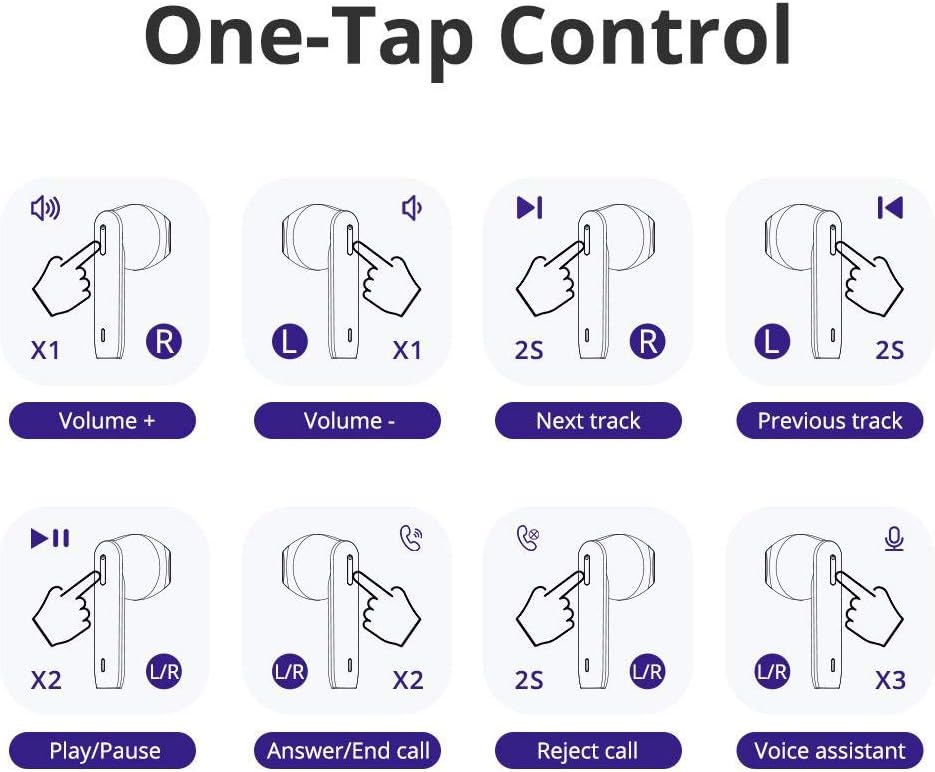
Image: One-Tap Control. This diagram illustrates the various touch gestures for controlling music playback, calls, and activating the voice assistant on the Onyx Ace earbuds.
- Pujar el volum: Single tap on the Right earbud.
- Baixar el volum: Single tap on the Left earbud.
- Pista següent: Toqueu dues vegades l'auricular dret.
- Pista anterior: Toqueu dues vegades l'auricular esquerre.
- Reproduir/pausa: Fes doble toc a qualsevol dels auriculars.
- Respondre/Finalitzar la trucada: Fes doble toc a qualsevol dels auriculars.
- Rebutja la trucada: Manteniu premut qualsevol dels auriculars durant 2 segons.
- Activa l'assistent de veu (Siri/Assistent de Google): Toqueu tres vegades qualsevol dels auriculars.

Image: Voice Access. This image shows how to activate your device's voice assistant (Siri, Google Assistant, Cortana) directly from the earbuds with a simple tap.
5.4. Mono or Stereo Mode
You can use either earbud independently (mono mode) or both together (stereo mode).

Image: Mono or Stereo Use. This image illustrates the flexibility of using either a single earbud (mono mode) or both earbuds (stereo mode) for audio playback and calls.
- To use in mono mode, simply take one earbud out of the charging case. It will automatically connect to your device.
- To switch to stereo mode, take the second earbud out of the case. It will automatically pair with the first earbud.
6. Manteniment
6.1. Neteja
- Netegeu regularment els auriculars i l'estoig de càrrega amb un drap suau, sec i sense borrissol.
- No utilitzeu productes químics aggressivs, dissolvents de neteja o detergents forts.
- Ensure charging contacts on both earbuds and case are clean and free of debris for proper charging.
6.2. Emmagatzematge
- Quan no els utilitzeu, guardeu els auriculars a la seva funda de càrrega per protegir-los i mantenir-los carregats.
- Emmagatzemar en un lloc fresc i sec, allunyat de temperatures extremes i de la llum solar directa.
6.3. Resistència a l'aigua (IPX5)
The Tronsmart Onyx Ace earbuds are rated IPX5 water-resistant, meaning they are protected against splashing water from any angle. This makes them suitable for workouts and light rain.
- No submergiu els auriculars a l'aigua.
- La funda de càrrega no és resistent a l'aigua.
- Assegureu-vos que els auriculars estiguin secs abans de tornar-los a col·locar a l'estoig de càrrega per evitar que es facin malbé.
7. Solució De Problemes
| Problema | Solució |
|---|---|
| Els auriculars no s'emparellan amb el dispositiu. |
|
| Només un auricular està reproduint so. |
|
| Els auriculars no es carreguen. |
|
| Mala qualitat de trucada. |
|
8. Especificacions
| Característica | Detall |
|---|---|
| Model | Onyx Ace |
| Xip | Qualcomm QCC3020 |
| Versió Bluetooth | 5.0 |
| Bluetooth Profiles | HFP / HSP / AVRCP / A2DP |
| Còdecs d'àudio | aptX, AAC, SBC |
| Distància de connexió | Fins a 15 metres (50 peus) |
| Diàmetre de l'altaveu | 13 mm |
| Sensibilitat del micròfon | -42 dB ± 1 dB |
| Impedància | 32 Ω |
| Interval de freqüència | 20 - 20K Hz |
| Temps de joc (auriculars) | Fins a 5 hores (50% volum) |
| Temps de joc (amb funda de càrrega) | Fins a 24 hores (50% volum) |
| Bateria d'auriculars | 40 mAh |
| Caixa de càrrega de la bateria | 400 mAh |
| Temps de càrrega dels auriculars | Aproximadament 1 hora i 20 minuts |
| Temps de càrrega de la caixa | Aproximadament 1 hora i 30 minuts |
| Standby Time (Earbuds) | Aprox. 60 hores |
| Standby Time (Charging Case) | Aprox. 90 dies |
| Pes de l'auricular | Aprox. 4 g |
| Pes de la caixa de càrrega | Aprox. 37 g |
| Resistència a l'aigua | IPX5 |
| Mètode de control | Toc, veu |
| Port de càrrega | USB-C |
9. Garantia i Suport
The Tronsmart Onyx Ace earbuds come with a warranty card included in the package. Please refer to the warranty card for detailed terms and conditions.
For technical support, product inquiries, or warranty claims, please contact Tronsmart customer service through their official weblloc web o el distribuïdor on vau comprar el producte.