Introducció
This manual provides comprehensive instructions for the setup, operation, and maintenance of your Perixx PERIBOARD-426 Wired Mini Low Profile Keyboard. Please read this manual thoroughly before using the product to ensure proper functionality and longevity.
The Perixx PERIBOARD-426 is a compact, low-profile keyboard designed for efficiency and comfort in various computing environments. It features a wired USB connection for reliable performance and integrated multimedia keys for enhanced control.
Contingut del paquet
- Perixx PERIBOARD-426 Wired Mini Low Profile Teclat
- Manual d'usuari (aquest document)
Requisits del sistema
- Operating System: Windows 7, Windows 8, Windows 10, or later
- Port USB disponible
Configuració
The Perixx PERIBOARD-426 is a plug-and-play device, requiring no additional driver installation for basic functionality.
- Descomprimir el teclat: Traieu amb cura el teclat del seu embalatge.
- Connexió a l'ordinador: Localitza un port USB disponible a l'ordinador. Insereix el connector USB del PERIBOARD-426 al port USB.
- Reconeixement del sistema: El sistema operatiu detectarà i instal·larà automàticament els controladors necessaris. Aquest procés pot trigar uns instants.
- Començar a utilitzar: Once the installation is complete, the keyboard is ready for use.

Instruccions de funcionament
General Typing
The PERIBOARD-426 features a standard US English layout with low-profile keys for a comfortable typing experience. The responsive key mechanism ensures accurate input.
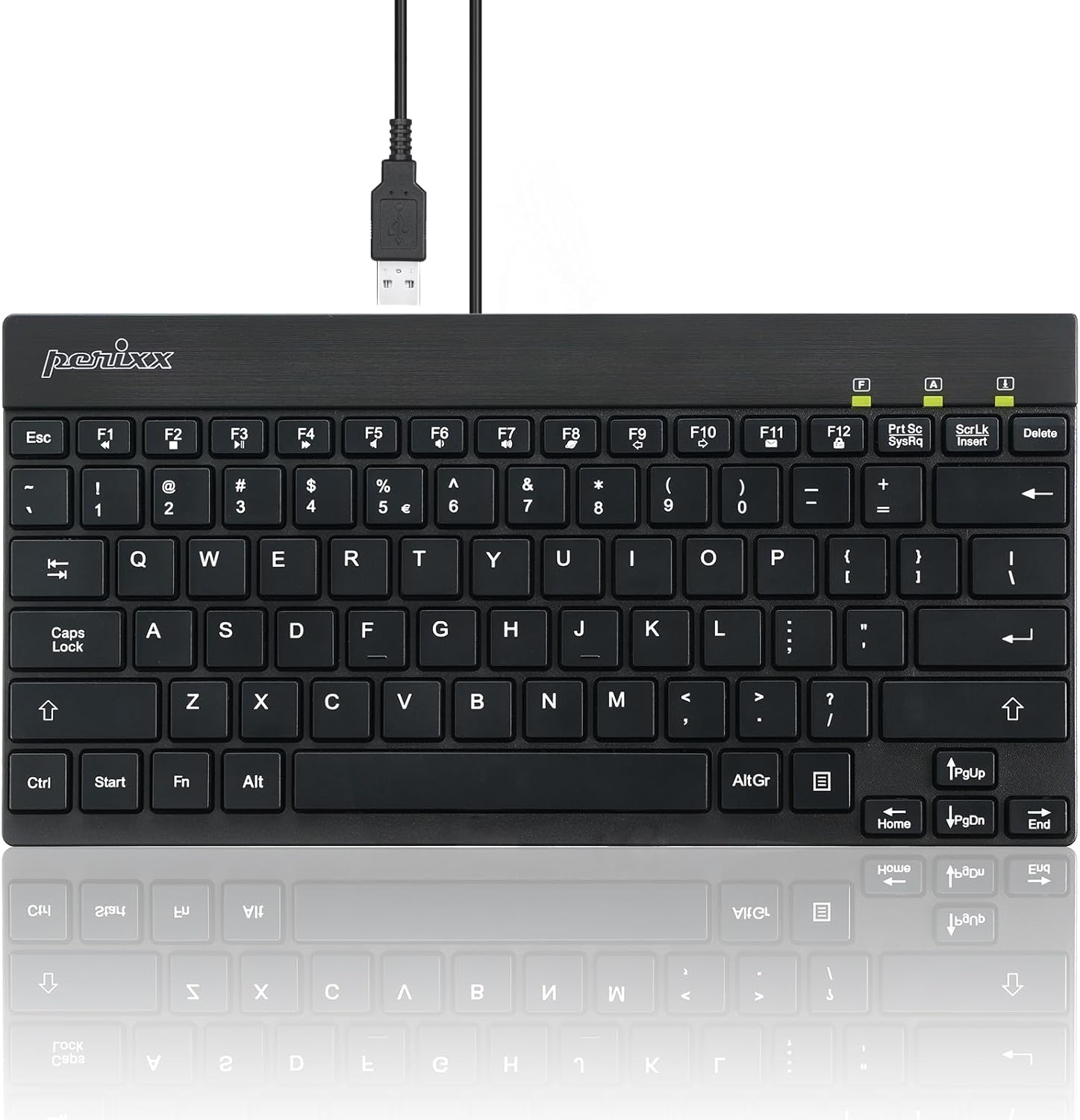
Claus multimèdia
The keyboard includes dedicated multimedia function keys (F1-F12) that can be accessed by pressing the Fn key in combination with the desired function key. These keys provide quick access to common media controls and system functions.
| Combinació de tecles | Funció |
|---|---|
| Fn + F1 | Obriu el reproductor multimèdia |
| Fn + F2 | Baixa el volum |
| Fn + F3 | Puja el volum |
| Fn + F4 | Silenciar |
| Fn + F5 | Pista anterior |
| Fn + F6 | Pista següent |
| Fn + F7 | Reproduir/Pausa |
| Fn + F8 | Atureu-vos |
| Fn + F9 | Obert Web Navegador |
| Fn + F10 | Obre el client de correu electrònic |
| Fn + F11 | El meu ordinador |
| Fn + F12 | Calculadora |
Note: Specific multimedia functions may vary slightly depending on your operating system and installed software.
Manteniment i cura
- Neteja: Per netejar el teclat, desconnecteu-lo de l'ordinador. Feu servir un drap suau i sense borrissol lleugerament humit.ampEsbandiu amb aigua o una solució de neteja suau. Eviteu productes químics agressius o materials abrasius.
- Eliminació de pols: Feu servir aire comprimit per eliminar la pols i les restes que hi ha entre les tecles.
- Emmagatzematge: Quan no l'utilitzeu, guardeu el teclat en un lloc net i sec, allunyat de temperatures extremes.
- Exposició líquida: Eviteu vessar líquids sobre el teclat. En cas de vessament accidental, desconnecteu immediatament el teclat i deixeu-lo assecar completament abans de tornar-lo a connectar.
Resolució de problemes
El teclat no respon
- Comprova la connexió USB: Ensure the USB cable is securely plugged into a functional USB port on your computer. Try a different USB port.
- Reinicieu l'ordinador: De vegades, un simple reinici del sistema pot resoldre els problemes de connectivitat.
- Prova en un altre ordinador: Si és possible, prova el teclat en un altre ordinador per determinar si el problema és del teclat o del sistema.
- Reinstal·lació del controlador: Although plug-and-play, you can try uninstalling the keyboard driver from Device Manager (Windows) and then reconnecting the keyboard to allow the system to reinstall it.
Les tecles no funcionen correctament
- Claus netes: Ensure no debris is lodged under the affected keys. Use compressed air to clear any obstructions.
- Interferència de programari: Check if any software or system settings are interfering with keyboard input.
Multimedia Keys Not Working
- Fn Key Usage: Assegureu-vos que esteu prement el botó Fn simultàniament amb la tecla de funció desitjada.
- Suport del sistema operatiu: Verify that your operating system and media player software support the standard multimedia key commands.
Especificacions
| Característica | Detall |
|---|---|
| Model | PERIBOARD-426 (11665) |
| Connectivitat | USB per cable |
| Disseny | Anglès dels EUA |
| Tipus de clau | Pro baixfile, Membrane Switch |
| Material | ABS (acrilonitril butadiè estirè) |
| Dimensions (L x A x A) | 10.87 x 5.43 x 0.55 polzades (27.6 x 13.8 x 1.4 cm) |
| Pes | 0.84 lliures (381 g) |
| Longitud del cable | Aproximadament 4.9 peus (1.5 metres) |
| Color | Negre |
| Sistema operatiu compatible | Windows 7/8/10 o posterior |
Garantia i Suport
The Perixx PERIBOARD-426 comes with a one-year limited warranty from the date of purchase. This warranty covers manufacturing defects and workmanship under normal use.
For technical support, warranty claims, or further assistance, please visit the official Perixx website or contact their customer service department. Contact information can typically be found on the Perixx brand store page or product packaging.
You can visit the Perixx Store for more information: Perixx Official Store
Informació de seguretat
- No exposeu el dispositiu a temperatures extremes, humitat o llum solar directa.
- Mantingueu el dispositiu allunyat de l'aigua i altres líquids.
- No intenteu desmuntar ni modificar el dispositiu. Això anul·larà la garantia.
- Mantenir fora de l'abast dels nens.


