1. Introducció
This manual provides detailed instructions for the installation, operation, and maintenance of your Phonocar VM011D 2-DIN Car Radio. Please read this manual thoroughly before using the product to ensure correct operation and to prevent damage.
The Phonocar VM011D is a versatile 2-DIN car radio featuring a 6.75-inch capacitive touchscreen monitor, Apple CarPlay, Android Auto, DAB+ digital radio, Bluetooth connectivity, and GPS capabilities.
2. Informació de seguretat
Observe the following safety precautions to prevent accidents and damage to the unit:
- No feu servir la unitat de manera que us distregui de la conducció.
- Assegureu-vos que tot el cablejat estigui connectat correctament per evitar curtcircuits o riscos elèctrics.
- Si no esteu segurs de cap pas, consulteu un tècnic qualificat per a la instal·lació.
- No exposeu la unitat a temperatures extremes, a la llum solar directa durant períodes prolongats ni a una humitat excessiva.
3. Contingut del paquet
Verifiqueu que tots els elements siguin presents al paquet:
- Phonocar VM011D Main Unit
- Arnès de potència
- Antena GPS
- Cable d'extensió USB
- Maquinari de muntatge
- Manual d'usuari (aquest document)
4. Configuració i instal·lació
Installation of the Phonocar VM011D requires basic automotive electrical knowledge. If you are not confident in performing the installation yourself, it is recommended to seek professional assistance.
4.1 Esquema de cablejat
Consulteu el diagrama de cablejat detallat que s'inclou amb la unitat per a les connexions específiques. Les connexions clau inclouen:
- Potència (Groc): 12V constants (bateria)
- Accessori (vermell): Commutat 12 V (encesa)
- Terra (negre): Terra del xassís
- Sortides dels altaveus: Front Left, Front Right, Rear Left, Rear Right (ensure correct polarity)
- Antena: Connecteu l'antena de ràdio del cotxe.
- Antena GPS: Connecteu l'antena GPS i munteu-la en un lloc amb llum clara view del cel.
- Ports USB: For Apple CarPlay, Android Auto, and media playback.

Figura 1: Frontal view of the Phonocar VM011D display showing the main menu with icons for Radio, Bluetooth Phone, Bluetooth Music, DAB, and AV In1. USB and SD card slots are visible at the bottom.
4.2 Muntatge de la unitat
- Traieu la ràdio del cotxe existent del tauler de control.
- Connect all necessary wiring harnesses to the VM011D.
- Slide the VM011D into the 2-DIN opening in your dashboard.
- Fixeu la unitat amb els suports i els cargols de muntatge proporcionats.
- Torneu a muntar el revestiment del tauler de control.
5. Instruccions de funcionament
5.1 Encès/Apagat
The unit will power on automatically when the vehicle's ignition is turned on. To manually power off (if supported by vehicle wiring), press and hold the power button (usually located on the front panel).
5.2 Interfície de pantalla tàctil
The VM011D features a 6.75-inch capacitive touchscreen. Navigate through menus and select functions by tapping icons or swiping across the screen.

Figure 2: The VM011D display highlighting compatibility with Apple CarPlay and Phonelink, indicating its smartphone integration features.
5.3 Radio (DAB+/FM/AM)
- Selecció de la font: Tap the "Radio" or "DAB" icon on the main menu.
- Escaneig: Use the scan function to automatically find and store available stations.
- Presets: Save your favorite stations to preset buttons for quick access.
5.4 Connectivitat Bluetooth
Pair your smartphone to the VM011D for hands-free calling and audio streaming.
- Go to the Bluetooth settings on the VM011D.
- Activeu el Bluetooth al vostre telèfon intel·ligent i cerqueu els dispositius disponibles.
- Select "Phonocar VM011D" from the list on your phone.
- Confirma el codi d'emparellament si se't demana.
Once paired, you can access "BT Phone" for calls and "Musica BT" for audio streaming.
5.5 Apple CarPlay / Android Auto
Connect your compatible smartphone via USB to access Apple CarPlay or Android Auto functionalities directly on the VM011D screen.
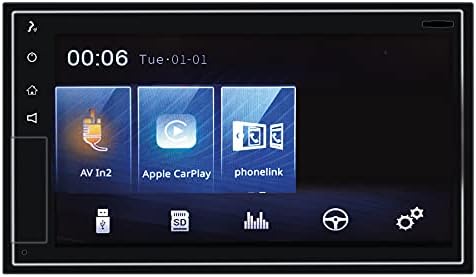
Figure 3: The VM011D display showing icons for AV In2, Apple CarPlay, and Phonelink, indicating various input and smartphone integration options.
- Apple CarPlay: Connect your iPhone using a certified USB cable. The CarPlay interface will automatically launch.
- Android Auto: Connect your Android phone using a certified USB cable. Ensure Android Auto is installed on your phone. The Android Auto interface will automatically launch.
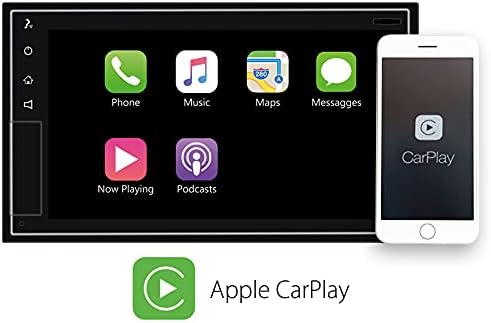
Figure 4: The VM011D display showing the Apple CarPlay interface with common applications like Phone, Music, Maps, and Messages, alongside an iPhone demonstrating connectivity.

Figure 5: The Phonocar VM011D integrated into a car's dashboard, displaying the Apple CarPlay interface with multiple application icons, demonstrating in-car usage.
5.6 Navegació GPS
The unit includes GPS functionality. Depending on the software pre-installed or accessed via CarPlay/Android Auto, you can use navigation applications for route guidance.

Figure 6: The VM011D display showing a navigation map, likely mirrored from a smartphone via Phonelink, with route details and traffic information.
5.7 Reproducció multimèdia (USB/SD)
Insert a USB drive or SD card into the designated slots to play audio or video files. The unit supports various media formats.
6. Manteniment
- Neteja de la pantalla: Feu servir un drap suau i sense borrissol per netejar suaument la pantalla tàctil. No utilitzeu productes de neteja abrasius ni dissolvents.
- Actualitzacions de programari: Periodically check the Phonocar website for any available firmware updates for your VM011D model. Follow the instructions provided with the update carefully.
- Atenció general: Avoid exposing the unit to extreme temperatures, direct sunlight, or excessive dust.
7. Solució De Problemes
| Problema | Causa possible | Solució |
|---|---|---|
| Sense poder | Incorrect wiring; Blown fuse; Vehicle ignition off. | Check power and ground connections. Inspect vehicle fuse box and unit's fuse. Ensure ignition is on. |
| Sense so | Volum massa baix; Silenciament activat; Cablejat incorrecte de l'altaveu. | Increase volume. Deactivate mute function. Verify speaker connections and polarity. |
| Bluetooth no connectat | Bluetooth not enabled on phone/unit; Device not in pairing mode; Interference. | Ensure Bluetooth is active on both devices. Put unit in pairing mode. Try pairing again. Move closer to the unit. |
| No s'inicia el CarPlay/Android Auto | Faulty USB cable; Incompatible phone; Software issue. | Use a certified USB cable. Ensure your phone is compatible and has the latest OS. Restart phone and unit. |
| La pantalla tàctil no respon | Temporary software glitch; Screen dirty. | Restart the unit (turn vehicle ignition off and on). Clean the screen with a soft cloth. |
8. Especificacions
- Model: VM011D
- Marca: Fonocar
- Visualització: 6.75-inch Capacitive Touchscreen
- Factor de forma: 2-DIN
- Connectivitat: Bluetooth, USB
- Integració del telèfon intel·ligent: Apple CarPlay, Android Auto, Phonelink
- Sintonitzador de ràdio: DAB+, FM, AM
- Potència de sortida d'àudio: 50 Watts (per channel, typically 4 channels)
- Dispositius compatibles: Smartphone
- Mètode de control: Toca
9. Garantia i Suport
For warranty information and technical support, please refer to the warranty card included with your product or visit the official Phonocar weblloc web. Conserveu el rebut de compra com a comprovant de compra.
Phonocar Official Weblloc: www.phonocar.com


