1. Introducció
The Helix V Twelve DSP is a high-performance 12-channel power amplifier with an integrated 14-channel digital signal processor (DSP), designed to deliver exceptional audio quality and precise sound customization for automotive applications. This manual provides essential information for the proper installation, operation, and maintenance of your V Twelve DSP.

Figure 1: Helix V Twelve DSP Amplificador - Top View. This image displays the sleek, black brushed aluminum casing de la amplifier, with the brand and model name prominently displayed on the top surface.
2. Característiques clau
- Potència de 12 canals Ampmés viu: Proporciona ample power for a comprehensive multi-speaker setup.
- 14-Channel DSP: Integrated digital signal processor for precise audio tuning and optimization.
- Component electrònic Ampmés viu: Utilizes high-quality electronic components for superior sound reproduction.
3. Configuració i instal·lació
Before beginning installation, ensure the vehicle's battery is disconnected. Always follow local regulations and safety guidelines. Professional installation is recommended.
3.1 Connexions acabadesview

Figure 2: Helix V Twelve DSP - Input Side. This image details the various input terminals including USB, control input, optical input, high-level inputs (A-L), line inputs (A-F), and the gain adjustment knob with clip indicator.
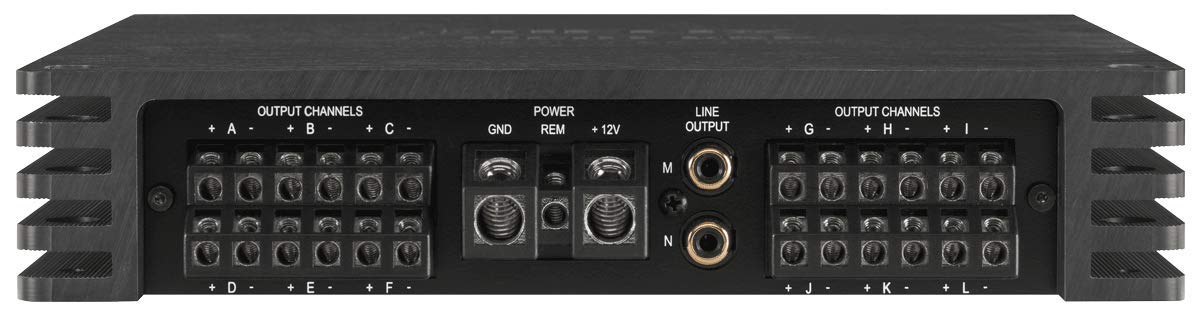
Figure 3: Helix V Twelve DSP - Output Side. This image shows the power input terminals (GND, REM, +12V), line output connections (M, N), and the twelve output channels (A-L) for speaker connections.
3.2 Connexió d'alimentació
- GND (terra): Connect to a clean, unpainted metal point on the vehicle chassis. Ensure a solid, low-resistance connection.
- REM (remot): Connecteu-lo a la sortida d'encesa remota de la unitat principal o a una font commutada de 12 V.
- +12V (Alimentació): Connect directly to the positive terminal of the vehicle's battery via a fused power cable. The fuse should be located within 30 cm (12 inches) of the battery.
3.3 Connexions d'entrada d'àudio
- Entrada d'alt nivell: Connect to the speaker outputs of your factory or aftermarket head unit.
- Entrada de línia: Connect to the RCA pre-out connections of your head unit.
- Entrada òptica: For digital audio signals from compatible sources.
3.4 Connexions de sortida d'àudio
- Output Channels (A-L): Connect your speakers to these terminals. Ensure correct polarity for each speaker.
3.5 Connexions de control
- USB: Connect to a computer for DSP configuration using the dedicated software.
- Entrada de control: For connecting optional remote controls or accessories.
4. Instruccions de funcionament
Once installed, the V Twelve DSP requires configuration via a computer to optimize its audio performance for your specific vehicle and speaker setup.
4.1 Configuració DSP
Connecteu el amplifier to a computer via the USB port. Install the Helix DSP PC-Tool software (available from the manufacturer's website). This software allows you to adjust all DSP parameters, including equalization, crossovers, time alignment, and input/output routing.
4.2 Ajust de guany
The GAIN knob adjusts the input sensitivity of the amplifier. Set the gain to match the output voltage of your head unit. The CLIP indicator LED will illuminate if the input signal is too high, indicating distortion. Adjust the gain until the CLIP LED only flashes briefly on peak signals, or remains off for optimal sound quality.
5. Manteniment
The Helix V Twelve DSP is designed for reliable operation with minimal maintenance. Keep the unit clean and free from dust and debris. Use a soft, dry cloth for cleaning. Do not use liquid cleaners or solvents. Ensure adequate ventilation around the amplificador per evitar el sobreescalfament.
6. Solució De Problemes
- Sense energia: Check all power connections (+12V, GND, REM). Verify the fuse in the power cable. Ensure the remote turn-on signal is present.
- Sense so: Check all audio input and output connections. Verify DSP settings (input routing, mute functions). Ensure speakers are correctly wired and functional.
- So distorsionat: Reduce the input gain. Check for proper grounding. Ensure speaker impedance matches amplifier specifications. Verify DSP settings for clipping or excessive equalization.
- Mode de protecció: Si el amplifier enters protection mode (indicated by a status LED), check for short circuits in speaker wiring, overheating (ensure proper ventilation), or excessively low impedance loads.
7. Especificacions tècniques
| Especificació | Valor |
|---|---|
| Marca | Hèlix |
| Número de model | V-TWELVE-DSP |
| Fabricant | Helix/Match |
| Voltage | 6 Volt (Operating Voltagrang e) |
| Tipus de muntatge | Autònom |
| ASIN | B087LRPWZJ |
| Disponible per primera vegada a Amazon.de | 23 d'abril de 2020 |
8. Garantia i Suport
This product comes with a manufacturer's warranty. Please refer to the warranty card included with your product or visit the official Helix website for detailed warranty terms and conditions. For technical support, troubleshooting assistance, or service inquiries, please contact your authorized Helix dealer or the manufacturer's customer support.
Conserveu el rebut de compra com a comprovant de compra per a reclamacions de garantia.


