Producte acabatview
The Radioddity GA-510 is a high-performance dual-band portable radio, offering robust communication capabilities for various applications. With a powerful 10W transmission output, it ensures clear and extended range communication. It features 128 memory channels and advanced functions like Busy Channel Lockout and DTMF. The device is designed for user-friendly operation, including full manual programming via the keypad.

Image: The Radioddity GA-510 two-way radio unit shown alongside its two included 2200mAh rechargeable batteries.
Key features include a 10W radio device with VHF and UHF dual-band support, up to 128 memory channels, 50 CTCSS/105 DCS, and 1750Hz tone. It supports dual watch and dual display. The GA-510 can be set to three transmission power modes (High/Medium/Low: 10W/5W/1W), allowing for a range of up to 10 km. It comes equipped with two powerful 2200mAh rechargeable batteries for extended use. The device supports full manual programming directly via the keypad, enabling users to add or delete channels on the fly. Additional features include a tri-color backlit LCD screen and an emergency alarm function, making it suitable for outdoor adventures.
Identificació de components
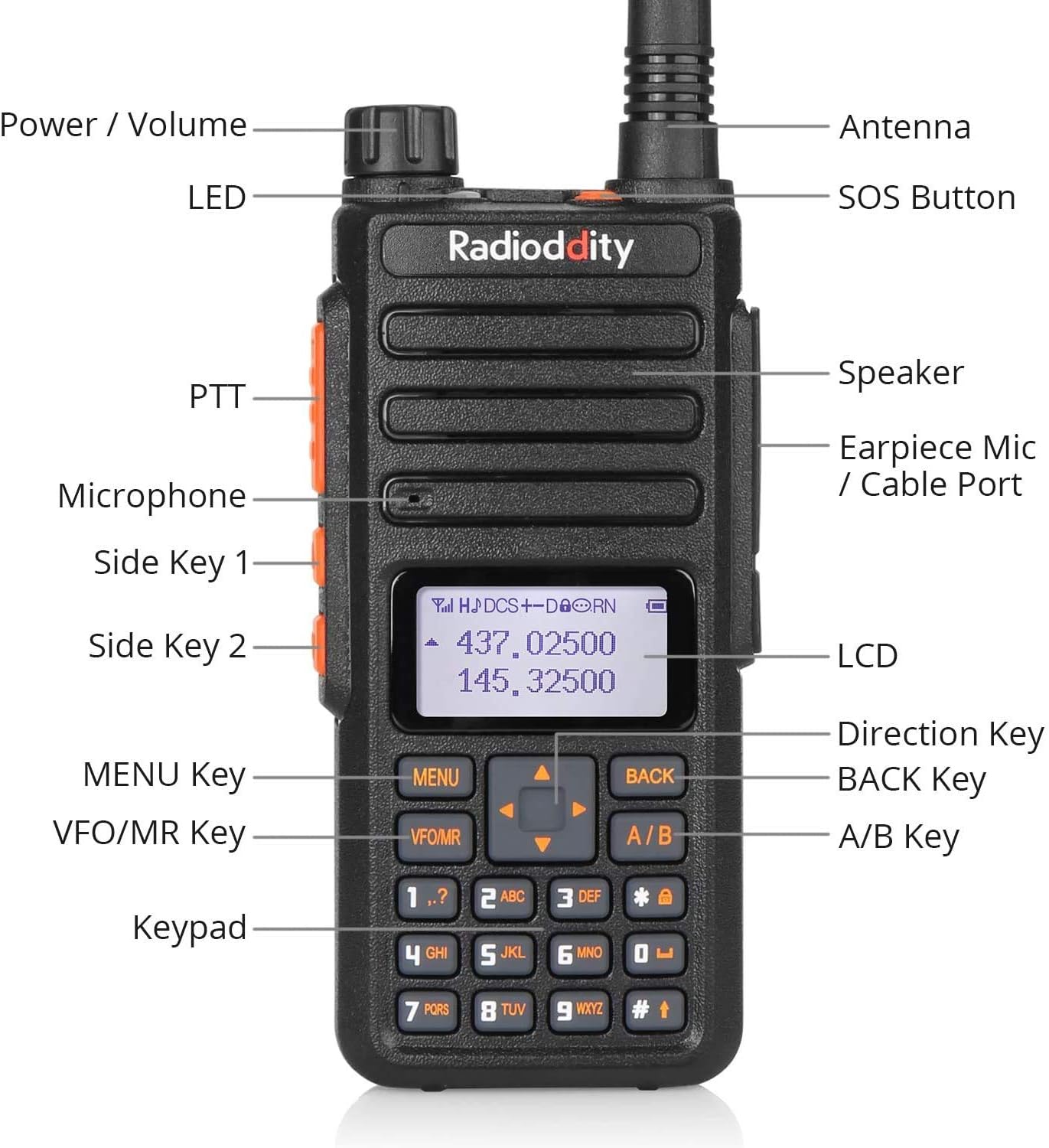
Image: A detailed diagram labeling the various components of the Radioddity GA-510, including Power/Volume knob, Antenna, LED indicator, SOS Button, PTT (Push-to-Talk) button, Speaker, Earpiece Mic/Cable Port, Microphone, Side Key 1, Side Key 2, LCD screen, Direction Key, MENU Key, BACK Key, VFO/MR Key, A/B Key, and Keypad.
Familiarize yourself with the radio's components for optimal operation:
- Power / Volume Knob: Gira per encendre/apagar la ràdio i ajustar el volum.
- Antena: Per transmetre i rebre senyals.
- Indicador LED: Mostra l'estat de la ràdio (per exemple, transmetent, rebent, carregant).
- Botó SOS: Activates emergency alarm.
- Botó PTT (Prem per parlar): Premeu i manteniu premut per transmetre, deixeu-lo anar per rebre.
- Ponent: Emet àudio.
- Earpiece Mic / Cable Port: Connects external audio accessories or programming cable.
- Micròfon: Per a l'entrada de veu durant la transmissió.
- Tecla lateral 1 i 2: Tecles de funció programables.
- LCD: Displays channel, frequency, and menu information.
- Clau de direcció: Navega pels menús i ajusta la configuració.
- Tecla MENÚ: Enters the menu system.
- Tecla BACK: Exits menus or returns to previous screen.
- Clau VFO/MR: Toggles between Frequency Mode (VFO) and Memory Channel Mode (MR).
- Clau A/B: Switches between upper and lower display frequencies/channels.
- Teclat: Per a l'entrada manual de freqüència, la selecció de canals i la navegació pel menú.
Configuració
1. Instal·lació i càrrega de la bateria
The GA-510 comes with two 2200mAh Lithium-ion batteries. Ensure they are fully charged before first use.
- Alineeu el paquet de bateries amb les ranures de la part posterior de la ràdio.
- Feu lliscar la bateria cap amunt fins que encaixi de manera segura al seu lloc.
- Per treure-la, premeu el pestell d'alliberament de la bateria (si n'hi ha) i feu-la lliscar cap avall.

Image: Diagram illustrating the 2200mAh capacity of the dual batteries, showing up to 48 hours standby time, up to 12 hours working time, and up to 6 hours working time under 10W transmission.
Use the provided charging cradle and adapter to charge the battery. The LED indicator on the radio or charger will show charging status (typically red for charging, green for fully charged).
2. Fixació de l'antena
The GA-510 uses an SMA-F antenna connector.
- Enrosqueu l'antena en sentit horari al connector de l'antena a la part superior de la ràdio fins que quedi ben ajustada amb els dits. No l'estrengueu massa.
- Ensure the antenna is securely attached for optimal performance.
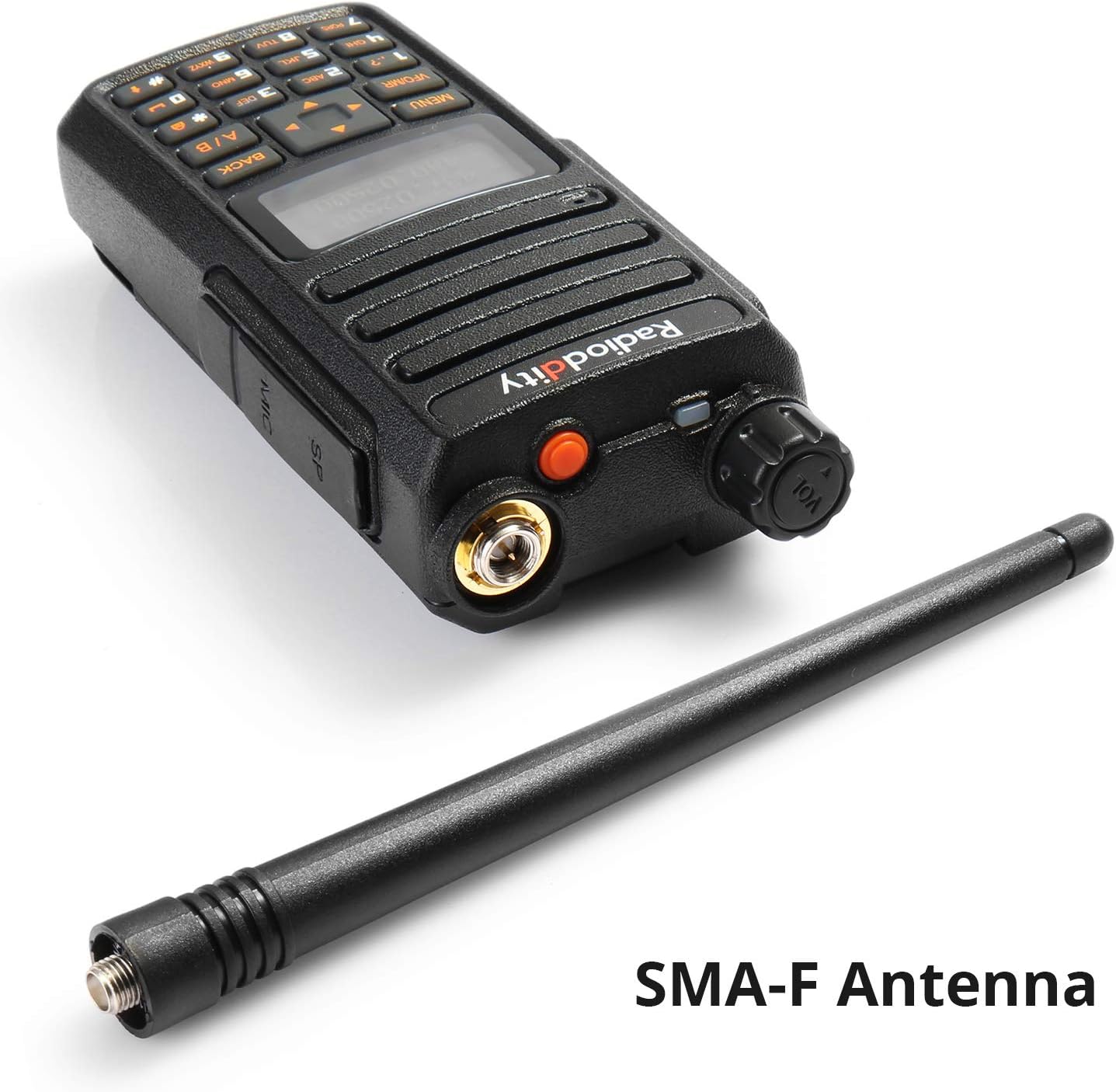
Image: The Radioddity GA-510 radio unit shown next to its SMA-F antenna, highlighting the antenna connection type.
3. Instal·lació del clip de cinturó
Attach the belt clip to the back of the radio using the provided screws for convenient carrying.

Image: A composite image showing various close-up details of the Radioddity GA-510, including the belt clip attachment point, antenna connector, side buttons, and keypad.
Instruccions de funcionament
1. Engegada/Apagada i Ajust de Volum
Gireu el botó d'engegada/volum en sentit horari per encendre la ràdio. Continueu girant en sentit horari per augmentar el volum. Gireu en sentit antihorari per disminuir el volum i apagar la ràdio.
2. Selecció de mode (VFO/MR)
Premeu el botó VFO/MR key to switch between Frequency Mode (VFO) and Memory Channel Mode (MR).
- Mode VFO: Permet l'entrada directa de freqüència i l'escaneig.
- Mode RM: Allows selection of pre-programmed memory channels.
3. Selecció de canal/freqüència
- In VFO Mode, use the keypad to directly input frequencies or the Direction Keys (Up/Down arrows) to tune.
- In MR Mode, use the Direction Keys (Up/Down arrows) to scroll through programmed channels.
4. Transmissió i recepció
Per transmetre, premeu i manteniu premut el botó PTT button on the left side of the radio. Speak clearly into the microphone. Release the PTT button to stop transmitting and return to receive mode.
5. Manual Programming
The GA-510 supports full manual programming directly from the keypad. This allows you to add, modify, or delete channels and settings without a computer.
- Premeu el botó MENÚ tecla per entrar al menú principal.
- Use the Direction Keys to navigate through menu options.
- Premeu MENÚ again to select an option.
- Use the keypad to input values or Direction Keys to select settings.
- Premeu MENÚ to confirm changes, or TORNAR per sortir sense desar.
Refer to the detailed programming guide (if available separately) for specific menu functions and programming steps.
6. Alarma d'emergència
Premeu el botó dedicat Botó SOS (usually located on top or side) to activate the emergency alarm function. This can be useful in critical situations.
Manteniment
- Neteja: Netegeu la superfície de la ràdio amb un drap suauamp tela. No utilitzeu productes químics aggressivs ni netejadors abrasius.
- Cura de la bateria:
- Avoid overcharging or completely draining the batteries.
- Guardeu les piles en un lloc fresc i sec quan no les utilitzeu.
- Si guardeu les bateries durant períodes prolongats, carregueu-les fins a un 50% de la seva capacitat aproximadament.
- Emmagatzematge: Guardeu la ràdio en un lloc sec i sense pols, allunyat de la llum solar directa i de temperatures extremes.
- Antena: Ensure the antenna connection remains clean and free of debris.
Resolució de problemes
| Problema | Causa possible | Solució |
|---|---|---|
| La ràdio no s'encén. | La bateria està esgotada o no està instal·lada correctament. | Charge the battery. Ensure battery is securely attached. |
| No es pot transmetre ni rebre. | Incorrect frequency/channel, antenna not connected, low battery, squelch level too high. | Verify frequency/channel. Check antenna connection. Charge battery. Adjust squelch level. |
| Mala qualitat d'àudio. | Low signal strength, incorrect CTCSS/DCS, volume too low/high. | Move closer to other radio. Check CTCSS/DCS settings. Adjust volume. |
| Keypad programming issues. | Incorrect menu steps, keypad lock enabled. | Review manual programming steps. Check for keypad lock function. |
Especificacions
| Característica | Detall |
|---|---|
| Marca | Radioditat |
| Número de model | GA-510 |
| Interval de freqüència | VHF (136-174 MHz) and UHF (400-480 MHz) |
| Canals de memòria | 128 |
| Potència de sortida | 10W / 5W / 1W (High/Medium/Low) |
| Tipus de bateria | Ió de liti |
| Capacitat de la bateria | 2 x 2200 mAh |
| Voltage | 7.4 Volts |
| Interval màxim | Up to 10 Kilometers (theoretical, depends on conditions) |
| Nivell de resistència a l'aigua | Waterproof (as per specification, usually means splash-proof or light rain) |
| Dimensions (aprox.) | 120 x 55 x 30 mm (sense antena) |
| Pes (aprox.) | 300 g |

Image: A visual representation of the Radioddity GA-510's dimensions and weight (0.25kg / 0.55lbs), with measurements in inches and millimeters.
Garantia i Suport
Radioddity provides an 18-month warranty and lifetime support for the GA-510. For technical assistance, troubleshooting beyond this manual, or warranty claims, please contact Radioddity customer service through their official weblloc web o la plataforma on es va comprar el producte.
Si us plau, conserveu el comprovant de compra per motius de garantia.


