1. Introducció
This manual provides essential information for the proper use and maintenance of your Xiaomi Redmi AirDots S TWSEJ05LS Bluetooth Earbuds. Please read these instructions carefully before using the product to ensure optimal performance and longevity.
2. Contingut del paquet
Verifiqueu que tots els elements siguin presents al paquet del producte:
- 1 x funda de càrrega
- 2 x Earbuds (Left and Right)
- 2 x Pairs of Eartips (Sizes S/M/L, with M pre-installed)
- 1 x Manual d'usuari
3. Producte acabatview
The Xiaomi Redmi AirDots S are compact, wireless in-ear earbuds designed for daily use, hands-free communication, and music playback. They feature Bluetooth 5.0 connectivity for stable audio transmission.

Figure 3.1: Redmi AirDots S Earbuds and Charging Case
This image displays the black charging case with its lid open, revealing the slots for the earbuds. One earbud is shown outside the case, highlighting its compact design.
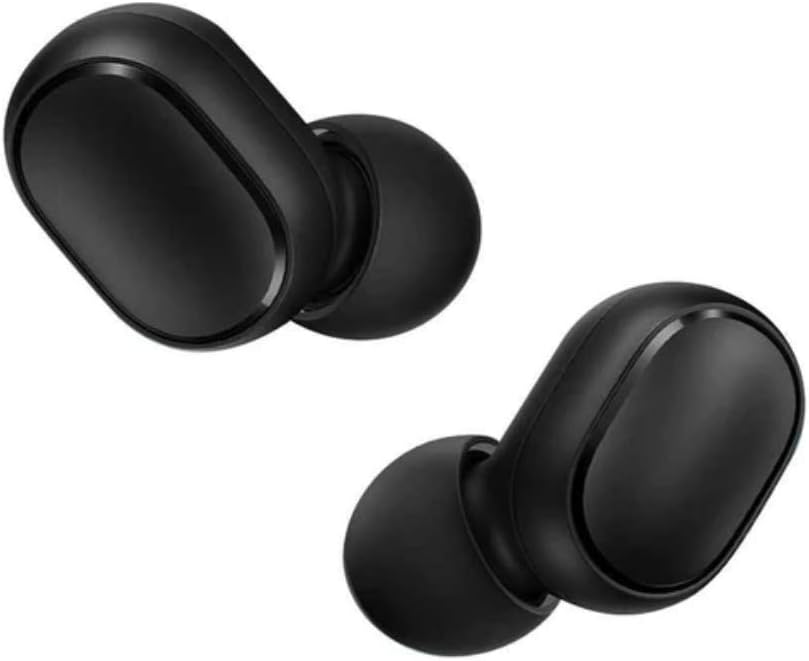
Figure 3.2: Individual Earbuds
Un detallat view of the left and right earbuds, showcasing their smooth, black finish and the in-ear design.

Figure 3.3: Earbud in Use
This image illustrates how the earbud fits comfortably within the ear canal, providing a secure and discreet listening experience.
4. Configuració
4.1 Càrrega dels auriculars i l'estoig
Abans del primer ús, assegureu-vos que tant els auriculars com l'estoig de càrrega estiguin completament carregats.
- Col·loca els auriculars a l'estoig de càrrega. Assegura't que estiguin correctament col·locats a les seves ranures respectives.
- Connecteu la funda de càrrega a una font d'alimentació amb un cable USB compatible (no inclòs).
- El llum indicador de la funda mostrarà l'estat de càrrega. Una càrrega completa sol trigar aproximadament 2 hores.
4.2 Primer aparellament
Follow these steps to pair your Redmi AirDots S with a new device:
- Remove both earbuds from the charging case. They will automatically power on.
- Al dispositiu mòbil (telèfon intel·ligent, tauleta, etc.), navegueu fins a la configuració de Bluetooth.
- Refresh the list of available Bluetooth devices.
- Select "Redmi Airdots S" from the list to initiate the connection.
- Once connected, you will hear an audible confirmation, and the earbud indicator lights will turn off or flash slowly.
Nota: When you place the earbuds back into the charging case, they will show a red light and automatically disconnect from your device. When removed, a white light will appear, and they will automatically attempt to reconnect to the last paired device.
Mode d'auricular únic 4.3
You can use either the left or right earbud independently. Simply remove one earbud from the case, and it will connect to your device. The other earbud can remain in the case or be powered off.
5. Instruccions de funcionament
The Redmi AirDots S feature a multi-function touch control button on each earbud.
| Acció | Funció |
|---|---|
| Single Press (either earbud) | Reproduir / Pausar música, Respondre / Finalitzar trucada |
| Double Press (either earbud) | Activate voice assistant (e.g., Siri, Google Assistant) |
| Press and Hold (during call) | Rebutja la trucada entrant |
Nota: Volume control and track skipping typically need to be managed directly from your connected device.
6. Manteniment
6.1 Neteja
- Netegeu regularment els auriculars i l'estoig de càrrega amb un drap suau, sec i sense borrissol.
- No utilitzeu netejadors abrasius, alcohol ni dissolvents químics.
- Gently remove any earwax or debris from the earbud mesh and eartips using a small, soft brush or cotton swab.
6.2 Emmagatzematge
- Quan no els utilitzeu, guardeu sempre els auriculars a la seva funda de càrrega per protegir-los i mantenir-los carregats.
- Store the product in a cool, dry place, away from direct sunlight, extreme temperatures, and humidity.
7. Solució De Problemes
7.1 Restablir els auriculars
If you experience pairing issues or other functional problems, resetting the earbuds may resolve the issue:
- Premeu i manteniu premut el botó multifunció dels dos auriculars durant aproximadament 15 segons.
- Release the button when the red and white indicator lights flash alternately 3 times and then turn off. This indicates a successful reset.
- On your phone's Bluetooth settings, forget or unpair "Redmi AirDots S" from the device list.
- Place the earbuds back into the charging case, then remove them to initiate a new pairing process as described in Section 4.2.
7.2 Problemes comuns i solucions
- Auriculars que no s'aparellen entre si: Ensure both earbuds are removed from the case simultaneously and are fully charged. Perform a reset if necessary.
- Només funciona un auricular: Try placing both earbuds back in the case, then removing them again. Check if the single earbud mode is active. Perform a reset if the issue persists.
- Sense so o volum baix: Check the volume level on your connected device. Ensure the earbuds are properly seated in your ears. Clean any debris from the earbud mesh.
- La connexió cau amb freqüència: Ensure there are no significant obstacles between the earbuds and your device. Keep the device within the effective Bluetooth range (typically 10 meters).
8. Especificacions
| Característica | Detall |
|---|---|
| Nom del model | TWSEJ05LS |
| Marca | XIAOMI |
| Tecnologia de connectivitat | Sense fil (Bluetooth 5.0) |
| Col·locació de l'orella | In-orella |
| Factor de forma | In-orella |
| Característiques especials | Micròfon incorporat |
| Mètode de control | Control tàctil |
| Aïllament del soroll | Passive (In-ear design provides some noise reduction) |
| Temps de càrrega | Aproximadament 2 hores |
| Composició de la bateria | Polímer de liti |
| Pes de l'article | 60 grams |
| Material | Plàstic |
| Dispositius compatibles | Smartphones, tablets, laptops, desktop computers, smart speakers |
| Usos recomanats | Calling, Exercising, Video Gaming |
9. Garantia i Suport
Information regarding product warranty is typically provided with your purchase documentation or can be found on the official Xiaomi website. For technical support, troubleshooting assistance beyond this manual, or warranty claims, please refer to the official Xiaomi support channels or contact your retailer.
Note: Spare parts availability and software update guarantees are not explicitly provided in the product information.
10. Recursos de vídeo
No official product videos from the seller were found in the provided data. For additional visual guides, please check the manufacturer's official website or authorized support channels.


