1. Introducció
This manual provides essential information for the safe and effective use of your Novation MiniNova Synthesizer Bundle. Please read this manual thoroughly before operating the product and retain it for future reference. The bundle includes the Novation MiniNova Synthesizer, a custom gig bag, and closed-back studio headphones.
2. Informació de seguretat
Seguiu sempre les precaucions de seguretat bàsiques quan utilitzeu aquest producte per reduir el risc d'incendi, descàrrega elèctrica i lesions a les persones. Això inclou, entre d'altres:
- Do not expose the synthesizer to rain or moisture.
- No obriu la c.asing; demaneu totes les tasques de manteniment a personal qualificat.
- Assegureu-vos una ventilació adequada al voltant de la unitat.
- Utilitzeu només l'adaptador d'alimentació subministrat amb la unitat.
- Eviteu col·locar objectes pesats al cable d'alimentació.
- Mantenir fora de l'abast dels nens.
3. Contingut del paquet
Your Novation MiniNova Synthesizer Bundle should contain the following items:
- Novation MiniNova Synthesizer
- MiniNova Gig Bag
- Closed-Back Studio Headphones
- Gooseneck Microphone (for Vocoder functionality)
- Unitat d'alimentació
- Cable USB
- Manual d'usuari (aquest document)
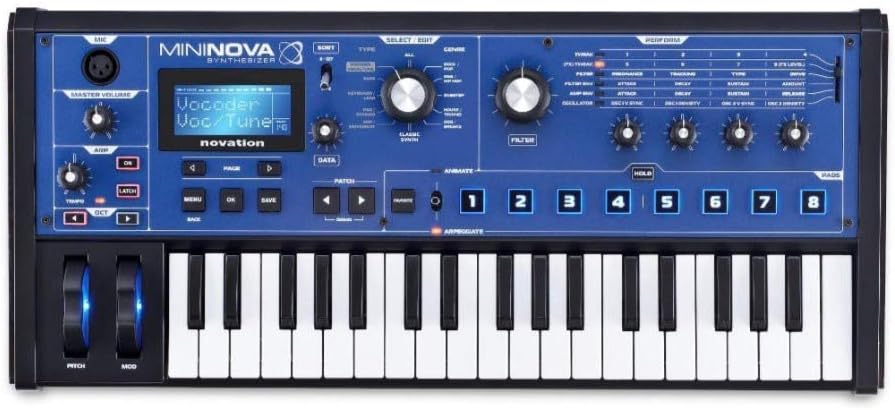
Imatge 3.1: Frontal view of the Novation MiniNova Synthesizer, showcasing its keys, controls, and display.

Image 3.2: The custom Novation MiniNova Gig Bag, designed for transport and protection.

Image 3.3: A pair of closed-back studio headphones included in the bundle for monitoring audio.
4. Configuració
4.1 Connexió de potència
- Connect the supplied power adapter to the "POWER IN - 9V DC" port on the rear of the MiniNova.
- Connecteu l'adaptador de corrent a una presa de corrent adequada.
- Press the power button located on the top panel to turn on the unit.
4.2 Connexions d'àudio
- Auriculars: Connect your closed-back studio headphones to the "HEADPHONES" output (1/4-inch jack) for private monitoring.
- Sortida principal: Connect the "OUTPUT RIGHT" and "OUTPUT LEFT" (1/4-inch jacks) to your mixer, audio interface, or ampmés viu.
- Entrada externa: Use the "EXT IN" (1/4-inch jack) to connect external audio sources for processing through the MiniNova's effects.

Image 4.1: Rear panel of the MiniNova, showing power, USB, MIDI, sustain, headphone, and audio output/input ports.
4.3 USB and MIDI Connections
- USB: Connect the MiniNova to your computer using the supplied USB cable for MIDI communication and audio streaming.
- MIDI: Use standard 5-pin MIDI cables to connect the "MIDI IN" and "MIDI OUT" ports to other MIDI devices.
4.4 Connexió del micròfon
Insert the gooseneck microphone into the XLR input labeled "MIC" on the top left of the synthesizer for Vocoder functionality.

Image 4.2: The MiniNova synthesizer with the gooseneck microphone connected, ready for vocoding.
5. Instruccions de funcionament
5.1 Navegació bàsica
- Utilitza el DADES knob to scroll through menus and parameters.
- Premeu OK to confirm selections and TORNAR per tornar a la pantalla anterior.
- El MENÚ button accesses the main system settings.
5.2 Selecció i edició de pegats
- Utilitza el PATCH navigation buttons (left/right arrows) to browse through presets.
- El TIPUS knob allows filtering patches by category.
- Ajusteu el FILTRE i SOBRE knobs to modify sound parameters.
- El ANIMAR buttons (1-8) trigger pre-assigned modulation effects for dynamic sound changes.
5.3 Vocoder Functionality
With the gooseneck microphone connected, select a Vocoder patch. Speak into the microphone while playing notes on the keyboard to create vocal synthesis effects. Adjust the VOLUM knob for the microphone input.
5.4 Arpegiador
Activa el ARPEGGIAT function to create rhythmic patterns from held notes. Use the dedicated controls to adjust tempo, octave range, and other arpeggiator parameters.
5.5 Saving Patches
After editing a sound, press the DESA button to store your custom patch. Follow the on-screen prompts to name and save your sound to a user slot.
6. Manteniment
- Neteja: Use a soft, dry cloth to clean the surface of the synthesizer. Do not use abrasive cleaners or solvents.
- Emmagatzematge: When not in use, store the MiniNova in its gig bag to protect it from dust and physical damage.
- Auriculars: Clean headphone earcups with a damp tela. Eviteu submergir-vos a l'aigua.
- Micròfon: Keep the microphone clean and dry. Avoid dropping or subjecting it to harsh impacts.
7. Solució De Problemes
| Problema | Causa possible | Solució |
|---|---|---|
| Sense sortida de so | Volume too low, incorrect audio connections, headphones not plugged in correctly. | Check Master Volume knob. Ensure cables are securely connected to the correct output ports. Verify headphones are fully inserted. |
| Vocoder not working | Microphone not connected, microphone volume too low, incorrect patch selected. | Ensure gooseneck microphone is firmly in the XLR input. Adjust the MIC VOLUME knob. Select a patch specifically designed for vocoding. |
| Synthesizer not powering on | Power adapter not connected, faulty power outlet. | Check power adapter connection to the unit and wall outlet. Try a different power outlet. |
8. Especificacions
8.1 Novation MiniNova Synthesizer
- Nom del model: MiniNova
- Fabricant: Novation
- Número de model de l'article: MiniNova
- Dimensions del producte: 26 x 19.3 x 12.2 polzades
- Material del cos: Plàstic
- Material: Metal (likely internal components/chassis)
- Tipus de connector: One Quarter Inch Phone Connector (for audio outputs/inputs), USB, MIDI (5-pin DIN), XLR (for microphone)
8.2 MiniNova Gig Bag
- Components inclosos: Cas
8.3 General Bundle Information
- Marca: Novation
- UPC: 040962896310
- Nom del conjunt: MiniNova Synthesizer Bundle
- Data de primera disponibilitat: 10 de setembre de 2024
9. Garantia i assistència
For detailed warranty information and technical support, please refer to the official Novation weblloc web o contacteu directament amb el servei d'atenció al client. Conserveu el comprovant de compra per a reclamacions de garantia.
Novation Official Weblloc: www.novationmusic.com


