1. Producte acabatview
The Hover-1 Chrome 2.0 is a versatile self-balancing scooter designed for personal transportation and recreation. It features dual 200W motors, LED lighting, and an integrated Bluetooth speaker. This model is often paired with a Go-Kart attachment for an alternative riding experience. The device is UL2272 certified, ensuring it meets safety standards.
Característiques principals:
- Rendiment potent: Dual 200W motors for a top speed of 6 mph and up to 7 miles range on a single charge.
- Il·luminació LED: Features bright LED headlights, wheel lights, and fender lights for visibility and style.
- Altaveu Bluetooth integrat: Connect your smartphone to play audio while riding.
- Bateria de llarga durada: Equipped with a 25.2V/4Ah lithium-ion rechargeable battery, charging in approximately 4.5-5 hours.
- Self-Balancing Design: Provides stability, making it suitable for various rider skill levels.
- Certificat de seguretat: UL2272 certified, with MSDS & UN 38.3 tested components.

Image: The Hover-1 Chrome 2.0 Self-Balancing Scooter with its Go-Kart attachment, showcasing its design and features like 400W motor, multi-color LED, and 6 miles max distance.

Image: The Hover-1 Chrome 2.0 Self-Balancing Scooter with the Go-Kart attachment, alongside the hoverboard unit by itself, illustrating both configurations.
Video: Official product video demonstrating the Hover-1 Chrome 2.0 Electric Hoverboard and its conversion to an electric Go-Kart, highlighting ease of setup, hand-operated controls, light-up wheels, and Bluetooth compatibility.
2. Què hi ha a la caixa
Upon opening your Hover-1 Chrome 2.0 package, please ensure all the following components are present:
- Hoverboard
- Go-Kart Attachment
- Carregador
- Manual d'instruccions
3. Informació de seguretat
Your safety is paramount when operating the Hover-1 Chrome 2.0. Please read and understand all safety instructions before use.
- Equip de protecció: Porteu sempre casc, genolleres i colzeres quan circuleu.
- Límit de pes: Adhere to the maximum weight limit of 220 lbs (100 kg).
- Condicions de la superfície: Ride on smooth, flat, and dry surfaces. Avoid uneven terrain, loose debris, steep inclines, or wet conditions.
- Control de velocitat: The scooter can reach speeds up to 6 mph. Always maintain a safe speed and be aware of your surroundings.
- Public Roads: Do not ride on public roads with vehicular traffic.
- Certificació UL2272: The Hover-1 Chrome 2.0 is UL2272 certified, indicating it meets electrical safety standards.
- Seguretat de la bateria: Use only the provided charger. Do not attempt to modify the battery or charger.
- Condicions ambientals: Do not operate in extreme temperatures or heavy rain.
- Sensibilització: Be mindful of pedestrians, obstacles, and other riders.
4. Configuració
4.1 Càrrega inicial
- Before first use, fully charge your Hover-1 Chrome 2.0.
- Connect the charger to the charging port on the hoverboard.
- Plug the charger into a standard wall outlet. The indicator light on the charger will change (e.g., red to green) when fully charged.
- A full charge typically takes 4.5 to 5 hours. Do not overcharge.
4.2 Go-Kart Attachment Assembly (Optional)
If using the Go-Kart attachment, follow these steps:
- Unpack all Go-Kart components.
- Attach the seat to the main frame using the provided hardware.
- Secure the front wheel assembly to the adjustable bar.
- Adjust the length of the Go-Kart frame to fit your height.
- Place the Hover-1 Chrome 2.0 onto the Go-Kart frame and secure it using the adjustable straps. Ensure the straps are tight and the hoverboard is firmly in place.

Image: A person riding the Hover-1 Chrome 2.0 with the Go-Kart attachment, demonstrating its use in a seated position.

Imatge: Vista de dalt a baix view of the Hover-1 Chrome 2.0 with the Go-Kart attachment, showing the overall layout and controls.
5. Instruccions de funcionament
5.1 Engegada/apagada
- To power on, press and hold the power button located on the hoverboard.
- Per apagar l'aparell, premeu i manteniu premut el botó d'engegada de nou fins que els llums s'apaguin.
5.2 Riding the Hoverboard (Without Go-Kart)
- Place the hoverboard on a flat surface.
- Step onto one footpad, ensuring the board is level.
- Quickly step onto the second footpad. Maintain balance by keeping your body upright and relaxed.
- Inclina't lleugerament cap endavant per avançar i inclina't cap enrere per reduir la velocitat o retrocedir.
- To turn, apply more pressure with one foot than the other.
- To dismount, step off one foot at a time, ensuring the board is stable.

Image: The Hover-1 Chrome 2.0 Self-Balancing Scooter highlighting its LED wheel and fender lights, along with performance specifications.
5.3 Operating with Go-Kart Attachment
- Ensure the Go-Kart attachment is securely fastened to the hoverboard.
- Sit comfortably in the Go-Kart seat.
- Use the hand-operated levers to control movement. Push both levers forward to move forward, pull both back to reverse.
- To turn, push one lever forward while pulling the other back.
5.4 Altaveu Bluetooth
- Turn on the Hover-1 Chrome 2.0.
- Activa el Bluetooth al teu telèfon intel·ligent o dispositiu d'àudio.
- Cerca "Hover-1 Chrome 2.0" in your device's Bluetooth settings and pair.
- Once connected, audio will play through the integrated speaker.
6. Manteniment
6.1 Neteja
- Apagueu el dispositiu abans de netejar.
- Netegeu l'exterior amb anunciamp tela. Eviteu utilitzar productes químics aggressivs o netejadors abrasius.
- Do not spray water directly onto the device.
6.2 Cura de la bateria
- Carregueu la bateria completament després de cada ús.
- If storing for an extended period, charge the battery to 50-70% every 3 months to prolong its lifespan.
- Emmagatzemar en un lloc fresc i sec, lluny de la llum solar directa.
6.3 Tire and Wheel Inspection
- Regularly inspect the wheels and tires for wear, damage, or debris.
- Ensure all fasteners are tight before each ride.
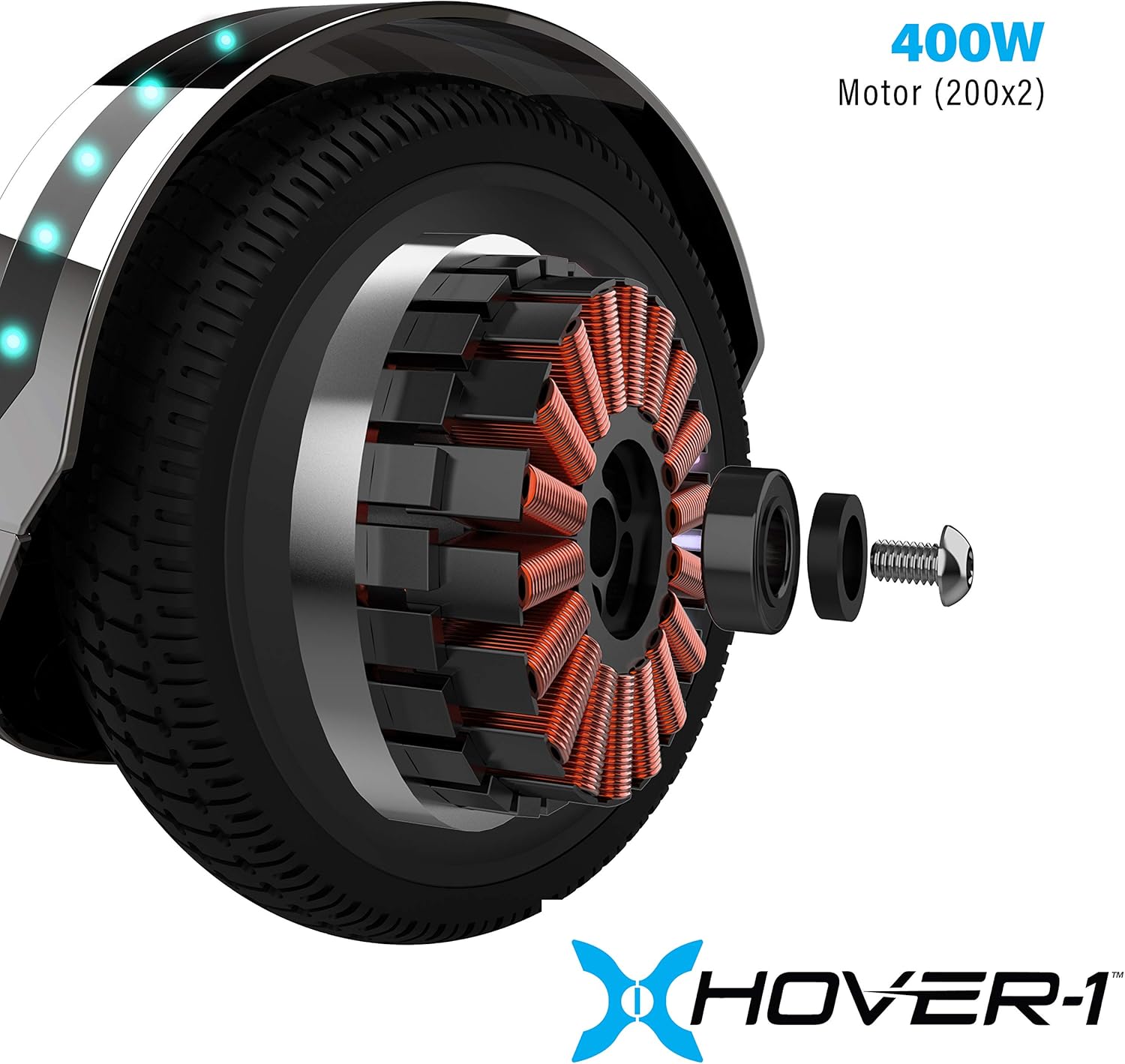
Imatge: Una imatge interna view of the Hover-1 Chrome 2.0 wheel, showing the 400W motor components.
7. Solució De Problemes
If you encounter issues with your Hover-1 Chrome 2.0, refer to the following common problems and solutions:
| Problema | Causa possible | Solució |
|---|---|---|
| El dispositiu no s’encén. | Low battery or power button issue. | Ensure the device is fully charged. Press and hold the power button firmly. |
| Difficulty balancing or erratic movement. | Calibration issue or uneven surface. | Recalibrate the hoverboard on a flat surface (refer to the full manual for specific calibration steps). Ensure you are on a smooth, level surface. |
| L'altaveu Bluetooth no es connecta. | Bluetooth not enabled or device not discoverable. | Ensure the hoverboard is on and your phone's Bluetooth is enabled and searching. Try restarting both devices. |
| Abast o velocitat reduïts. | Low battery, heavy load, or riding conditions. | Charge the battery fully. Ensure rider weight is within limits. Avoid riding uphill or on rough terrain. |
For more detailed troubleshooting or issues not listed here, please consult the full product manual or contact Hover-1 customer support.
8. Especificacions
| Nom del model | H1-CME-CMB |
| Marca | Hover-1 |
| Pes de l'article | 33 lliures (14.97 kg) |
| Dimensions de l'article (LxWxH) | 36 x 24 x 18.5 polzades (91.44 x 60.96 x 46.99 cm) |
| Pes del paquet | 16.26 quilos (35.85 lliures) |
| Color | Negre |
| Material | Alumini, Plàstic |
| Usuaris suggerits | Unisex-Youth |
| Fabricant | Grup DGL |
| Característica especial | Llum LED |
| Velocitat màxima | 6 MPH |
| Interval màxim | 7 milles |
| Tipus de bateria | 25.2V/4.0 Ah Li-ion rechargeable |
| Temps de càrrega | 4.5 - 5 hores |
| Certificació de seguretat | Certificat UL2272 |
9. Garantia i Suport
The Hover-1 Chrome 2.0 comes with a 90 dies de garantia des de la data de compra, que cobreix els defectes de fabricació. Conserveu el comprovant de compra per a reclamacions de garantia.
For technical support, warranty inquiries, or to purchase replacement parts and accessories, please visit the official Hover-1 website or contact their customer service department. You can also find additional information and products at the Hover-1 Brand Store.


