Introducció
Thank you for choosing the Mi Dual Mode Wireless Mouse Silent Edition. This manual provides essential information for setting up, operating, and maintaining your new wireless mouse. Please read it thoroughly before use to ensure optimal performance and longevity of the product.
Característiques del producte
- Connectivitat de mode dual: Seamlessly switch between 2.4GHz wireless (via USB receiver) and Bluetooth connectivity.
- Clics silenciosos: Designed for quiet operation, reducing click noise for a more peaceful working environment.
- Disseny ergonòmic: Adherència còmoda per a un ús prolongat.
- DPI ajustable: Customize cursor sensitivity to suit your needs.
- Llarga vida útil de la bateria: Efficient power consumption for prolonged use.
Contingut del paquet
- Mi Dual Mode Wireless Mouse Edition Silent Edition
- Receptor USB (emmagatzemat dins del ratolí)
- Manual d'usuari
- AA Battery (may or may not be included depending on region)
Guia de configuració
1. Instal·lació de la bateria
The mouse requires one AA battery. To install:
- Gently lift the top cover of the mouse from the rear to reveal the battery compartment.
- Inseriu una pila AA, assegurant-vos que els terminals positiu (+) i negatiu (-) s'alineïn correctament amb les marques de l'interior del compartiment.
- Locate the USB receiver inside the battery compartment. Remove it for 2.4GHz wireless connection.
- Replace the top cover, ensuring it clicks securely into place.

Figura 1: A baix view of the mouse showing the battery compartment and USB receiver.

Figure 2: The Mi Dual Mode Wireless Mouse Silent Edition.
2. Connectar el ratolí
The mouse supports two connection modes: 2.4GHz Wireless and Bluetooth.
2.1. Connexió sense fil de 2.4 GHz (receptor USB)
- Connecteu el receptor USB a un port USB disponible de l'ordinador.
- Enceneu el ratolí amb l'interruptor d'encesa situat a la part inferior.
- The mouse should automatically connect to your computer. If not, press the mode switch button on top of the mouse until the indicator light turns green, indicating 2.4GHz mode.
2.2. Connexió Bluetooth
- Enceneu el ratolí amb l'interruptor d'encesa a la part inferior.
- Press the mode switch button on top of the mouse until the indicator light turns blue, indicating Bluetooth mode.
- A l'ordinador, navega fins a la configuració de Bluetooth.
- Cerca new devices and select "Mi Mouse" or similar from the list.
- Seguiu les indicacions de la pantalla per completar el procés de vinculació.
Instruccions de funcionament
Canvi de mode
The small button located above the scroll wheel allows you to switch between 2.4GHz wireless mode and Bluetooth mode. The indicator light will change color to confirm the active mode:
- Llum verda: Mode sense fil de 2.4 GHz
- Llum blava: Mode Bluetooth

Figura 3: superior view of the mouse showing the mode switch button.
Funcions bàsiques
- Clic esquerre: Acció primària, selecció.
- Clic dret: Menú contextual.
- Roda de desplaçament: Scroll up/down. Pressing the wheel often acts as a middle click.
- Botons laterals: (If present) Typically for forward/backward navigation in web navegadors.
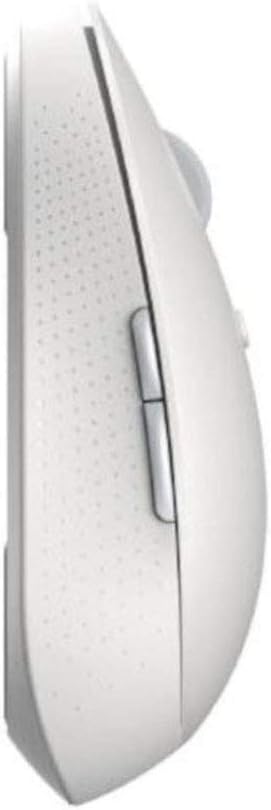
Figura 4: lateral view of the mouse with side buttons.

Figure 5: Mouse in use, demonstrating ergonomic design.
Manteniment
- Neteja: Feu servir un drap suau i sec per netejar el ratolí. Per a la brutícia persistent, feu un drap lleugerament sec.amp Es pot fer servir un drap, però assegureu-vos que no entri humitat als components interns.
- Substitució de la bateria: Replace the AA battery when the mouse performance degrades or the indicator light signals low battery (if applicable).
- Emmagatzematge: When not in use for extended periods, turn off the mouse to conserve battery life. Store the USB receiver inside the mouse to prevent loss.
Resolució de problemes
| Problema | Possible solució |
|---|---|
| El ratolí no respon |
|
| Cursor erràtic o no es mou suaument |
|
| Dificultat per canviar de mode |
|
Especificacions
| Característica | Detall |
|---|---|
| Dimensions del producte | 4.41 x 2.47 x 1.45 polzades |
| Pes de l'article | 2.47 unces |
| Número de model | XM800009 |
| Piles necessàries | 1 Lithium Polymer battery (AA size) |
| Tecnologia de connectivitat | Wireless (2.4GHz USB, Bluetooth) |
| Característiques especials | Soundless, Wireless |
| Detecció de moviment | Optical or Laser |
| Color | Blanc |
Garantia i Suport
This product comes with a standard manufacturer's warranty. For detailed warranty information, please refer to the warranty card included in your package or visit the official Xiaomi weblloc web. Per a consultes sobre assistència tècnica o servei, poseu-vos en contacte amb el servei d'atenció al client de Xiaomi.
Conserveu el vostre comprovant de compra per a reclamacions de garantia.