Introducció
This manual provides essential information for the safe and efficient use of your Grundig 24 GCH 5900B HD Ready TV. Please read these instructions carefully before operating the device and retain them for future reference. This television features HDR technology for enhanced contrast, Dolby Digital sound for clear audio, and a built-in satellite receiver for convenience.
Informació de seguretat
- Ensure the television is placed on a stable surface to prevent tipping.
- Do not expose the TV to rain or moisture to avoid electric shock.
- Mantingueu les obertures de ventilació netes per evitar el sobreescalfament.
- Desendolleu el televisor de la presa de corrent durant tempestes o quan no el feu servir durant períodes prolongats.
- Demaneu tot el servei a personal de servei qualificat.
Configuració
1. Desembalatge
Carefully remove the TV and all accessories from the packaging. Check for any damage during transit. Keep packaging materials for future transport or storage.
2. Instal·lació de l'estand
If you are not wall-mounting the TV, attach the stand according to the diagrams provided in the separate assembly guide. Ensure all screws are securely tightened.

Imatge: Frontal view of the Grundig 24 GCH 5900B HD Ready TV with its stand attached. The screen displays a vibrant image of cherries on a plate.
3. Cables de connexió
- Cable de corrent: Connecteu el cable d'alimentació a l'entrada d'alimentació del televisor i després a una presa de corrent.
- Antena/Satèl·lit: Connect your antenna or satellite cable to the appropriate input on the TV. This model includes a built-in satellite receiver.
- Dispositius externs: Use HDMI or other available ports to connect devices like DVD players, game consoles, or sound systems.
4. Assistent de configuració inicial
Upon first power-on, the TV will guide you through an initial setup process. This includes language selection, country, and channel scanning. Follow the on-screen prompts to complete the setup.
En funcionament
1. Control remot sobreview
The remote control allows you to access all TV functions. Familiarize yourself with the button layout.
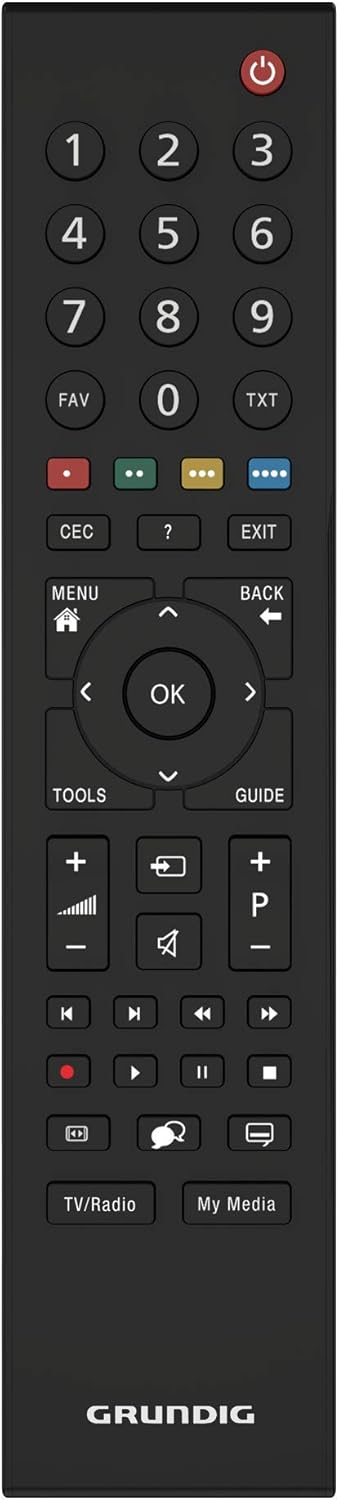
Imatge: Vista de dalt a baix view of the black Grundig TV remote control. Key buttons include Power, Number Pad, Volume Up/Down, Channel Up/Down, Menu, OK, and navigation arrows.
2. Funcions bàsiques
- Potència: Premeu el botó botó d'engegada vermell to turn the TV on or off.
- Volum: Utilitza el VOL +/- botons per ajustar el nivell de so.
- Canal: Utilitza el CH +/- botons per canviar de canal.
- Selecció d'entrada: Premeu el botó FONT button (if available, or similar icon) to select between different input sources (HDMI, AV, TV, Satellite).
3. Navegació del menú
Premeu el botó MENÚ button to access the main menu. Use the arrow buttons (Amunt, Avall, Esquerra, Dreta) per navegar per les opcions i el OK per confirmar les seleccions. El TORNAR or Sortida button will return you to the previous screen or exit the menu.
4. Funcions avançades
- Tecnologia HDR: Your Grundig TV utilizes HDR (High Dynamic Range) technology to enhance contrast and deliver more realistic images. This technology increases the contrast between bright whites and deep blacks, providing a more immersive viewexperiència.
- Dolby Digital Sound: The integrated Dolby Digital sound technology ensures natural and clear audio, even at high volumes.
- Built-in Satellite Receiver: The TV includes a built-in satellite receiver, eliminating the need for an external set-top box and reducing cable clutter. This allows for easy and seamless viewing of satellite channels.
Manteniment
1. Neteja de la pantalla
Netegeu suaument la pantalla amb un drap suau, sec i sense borrissol. Per a marques difícils, netegeu lleugerament.ampNetegeu el drap amb aigua o un netejador de pantalles especialitzat. No ruixeu líquid directament sobre la pantalla.
2. Neteja de la carcassa del televisor
Use a soft, dry cloth to wipe the exterior of the TV. Avoid using abrasive cleaners or solvents.
Resolució de problemes
Si teniu problemes amb el televisor, consulteu els problemes i solucions més comuns següents:
- Sense energia: Ensure the power cable is securely connected to both the TV and the wall outlet. Check if the outlet is functioning by plugging in another device.
- Sense imatge, però sí so: Check the input source selection. Ensure the connected device (e.g., DVD player) is powered on and functioning correctly.
- Sense so, però sí imatge: Comproveu el nivell de volum i assegureu-vos que el televisor no estigui silenciat. Si feu servir àudio extern, verifiqueu les connexions i la configuració.
- El control remot no funciona: Revisa les piles i canvia-les si cal. Assegura't que no hi hagi cap obstrucció entre el comandament a distància i el sensor d'infrarojos del televisor.
- Mala qualitat d'imatge: Check antenna/cable connections. If using an external device, try a different HDMI cable or input port.
For persistent issues, please contact Grundig customer support.
Especificacions
| Marca | Grundig |
| Model | 24 GCH 5900B |
| Any model | 2019 |
| Mida de la pantalla | 24 polzades (59 cm) |
| Tecnologia de visualització | LED |
| Resolució | 720p HD Ready (Max. Vertical Resolution: 768 Pixels) |
| Freqüència d'actualització | 60 Hz |
| Tipus de connectivitat | Cable |
| Tipus de muntatge | Muntatge de paret |
| Dimensions del producte | 12.3 x 55.2 x 34.3 cm |
| Pes del producte | 2.4 quilos |
Garantia i Suport
Your Grundig 24 GCH 5900B HD Ready TV comes with a manufacturer's warranty. Please refer to the warranty card included in your product packaging for specific terms and conditions. For technical support, service, or warranty claims, please contact your local Grundig service center or authorized dealer. Keep your purchase receipt as proof of purchase.


