1. Introducció
Thank you for choosing the Cigii S36 Portable Bluetooth Speaker. This manual provides detailed instructions for the proper setup, operation, and maintenance of your device. Please read this manual thoroughly before use to ensure optimal performance and to prevent damage.
2. Producte acabatview
2.1 Característiques clau
- Wireless Bluetooth connectivity for audio streaming.
- Integrated 8-inch subwoofer for enhanced bass.
- Multiple audio inputs: USB, SD card, and Line-in (AUX).
- Sintonitzador de ràdio FM integrat.
- Two microphone inputs, including one wireless microphone.
- Rechargeable 4400 mAh battery for portable use.
- Convenient side panel controls for volume and other functions.
- Retractable trolley handle and rear wheels for easy transport.
2.2 Components i controls del producte

Figura 1: Davant view of the Cigii S36 speaker, showcasing the main unit, attached microphone, and the base with a retractable trolley handle.

Figura 2: A dalt view of the speaker's control panel, featuring power switch, display, media controls, mode button, USB/SD card slots, microphone inputs, and volume/bass knobs.

Figura 3: Angled perspective of the speaker's top control panel, providing a clearer view of the various buttons, ports, and the attached microphone.

Figura 4: The Cigii S36 speaker shown with its retractable trolley handle fully extended, illustrating its portability feature.
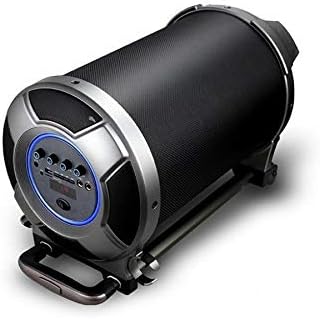
Figura 5: The Cigii S36 speaker positioned horizontally, highlighting the side panel where additional controls and ports may be located.
3. Configuració
3.1 Càrrega inicial
Before first use, fully charge the speaker's internal battery. Connect the provided power adapter to the DC 9V input port on the speaker and plug it into a power outlet. The charging indicator will illuminate. Charging typically takes several hours.
3.2 Engegada/apagada
- To power on: Locate the power switch on the control panel and slide it to the 'ON' position. The display will light up.
- To power off: Slide the power switch to the 'OFF' position.
4. Instruccions de funcionament
4.1 Mode Bluetooth
- Power on the speaker. The speaker will automatically enter Bluetooth pairing mode, indicated by a flashing Bluetooth icon or a voice prompt.
- Al dispositiu mòbil (telèfon intel·ligent, tauleta, etc.), activeu el Bluetooth i cerqueu els dispositius disponibles.
- Select "Cigii S36" from the list of found devices.
- Un cop emparellat, l'altaveu confirmarà la connexió i ara podràs reproduir àudio des del teu dispositiu.
4.2 Mode de targeta USB/SD
- Insert a USB flash drive or SD card (with MP3 audio files) a la ranura corresponent del tauler de control.
- The speaker will automatically detect the storage device and begin playing audio. If not, press the 'MODE' button to switch to USB or SD mode.
- Use the play/pause, next, and previous track buttons to control playback.
4.3 Mode de ràdio FM
- Power on the speaker and press the 'MODE' button repeatedly until "FM" appears on the display.
- Press and hold the play/pause button to initiate an automatic scan for available FM stations. The speaker will save detected stations.
- Use the next and previous track buttons to navigate between saved FM stations.
4.4 Line-in (AUX) Mode
- Connecteu un extrem d'un cable d'àudio de 3.5 mm (no inclòs) al port d'entrada AUX de l'altaveu.
- Connect the other end of the cable to the audio output jack of your external device (PC, TV, MP3 player, etc.).
- Press the 'MODE' button until "LINE" or "AUX" is displayed.
- Control audio playback from your connected external device.
4.5 Ús del micròfon
- For the wireless microphone: Ensure the microphone has batteries and is powered on. It should automatically connect to the speaker.
- For wired microphones: Plug a wired microphone into one of the MIC input jacks.
- Adjust the microphone volume using the dedicated 'MIC VOL' knob on the control panel.
- Adjust echo effects using the 'ECHO' knob (if available).
5. Manteniment
- Neteja: Feu servir un drap suau i sec per netejar l'exterior de l'altaveu. No utilitzeu netejadors abrasius, ceres ni dissolvents.
- Emmagatzematge: Guardeu l'altaveu en un lloc fresc i sec, allunyat de la llum solar directa i de temperatures extremes quan no l'utilitzeu durant períodes prolongats.
- Cura de la bateria: Per allargar la durada de la bateria, eviteu descarregar-la completament amb freqüència. Carregueu l'altaveu regularment, fins i tot si no l'esteu fent servir, per mantenir la bateria en bon estat.
- Exposició a l'aigua: Aquest altaveu no és impermeable. Eviteu exposar-lo a l'aigua o a una humitat excessiva.
6. Solució De Problemes
| Problema | Possible solució |
|---|---|
| L'altaveu no s'encén. | Ensure the battery is charged. Connect the power adapter and try again. Check the power switch position. |
| No hi ha so de l’altaveu. | Check the volume level on both the speaker and the connected device. Ensure the correct input mode is selected (Bluetooth, USB, AUX, FM). |
| L'aparellament de Bluetooth falla. | Ensure the speaker is in Bluetooth mode and discoverable. Move your device closer to the speaker. Turn off and on Bluetooth on your device. Forget the device and try pairing again. |
| La targeta USB/SD no es reprodueix. | Ensure the USB drive or SD card is inserted correctly. Verify that the audio files are in a supported format (e.g., MP3). Press the 'MODE' button to select USB/SD mode. |
| La recepció de ràdio FM és deficient. | Extend the antenna fully. Move the speaker to a location with better signal reception. Perform an auto-scan again. |
| El micròfon no funciona. | Check if the microphone is powered on (for wireless). Ensure it is properly connected (for wired). Adjust the 'MIC VOL' knob. |
7. Especificacions
| Característica | Especificació |
|---|---|
| Número de model | S36 |
| Marca | Cigii |
| Tecnologia de connectivitat | Bluetooth, USB, SD Card, Line-in (AUX), RCA |
| Tipus d'altaveu | Portable Bluetooth Speaker with Subwoofer |
| Potència de sortida nominal | 20 - 30 watts |
| Potència de sortida màxima | 30 watts |
| Diàmetre del subwoofer | 8 polzades |
| Capacitat de la bateria | 4400 mAh (recarregable) |
| Distància de transmissió | Fins a 10 metres (Bluetooth) |
| Dispositius compatibles | Personal Computer, Smartphone, Television, other audio devices |
| Dimensions del producte | 306 mm x 428 mm (approximate) |
| Característiques especials | FM Radio, Microphone Input (x2), Wireless Microphone included, Retractable Trolley Handle, Rear Wheels |
8. Informació de seguretat
- No exposeu l'altaveu a temperatures extremes, llum solar directa ni humitat elevada.
- Eviteu deixar caure o sotmetre l'altaveu a forts impactes.
- No intenteu desmuntar ni modificar l'altaveu. Això anul·larà la garantia i pot causar danys o lesions.
- Mantingueu l'altaveu lluny dels nens i de les mascotes.
- Use only the provided or recommended charging adapter.
- Dispose of the battery and electronic components responsibly according to local regulations.
9. Garantia i Suport
Specific warranty information is typically provided at the point of purchase or included with the product packaging. Please refer to your purchase documentation for details regarding warranty coverage and how to obtain support. For technical assistance or inquiries, please contact Cigii customer service through their official channels.


