Introducció
Welcome to the instruction manual for your Theater Solutions TT100 Bluetooth Tiki Torch Speakers. This manual provides essential information for setting up, operating, maintaining, and troubleshooting your new speakers. Please read it thoroughly before use to ensure optimal performance and longevity of your product.
The TT100 speakers are designed to provide wireless audio and ambient lighting for outdoor environments. They feature Bluetooth connectivity, rechargeable batteries, and a unique flickering flame LED effect. The versatile design allows them to be used as hanging lanterns, tabletop speakers, or traditional tiki torches with adjustable height.
Contingut del paquet
Before proceeding, please verify that all components are present in your package:
- 2 x Bluetooth Battery Powered Tiki Lantern Speakers
- 2 x Torch Mounts
- 2 x Weatherized Steel Stakes
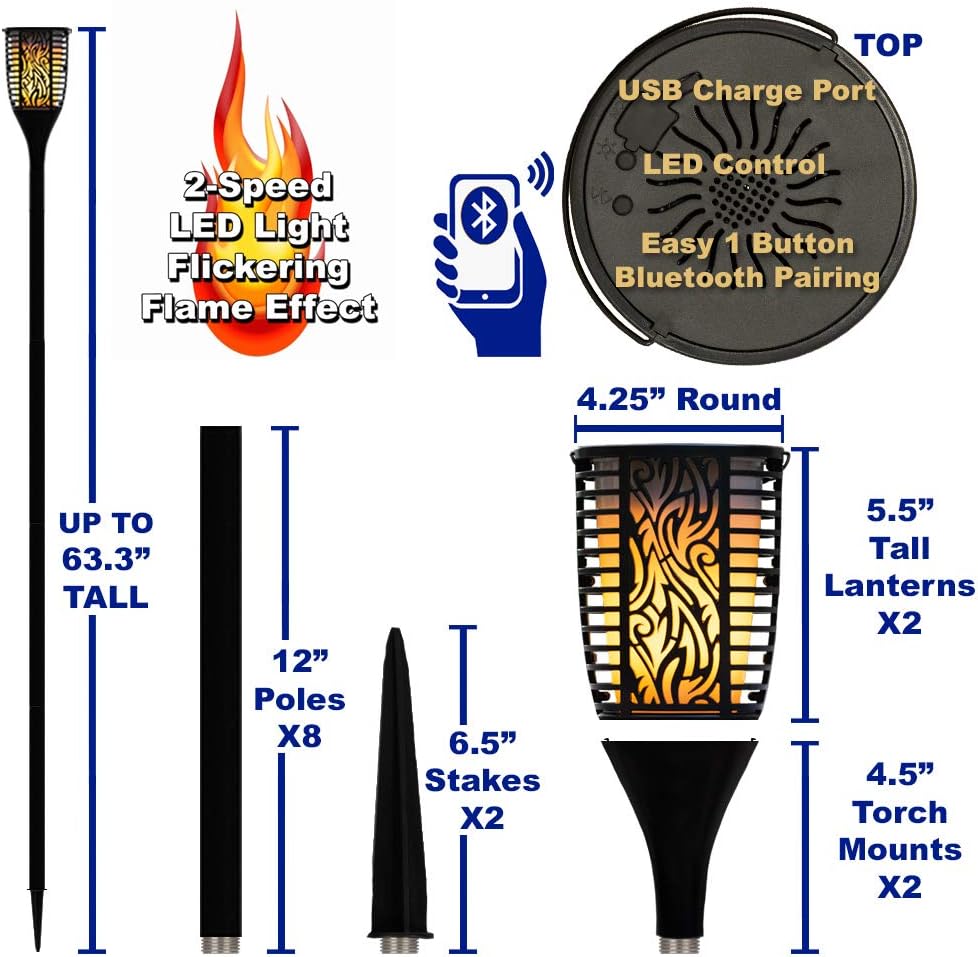
- 8 x Weatherized Steel Poles (12" each)
- 2 x Micro USB to USB Battery Charge Cables
- 1 x manual d'instruccions

Image: Contents of the TT100 package. This image displays all items included in the box: two lantern speakers, two torch mounts, two weatherized steel stakes, eight weatherized steel poles, two micro USB to USB battery charge cables, and the instruction manual.
Configuració
1. Càrrega dels altaveus
Before first use, fully charge both speakers. Connect the provided Micro USB cables to the charging port located on the top of each speaker. Connect the other end of the USB cable to a standard US 110V grounded wall plug adapter (not included) or a USB power source. A full charge takes approximately 5 hours and provides up to 7 hours of playback at standard volume.
Imatge: Superior view of the TT100 speaker. This image highlights the USB charge port, LED control button, and the easy one-button Bluetooth pairing control on the top surface of the speaker.
2. Assembly Options
The TT100 speakers offer versatile assembly options:
- Tiki Torch Configuration: Screw the weatherized steel poles together to achieve the desired height (from 28.5" to 63.3"). Attach a torch mount to the top pole segment, then place the speaker into the torch mount. Insert the steel stake into the ground for stability.
- Hanging Lantern: Use the integrated hook on the top of the speaker to hang it from a suitable fixture.
- Tabletop Lantern: Simply place the speaker on any flat, stable surface.

Image: TT100 speaker versatility. This image demonstrates the speaker's ability to be used as a tiki torch, a hanging lantern, or a tabletop lantern.

Image: TT100 assembly components and dimensions. This diagram illustrates the various parts like poles, stakes, and torch mounts, along with their dimensions, for assembling the speaker in its tiki torch configuration.
Instruccions de funcionament
1. Encès / apagat
Press and hold the power button (usually integrated with the Bluetooth pairing button) on the top of the speaker to turn it on or off.
2. Emparellament Bluetooth
- Assegureu-vos que l'altaveu estigui encès. Entrarà automàticament en mode d'emparellament Bluetooth, cosa que s'indicarà amb un llum LED intermitent.
- On your Bluetooth audio streaming device (smartphone, tablet, laptop), enable Bluetooth and search for available devices.
- Select "TT100" from the list of devices. Once paired, you will hear an audible confirmation, and the LED light will become solid.

Image: TT100 Setup Steps. This diagram illustrates the three main steps for setting up the speakers: charging before first use, pairing with a Bluetooth device, and linking multiple speakers together.
3. Linking Multiple Speakers (Up to 99)
The TT100 features a unique wireless linking capability, allowing you to connect up to 99 additional TT100 speakers, and even select compatible Goldwood rock and pool speakers, for a synchronized audio experience.
- First, pair your primary TT100 speaker to your Bluetooth device as described above. This will be your master speaker.
- Turn on any additional TT100 speakers you wish to link. Ensure they are not currently paired to any other Bluetooth device.
- On the master speaker, press the "Link" button (often integrated with the power/Bluetooth button, refer to the top panel diagram). The master speaker will begin searching for other speakers.
- On each additional speaker, press its "Link" button. They will automatically connect to the master speaker. You will hear an audible confirmation for each successful link.
- All linked speakers will now play audio from your Bluetooth device simultaneously.

Image: Wireless Music United. This diagram illustrates how one TT100 speaker can be paired via Bluetooth and then wirelessly link to up to 99 other compatible Goldwood speakers, including rock speakers and additional TT100 units, for a unified audio experience.
4. LED Flickering Flame Effect
The TT100 speakers feature a realistic flickering flame LED light effect with two speed control settings. Press the dedicated LED control button on the top of the speaker to cycle through the flame speeds or turn the light off.

Image: LED Flickering Flame Effect. This image highlights the 2-speed LED light flickering flame effect of the TT100 speaker, providing ambient lighting.
Manteniment
- Neteja: Utilitzeu un suau, damp cloth to clean the exterior of the speakers. Do not use abrasive cleaners or solvents.
- Emmagatzematge: When not in use for extended periods, store the speakers in a cool, dry place. Ensure they are fully charged before storage to preserve battery life.
- Resistència a la intempèrie: The speakers are designed to be weatherproof against rain, snow, salt, ice, and pool chemicals. However, it is recommended to avoid prolonged submersion in water. Ensure the USB charging port cover is securely closed when not charging to prevent water intrusion.
- Cura de la bateria: To maximize battery lifespan, avoid completely draining the battery frequently. Recharge when the battery level is low.
Resolució de problemes
| Problema | Causa possible | Solució |
|---|---|---|
| L'altaveu no s'encén. | La bateria està esgotada. | Carregueu l'altaveu amb el cable USB proporcionat. |
| No es pot emparellar per Bluetooth. | Speaker is not in pairing mode; Bluetooth on device is off; Speaker is already paired to another device. | Ensure speaker is on and flashing LED; Turn on Bluetooth on your device; Disconnect from other devices or restart speaker. |
| Sound cuts in and out when linking multiple speakers. | Interference; Speakers are too far apart; Low battery on one or more speakers. | Reduce distance between speakers; Ensure clear line of sight; Charge all speakers. |
| Flickering flame LED not working. | LED function is off; Malfunction. | Press the LED control button to cycle through modes; If issue persists, contact support. |
| Water inside speaker. | USB port cover not sealed; Prolonged submersion. | Ensure USB port cover is always securely closed when not charging. Avoid submersion. If water ingress occurs, turn off immediately and allow to dry completely before attempting to use again. |
Especificacions
| Característica | Detall |
|---|---|
| Model | TT100 |
| Marca | Theater Solutions by Goldwood |
| Tipus d'altaveu | Outdoor, Bluetooth, Rechargeable |
| Potència total del sistema | 120 Watts (60 Watts per speaker) |
| Resposta de freqüència | 70Hz-20kHz |
| Sensibilitat | 90 dB |
| Impedància | 8 ohms |
| Durada de la bateria | Up to 7 hours (at standard volume) |
| Temps de càrrega | Aproximadament 5 hores |
| Dimensions (A x A x P) | 5.5" x 4.25" x 4.25" (Lantern) |
| Alçada ajustable | 28.5" to 63.3" (Tiki Torch configuration) |
| Connectivitat | Bluetooth, Wireless Link (up to 99 speakers) |
| Efecte LED | Realistic Flickering Flame (2 speed settings) |
| Resistència a la intempèrie | Durable and Weatherproof (against rain, snow, salt, ice, pool chemicals) |
| Font d'alimentació | Battery Powered (1 Lithium Ion battery included per speaker) |
| Entrada Voltage (for charging) | 110 Volts (US Standard) |
Informació de la garantia
Theater Solutions by Goldwood products come with a limited warranty. For specific details regarding the warranty period and coverage for your TT100 speakers, please refer to the warranty card included in your package or visit the official Theater Solutions website. This warranty typically covers manufacturing defects and workmanship under normal use.
Si us plau, conserveu el comprovant de compra per a qualsevol reclamació de garantia.
Suport
For technical assistance, troubleshooting beyond this manual, or warranty inquiries, please contact Theater Solutions customer support:
- Fabricant: Theater Solutions by Goldwood
- Weblloc: www.goldwood.com (Note: This is a placeholder link as no specific support link was provided in the input. Users should refer to the official product packaging or included documentation for precise support contact information.)
- Correu electrònic/Telèfon: Consulteu l'embalatge del producte o la fitxa oficial weblloc web per obtenir dades de contacte actuals.
When contacting support, please have your product model (TT100) and purchase information ready.


