Introducció
This manual provides detailed instructions for the installation, operation, and maintenance of your MSI MAG B460M Mortar Gaming Motherboard. Designed for 10th Gen Intel Core processors, this motherboard offers robust performance and features for a stable computing experience. Please read this manual thoroughly before proceeding with installation or use.
Informació de seguretat
Observeu sempre les següents precaucions de seguretat per evitar danys a la placa base o lesions personals:
- Desconnecteu el cable d'alimentació de la presa de corrent abans de tocar qualsevol component.
- Wear an anti-static wrist strap when handling components to prevent electrostatic discharge (ESD).
- Manipuleu els components per les vores; eviteu tocar els pins o els circuits.
- Assegura't de ventilar adequadament la carcassa del teu PC per evitar que es sobreescalfi.
- Mantingueu la placa base allunyada de la humitat i de les temperatures extremes.
Contingut del paquet
Verifiqueu que tots els elements que s'enumeren a continuació siguin presents a l'embalatge de la placa base:

Image: Contents of the MSI MAG B460M Mortar Motherboard retail box, including the motherboard, user manual, quick installation guide, MSI case badge, product registration card, driver DVD, and two SATA cables.
- MSI MAG B460M Mortar Motherboard
- Manual d'usuari
- Guia d'instal·lació ràpida
- Insígnia de la caixa MSI
- Targeta de registre del producte
- DVD del controlador
- 2 cables SATA
Disseny i característiques de la placa base
Familiaritzeu-vos amb els components i connectors clau de la vostra placa base.

Imatge: De dalt a baix view of the MSI MAG B460M Mortar Motherboard highlighting its premium thermal solution, including an extended heatsink, M.2 Shield Frozr, heatsinks with 7W/mK thermal pad, and pump fan support.
- Extended Heatsink: Enlarged heatsink for improved heat dissipation.
- M.2 Shield Frozr: Thermal solution for M.2 SSDs to prevent throttling.
- Heatsinks with 7W/mK Thermal Pad: High-quality thermal pads for efficient heat transfer.
- Pump Fan Support: Dedicated header for liquid cooling pump.
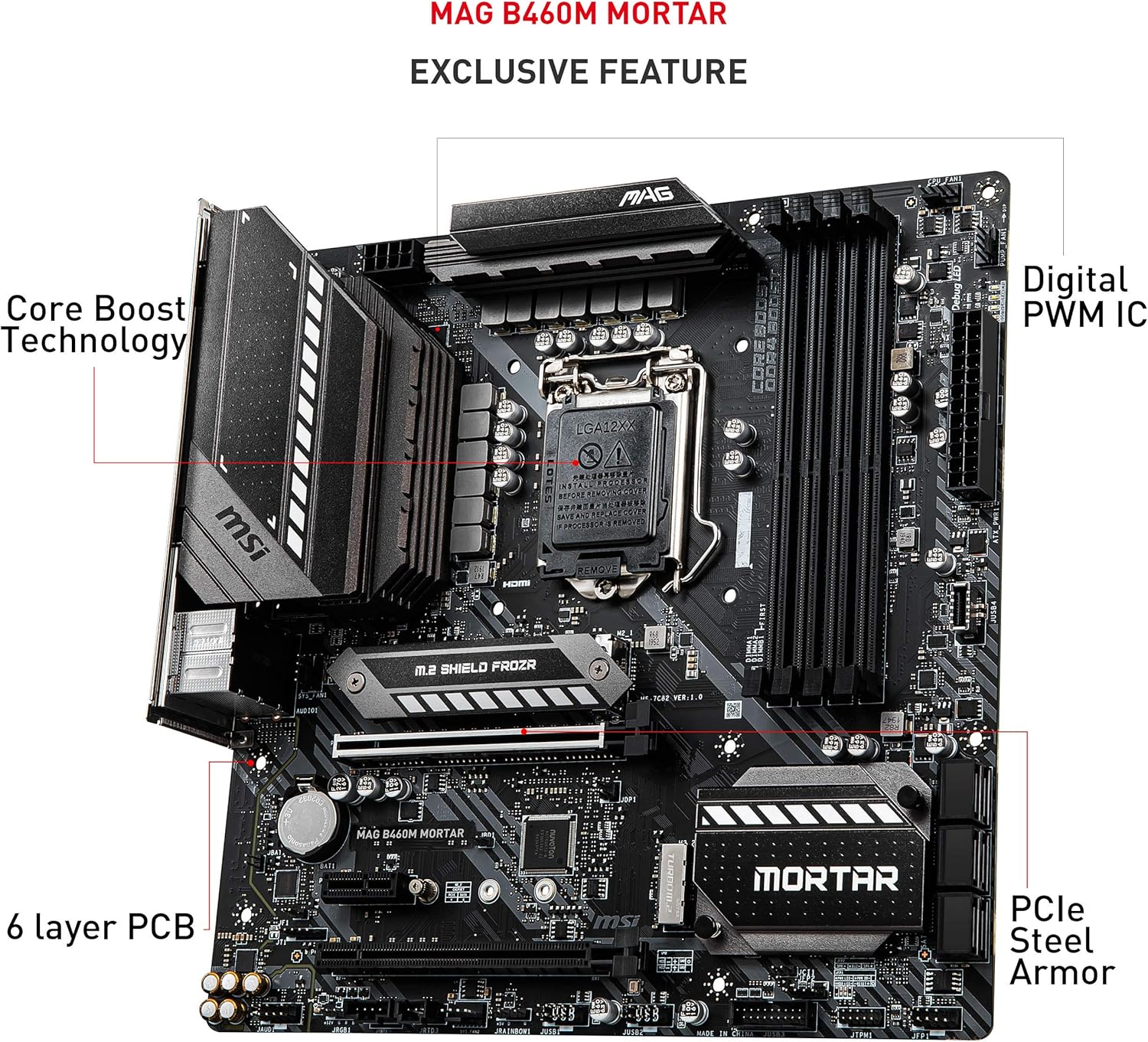
Imatge: Anglesa view of the MSI MAG B460M Mortar Motherboard, pointing out exclusive features such as Core Boost Technology, Digital PWM IC, 6-layer PCB, and PCIe Steel Armor.
- Core Boost Technology: Optimized power delivery for multi-core processors.
- Digital PWM IC: Ensures precise and stable power delivery to the CPU.
- 6-layer PCB: Enhanced PCB design for improved signal integrity and durability.
- PCIe Steel Armor: Reinforced PCIe slots for heavy graphics cards.

Imatge: Un altre angle view of the MSI MAG B460M Mortar Motherboard, highlighting high-speed transmission features like Turbo USB, DDR4 Boost, 2.5G Network Solution, and Turbo M.2.
- Turbo USB: Optimized USB ports for faster data transfer.
- Augment de DDR4: Isolated memory circuitry for optimal performance and stability.
- 2.5G Network Solution: High-speed Ethernet for reliable network connectivity.
- Turbo M.2: M.2 slots supporting NVMe SSDs for ultra-fast storage.

Imatge: Detallada view of the rear I/O panel of the MSI MAG B460M Mortar Motherboard, showing ports for PS/2 keyboard/mouse, DisplayPort, HDMI, USB 3.2 Gen 1 (Type-A and Type-C), 2.5G LAN, HD Audio Connectors, and Optical S/PDIF OUT.
- PS/2 Keyboard / Mouse Port: For legacy peripherals.
- DisplayPort & HDMI: Video output ports.
- USB 3.2 Gen 1 (Type-A & Type-C): Connectivitat USB d'alta velocitat.
- LAN 2.5G: High-speed wired network connection.
- HD Audio Connectors & Optical S/PDIF OUT: Audio input/output.
Configuració i instal·lació
Segueix aquests passos per instal·lar correctament la placa base i els components.
1. Instal·lació de la CPU (sòcol LGA 1200)
- Localitzeu el sòcol LGA 1200 a la placa base.
- Open the CPU socket lever and lift the metal load plate.
- Carefully align the notches on your 10th Gen Intel Core processor with the keys on the socket.
- Col·loca suaument la CPU al sòcol sense forçar-la.
- Tanqueu la placa de càrrega i assegureu-la amb la palanca.
- Instal·leu el refrigerador de CPU segons les instruccions del fabricant.
2. Instal·lació de memòria (RAM)
- Locate the DDR4 DIMM slots. For dual-channel configuration, refer to the motherboard manual for recommended slot pairing.
- Obriu els clips dels dos extrems de la ranura DIMM.
- Alineeu l'osca del mòdul de memòria DDR4 amb la clau de la ranura DIMM.
- Premeu fermament els dos extrems del mòdul de memòria fins que els clips encaixin al seu lloc.
3. Instal·lació del dispositiu d'emmagatzematge
The motherboard supports both M.2 NVMe SSDs and SATA drives.
Instal·lació SSD M.2:
- Locate the M.2 slots and remove the M.2 Shield Frozr heatsink if present.
- Inseriu l'SSD M.2 a la ranura amb un angle de 30 graus.
- Gently push down the SSD and secure it with the provided screw or M.2 standoff.
- Reinstall the M.2 Shield Frozr heatsink.
Instal·lació d'unitats SATA:
- Connecteu un extrem d'un cable de dades SATA a un port SATA de la placa base.
- Connecteu l'altre extrem del cable de dades SATA al vostre disc dur/SSD SATA.
- Connecteu un cable d'alimentació SATA de la font d'alimentació (PSU) a la unitat.
4. Instal·lació de la targeta gràfica (GPU)
- Locate the primary PCIe x16 slot (often reinforced with Steel Armor).
- Obriu el clip de retenció al final de la ranura.
- Align your graphics card with the slot and press down firmly until it is seated and the clip snaps into place.
- Fixeu la targeta gràfica a la carcassa de l'ordinador amb cargols.
- Connecteu els cables d'alimentació PCIe necessaris de la font d'alimentació a la targeta gràfica.
5. Connexions d'alimentació
- Connecteu el connector d'alimentació principal ATX de 24 pins de la font d'alimentació a la placa base.
- Connect the 8-pin (or 4+4-pin) ATX 12V CPU power connector from your PSU to the motherboard.
- Connect any case fans, front panel connectors (USB, audio, power/reset buttons, LEDs) to their respective headers on the motherboard. Refer to the motherboard manual for exact header locations.
Instruccions de funcionament
1. Primera arrencada i configuració de la BIOS/UEFI
- Després de muntar l'ordinador, connecteu un monitor, un teclat i un ratolí.
- Engegueu el sistema. Premeu el botó DEL Premeu la tecla repetidament durant l'inici per accedir a la utilitat de configuració del BIOS/UEFI.
- In the BIOS, you can configure boot order, system time, fan speeds, and other advanced settings.
- Deseu els canvis i sortiu de la BIOS per continuar amb la instal·lació del sistema operatiu.
2. Instal·lació del controlador
After installing your operating system, install the necessary drivers for optimal performance. Use the included Driver DVD or download the latest drivers from the MSI weblloc.
- Controladors de xips
- LAN Drivers (for 2.5G Ethernet)
- Controladors d'àudio
- Graphics Drivers (for integrated graphics or discrete GPU)
- Controladors USB
Manteniment
El manteniment regular ajuda a garantir la longevitat i el rendiment estable de la placa base.
1. Neteja
- Periodically clean dust from the motherboard and case fans using compressed air.
- Assegureu-vos que el sistema estigui apagat i desendollat abans de netejar-lo.
- Eviteu utilitzar netejadors líquids directament sobre els components.
2. Actualitzacions de la BIOS
Check the MSI website for the latest BIOS updates. BIOS updates can improve system stability, compatibility, and performance. Follow MSI's instructions carefully when updating the BIOS to avoid system damage.
Resolució de problemes
Aquesta secció tracta problemes comuns que podeu trobar.
- Sense energia: Ensure all power cables (24-pin ATX, 8-pin CPU) are securely connected. Check PSU functionality.
- Sense pantalla: Verify that the monitor is connected to the correct video output (either motherboard or graphics card). Reseat the graphics card and RAM modules.
- Inestabilitat/Avaries del sistema: Check RAM seating, CPU cooler installation, and ensure all drivers are up to date. Monitor temperatures.
- Problemes de connectivitat de xarxa: Ensure LAN cable is properly connected. Install or update LAN drivers. Check router/modem.
Producte acabatview Vídeo
Vídeo: Un producte oficial acabatview video from MSI, showcasing the key features and design of the MSI MAG B460M Mortar Motherboard. This video provides a visual guide to the motherboard's capabilities and design elements.
Especificacions
| Característica | Detall |
|---|---|
| Marca | MSI |
| Sèrie | MAG B460M MORTAR |
| Número de model de l'article | B460M Mortar |
| Socket de CPU | LGA 1200 |
| Processadors compatibles | 10th Gen Intel Core / Pentium Celeron |
| Tipus de xipset | Intel B460 |
| Tecnologia de memòria RAM | DDR4 |
| Velocitat de memòria | Fins a 2933 MHz |
| Nombre de ports USB 2.0 | 2 |
| LAN | 2.5G LAN with LAN Manager |
| Emmagatzematge | Dual M.2 Slots, SATA ports |
| Àudio | Ampliació d’àudio |
| Dimensions del producte | 9.6 x 9.6 x 1.5 polzades |
| Pes de l'article | 3.17 lliures |
| Plataforma | Windows 10 |
Garantia i Suport
For warranty information and technical support, please refer to the official MSI website or contact MSI customer service. Keep your proof of purchase for warranty claims.
Recursos en línia:


