1. Introducció
This manual provides detailed instructions for the installation, operation, maintenance, and troubleshooting of the TOPENS CK500 Automatic Sliding Gate Opener. Please read all instructions carefully before beginning installation or operation to ensure proper function and safety.

Figure 1.1: TOPENS CK500 Automatic Sliding Gate Opener and included accessories.
2. Informació important de seguretat
Failure to follow these safety instructions may result in serious injury or property damage. Always exercise caution when installing or operating the gate opener.
- Ensure the gate operates smoothly and freely by hand before installing the opener.
- Desconnecteu l'alimentació abans de realitzar qualsevol manteniment o ajust.
- Mantingueu els nens i les mascotes allunyats de la zona de la porta durant el funcionament.
- Do not allow children to operate the gate opener or play with controls.
- Install all controls where they are out of reach of children and away from the gate.
- Inspeccioneu regularment l'obridor de la porta per detectar signes de desgast o danys.
3. Contingut del paquet
The TOPENS CK500 package includes the following components:

Figura 3.1: Explotat view of the TOPENS CK500 Automatic Sliding Gate Opener components.
- Gate Opener Motor Unit
- 20ft Roller Chain
- 2 comandaments a distància M12
- Magnet Assembly (N pole & S pole)
- Clau d'alliberament manual
- Durable Chain-wheel
- Mounting Hardware (L-brackets, bolts, washers)
- Manual d'instruccions
4. Configuració i instal·lació
The installation process may vary depending on your gate and ground conditions. The following steps provide a general guide.
4.1 Comprovació prèvia a la instal·lació
Before installation, ensure your gate can open and close smoothly by hand without any obstruction. The gate should move freely along its track.
4.2 Install the Motor on the Base Plate
Assemble the base plate and securely mount the motor unit onto it. Ensure all bolts are reinforced.
Video 4.1: Detailed installation guide for the TOPENS CK500 Automatic Sliding Gate Opener, covering mechanical setup, power connection, and accessory integration.
4.3 Determine Gate Opener Position
Position the gate opener so that the teeth of the chain wheels are vertically aligned within the range of the hole in the 'L' bracket. Mark the bolt-hole points for drilling.
4.4 Fit the Chain
Disassemble the end of the chain and connect it to one of the chain bolts on the 'L' bracket. Ensure the chain fully engages the drive sprocket and the two idler wheels. Cut the chain to the appropriate length and connect the other end to the second chain bolt. Verify smooth gate movement with the chain installed.
4.5 Install the Magnets
Install the N magnet bracket on the left side (from inside the property) and the S magnet bracket on the right side. Ensure the magnet center aligns with the marked line on the limit switch and is 25-30 mm (1-1.2 inches) away from the limit switch. Reinforce with self-tapping screws.
4.6 Connection of the Power Supply
The CK500 gate opener is powered ONLY by AC electricity. Connect the earth wire to the 'PE' terminal and the live and neutral wires to the 'L' (2) and 'N' (1) terminals respectively. The power supply cord (not included) should be at least 3 x 0.75mm2 (3C x 18AWG).
5. Instruccions de funcionament
5.1 Program the Remote Control
Press the LNSW button on the control board. The LEARN LED will flash. Press the remote button twice within 2 seconds, holding for a moment between presses. The LEARN LED will flash for 3 seconds and then turn OFF, indicating successful programming.

Figure 5.1: TOPENS M12 Remote Control.
5.2 Setting of Left/Right Open
According to the actual opening direction of your gate, set DIP Switch #4 accordingly. Refer to the control board diagram in the manual for specific settings.

Figure 5.2: DIP Switch #4 setting for Left/Right open.
5.3 Adjust the Open/Close Limit Position
If the gate does not stop at the desired position, re-adjust the open/close limit position by carefully moving the magnets along the gate until the desired stop points are achieved.
5.4 Setting of the Control Board
Adjust the DIP switches and potentiometers on the control board according to the instruction manual for functions such as auto-close time, midway mode, and obstacle sensitivity.

Figure 5.3: Control board settings for various operational features.
6. Connection of Accessories
The TOPENS CK500 supports various accessories to enhance functionality. Refer to the instruction manual for detailed wiring diagrams and setup for each accessory.
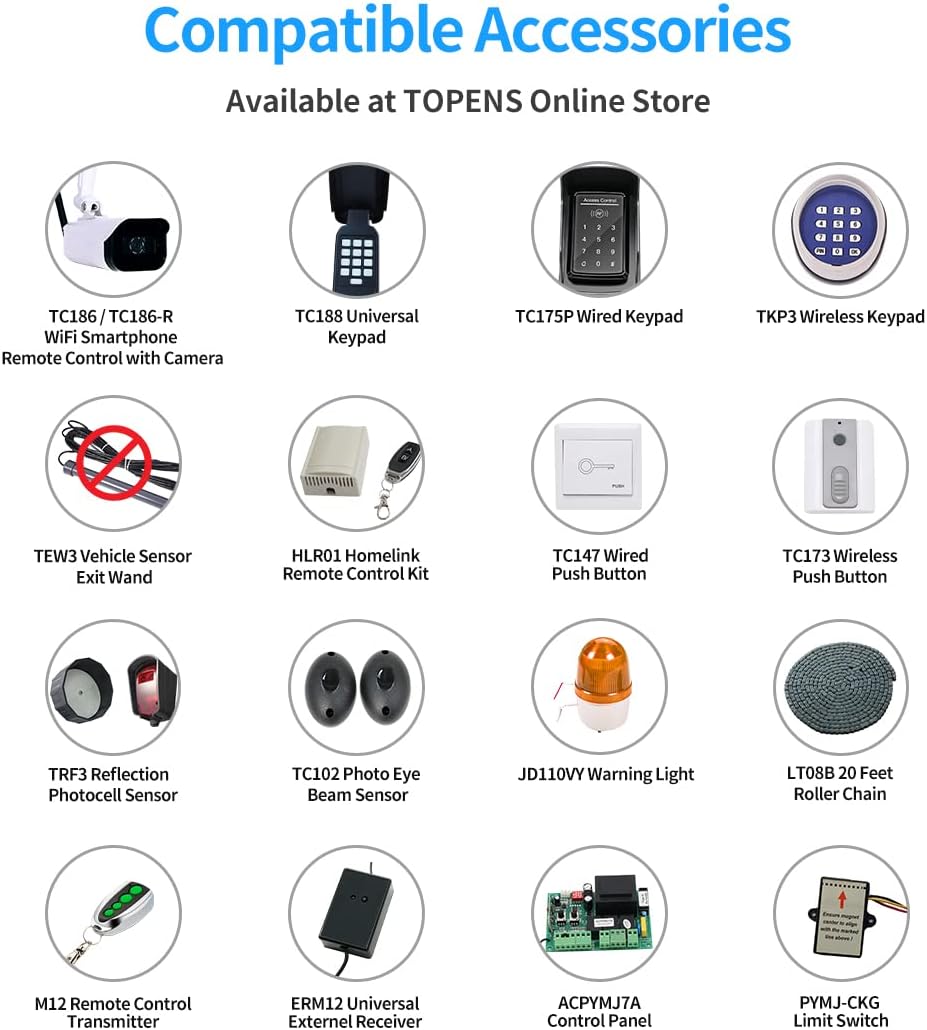
Figure 6.1: Compatible accessories for TOPENS gate openers.
6.1 TC147 Wired Push Button
Connect the TC147 Wired Push Button to the control board terminals as specified in the manual to enable manual gate operation.
6.2 JD110VY / JD230VY AC Warning Light
Connect the warning light to the designated terminals on the control board. Ensure power is OFF before connecting and ON after connection is complete.
6.3 ERM12 External Receiver
Connect the ERM12 External Receiver to the control board to extend the remote control range or integrate additional remote controls.
6.4 TC175P Wired Keypad
Connect the TC175P Wired Keypad for secure, code-based access. Follow the wiring diagram in the manual for proper connection and programming of access codes.
6.5 TKP3 Wireless Keypad
Program the TKP3 Wireless Keypad to the gate opener's control board. This allows for wireless, code-based access.
6.6 TC102 Photo Eye Beam Sensor
Install and connect the TC102 Photo Eye Beam Sensor to enhance safety by detecting obstructions in the gate's path. Disconnect the wire jumper on the control board to activate the photocell function.
6.7 TRF3 Reflection Photocell Sensor
Install and connect the TRF3 Reflection Photocell Sensor for obstruction detection. Ensure the wire jumper on the control board is disconnected to activate the photocell function.
6.8 TC186-R WiFi Smartphone Remote Control with Camera
Connect the TC186-R WiFi Smartphone Remote Control with Camera to your home's 2.4GHz WiFi network. Use the Linkcraft APP to bind the device and control the gate remotely. Ensure your smartphone is connected to your home's WiFi and cellular data is active during setup.
7. Manteniment
Regular maintenance ensures optimal performance and longevity of your gate opener.
- Inspect the gate and opener regularly for any loose connections, wear, or damage.
- Keep the gate track clean and free of debris.
- Lubricate moving parts of the gate and chain as needed.
- Test safety features, such as photocell sensors, monthly.
- In case of power failure, use the manual release key to disengage the clutch and operate the gate manually.

Figure 7.1: Manual release key for emergency gate operation.
8. Solució De Problemes
If you encounter issues with your gate opener, refer to the following common troubleshooting steps:
- Gate not responding to remote: Check remote battery, ensure opener is powered, and re-program the remote if necessary.
- Gate stops unexpectedly: Inspect for obstructions in the gate's path. Check photocell sensors for proper alignment and function.
- Gate does not open/close fully: Re-adjust the limit switch positions.
- Motor makes noise but gate does not move: Check if the clutch is engaged. Inspect the chain for proper tension and engagement with sprockets.
9. Especificacions
Key specifications for the TOPENS CK500 Automatic Sliding Gate Opener:
- Gate Capabilities: Up to 1300 lbs and 40 ft
- Motor Voltage i potència: AC 120V & 300W, 2/5 HP
- Velocitat de moviment de la porta: 8 polzades/s (20 cm/s)
- Mode d'alimentació: AC Electricity ONLY
- Chain Included: 20 peus
- Pes de l'article: 40.6 lliures
- Dimensions del producte: 14.37 x 5.59 x 18.62 polzades

Figure 9.1: Comparison of TOPENS Sliding Gate Opener models.
10. Garantia i Suport
TOPENS provides a 12-month warranty for the CK500 Automatic Sliding Gate Opener. For technical support, warranty registration, or installation videos, please visit the official TOPENS weblloc o contacteu amb el servei d'atenció al client.

Figure 10.1: Scan for TOPENS customer support and weblloc.
Oficial Weblloc: www.topens.com
Phone: +1 (888) 750 9899 (Toll Free USA & Canada)


