1. Introducció
Thank you for choosing the STRONG SRT 24HC3023 24-inch TV. This television is designed for versatile use, offering a triple tuner for DVB-T2 HD, DVB-C, and DVB-S2 reception, making it suitable for both home entertainment and mobile applications such as motorhomes, caravans, or boats, thanks to its 12 Volt compatibility. This manual provides essential information for setting up, operating, and maintaining your new television. Please read it thoroughly before use to ensure proper functionality and safety.

Figure 1.1: STRONG SRT 24HC3023 24-inch TV
2. Informació de seguretat
Per garantir un funcionament segur i evitar danys, observeu les següents precaucions de seguretat:
- No exposeu el televisor a la pluja ni a la humitat per evitar incendis o descàrregues elèctriques.
- No bloquegeu les obertures de ventilació. Assegureu-vos que hi hagi prou espai al voltant del televisor per a un flux d'aire adequat.
- Use only the power adapter supplied with the TV. For 12V operation, ensure the power source is stable and within the specified voltage gamma.
- Eviteu que el cable d'alimentació sigui trepitjat o pessigat, especialment als endolls, els endolls i el punt on surten de l'aparell.
- No intenteu atendre aquest producte vosaltres mateixos. Consulteu tots els serveis a personal de servei qualificat.
- Clean the TV only with a dry cloth. Do not use liquid cleaners or aerosol cleaners.
- Keep batteries for the remote control out of reach of children.
3. Contingut del paquet
Carefully unpack your TV and check that all items listed below are included and undamaged. If any items are missing or damaged, contact your retailer.
- TV LED STRONG SRT 24HC3023
- Remote Control (including 2x AAA Batteries)
- Stand (Base and Screws)
- Power Adapter (Standard Euro; 12V power cable not included)
- Manual d'usuari

Figura 3.1: Embalatge del producte

Figura 3.2: Comandament a distància
4. Configuració
4.1 Col·locació del suport
- Place the TV face down on a soft, clean surface to prevent scratching the screen.
- Alineeu el suport amb els forats de muntatge de la part inferior del televisor.
- Fixeu el suport amb els cargols proporcionats. No l'estrenyeu massa.
4.2 Connexió de perifèrics
Your TV offers a variety of connection ports for different devices.
- Antena/Satèl·lit: Connect your DVB-T/T2 antenna to the "ANT In" port or your satellite dish to the "SAT In" port.
- HDMI: For high-definition devices like Blu-ray players, game consoles, or streaming sticks.
- SCART: For older devices like DVD players or VCRs.
- USB: Per a la reproducció de contingut multimèdia des d'unitats USB.
- AV In / Mini YPbPr: For analog video and audio sources.
- Auriculars: Per a una escolta privada.
- S/PDIF: For digital audio output to external sound systems.
- Ranura CI: For CI+ modules (e.g., for freenet-TV).
- Potència de 12 V: This TV is 12V compatible, ideal for mobile use. A 12V power cable is not included and must be purchased separately.

Figura 4.1: Dimensions del televisor
4.3 Engegada inicial i escaneig de canals
- Connect the TV to a power source (either the supplied AC adapter or a compatible 12V source).
- Premeu el botó d'engegada del televisor o del comandament a distància.
- Follow the on-screen instructions for initial setup, including language selection and channel scanning. The triple tuner allows you to scan for DVB-T/T2, DVB-C, and DVB-S2 channels.
5. Instruccions de funcionament
5.1 Funcions bàsiques
- Encès/apagat: Premeu el botó Poder botó del comandament a distància.
- Selecció de canals: Utilitza el CH +/- buttons to change channels sequentially, or enter channel numbers directly using the numeric keypad.
- Control de volum: Utilitza el VOL+/- botons per ajustar el volum.
- Selecció de la font: Premeu el botó FONT button to switch between input sources (HDMI, SCART, TV, etc.).
5.2 Triple Tuner Operation
The integrated triple tuner supports DVB-T/T2 (terrestrial), DVB-C (cable), and DVB-S2 (satellite) reception. During the initial setup, you will be prompted to select your preferred reception type and perform a channel scan. You can switch between these modes via the input source menu.
5.3 Guia electrònica de programes (EPG)
Premeu el botó EPG button on the remote control to access the Electronic Program Guide. This displays program schedules for upcoming broadcasts and allows you to set timers for recording or viewing.
Reproducció USB 5.4
Insert a USB storage device into the USB port. The TV will typically detect the device and prompt you to access its media content (photos, music, videos). Navigate through the files'utilitza el comandament a distància.
5.5 CI+ Slot
The CI+ slot allows you to insert a Conditional Access Module (CAM) and a smart card (e.g., for freenet-TV in Germany) to decrypt encrypted channels. Follow the instructions provided with your CI+ module for installation and activation.
Vídeo 5.1: Presentació oficial del producte en vídeoasing the STRONG 24HC3023 TV's features, including its 12V compatibility for mobile use in settings like camping or motorhomes.

Figure 5.1: STRONG TV in a mobile setting, highlighting 12V compatibility.
6. Manteniment
Proper maintenance helps extend the life of your TV.
- Neteja de la pantalla: Netegeu suaument la pantalla amb un drap suau i sense borrissol. Per a les marques difícils, utilitzeu una solució de neteja específica per a pantalles aplicada al drap, no directament a la pantalla.
- Neteja de l'armari: Feu servir un drap suau i sec per netejar el moble del televisor. No utilitzeu productes de neteja abrasius ni dissolvents.
- Ventilació: Ensure the ventilation openings are clear of dust and debris. Do not place the TV in an enclosed space without adequate airflow.
- Apagar: Always unplug the TV from the power outlet before cleaning or when not in use for extended periods.
7. Solució De Problemes
If you encounter problems with your TV, refer to the following common issues and solutions.
| Problema | Causa possible | Solució |
|---|---|---|
| Sense poder | Cable d'alimentació no connectat; no hi ha corrent a la presa de corrent. | Comproveu la connexió del cable d'alimentació. Proveu la presa de corrent amb un altre dispositiu. |
| No hi ha imatge, però hi ha so | Font d'entrada incorrecta seleccionada; cable de vídeo fluix. | Press SOURCE button to select correct input. Check video cable connections. |
| No hi ha so, però hi ha imatge | Volume too low or muted; incorrect audio output setting. | Increase volume or unmute. Check audio settings in the menu. |
| Poca qualitat d'imatge | Weak signal; antenna/cable issue; picture settings. | Check antenna/cable connection. Adjust picture settings (brightness, contrast). |
| El comandament a distància no funciona | Les piles estan gastades o mal inserides; obstrucció. | Replace batteries. Ensure no obstruction between remote and TV. |
Si el problema persisteix després d'intentar aquestes solucions, poseu-vos en contacte amb personal de servei qualificat.
8. Especificacions
| Característica | Detall |
|---|---|
| Número de model | SRT24HC3023 |
| Mida de la pantalla | 24 polzades (61 cm) |
| Tecnologia de visualització | LED |
| Resolució | 720p (1366 x 768 píxels) |
| Freqüència d'actualització | 60 Hz |
| Sintonitzadors | DVB-T2 HD, DVB-C, DVB-S2 (Triple Tuner) |
| Connectivitat | HDMI, SCART, USB, AV In, Mini YPbPr, Headphone, S/PDIF, PC Audio In, ANT In, SAT In, CI Slot |
| Font d'alimentació | AC 220-240V, 50/60Hz; 12V DC compatible |
| Consum d'energia (mode encès) | 25 watts |
| Classe d'eficiència energètica | F |
| Dimensions (L x P x A) | 55.07 x 16.1 x 36.73 cm (amb suport) |
| Pes | 2.66 kg |
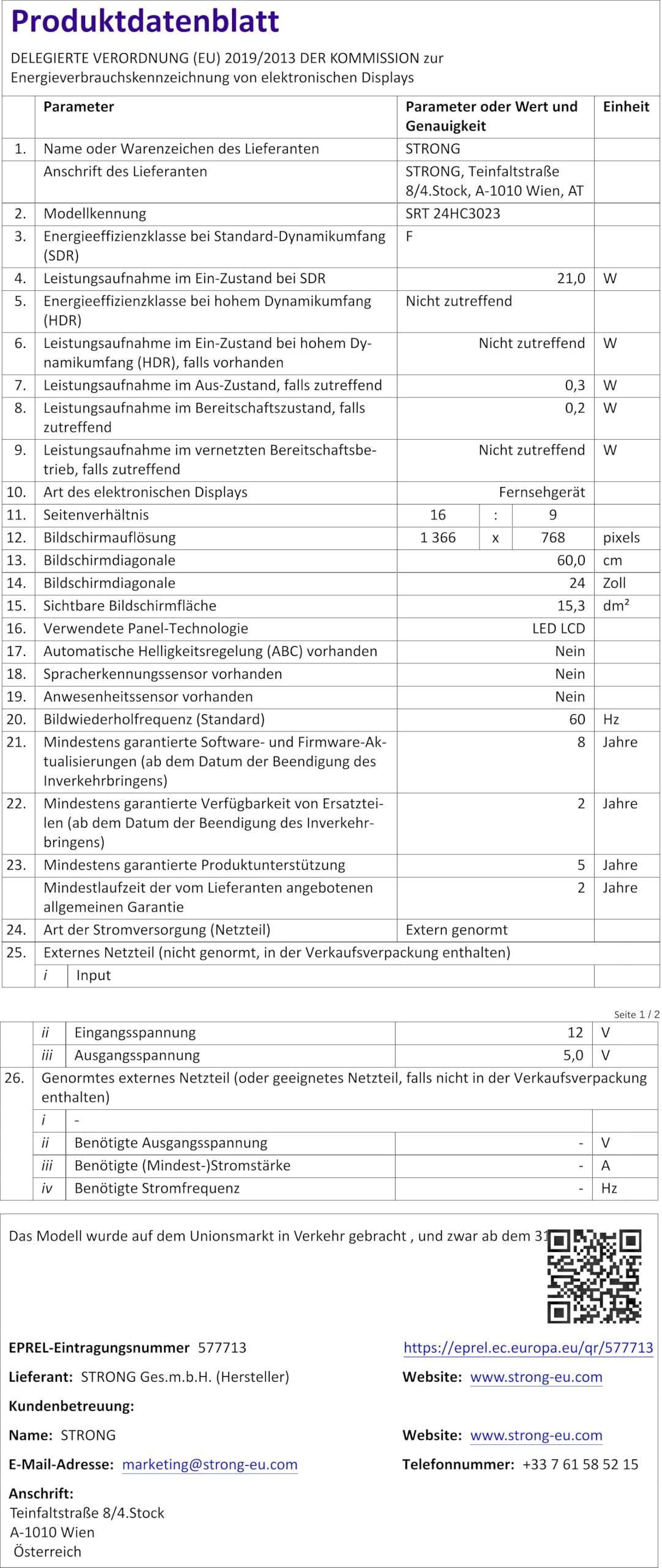
Figure 8.1: Product Fiche (Energy Label Information)
Per obtenir informació energètica més detallada, consulteu la Base de dades EPREL (enllaç amb codi QR).

Figura 8.2: Etiqueta d'eficiència energètica
9. Garantia i Suport
Your STRONG SRT 24HC3023 TV comes with a standard manufacturer's warranty. Please refer to the warranty card included in your package for specific terms and conditions. For technical support, troubleshooting assistance beyond this manual, or warranty claims, please contact STRONG customer service or your local retailer.
You can find more information and support on the official STRONG weblloc: www.strong.tv


