1. Introducció
Thank you for choosing the Powertech PT-600 Uninterruptible Power Supply (UPS). This device is designed to provide reliable battery backup and surge protection for your electronic equipment, safeguarding against power outages, voltage fluctuations, and electrical surges. The PT-600 ensures continuous operation and protection for critical devices such as PCs, wireless routers, modems, TVs, and home entertainment systems.
Característiques principals:
- 6 endolls NEMA 5-15R: All outlets provide both battery backup and surge protection.
- Self-Starting Functionality: The UPS is designed to auto-restart after an AC power failure once power is restored.
- Volum automàtictage Regulació (AVR): Microprocessor-controlled AVR corrects minor power fluctuations without switching to battery, extending battery life.
- Touch Screen LCD Display: Provides real-time information on the UPS status, including battery load, voltage, i el nivell de la bateria.
- Protecció integral: Guards against discharges, voltage surges, overloads, short circuits, and transients from modems/telephone lines.
2. Producte acabatview
Familiarize yourself with the components of your Powertech PT-600 UPS.

Figura 2.1: frontal i lateral view of the Powertech PT-600 UPS, showing the main unit with ventilation grilles and the Powertech logo.
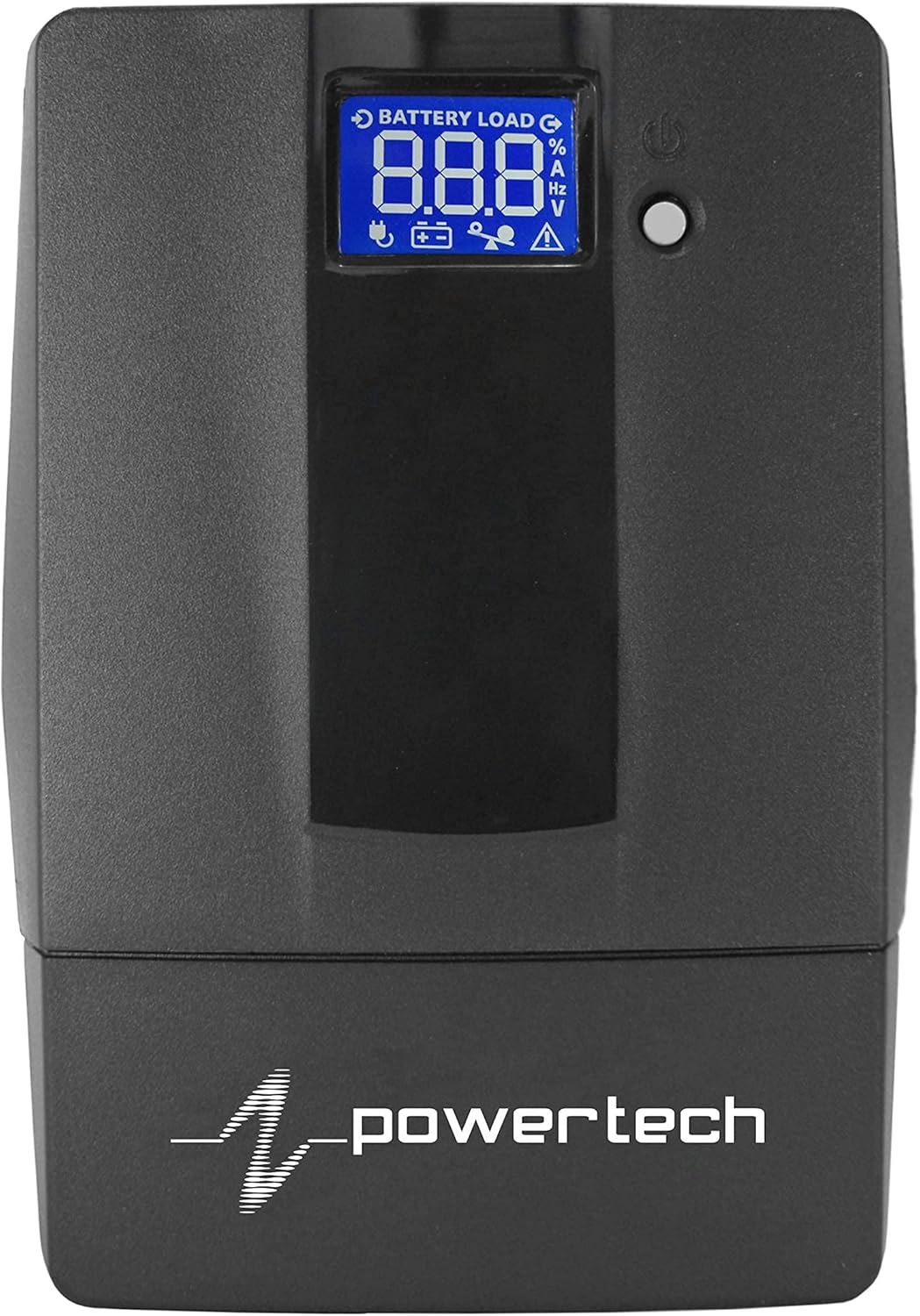
Figure 2.2: Close-up of the touch screen LCD display on the Powertech PT-600 UPS, showing battery load, voltage, i altres indicadors d'estat.

Figure 2.3: Rear panel of the Powertech PT-600 UPS, displaying six NEMA 5-15R outlets, a USB port, and RJ11/RJ45 ports for modem/telephone line protection.
Components:
- Panell frontal: Features the touch screen LCD display for status monitoring and a power button.
- Panell posterior: Includes six NEMA 5-15R outlets (all battery backup and surge protected), a USB communication port, and RJ11/RJ45 ports for surge protection of telephone/modem lines.
- Cable d'alimentació: Integrated power cord for connecting to a wall outlet.
3. Configuració
Follow these steps for the initial setup of your Powertech PT-600 UPS.
- Desembalatge: Traieu amb cura el SAI del seu embalatge. Inspeccioneu-lo per detectar qualsevol dany durant l'enviament.
- Col·locació: Place the UPS in a cool, dry, and well-ventilated area, away from direct sunlight, heat sources, and excessive moisture. Ensure adequate space around the unit for proper airflow.
- Càrrega inicial de la bateria: Connect the UPS power cord to a standard wall outlet. Allow the unit to charge for at least 8 hours before connecting any devices to ensure optimal battery performance. The LCD display will indicate charging status.
- Dispositius de connexió: Once the battery is sufficiently charged, connect your electronic devices (e.g., computer, monitor, router) to the NEMA 5-15R outlets on the rear panel. Ensure the total load does not exceed the UPS's capacity (600VA / 360W).
- Connecting Data Lines (Optional): For surge protection of telephone or modem lines, connect your incoming line to the "IN" port and your device to the "OUT" port on the rear panel.
- Encès: Press and hold the power button on the front panel for a few seconds until the UPS powers on and the LCD display illuminates.
Important: Do not connect laser printers or shredders to the UPS battery backup outlets, as their high power draw can overload the unit.
4. Instruccions de funcionament
4.1 Engegada/apagada
- Per encendre: With the UPS connected to AC power, press and hold the power button for approximately 2-3 seconds until you hear a beep and the LCD display lights up.
- Per apagar: Press and hold the power button for approximately 2-3 seconds until the LCD display turns off. If the UPS is running on battery power, it will shut down immediately. If connected to AC power, it will enter standby mode.
4.2 Comprensió de la pantalla LCD
The touch screen LCD display provides real-time operational status. Tap the screen to cycle through different information displays.
| Icon/Indicator | Descripció |
|---|---|
| Battery Load % | Indica el percentatgetage of the UPS's capacity currently being used by connected devices. |
| Nivell de bateria | Shows the current charge level of the internal battery. |
| Entrada Voltage (V) | Displays the incoming AC voltage de la presa de corrent. |
| Vol. De sortidatage (V) | Mostra el voltage being supplied by the UPS to connected devices. |
| Freqüència (Hz) | Shows the operating frequency of the power supply. |
| Indicador de sobrecàrrega | Flashes or illuminates if the connected load exceeds the UPS's capacity. Disconnect non-essential devices immediately. |
| Indicador de falles | Indicates an internal fault with the UPS. Refer to troubleshooting. |
4.3 Volum automàtictagReglament (AVR)
The PT-600 features Automatic Voltage Regulation (AVR) to stabilize incoming utility power. When the input voltage fluctuates (either too high or too low) but remains within a safe range, the UPS will automatically adjust the output voltage without switching to battery power. This protects your devices from minor power disturbances and prolongs the life of the UPS battery.
4.4 Funcionament amb bateria de reserva
En cas d'una potènciatage, the UPS will automatically switch to battery power, providing continuous power to connected devices. The UPS will emit an audible alarm (beeping) to indicate it is operating on battery. The LCD display will show the remaining battery level. When utility power is restored, the UPS will automatically switch back to AC power and begin recharging its battery.
Nota: The runtime on battery power depends on the load connected. Disconnect non-essential devices during an outage to maximize runtime for critical equipment.
5. Manteniment
Proper maintenance ensures the longevity and optimal performance of your Powertech PT-600 UPS.
- Cura de la bateria:
- Keep the UPS connected to AC power to ensure the battery remains fully charged.
- Eviteu les descàrregues profundes freqüents.
- If storing the UPS for an extended period, fully charge it, then disconnect from AC power. Recharge every 3 months to prevent battery degradation.
- The internal battery is a sealed lead-acid type. Its lifespan is typically 3-5 years under normal operating conditions. Battery replacement should be performed by qualified personnel.
- Neteja:
- Disconnect the UPS from AC power and all connected devices before cleaning.
- Utilitzeu un drap suau i sec per netejar l'exterior de la unitat.
- No utilitzeu netejadors líquids ni aerosols.
- Assegureu-vos que les obertures de ventilació estiguin lliures de pols i deixalles.
- Condicions ambientals:
- Operate the UPS within its specified temperature and humidity ranges (refer to Specifications section).
- Avoid placing the UPS near water or in excessively humid environments.
6. Solució De Problemes
If you encounter issues with your Powertech PT-600 UPS, refer to the following common problems and solutions.
| Problema | Causa possible | Solució |
|---|---|---|
| El SAI no s'encén. | No AC power; Battery discharged; Power button not held long enough. | Ensure UPS is plugged into a live wall outlet. Allow battery to charge for 8 hours. Press and hold power button for 2-3 seconds. |
| UPS beeps continuously or shows overload. | Overload condition; Too many devices connected. | Disconnect non-essential devices. Ensure total load is within 600VA/360W capacity. |
| El SAI funciona amb bateria sovint. | Vol d’entradatage fluctuations; AVR working. | This may be normal if power quality is poor. If excessive, check wall outlet or consult an electrician. |
| La durada de la bateria és més curta del que s'esperava. | Battery not fully charged; Battery nearing end of life; Excessive load. | Allow battery to fully charge. Reduce connected load. Consider battery replacement if unit is old. |
| La pantalla LCD està en blanc. | UPS is off; Display sleep mode. | Press the power button briefly to wake the display. Ensure UPS is powered on. |
If the problem persists after trying these solutions, please contact Powertech customer support.
7. Especificacions
Technical specifications for the Powertech PT-600 UPS.
| Atribut | Detall |
|---|---|
| Marca | Powertech |
| Model | PT-600 (PT 600) |
| Capacitat | 600 VA / 360 W |
| Entrada Voltage | 120 Volts |
| Forma d'ona de sortida | Ona Sinusoïdal Esglaonada |
| Punts de venda | 6 x NEMA 5-15R (Battery Backup & Surge Protected) |
| Tipus de bateria | Sealed Lead Acid (1 x 12V battery required for operation) |
| Factor de forma | Rack (Note: Product images suggest a tower form factor, but specification lists "Rack". User should verify.) |
| Dimensions del producte | 30 x 9.98 x 14 cm; 4.35 kg |
| Primera data disponible | 14 d'abril de 2021 |
| Color | Negre |
| Ampedat | 3 Amps |
8. Garantia i Suport
For detailed warranty information, please refer to the warranty card included with your purchase or visit the official Powertech weblloc.
If you require technical assistance, troubleshooting beyond this manual, or have questions regarding your Powertech PT-600 UPS, please contact Powertech customer support.
- Powertech Official Weblloc: www.powertech.com (Exampl'enllaç, consulteu el fabricant real weblloc)
- Atenció al client: Refer to contact information provided on the product packaging or official weblloc.


