Introducció
Welcome to the world of robotics with your new Silverlit YCOO Program A Bot X! This gigantic programmable robot stands at an impressive 40cm tall and offers a dynamic play experience with multiple control methods and interactive features. Please read this manual carefully to ensure proper setup, operation, and maintenance of your robot.

Figure 1: The Program A Bot X robot alongside its retail packaging.
Què hi ha a la caixa
Your Program A Bot X package should contain the following items:
- 1 x Program A Bot X Robot
- 1 x Full-Function Remote Control
- Manual d'instruccions (aquest document)
Configuració
Instal·lació de la bateria
The Program A Bot X requires batteries for both the robot and the remote control. Batteries are not included.
- Robot: Locate the battery compartment on the back of the robot. Use a screwdriver to open the compartment. Insert 4 x AA batteries, ensuring correct polarity (+/-). Close the compartment and secure with the screw.
- Comandament a distància: Locate the battery compartment on the back of the remote control. Use a screwdriver to open the compartment. Insert 2 x AAA batteries, ensuring correct polarity (+/-). Close the compartment and secure with the screw.
Nota: Feu servir sempre piles noves del mateix tipus. No barregeu piles velles i noves, ni piles de tipus diferents.
Encès inicial
Once batteries are installed:
- Turn on the robot using the power switch, usually located on its back or chest.
- Engegueu el comandament a distància amb el seu interruptor d'alimentació.
- The robot and remote should automatically pair. If not, refer to the troubleshooting section.
Funcionament del robot
The Program A Bot X offers three primary modes of interaction: direct remote control, motion control, and programmable actions.
Operació de control remot
Use the included remote control for full-function direct command over the robot's movements and actions.
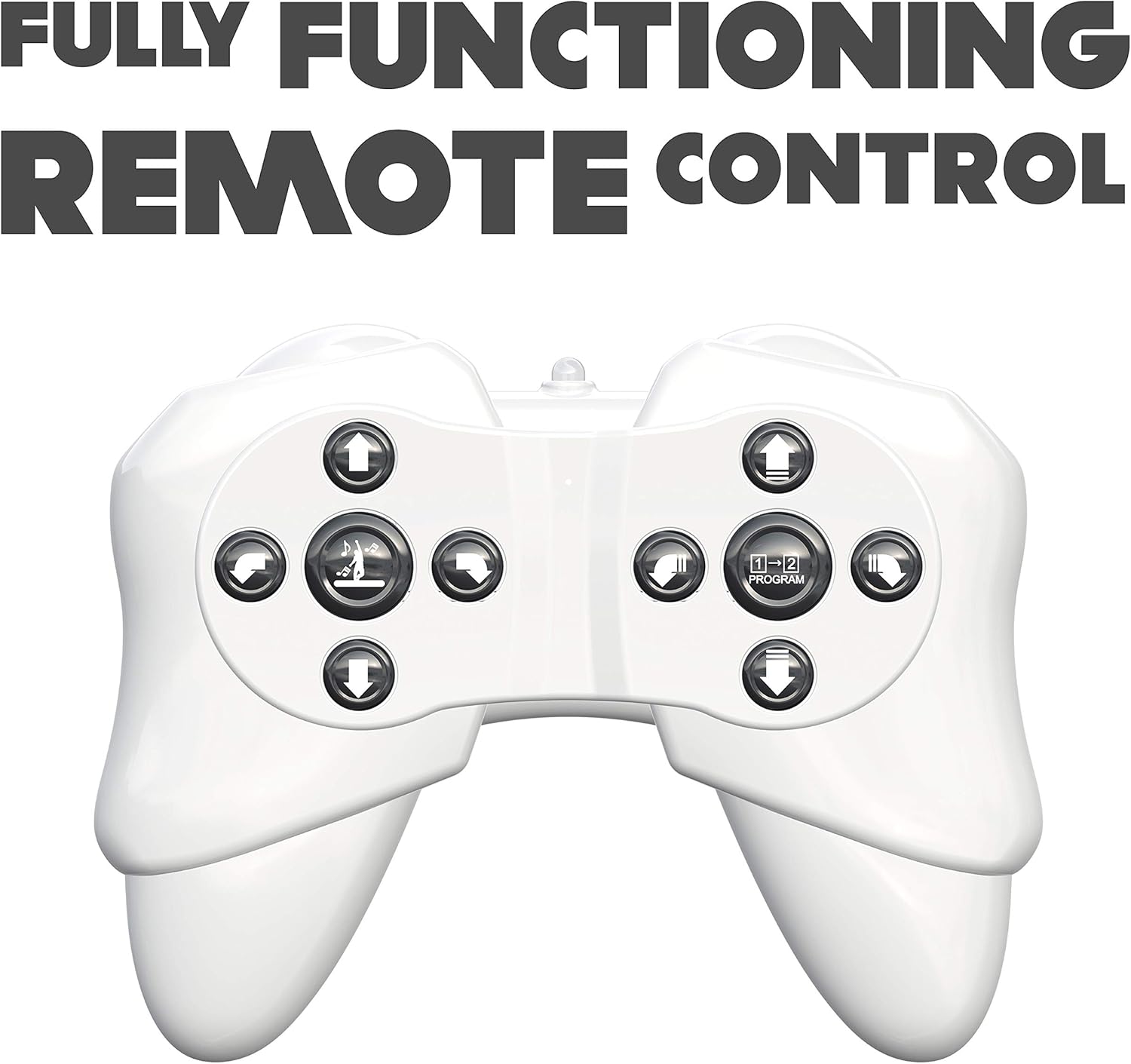
Figure 2: The robot's remote control, featuring various directional and action buttons.
- Botons direccionals: Control forward, backward, left, and right movements.
- Walk/Glide Button: Toggle between walking and gliding modes.
- Dance Button: Activate pre-programmed dance routines. The robot features swinging arms during dance.
- Botó del programa: Enter programming mode (see below).
Control de moviment
Interact with the robot using simple hand gestures. The robot is equipped with sensors to detect specific hand movements.

Figure 3: Demonstrating the gesture control feature of the robot.
- Refer to the quick start guide for specific gesture commands.
- Ensure adequate lighting and clear space for optimal gesture recognition.
Accions programables
The Program A Bot X can store and execute a sequence of up to 48 commands.

Figure 4: The robot is programmable, allowing for sequences of up to 48 actions.
- Premeu el botó Programa button on the remote control to enter programming mode.
- Input your desired sequence of movements and actions using the remote control buttons. Each button press will be recorded as one command.
- Premeu el botó Programa button again to exit programming mode and save the sequence.
- Premeu el botó Jugar button (or equivalent, refer to remote diagram) to execute the programmed sequence.
Característiques interactives
- Robotic Sound Effects: The robot produces various sound effects to enhance interaction.
- Ulls LED: The robot's eyes display different LED expressions, adding to its personality.

Figure 5: The robot features integrated robotic sound effects.

Figure 6: The robot's eyes illuminate with various LED patterns.
Manteniment
- Neteja: Wipe the robot and remote control with a soft, dry cloth. Do not use harsh chemicals or abrasive cleaners.
- Substitució de la bateria: Replace batteries when the robot's performance diminishes or it stops responding. Always replace all batteries at once.
- Emmagatzematge: When not in use for extended periods, remove all batteries from both the robot and the remote control to prevent leakage. Store in a cool, dry place away from direct sunlight.
Resolució de problemes
| Problema | Causa possible | Solució |
|---|---|---|
| El robot no s'encén. | Les bateries estan esgotades o instal·lades incorrectament. | Comproveu la polaritat de la bateria. Substituïu-la per bateries noves. |
| El robot no respon al comandament a distància. | Remote control batteries are low/dead; robot and remote are not paired; out of range. | Replace remote control batteries. Ensure robot and remote are turned on and within operating range. Re-pair if necessary (refer to initial power on steps). |
| Robot falls over frequently. | Uneven surface; complex programmed movements. | Operate on a flat, smooth surface. Simplify programmed sequences if they cause instability. |
| El control gestual no funciona. | Insufficient lighting; incorrect gesture; obstruction of sensors. | Ensure adequate lighting. Perform gestures clearly as instructed. Check for any obstructions blocking the robot's sensors. |
Especificacions
| Número de model | 88071 |
| Dimensions del producte | 15.24 x 45.72 x 25.4 cm; 1.22 kg |
| Tipus de material | Plàstic |
| Piles necessàries | Yes (4 x AA for robot, 2 x AAA for remote) |
| Comandament a distància inclòs | Sí |
| Edat recomanada pel fabricant | 15 anys i més |
| Llengua | English, Italian, French, German, Spanish |
| Color | Blanc |
Garantia i Suport
For warranty information and customer support, please refer to the contact details provided on the product packaging or visit the official Silverlit weblloc web. Conserveu el rebut de compra com a comprovant de compra per a qualsevol reclamació de garantia.