Introducció
Thank you for choosing Tribit FlyBuds NC Wireless Earbuds. These earbuds are designed to provide a superior audio experience with Active Noise Cancellation (ANC), Transparent Mode, and intuitive Smart Touch Controls. Featuring Bluetooth 5.0 connectivity and up to 35 hours of total playtime with the charging case, they are perfect for various activities, from work to home and office use.
Què hi ha a la caixa
- Tribit FlyBuds NC Wireless Earbuds
- Estoig de càrrega sense fil
- Cable de càrrega USB-C
- Multiple Sizes of Eartips (5 additional pairs)
- Manual d'usuari

Image: Tribit FlyBuds NC Earbuds and Charging Case, along with included accessories.
Configuració
1. Càrrega dels auriculars i l'estoig
Before first use, ensure the charging case and earbuds are fully charged. Connect the provided USB-C cable to the charging port on the case and to a power source. The LED indicators on the case will show the charging status. Ensure the protective film on the earbud charging points is removed before placing them in the case.
2. Emparellament en un sol pas
The Tribit FlyBuds NC earbuds feature one-step pairing for convenience.
- Obre l'estoig de càrrega. Els auriculars s'encendran automàticament i entraran en mode d'emparellament.
- Al telèfon intel·ligent o al dispositiu amb Bluetooth, aneu a la configuració de Bluetooth.
- Select "Tribit FlyBuds NC" from the list of available devices to connect.
- Un cop connectat, sentireu una confirmació audible.

Image: Earbuds automatically connecting to a smartphone for easy setup.
Instruccions de funcionament
Controls tàctils intel·ligents
The earbuds are equipped with smart touch controls for easy management of music and calls.
- Reproduir/pausa: Un sol toc a qualsevol dels auriculars.
- Respondre/Finalitzar la trucada: Un sol toc a qualsevol dels auriculars.
- Rebutja la trucada: Manteniu premut qualsevol dels auriculars durant 2 segons.
- Pista següent: Toca dues vegades l'auricular dret.
- Pista anterior: Toca dues vegades l'auricular esquerre.
- Pujar el volum: Toca tres vegades l'auricular dret.
- Baixar el volum: Toca tres vegades l'auricular esquerre.
- Activa l'Assistent de veu: Manteniu premut l'auricular dret durant 2 segons.

Image: User interacting with the touch-sensitive surface of the earbud.
Active Noise Cancellation (ANC) & Transparent Mode
Switch between different listening modes to suit your environment.
- Canvi de modes: Press and hold the left earbud for 2 seconds to cycle through ANC On, Transparent Mode, and ANC Off.
- Cancel·lació activa del soroll: Reduces ambient noise by up to 30dB, ideal for focused listening in noisy environments.
- Mode transparent: Amplifies surrounding sounds, allowing you to stay aware of your environment without removing the earbuds.

Image: Visual representation of Active Noise Cancellation technology.

Image: User experiencing Transparent Mode while exercising outdoors.
Manteniment
To ensure the longevity and optimal performance of your Tribit FlyBuds NC earbuds, follow these maintenance guidelines:
- Netegeu regularment els auriculars i l'estoig de càrrega amb un drap suau, sec i sense borrissol.
- Traieu les puntes de les orelles i netegeu-les amb aigua i sabó suau si cal, assegurant-vos que estiguin completament seques abans de tornar-les a col·locar.
- Avoid exposing the earbuds to extreme temperatures, humidity, or liquids. While they are waterproof, prolonged exposure is not recommended.
- Guardeu els auriculars a la funda de càrrega quan no els feu servir per protegir-los i mantenir-los carregats.
Resolució de problemes
| Problema | Possible solució |
|---|---|
| Els auriculars no s'aparellen | Assegura't que els auriculars estiguin carregats. Desactiva i activa el Bluetooth del dispositiu. Oblida't del dispositiu i torna a emparellar-lo. |
| No hi ha so d'un auricular | Ensure both earbuds are charged. Place both earbuds back in the case, close, and reopen. Re-pair if necessary. |
| Problemes de càrrega | Check USB-C cable and power source. Ensure charging contacts on earbuds and case are clean and free of debris. Remove any protective films. |
| L'ANC no funciona eficaçment | Ensure ear tips provide a good seal. Cycle through ANC modes (ANC On, Transparent, ANC Off) by pressing and holding the left earbud. |
Especificacions
| Característica | Detall |
|---|---|
| Nom del model | FlyBuds NC (BTHA1) / FlyBuds C2 / SolarBuds C2 |
| Tecnologia de connectivitat | Sense fil, Bluetooth 5.0 |
| Control de soroll | Cancel·lació activa de soroll (ANC) |
| Micròfons | 4 Microphones with ENC (Environmental Noise Cancellation) |
| Temps de reproducció (càrrega única) | Fins a 10 hores |
| Temps de reproducció total (amb estoig) | Fins a 35 hores |
| Càrrega ràpida | 10 minuts de càrrega per a 1 hora de reproducció |
| Charging Time (Earbuds/Case) | 1.5 hores |
| Nivell de resistència a l'aigua | Impermeable |
| Tipus de control | Control tàctil intel·ligent |
| Tipus de controlador d'àudio | Dynamic Driver (10mm Dual Drivers) |
| Pes de l'article | 0.4 unces |
| Dimensions del producte | 2.36 x 2.36 x 1.28 polzades |

Image: Visual representation of the extended 35-hour playtime.
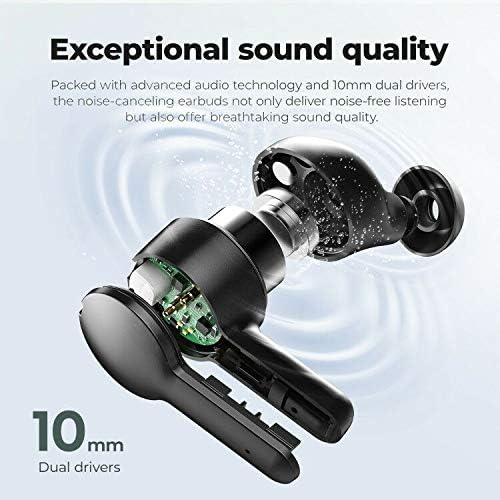
Imatge: Detallada view of the 10mm dual drivers for exceptional sound quality.

Image: Illustration of Environmental Noise Cancellation for clear calls.
Garantia i Suport
Tribit offers comprehensive support for your product:
- Garantia de devolució de 30 dies: Si no esteu satisfets amb la vostra compra.
- Garantia de reemplaçament de 18 mesos: For product defects or malfunctions.
- Lifetime Support Guarantee: Ongoing technical support and assistance.
For further assistance, please visit the official Tribit weblloc: tribitaudio.com


