1. Introducció
This manual provides comprehensive instructions for the installation, operation, and maintenance of your Yale YMF 40 Smart Door Lock. The Yale YMF 40 offers advanced security and convenience with multiple access methods, including biometric fingerprint recognition, PIN codes, mechanical keys, and smartphone control via the Yale App. Please read this manual thoroughly before using your smart lock to ensure proper function and safety.
2. Producte acabatview i Característiques
The Yale YMF 40 Smart Door Lock is designed to provide secure and flexible access to your property. It integrates various technologies to enhance your home security experience.
2.1 Característiques clau
- Opcions d'accés múltiples: Unlock your door using biometric fingerprint, a personalized PIN code, traditional mechanical keys, or through the Yale Link app via Bluetooth. Optional Wi-Fi connectivity is available with the Yale Link Wi-Fi Bridge for remote access.
- One-Touch Fingerprint Verification: Advanced biometric technology allows for quick and secure access with a single touch.
- Guia de veu: The lock provides step-by-step voice prompts for various operations, including user registration, password setting, and status notifications (e.g., low battery, lock/unlock status).
- Bloqueig automàtic: The auto-lock feature automatically secures your door after it closes, providing peace of mind.
- Internal Forced Lock: This security function disables external authentication methods (fingerprint, PIN, RFID) when activated from inside, enhancing privacy and security.
- Alarma de bateria baixa i energia d'emergència: The lock warns you with an alarm and LED indicator when batteries are low. In case of complete battery discharge, emergency power can be supplied using a standard 9V battery.
- Alarmes de seguretat: An 80dB alarm activates if tampering is detected, the door is forced open, or if the lock senses high temperatures (above 60°C) due to fire.
- Fake PIN Code: This feature allows users to enter random numbers before or after their actual PIN to prevent exposure of the code to onlookers.
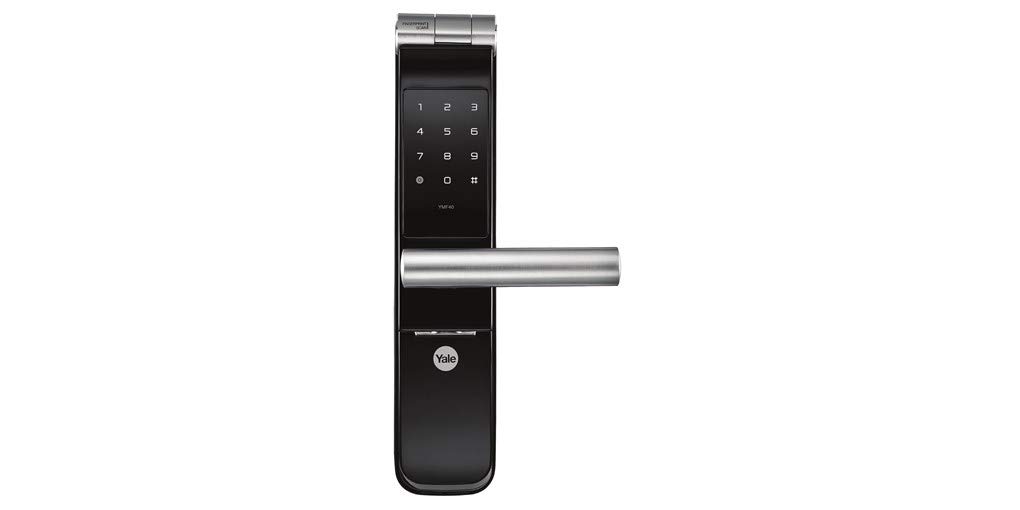
Figura 2.1: Frontal view of the Yale YMF 40 Smart Door Lock, showcasinel teclat numèric i la nansa.

Figure 2.2: Front and back components of the Yale YMF 40 Smart Door Lock, illustrating the internal mechanism and external keypad.
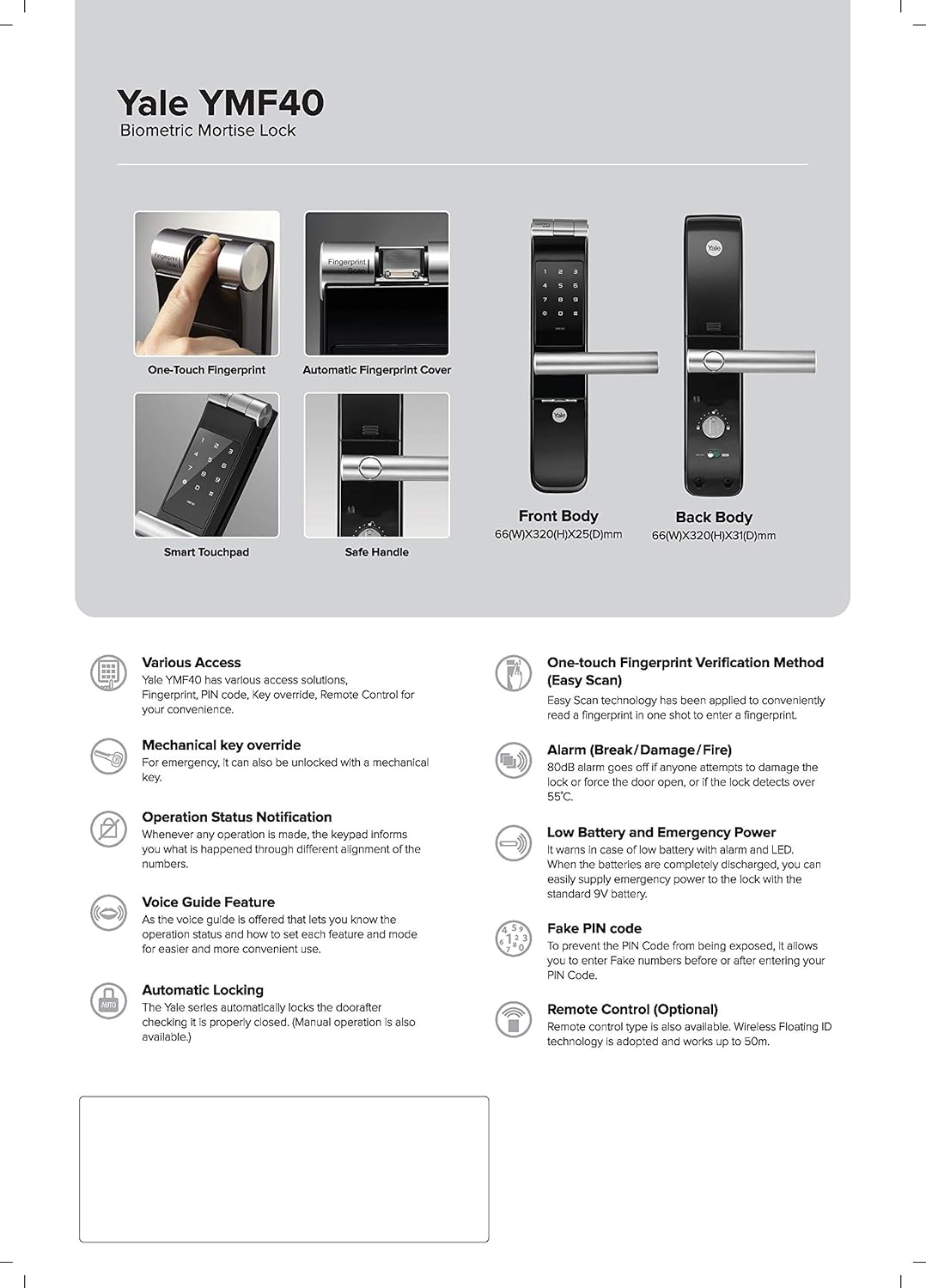
Figure 2.3: Detailed diagram highlighting various features and dimensions of the Yale YMF 40 Smart Door Lock, including one-touch fingerprint, smart touchpad, and safe handle.
3. Configuració i instal·lació
The Yale YMF 40 Smart Door Lock is designed for easy replacement of existing door locks and supports door thicknesses from 40 mm to 100 mm. While installation can be straightforward, professional installation is recommended to ensure optimal performance and security. For installation assistance, please refer to the warranty and support section.
3.1 Contingut del paquet
- Yale YMF 40 Smart Door Lock unit (Front and Back bodies)
- 4 x piles AA
- Claus mecàniques
- Installation Template and Hardware (not explicitly listed but implied for installation)
3.2 Instal·lació de la bateria
- Locate the battery compartment on the interior unit of the lock.
- Obriu la tapa de la bateria.
- Introduïu les 4 piles AA, assegurant-vos de la polaritat correcta (+/-).
- Close the battery cover. The lock will typically provide a voice prompt upon successful battery installation.
Nota: The lock's memory retains all credentials and settings when changing batteries, simplifying the replacement process.
4. Instruccions de funcionament
The Yale YMF 40 offers multiple ways to lock and unlock your door. Follow the voice guidance for step-by-step assistance during operation.
4.1 Desbloqueig amb empremta digital
- Place your registered finger on the biometric sensor.
- The lock will verify your fingerprint and unlock the door.
- A voice prompt will confirm the unlock status.
4.2 Desbloqueig amb codi PIN
- Toqueu el teclat numèric per activar-lo.
- Introduïu el vostre codi PIN registrat.
- Premeu la tecla '#' per confirmar.
- The lock will unlock, and a voice prompt will confirm.
Consell: Use the Fake PIN Code feature by entering random numbers before or after your actual PIN to obscure your code from others.
4.3 Desbloqueig amb clau mecànica
In case of emergency or battery failure, the door can be unlocked using the provided mechanical keys. Insert the key into the keyhole and turn to unlock.
4.4 Unlocking via Yale App (Bluetooth/Wi-Fi)

Figure 4.1: Illustration of Yale Link App features, including alarm notifications, remote access, visitor management, and auto-lock settings.
- Download the Yale Link app from your smartphone's app store (available on App Store and Google Play).
- Follow the in-app instructions to pair your smartphone with the Yale YMF 40 lock via Bluetooth.
- To enable remote access outside Bluetooth range, install the Yale Link Wi-Fi Bridge (sold separately) and connect it to your local Wi-Fi network.
- Use the app to lock/unlock the door, manage user access, view activity logs, and receive notifications.
4.5 Bloqueig automàtic
The lock is equipped with an automatic locking feature. Once the door is closed, the lock will automatically engage after a short delay. This feature can typically be configured or disabled via the lock's settings or the Yale Link app.
4.6 Internal Forced Lock
To activate the Internal Forced Lock, locate the corresponding button or switch on the interior unit of the lock. Once activated, all external authentication methods (fingerprint, PIN, RFID) will be disabled, preventing entry from the outside. This is ideal for enhanced privacy when inside your home.
5. Manteniment
Proper maintenance ensures the longevity and reliable operation of your Yale YMF 40 Smart Door Lock.
5.1 Low Battery Alarm and Emergency Power
When the batteries are running low, the lock will provide an audible alarm and an LED indicator. It is recommended to replace the batteries promptly upon this warning.
If the batteries are completely discharged, you can supply emergency power to the lock using a standard 9V battery. Locate the emergency power terminal on the exterior unit (usually two small contacts) and hold a 9V battery against them while attempting to unlock with your PIN or fingerprint.
5.2 Substitució de la bateria
Replace all four AA batteries simultaneously with new, high-quality alkaline batteries. Refer to section 3.2 for detailed battery installation steps. The lock's settings will be preserved during battery replacement.
5.3 Neteja
Clean the lock's exterior with a soft, dry cloth. Avoid using abrasive cleaners, solvents, or harsh chemicals, as these can damage the finish and electronic components.
6. Solució De Problemes
This section addresses common issues you might encounter with your Yale YMF 40 Smart Door Lock.
| Problema | Causa possible | Solució |
|---|---|---|
| El bloqueig no respon. | Bateries esgotades. | Replace batteries (refer to Section 5.2) or use emergency 9V power (refer to Section 5.1). |
| Empremta digital no reconeguda. | Finger is dirty, wet, or improperly placed; fingerprint not registered. | Ensure finger is clean and dry. Place finger firmly and completely on the sensor. Re-register fingerprint if necessary. |
| PIN code not accepted. | Incorrect PIN entered; keypad not active. | Ensure the keypad is illuminated before entering the PIN. Verify the correct PIN. |
| L'alarma sona inesperadament. | Tampering attempt; forced entry; high temperature detected. | Investigate the cause. The alarm will typically reset after the threat is removed or after a set period. If persistent, contact support. |
| Cannot connect to Yale Link app. | Bluetooth/Wi-Fi issues; lock not paired; Yale Link Bridge not connected. | Ensure Bluetooth is enabled on your phone. Check Yale Link Bridge connection if using Wi-Fi. Re-pair the lock with the app if necessary. |
Per a problemes que no es cobreixin aquí, poseu-vos en contacte amb l'atenció al client.
7. Especificacions
| Característica | Detall |
|---|---|
| Marca | Yale |
| Nom del model | Yale YMF 40 |
| Tipus de bloqueig | Electronic Lock, Key Lock |
| Mètodes d'accés | Biometric Fingerprint, PIN Code, Mechanical Keys, Yale Link App (Bluetooth & Optional Wi-Fi) |
| Material | Alumini |
| Color | Negre |
| Dimensions (L x A x A) | 6.2 x 2.8 x 30.8 centímetres |
| Pes de l'article | 4.3 kg (4300 grams) |
| Compatibilitat del gruix de la porta | 40 mm a 100 mm |
| Font d'alimentació | 4 x piles AA |
| Protocol de connectivitat | Bluetooth, Wi-Fi (with optional Yale Link Bridge) |
| Mètode de control | Aplicació, comandament a distància, tàctil |
| Característiques especials | Automatic Locking, Voice Guidance, Internal Forced Lock, Low Battery Alarm, Emergency Power Terminal, Security Alarms |
8. Garantia i Suport
Yale provides comprehensive support for your YMF 40 Smart Door Lock.
- Garantia: El producte inclou una garantia de 1 anys. Si us plau, conserveu el comprovant de compra per a reclamacions de garantia.
- Atenció al client: For installation assistance, service support, or any queries, please contact our 24/7 toll-free customer support helpline. Refer to the product packaging or Yale's official weblloc per obtenir dades de contacte.
9. Informació de seguretat
- Do not attempt to disassemble or repair the lock yourself. This may void the warranty and could lead to malfunction.
- Use only the specified battery type (AA alkaline batteries). Do not mix old and new batteries or different types of batteries.
- Keep mechanical keys in a safe place, separate from the lock, and ensure they are not accessible to unauthorized individuals.
- Regularly check the lock for any signs of damage or wear.
- Protect your PIN codes and ensure they are not easily discoverable. Change PIN codes periodically.
- Ensure your smartphone and the Yale Link app are secured with strong passwords or biometric authentication.


