1. Introducció
Thank you for choosing the iKiKin Head Up Display (HUD) for your vehicle. This device is designed to enhance your driving safety and convenience by projecting essential vehicle information directly into your line of sight. Featuring a dual OBD2 and GPS system, it offers versatile compatibility and a wide range of display options. Please read this manual thoroughly before installation and operation to ensure proper use and optimal performance.
2. Informació de seguretat
- Assegureu-vos que el dispositiu estigui ben muntat i que no us obstrueixi view de la carretera o interferir amb els controls del vehicle.
- No intenteu desmuntar ni modificar el dispositiu. Això pot causar danys i anul·lar la garantia.
- Eviteu exposar el dispositiu a temperatures extremes, a la llum solar directa durant períodes prolongats o a una humitat excessiva.
- Always prioritize driving safety. Do not adjust settings or interact with the HUD in a way that distracts you from driving.
- If the device malfunctions, disconnect it immediately and contact customer support.
3. Producte acabatview
3.1 Components i controls
The iKiKin HUD unit includes the main display, an OBD2 cable, and Velcro for mounting. The device features several buttons for navigation and settings adjustment.

Imatge: Lateral view of the iKiKin HUD, highlighting the power on/off button, OBD2 interface, light sensor, and control buttons (M, Left, OK, Right).
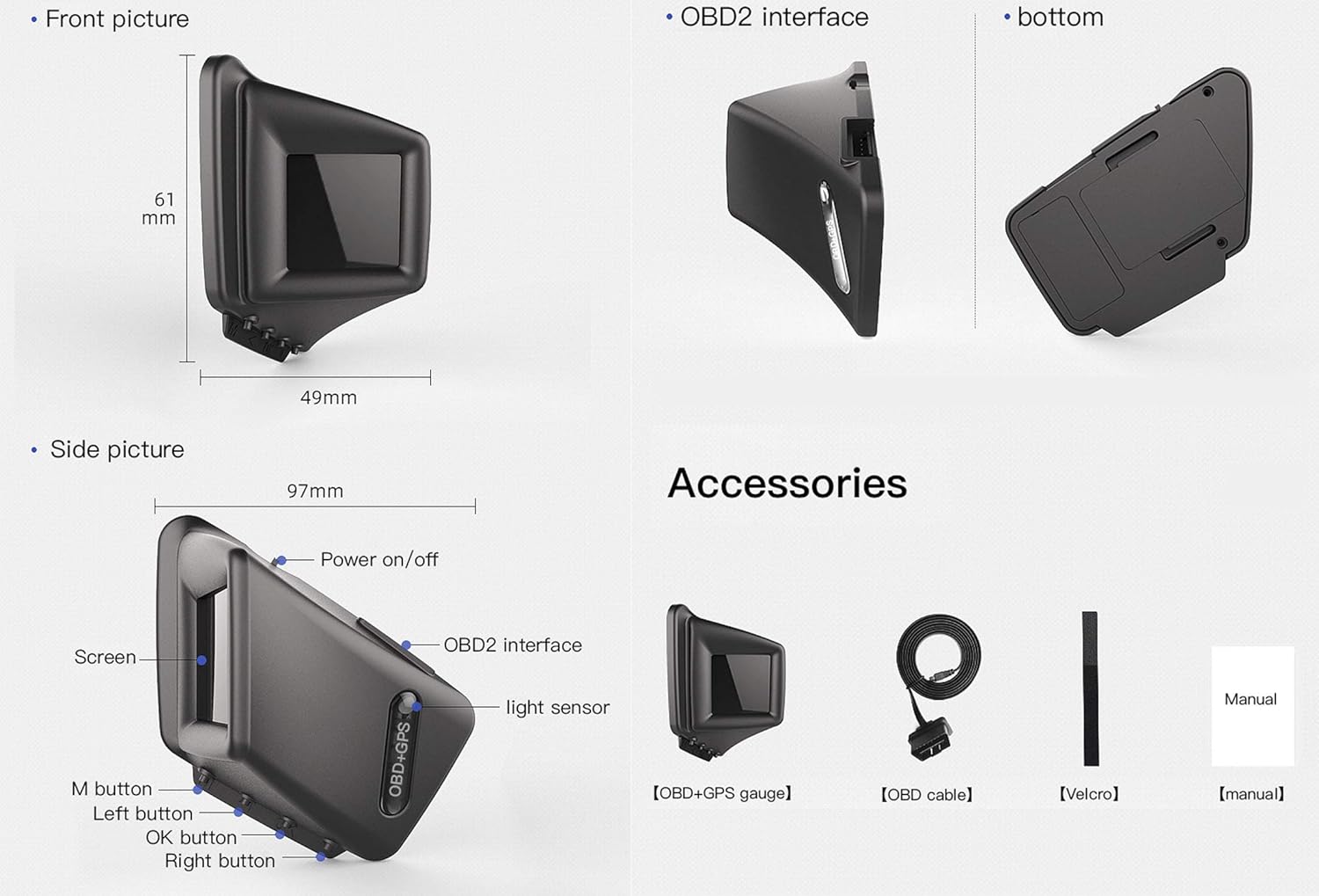
Image: Detailed diagram illustrating the dimensions of the iKiKin HUD (61mm height, 49mm width, 97mm length) and its accessories, including the HUD gauge, OBD cable, Velcro, and manual.
- Botó M: Used to enter the setting menu (long press) and switch display interfaces (short press).
- Botons esquerra/dreta: Used to navigate options within the setting menu.
- Botó D'acord: Used to confirm selections in the setting menu.
- Interfície OBD2: Port for connecting the HUD to your vehicle's OBD2 port.
- Sensor de llum: Ajusta automàticament la brillantor de la pantalla en funció de la llum ambiental.
3.2 Característiques clau
- Dual System (OBD2 & GPS): Supports both OBD2 and GPS modes, allowing for broad vehicle compatibility. GPS mode works for all cars.
- Multiple Display UIs: Offers 8 different function UIs to choose from, displaying various driving data such as speed, RPM, voltage, water temperature, fuel consumption, driving time, driving distance, turbo pressure, acceleration test, brake test, and oil temperature.
- A-Pillar Trim Installation: Unique design allows for installation on the A-pillar trim for an optimal viewangle de ing.
- Funcions d'alarma: Includes over speed alarm, low voltage alarm, high water temperature alarm, and engine RPM alarm for enhanced safety.
- Esborra el codi d'error: Ability to clear Diagnostic Trouble Codes (DTCs) directly from the device.
- Xip d'alt rendiment: Ensures smooth operation and quick data processing.
3.3 Especificacions
| Especificació | Valor |
|---|---|
| Pes de l'article | 5.3 unces (0.15 quilograms) |
| Dimensions del paquet | 4.49 x 4.41 x 2.64 polzades |
| Material | Plastic, Metal, Glass, Fabric |
| Fabricant | iKiKin |
| Data de primera disponibilitat | 10 de juny de 2020 |
4. Configuració
4.1 Mètodes d'instal·lació
The iKiKin HUD offers flexible installation options to suit your vehicle's interior and your preference.
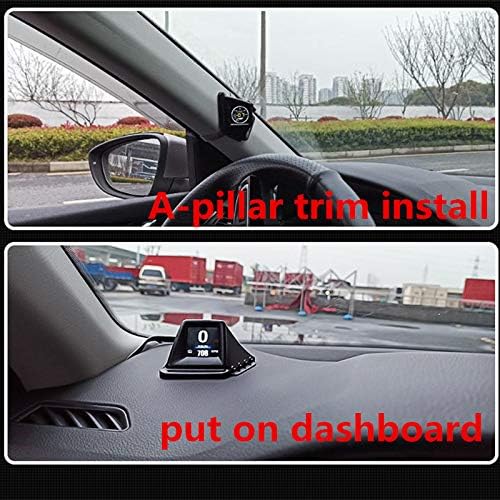
Image: Top panel shows the iKiKin HUD installed on the A-pillar trim. Bottom panel shows the iKiKin HUD placed on the dashboard.
- A-Pillar Trim Installation: Position the HUD on the A-pillar trim for a direct line-of-sight display. Ensure it is securely attached using the provided Velcro and does not obstruct airbags or vision.
- Instal·lació del tauler de control: Place the HUD on your vehicle's dashboard. Use the provided Velcro to prevent it from sliding during driving. Choose a location that provides a clear view without obstructing the windshield.
4.2 Connexió del dispositiu
- Localitza el port OBD2 del teu vehicle. Normalment es troba sota el tauler de control, al costat del conductor.
- Connect one end of the provided OBD2 cable to the HUD's OBD2 interface.
- Connect the other end of the OBD2 cable to your vehicle's OBD2 port.
- Once connected, the HUD should power on automatically when the vehicle's ignition is turned on.
Note on OBD2 Compatibility:
- OBD2 Mode Application Range:
- American gasoline cars produced after 2004 that comply with OBD2 protocol.
- Other regions' gasoline cars produced after 2008 that comply with OBD2 protocol.
- Common Car Models Not Compatible with OBD2 Mode:
- American Cars: Dodge, JEEP, SAIL, Chrysler models produced before 2004 and 2004.
- All French and Italian car models.
- Japan Cars: Suzuki, Mazda6, Infiniti (QX50, Q50, Q501), for Avanza 2013, Lexus (is250, ex250, es300h), Honda (Jazz, CRV), and cars produced before 2008.
- Some South Korean KIA and Hyundai models (e.g., Hyundai Sonata 2013, Kia Soul PS 2017).
- Oil-electric hybrid and diesel cars, pickup trucks, trucks, RVs, and cars with modified computer systems.
- If your car is not suitable for OBD2 mode, the device will automatically switch to GPS mode. GPS mode is compatible with all vehicles.
5. Instruccions de funcionament
5.1 Display Modes (OBD & GPS)
The iKiKin HUD supports both OBD2 and GPS modes. The default mode is OBD2. If OBD2 data is not available or compatible, the device will automatically switch to GPS mode.

Image: Icons representing data available in OBD mode (Speed, Clock, RPM, Water temperature, Voltage, Fuel consumption, Driving time, Driving distance, Turbo pressure, Acceleration test, Brake test, Clear fault code, Oil temperature) and GPS mode (Speed, Clock, Driving time, Satellite number, Altitude, Driving distance).
- Mode OBD: Displays real-time data from your vehicle's onboard diagnostic system, including speed, RPM, water temperature, voltage, fuel consumption, driving time, driving distance, turbo pressure, acceleration test, brake test, clear fault code, and oil temperature.
- Mode GPS: Utilizes satellite positioning to display data such as speed, clock, driving time, satellite number, altitude, and driving distance. This mode is suitable for all vehicles, especially those not compatible with OBD2.
5.2 Display Interface and Navigation
The iKiKin HUD offers 8 different function UIs. You can choose to display a single data type (e.g., speed) or multiple data types simultaneously (e.g., speed, voltage, water temperature).

Image: Operational guide showing how to view voltage, switch display interfaces, enter the setting menu, and power off. Various display layouts are also shown.
- View Voltage: Upon power-on, the device may briefly show the current voltage (e.g., 14.3V) for about 3 seconds before switching to the default interface.
- Switch Display Interface: Premeu breument M button to cycle through the different display interfaces.
- Enter Setting Menu: Premeu llargament el botó M button for 5 seconds to enter the setting menu.
- Navigate Setting Menu: Utilitza el Esquerra or D'acord buttons to switch between different settings (e.g., Speed Set, RPM Set, Fuel Set, Turbo Set, Clock Set, System Set).
- Confirmeu la selecció: Premeu el botó OK button to enter a setting or save changes.
- Apagar: When the vehicle powers off, the HUD will display the trip driving distance (e.g., 10.5 km) before shutting down.
5.3 Funcions d'alarma
The iKiKin HUD provides critical alerts to help maintain safe driving conditions:
- Alarma de sobre velocitat: Alerts you when your vehicle exceeds a preset speed limit.
- Volum baixtage Alarma: Warns you if the vehicle's battery voltage cau per sota d'un nivell segur.
- High Water Temperature Alarm: Notifies you if the engine's coolant temperature becomes too high.
- Engine RPM Alarm: Alerts you if the engine RPM exceeds a specified limit.
These alarm thresholds can be configured within the setting menu.
5.4 Funcions especials

Image: Visual representation of the Acceleration Test (0 to 100 km/h time), Turbo Pressure display, and Brake Test (time to stop from 100 km/h).
- Prova d'acceleració: Measures the time it takes for your vehicle to accelerate from 0 km/h to 100 km/h.
- Prova de fre: Measures the time and distance required for your vehicle to come to a complete stop from a certain speed (e.g., 100 km/h).
- Turbo Pressure: Displays real-time turbo pressure. Nota: If your car does not have a turbocharger, this function will not display data.
- Clear Fault Code (DTC): The device has a function to clear Diagnostic Trouble Codes (DTCs) from your vehicle's ECU. Refer to the setting menu for this option.
6. Manteniment
- Keep the device clean by wiping it with a soft, dry cloth. Do not use abrasive cleaners or solvents.
- Ensure the OBD2 cable is not pinched or damaged.
- Guardeu el dispositiu en un lloc fresc i sec si no el feu servir durant un període prolongat.
7. Solució De Problemes
| Problema | Possible causa/solució |
|---|---|
| El dispositiu no s'encén. |
|
| No data displayed in OBD mode. |
|
| Display is dim or unreadable in bright sunlight. |
|
| Inaccurate speed reading in GPS mode. |
|
| Device randomly turns off or restarts. |
|
8. Garantia i Suport
iKiKin products are designed for reliability and performance. While specific warranty details may vary by region and purchase point, we stand behind the quality of our products.
- For technical assistance, troubleshooting, or warranty inquiries, please contact iKiKin customer support through the retailer where you purchased the product or visit the official iKiKin weblloc per obtenir informació de contacte.
- Please have your product model (AP-1) and purchase details ready when contacting support.


