1. Introducció
This manual provides detailed instructions for the setup, operation, and maintenance of your JAGUAR Connected Collection J888/4 smartwatch. Please read this manual thoroughly before using your device to ensure proper function and longevity.

Figura 1.1: JAGUAR Connected Collection J888/4 Smartwatch. This image displays the watch face, showing the main hands, sub-dials, and the distinctive red and blue rotating bezel.
2. Informació de seguretat
⚠ BATTERY WARNING ⚠
This product contains a button cell battery. KEEP OUT OF REACH OF CHILDREN. Ingestion can lead to serious internal burns in as little as 2 hours and can lead to death. If you suspect a button battery has been swallowed or placed inside any part of the body, seek immediate medical attention.
Always handle the watch with care. Avoid exposing it to extreme temperatures, strong magnetic fields, or harsh chemicals. Do not attempt to open the watch case or replace the battery yourself, as this may void the warranty and cause damage. Ensure the watch is properly sealed before exposure to water, especially given its water resistance rating.
3. Producte acabatview
The JAGUAR Connected Collection J888/4 is a hybrid smartwatch combining traditional watch aesthetics with smart functionalities. It features a robust stainless steel case and bracelet, a sapphire crystal, and a connected movement.
3.1 Components
- Estoig del rellotge: 45.7mm black case.
- Bisell: Unidirectional rotating bezel with red and blue segments.
- Marca: Esfera negra amb marcadors d'hores i agulles lluminoses.
- Subdials: Two functional sub-dials for connected features.
- Crown and Pushers: Used for time setting and activating connected functions.
- Polsera: Polsera d'acer inoxidable amb tancament segur.

Figura 3.1: Watch Side ProfileAquesta imatge proporciona una visió clara view of the watch's side, detailing the textured crown and the two pushers used for various functions.
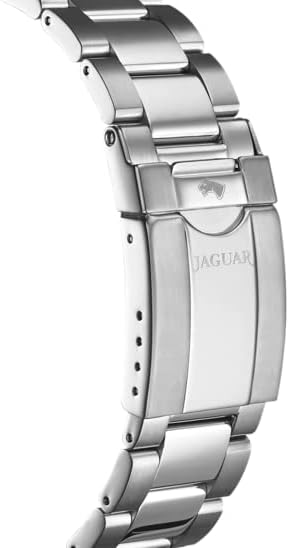
Figura 3.2: Bracelet and Clasp Detail. This image focuses on the watch's metal bracelet and its deployment clasp, which features the engraved JAGUAR logo.

Figura 3.3: Connected Technology. This image highlights the smartwatch's hybrid nature, blending traditional watch design with modern digital connectivity, set against a technological backdrop.
4. Configuració
4.1 Activació inicial
Your JAGUAR Connected smartwatch is powered by a battery. While it is a hybrid watch, it may require initial activation or a specific procedure to ensure the connected features are ready. Refer to the quick start guide included in the packaging for specific battery activation steps.

Figura 4.1: Product Packaging. This image displays the elegant black outer box and the wooden inner presentation box for the JAGUAR Connected smartwatch, where the quick start guide can be found.
4.2 Instal·lació i emparellament de l'aplicació
- Download the official JAGUAR Connected app from your smartphone's app store (iOS or Android).
- Assegureu-vos que el Bluetooth del vostre telèfon intel·ligent estigui activat.
- Open the JAGUAR Connected app and follow the on-screen instructions to create an account or log in.
- Select "Add New Device" and choose your J888/4 model from the list.
- The app will guide you through the pairing process. This typically involves pressing a specific button on your watch to confirm the connection.
- Once paired, the watch time will automatically synchronize with your phone, and you can customize settings within the app.

Figura 4.2: Watch and Smartphone Interaction. This image illustrates a user interacting with their smartphone while wearing the JAGUAR Connected smartwatch, symbolizing the device's smart connectivity.
5. Instruccions de funcionament
5.1 Configuració de l'hora
After successful pairing with the JAGUAR Connected app, the watch time will automatically synchronize with your smartphone's time. Manual time adjustment is typically not required for connected models.
5.2 Using Connected Features
The J888/4 offers various connected features accessible through the watch and managed via the app. These may include:
- Seguiment de l'activitat: Monitor steps, distance, and calories burned.
- Monitorització del son: Track sleep patterns.
- Notificacions: Receive alerts for calls, messages, and app notifications (indicated by vibrations or hand movements).
- Control remot de la càmera: Use a watch button to trigger your phone's camera.
- Control de música: Controla la reproducció de música al teu telèfon.
- Troba el meu telèfon: Activate an alert on your phone from your watch.
Refer to the in-app help section for detailed instructions on configuring and using each specific connected feature.
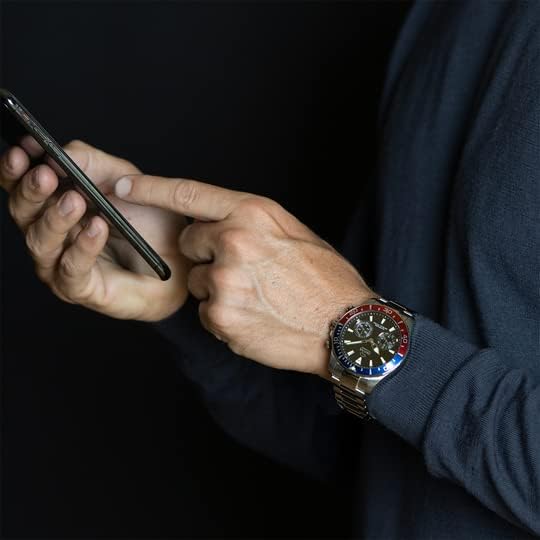
Figura 5.1: Utilizing Connected Features. This image shows the watch on a wrist while the user operates a smartphone, illustrating the seamless interaction between the watch and its companion application for smart functionalities.
5.3 Using the Bezel
The unidirectional rotating bezel can be used for timing events, such as dives or elapsed time. Rotate the bezel so the zero marker aligns with the minute hand at the start of the event. Read the elapsed time by noting the minute hand's position against the bezel's scale.
6. Manteniment
6.1 Neteja del rellotge
Per mantenir l'aspecte del rellotge:
- Netegeu la caixa i el braçalet amb un drap suau.amp tela.
- For stainless steel bracelets, a mild soap solution can be used, followed by thorough rinsing and drying.
- Eviteu utilitzar productes químics o materials abrasius.
- Ensure the crown is pushed in before cleaning to maintain water resistance.
6.2 Substitució de la bateria
The J888/4 uses a standard watch battery for its analog movement and a separate power source for its connected features. When the battery for the analog movement or connected features runs low, it is recommended to take your watch to an authorized JAGUAR service center for professional battery replacement. Attempting to replace the battery yourself may damage the watch and void the warranty.
7. Solució De Problemes
- El rellotge no es connecta a l'aplicació:
- Assegureu-vos que el Bluetooth estigui habilitat al vostre telèfon.
- Check if the watch battery is sufficiently charged.
- Restart both your phone and the watch (if applicable).
- Try unpairing and re-pairing the watch through the app settings.
- Visualització de l'hora incorrecta:
- Verify that your watch is successfully paired with the app and your phone's time is correct.
- Check for any app updates.
- Connected features not working:
- Assegureu-vos que l'aplicació s'executa en segon pla al telèfon.
- Check app permissions on your phone (e.g., location, notifications).
- Restart the app and your watch.
If problems persist, consult the support section within the JAGUAR Connected app or contact JAGUAR customer support.
8. Especificacions
| Característica | Detall |
|---|---|
| Número de model | J888/4 |
| Diàmetre de la caixa | 45.7 mm |
| Material de la caixa | Black Case (Stainless Steel) |
| Material de la corretja | Steel Bracelet |
| Tipus de moviment | Connected (Hybrid Smartwatch) |
| Cristall | Safir |
| Resistència a l'aigua | 20 BAR / Diver (200 meters) |
| Connectivitat | Bluetooth 5.0 |
| Fabricant | GRUPO FESTINA |
| País d'origen | Espanya |
| Primera data disponible | 11 de juny de 2020 |
9. Garantia i Suport
Your JAGUAR Connected Collection J888/4 smartwatch is covered by a manufacturer's warranty. Please refer to the warranty card included with your purchase for specific terms and conditions, including warranty duration and coverage details.
For technical support, service, or warranty claims, please contact JAGUAR customer service or visit the official JAGUAR weblloc web. Conserveu el comprovant de compra per validar la garantia.
10. Informació normativa
This device complies with relevant European Union directives regarding electronic and electrical equipment and batteries. For detailed regulatory compliance information, including WEEE and RoHS directives, please refer to the official documentation provided with your product or visit the manufacturer's weblloc.
| Característic | Funcionalitat | Potència màxima transmesa |
|---|---|---|
| Banda de freqüència | 2.412-2.472 GHz | WLAN IEEE 802.11 b/g/n: 19 dBm |
| Banda de freqüència | 2.402-2.480 GHz | Bluetooth 5.0: 12 dBm |
The Bluetooth® word mark and logos are registered trademarks owned by Bluetooth SIG, Inc. and any use of such marks by GRUPO FESTINA is under license. Other trademarks and trade names are those of their respective owners.


