1. Producte acabatview
The Optoma ZK507-W is a high-performance 4K UHD laser projector designed for professional installations. It delivers crisp, clear images with vibrant colors and sharp details, suitable for various environments including business, education, and conference rooms. Its laser light source provides long-lasting brightness and requires minimal maintenance.
Característiques principals:
- Resolució 4K UHD: Native resolution of 3840 x 2160 for superior image clarity.
- Tecnologia DLP: Utilizes Digital Light Processing for vibrant colors and sharp contrast.
- Brillantor de llarga durada: Produces up to 5000 lumens for vivid images in various lighting conditions.
- Connectivitat versàtil: Supports HDMI, USB, and VGA input options.
- Disseny compacte: Slim and lightweight construction for flexible installation.
2. Components del producte
The following image illustrates the front view of the Optoma ZK507-W projector, highlighting its primary components.
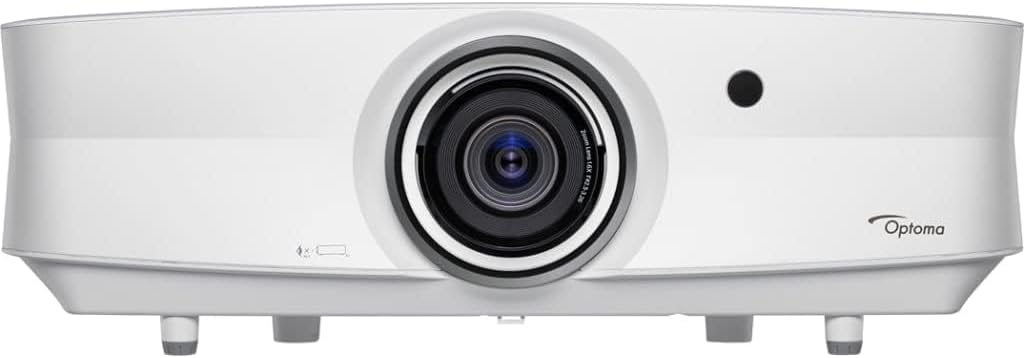
Descripció de la imatge: A white Optoma ZK507-W projector shown from the front. The large central lens is prominent, with ventilation grilles on the sides. The 'Optoma' logo is visible on the right side of the front panel. A small black sensor is located above and to the right of the lens.
3. Configuració
3.1 Desembalatge
- Traieu amb cura el projector i tots els accessoris de l'embalatge.
- Verifiqueu que tots els components enumerats siguin presents.
3.2 Col·locació
The ZK507-W offers flexible installation options, including front, rear, ceiling, and table-top projection. Ensure the projector is placed on a stable, level surface or securely mounted to the ceiling. Maintain adequate ventilation around the projector to prevent overheating.
3.3 Connectivitat
Connect your video source (e.g., computer, Blu-ray player) to the projector using the appropriate cables.
- HDMI: For high-definition digital video and audio. The projector supports multiple HDMI inputs.
- VGA: For analog video input from computers.
- USB: For connecting USB devices or for service.
- Xarxa (RJ45): Per al control i la monitorització de la xarxa.
- RS232: Per al control en sèrie.
3.4 Connexió d'alimentació
Connect the power cable to the projector's power inlet and then to a grounded electrical outlet.
4. Instruccions de funcionament
4.1 Engegada/apagada
- Encès: Premeu el botó d'engegada del tauler de control o del comandament a distància del projector. L'indicador lluminós d'engegada s'il·luminarà.
- Apagar: Press the Power button twice. The projector will enter a cooling down cycle before completely shutting off. Do not unplug the projector during the cooling cycle.
4.2 Selecció de la font d'entrada
Press the 'Source' button on the projector or remote control to cycle through available input sources (HDMI1, HDMI2, VGA, etc.) until your desired source is displayed.
4.3 Ajust de la imatge
- Focus: Gireu l'anell d'enfocament de l'objectiu fins que la imatge sigui nítida i clara.
- Zoom: Adjust the zoom ring on the lens to change the image size.
- Correcció Keystone: Use the projector's menu or dedicated buttons to correct trapezoidal distortion if the projector is not perfectly perpendicular to the screen.
- Four-Corner Correction: For advanced image shaping, use the four-corner correction feature in the OSD menu to adjust each corner of the image independently.
4.4 Modes d'imatge
The projector offers various picture modes to optimize image quality for different content types and environments. Access these settings through the On-Screen Display (OSD) menu. The ZK507-W supports HDR (High Dynamic Range) for enhanced contrast and color depth.
4.5 Àudio
The projector features a built-in speaker. For enhanced audio, connect external audio systems to the 'Audio Out' port.
5. Manteniment
5.1 Neteja
- Lent: Feu servir un drap suau i sense borrissol dissenyat específicament per a lents òptiques. No utilitzeu productes de neteja abrasius.
- Projector Casing: Netegeu amb un suau, damp tela. Eviteu els productes químics durs.
- Reixetes de ventilació: Regularly clean the vents to ensure proper airflow and prevent overheating. Use a soft brush or compressed air.
5.2 Font de llum làser
The Optoma ZK507-W utilizes a laser light source with an expected lifespan of up to 30,000 hours, significantly reducing the need for lamp replacements and maintenance compared to traditional lampprojectors basats en -.
6. Solució De Problemes
Si teniu problemes amb el projector, consulteu els passos habituals següents per a la resolució de problemes:
- Sense imatge:
- Assegureu-vos que el projector estigui encès i que l'indicador d'engegada estigui fix.
- Verify that the video source is properly connected and powered on.
- Select the correct input source using the 'Source' button.
- Comproveu si les connexions del cable de vídeo estan soltes o danyats.
- Mala qualitat d'imatge:
- Ajusteu els anells d'enfocament i zoom de l'objectiu.
- Perform keystone and four-corner correction if the image is distorted.
- Check the resolution settings of your video source.
- Netegeu la lent del projector.
- Sense so:
- Assegureu-vos que el volum no estigui silenciat ni massa baix.
- If using external speakers, verify their connection and power.
- Check audio settings in the projector's OSD menu.
For persistent issues, please contact Optoma customer support.
7. Especificacions
| Característica | Especificació |
|---|---|
| Marca | Optoma |
| Número de model | ZK507-W |
| Resolució de visualització | 3840 x 2160 (4K UHD) |
| Brillantor | Fins a 5000 lúmens |
| Tecnologia de connectivitat | HDMI, USB, VGA |
| Usos recomanats | Business, Education, Conference Room |
| Característiques especials | Operate 24/7, Full HD 3D, Frame Interpolation, HDR, Blackboard Mode, Crestron RoomView |
| Pes de l'article | 26.2 lliures |
| Dimensions del producte | 13.4 x 19.7 x 6.31 polzades |
| Color | Blanc |
8. Garantia i Suport
For warranty information, technical support, or service inquiries, please refer to the official Optoma website or contact Optoma customer service directly. Keep your purchase receipt and product serial number handy for any support requests.


