Manual d'usuari del telèfon d'escriptori Snom M18 KLE SIP DECT de 4 línies
Model: M18 KLE
This manual provides comprehensive instructions for the setup, operation, and maintenance of your Snom M18 KLE SIP DECT 4-Line Desk Office Phone.
Guia de configuració
Contingut del paquet
- Snom M18 KLE Desk Phone Unit
- Telèfon
- Cable de l'auricular
- Cable Ethernet
- Adaptador de corrent alterna
Instal·lació física
Connecteu el telèfon: Plug one end of the coiled handset cord into the handset and the other end into the port labeled with a handset icon on the side of the phone base.
Connecteu-vos a la xarxa: Connect one end of the Ethernet cable to the LAN port on the back of the phone and the other end to your network router or switch.
Connectar l'alimentació: Plug the AC power adapter into the power port on the back of the phone, then plug the adapter into a standard electrical outlet. The phone will power on automatically.
Configuració Inicial
Upon first power-on, the phone may display a setup wizard or attempt to obtain network settings via DHCP. Follow the on-screen prompts to configure basic settings such as language, time zone, and network parameters if not automatically assigned.
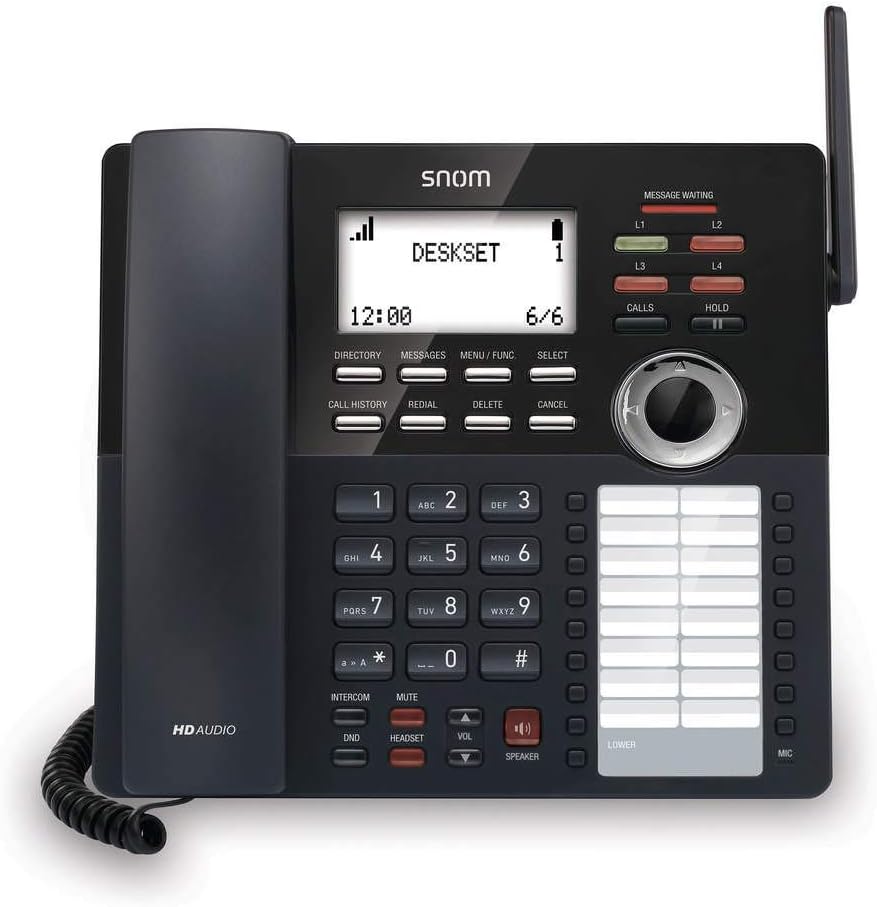
Imatge: Frontal view of the Snom M18 KLE Desk Office Phone, showing the display, keypad, and function buttons. The handset is cradled on the left side, and a DECT antenna is visible on the right.
Instruccions de funcionament
Funcions de trucada bàsiques
Fer una trucada:
Agafeu el telèfon o premeu PONENT botó.
Marqueu el número de telèfon desitjat amb el teclat.
Premeu el botó TRUCADES o espereu uns segons perquè la trucada es connecti automàticament.
Respondre una trucada:
Quan soni el telèfon, agafeu l'auricular o premeu la tecla PONENT botó per respondre.
Finalització d'una trucada:
Torneu a col·locar l'auricular al suport o premeu la tecla PONENT botó de nou.
Funcions de trucada avançades
Manteniu: Durant una trucada activa, premeu MANTENIM button to place the call on hold. Press MANTENIM de nou per reprendre la trucada.
Transferència:
Durant una trucada activa, premeu TRANSFERÈNCIA soft key (may be labeled differently on screen).
Marqueu el número al qual voleu transferir la trucada.
Per realitzar a transferència a cegues, premeu TRANSFERÈNCIA soft key again before the recipient answers. To perform an attended transfer, wait for the recipient to answer, announce the call, then press TRANSFERÈNCIA.
Conferència: The phone supports 3-way local conferencing. During an active call:
Premeu el botó CONF soft key (or similar). The first call is placed on hold.
Marqueu el número del tercer.
Un cop respongui la tercera persona, premeu la tecla CONF soft key again to join all parties.
Silenciar: Premeu el botó MUT botó per silenciar el micròfon durant una trucada. Premeu-lo de nou per activar el so.
No Molestis (DND): Premeu el botó DND button to activate or deactivate Do Not Disturb mode. When active, incoming calls will be redirected or sent to voicemail without ringing the phone.
Navegació pel menú
Use the 4-way navigational pad and the SELECCIONA soft key to navigate through the phone's menus. Soft keys below the display change functionality based on the current screen.
Phonebook and Call History
Directori: Premeu el botó DIRECTORI soft key to access your local phonebook. You can add, edit, and delete contacts.
Historial de trucades: Premeu el botó HISTÒRIA DE LA CONVOCATÒRIA botó per view a list of dialed, received, and missed calls.
Manteniment i cura
Neteja del dispositiu
To clean the phone, use a soft, damp cloth. Avoid using abrasive cleaners or solvents, as these can damage the phone's surface. Ensure the phone is unplugged before cleaning.
Canvi de bateria
The deskset contains a 2.4V/750 mAh Ni-MH battery. If battery performance degrades significantly over time, contact Snom support or a qualified technician for replacement. Do not attempt to replace the battery yourself unless specifically instructed by Snom.
Actualitzacions de firmware
Periodically, Snom may release firmware updates to improve performance and add new features. Consult your system administrator or the Snom website for instructions on how to update your phone's firmware.
Resolució de problemes
| Problema | Causa possible | Solució |
|---|---|---|
| Sense to de marcatge | Phone not powered, network cable disconnected, or SIP registration failure. | Check power connection. Ensure Ethernet cable is securely connected. Verify SIP account registration status on the display. Restart the phone. |
| No puc fer/rebre trucades | SIP registration issue, DND active, or network problem. | Check SIP registration. Deactivate DND. Verify network connectivity. Contact your IT administrator. |
| La pantalla està en blanc o congelada | Power issue or software error. | Unplug the power adapter, wait 10 seconds, then plug it back in. If the issue persists, contact support. |
| Mala qualitat d'àudio | Network congestion, faulty cable, or handset issue. | Check network connection and bandwidth. Try a different handset or headset. |
Especificacions tècniques
- Visualització: 3.5-inch 102 x 66 pixels (w x h) mono LCD with blue/white backlighting
- Tecles de línia: 4 programmable LED backlit line keys
- Feature Keys: 17 dedicated feature keys
- Navegació: 4-way navigational pad
- De marcatge ràpid: 32 speed dial keys (2 pages x 16)
- Voice Quality: HD voice for receiver and speakerphone, Full-duplex speakerphone
- Headset Support: HAC receiver, 2.5mm corded headset jack
- Gestió de trucades: 4-line call handling (active and held), 3-way local conference, N-way network conference, Intercom, Call transfer (blind/attended), Call hold, Call forwarding, Mute, Redial, Caller ID
- Guia telefònica: Local up to 1,000 entries, XML/LDAP remote phonebook
- Historial de trucades: Fins a 200 entrades
- Bateria: Deskset battery: 2.4v/750 mAh Ni-MH
- Font d'alimentació: Corded Electric (Included AC Adapter)
- Standby/Talk Time: 36 hours standby / 7 hours talk time
Informació de la garantia
The Snom M18 KLE SIP DECT 4-Line Desk Office Phone comes with a 3-year limited warranty from the date of purchase. This warranty covers defects in materials and workmanship under normal use. For full terms and conditions, please refer to the official Snom warranty policy available on their weblloc o contacteu amb el servei d'atenció al client.
Atenció al client
For technical assistance, warranty claims, or further information, please visit the official Snom website or contact their customer support department. Keep your product model number (M18 KLE) and purchase details ready when contacting support.


