1. Introducció
The Pivo Equestrian Silver Pack is an advanced AI-powered smartphone tracking holder designed for hands-free video recording. It is ideal for athletes, content creators, and especially equestrians, enabling dynamic and engaging video capture without the need for a dedicated camera operator.
This device features 360° auto-tracking capabilities, seamlessly switching between Face Tracking, Body Tracking, and Horse Tracking to ensure you are always in frame. Advanced AI functions like Auto Zoom, Auto-Alignment, and Predictive Follow enhance the quality and fluidity of your recordings. The Pivo Pod connects to your smartphone via Bluetooth and works with dedicated Pivo applications to unlock its full potential.
2. Què hi ha a la caixa
Upon unboxing your Pivo Equestrian Silver Pack, verify that all components are present:
- Pivo Pod (Main Unit)
- Cable de càrrega micro USB
- Control remot

Image: The Pivo Pod, its charging cable, and the remote control, as typically found in the product packaging.
3. Producte acabatview
The Pivo Pod is a compact and portable device designed to hold your smartphone and provide 360-degree rotation for automated tracking. It features a universal 1/4" UN thread at the bottom for tripod compatibility and extendable stabilizer feet for standalone use.
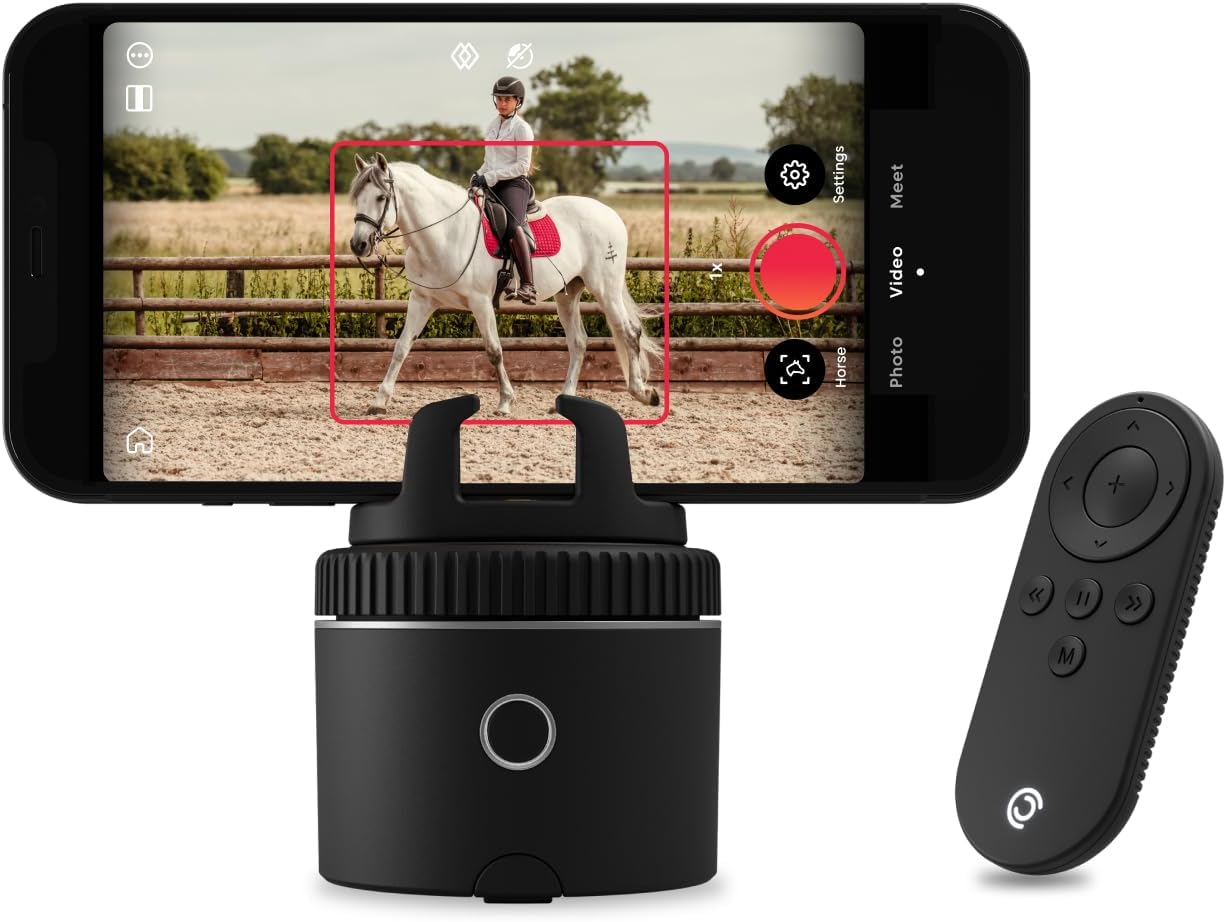
Image: The Pivo Pod with a smartphone mounted, actively tracking a horse, alongside its remote control.

Image: Detailed dimensions and weight of the Pivo Pod, highlighting its compact size.
The included remote control allows for convenient operation, enabling you to start/stop recording, adjust tracking, and control other functions from a distance.
4. Configuració
4.1. Charging the Pivo Pod
Before first use, fully charge your Pivo Pod using the provided Micro USB charging cable. Connect the cable to the Micro USB charging port on the Pivo Pod and a compatible USB power source. The charging indicator light will provide status feedback.
4.2. Instal·lació i emparellament de l'aplicació
The Pivo Pod requires the use of Pivo applications for full functionality. Download the necessary apps from your smartphone's app store (compatible with iOS and Android). Key applications include Pivo+, Pivo Play, and Pivo Cast, each offering different features and recording modes.
- Turn on the Pivo Pod: Premeu i manteniu premut el botó d'engegada fins que s'il·lumini l'indicador lluminós.
- Run the Pivo App: Open the desired Pivo application on your smartphone.
- Vincular mitjançant Bluetooth: The app will guide you through the Bluetooth pairing process. Ensure Bluetooth is enabled on your smartphone.

Image: Visual guide for initial setup, showing the Pivo apps and the three-step process to begin recording.
4.3. Muntatge del telèfon intel·ligent
Securely place your smartphone into the Pivo Pod's phone holder. Ensure it is centered and stable. The Pivo Pod is compatible with most smartphones, including iPhone, Samsung, LG, and Google models.
4.4. Tripod and Accessory Compatibility
The Pivo Pod features a universal 1/4" UN thread, allowing it to be mounted on any standard tripod for increased stability and height. It is also compatible with other Pivo accessories (sold separately) for enhanced versatility.

Image: Diagram illustrating the Pivo Pod's charging port, accessory compatibility, stabilizer feet, and tripod thread.
5. Instruccions de funcionament
5.1. Auto Tracking Features
The Pivo Pod utilizes AI technology for precise auto-tracking. It can track various subjects, ensuring they remain centered in the frame:
- Seguiment facial: Tracks a person's face.
- Body Tracking: Tracks a person's full body movements.
- Seguiment de cavalls: Specifically optimized for tracking horses, ideal for equestrian activities.

Image: Visual representation of Pivo's versatile auto-tracking modes for different subjects.
5.2. Advanced AI Functions
- Zoom automàtic: Automatically adjusts the zoom level to keep the subject framed smoothly.
- Alineació automàtica: Self-corrects the shot to ensure the subject is always centered.
- Predictive Follow: Tracks the subject even if they temporarily move out of frame.

Imatge: Més deview of Pivo's tracking capabilities, rotation speed, various modes, and battery duration.

Image: The Pivo Pod in action, capturing a horse and rider, showcasing its effectiveness for equestrian filming.
5.3. Ús del control remot
The remote control allows you to manage the Pivo Pod without touching your phone. Functions typically include starting/stopping recording, switching tracking modes, and adjusting rotation speed. Refer to the in-app guide for specific remote button functionalities.
5.4. Modes de velocitat
The Pivo Pod offers multiple speed modes to adapt to different movements and activities. These typically include Slow, Normal, Fast, and Frenzy, allowing you to select the optimal tracking speed for your specific needs.
6. Manteniment
6.1. Neteja
To clean your Pivo Pod, gently wipe the exterior with a soft, dry, lint-free cloth. Do not use liquid cleaners, aerosols, or abrasive solvents, as these may damage the device. Ensure no moisture enters the charging port or other openings.
6.2. Emmagatzematge
Store the Pivo Pod in a cool, dry place away from direct sunlight and extreme temperatures. When not in use for extended periods, ensure the device is fully charged before storage and periodically recharge it to maintain battery health. The Pivo Pod is pocket-sized for easy portability.

Image: The Pivo Pod being held, illustrating its small and portable design.
7. Solució De Problemes
If you encounter issues with your Pivo Equestrian Silver Pack, refer to the following common problems and solutions:
| Problema | Possible causa/solució |
|---|---|
| Pivo Pod not turning on or responding. | Ensure the device is fully charged. Press and hold the power button for a few seconds to turn it on. |
| Smartphone not connecting via Bluetooth. | Ensure Bluetooth is enabled on your phone. Restart both the Pivo Pod and your smartphone. Try re-pairing through the Pivo app. |
| Tracking is inconsistent or loses subject. |
|
| L'enregistrament s'atura inesperadament. | Check your smartphone's available storage space. Insufficient storage can cause recording interruptions. |
| Focus issues with iPhone 16 series. | Some users have reported focus issues with iPhone 16 Pro models in certain modes. Pivo is aware of this and suggests checking their official support channels for updates on compatibility and potential software fixes. |
For further assistance, consult the Pivo app's help section or visit the official Pivo support weblloc.
8. Especificacions
| Característica | Detall |
|---|---|
| Marca | Pivo |
| Nom del model | Pivo Pod Silver |
| Número de model | PIVO-R1 |
| Color | Plata |
| Dispositius compatibles | Telèfon mòbil |
| Models de telèfon compatibles | iPhone, Samsung, LG, Google |
| Tipus de muntatge | Tripod (Universal 1/4" UN thread) |
| Característiques addicionals | Hand Free, AI-Powered Auto Tracking (Face, Body, Horse), 360° Rotation, Remote Control |
| Alçada de l'element | 2.5 polzades (6.35 cm) |
| Dimensions de l'article (L x A x A) | 2.9 x 2.5 x 2.5 polzades (7.37 x 6.35 x 6.35 cm) |
| Pes de l'article | 176 grams (6.21 oz) |
| Material de tancament | Plàstic |
| Durada de la bateria (aprox.) | 6 hores |
9. Informació de la garantia
The Pivo Equestrian Silver Pack comes with a manufacturer's warranty. For detailed information regarding warranty coverage, terms, and conditions, please refer to the official Pivo website or the product's specific detail page where it was purchased. Typically, warranty details are provided with the product documentation or accessible online.
10. Suport
For further assistance, technical support, or to explore additional Pivo products and accessories, please visit the official Pivo weblloc:
Visit the Pivo Store on Amazon
You can also find FAQs, user guides, and contact information for customer service on their official brand weblloc.


