Introducció
Welcome to the user manual for your Technical Pro BOOM8 Wireless TWS Portable 8" LED Party Speakers. This manual provides essential information for the safe and efficient operation of your new speakers. Please read it thoroughly before use and retain it for future reference.
The BOOM8 speakers are designed to deliver powerful audio with dynamic LED lighting, offering versatile connectivity options including Bluetooth, USB, FM radio, and AUX input. With True Wireless Stereo (TWS) functionality, you can connect two BOOM8 speakers for an immersive stereo sound experience.
Informació de seguretat
Per garantir un funcionament segur i evitar danys, observeu les precaucions següents:
- No exposeu els altaveus a l'aigua, la humitat ni a temperatures extremes.
- Eviteu col·locar els altaveus a prop de fonts de calor com ara radiadors, registres de calor, estufes o altres aparells (inclosos amplificadors) que produeixen calor.
- Utilitzeu només accessoris/accessoris especificats pel fabricant.
- Netegeu només amb un drap sec. No utilitzeu netejadors líquids ni aerosols.
- Eviteu que el cable d'alimentació sigui trepitjat o pessigat, especialment als endolls, els endolls i el punt on surten de l'aparell.
- Desendolleu l'aparell durant les tempestes amb llamps o quan no l'utilitzeu durant llargs períodes de temps.
- Demaneu tot el servei a personal de servei qualificat. El manteniment és necessari quan l'aparell s'ha fet malbé d'alguna manera, com ara el cable d'alimentació o l'endoll està danyat, s'ha vessat líquid o han caigut objectes a l'aparell, l'aparell ha estat exposat a la pluja o la humitat, no funciona amb normalitat. , o s'ha deixat caure.
Contingut del paquet
Verifiqueu que tots els elements que s'enumeren a continuació s'inclouen al vostre paquet:
- Technical Pro BOOM8 Portable Rechargeable 8" LED Speaker (x2)
- Cable de càrrega USB (x1)
- Manual d'usuari (x1)

Image: Technical Pro BOOM8 User Manual and USB Charging Cable
Producte acabatview
Familiarize yourself with the various components and controls of your BOOM8 speaker.

Imatge: Frontal View of BOOM8 Speaker with Blue LED

Imatge: Superior View of BOOM8 Speaker Control Panel

Image: Close-up of BOOM8 Control Panel
Característiques del tauler de control:
- Botó POWER/VOLUME: Turns the speaker on/off and adjusts the master volume.
- ENTRADA 5V DC: Charging port for the built-in battery.
- Entrada AUX: Jack de 3.5 mm per connectar dispositius d'àudio externs.
- Controls de reproducció: Previous Track, Play/Pause, Next Track.
- Interruptor LED: Toggles the LED lights on/off.
- Port USB: Per reproduir MP3 filedes d'una unitat flaix USB (fins a 64 GB).
- MIC IN: 1/4" input for a microphone.
- Pantalla LCD: Displays current mode and track information.
Configuració
Carregant la bateria
Before initial use, fully charge the speaker's built-in rechargeable battery for 8-10 hours. Connect the provided USB charging cable to the 5V DC IN port on the speaker and to a compatible USB power adapter (not included). The charging indicator light will illuminate during charging.
Encès/Apagat
To power on the speaker, rotate the POWER/VOLUME knob clockwise until it clicks and the display illuminates. To power off, rotate the knob counter-clockwise until it clicks.
Col·locació inicial
Place the speakers on a stable, flat surface. For optimal sound dispersion, ensure there are no obstructions directly in front of the speaker grille.
Instruccions de funcionament
Emparellament Bluetooth (altaveu individual)
- Ensure the speaker is powered on and in Bluetooth mode (indicated on the LCD screen). If not, press the Mode button to cycle through modes until "Bluetooth" is displayed.
- Enable Bluetooth on your A2DP stereo Bluetooth device (e.g., smartphone, tablet).
- Cerca available Bluetooth devices. The speaker will appear as "BOOM8".
- Select "BOOM8" from the list to pair. A confirmation tone will sound upon successful pairing.
- You can now play audio from your device through the speaker. The Bluetooth range is approximately 30 feet.
Vinculació True Wireless Stereo (TWS).
TWS allows you to connect two BOOM8 speakers wirelessly to a single Bluetooth device for a true stereo sound experience.

Image: Two BOOM8 Speakers in TWS Configuration
- Ensure both BOOM8 speakers are powered on and in Bluetooth mode.
- On one of the speakers (this will be your primary speaker), press and hold the Play/Pause button for a few seconds until you hear a pairing tone. The two speakers will automatically connect to each other.
- Once the speakers are paired with each other, enable Bluetooth on your A2DP stereo Bluetooth device.
- Cerca available Bluetooth devices and select "BOOM8".
- Both speakers will now play audio in stereo from your device.
Reproducció USB
- Insert a USB flash drive (formatted with MP3 files, maximum 64GB) into the USB port on the control panel.
- The speaker will automatically switch to USB mode and begin playing the first compatible MP3 file.
- Use the Previous Track, Play/Pause, and Next Track buttons to control playback.
- The speaker supports a repeat function for USB playback.
Funcionament de la ràdio FM
- Premeu el botó Mode per canviar al mode de ràdio FM.
- Press the Play/Pause button once to initiate an automatic station scan. The speaker will scan and save available FM stations.
- Use the Previous Track and Next Track buttons to navigate between saved stations.
Entrada AUX
- Connect an external audio device (e.g., smartphone, MP3 player) to the AUX input port using a 3.5mm audio cable (not included).
- Premeu el botó Mode per canviar al mode AUX.
- Audio from your connected device will now play through the speaker. Control playback from your external device.
Entrada de micròfon
- Connect a 1/4" microphone (not included) to the MIC IN port.
- Adjust the microphone volume using the dedicated microphone volume control (if available on your microphone or speaker model).
- L'entrada de micròfon es pot utilitzar simultàniament amb altres fonts d'àudio (Bluetooth, USB, AUX).
Control de llum LED
The BOOM8 speakers feature dynamic LED lights around the woofer. To toggle the LED lights on or off, press the dedicated LED switch on the control panel.
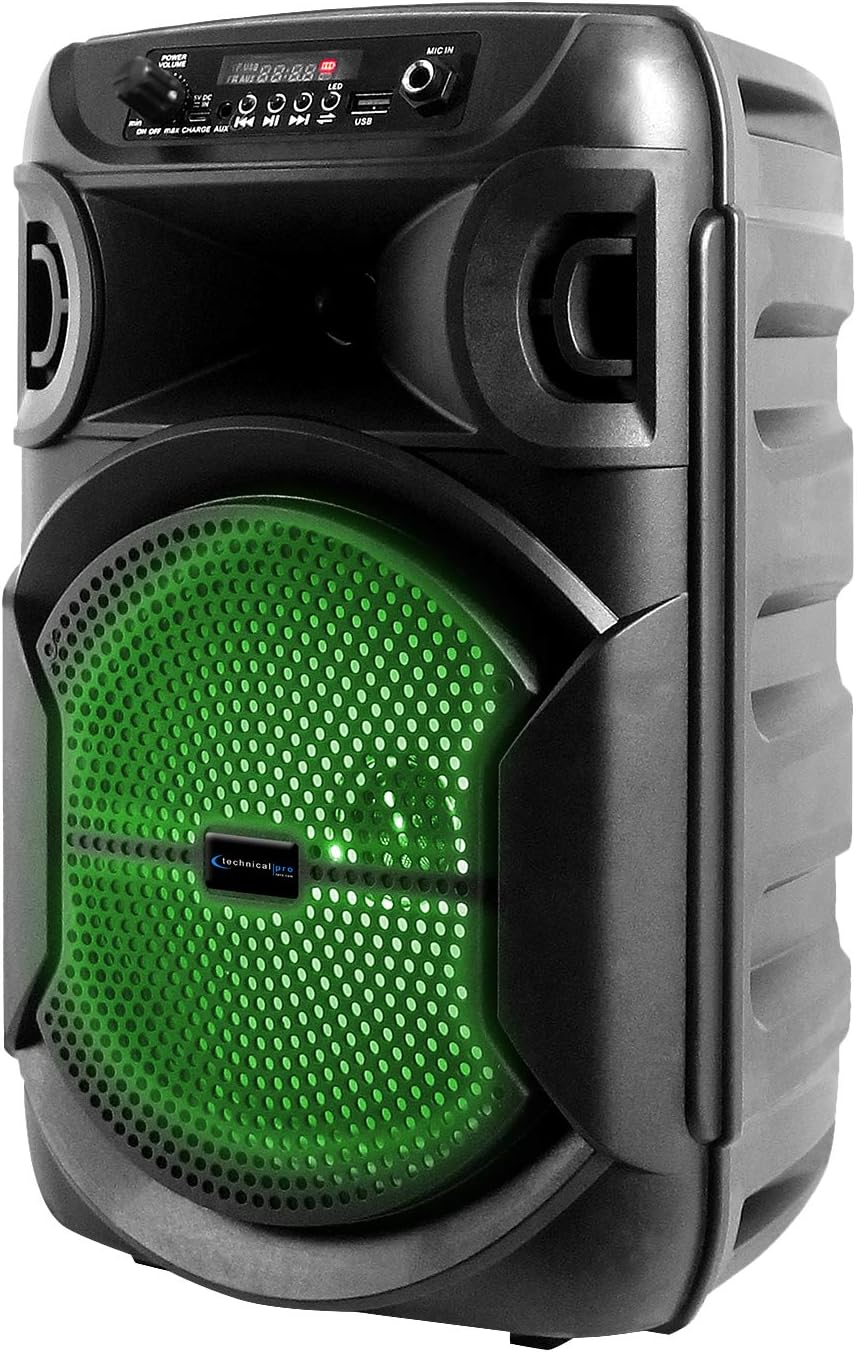
Image: BOOM8 Speaker with Green LED Illumination
Manteniment
Neteja
- Apagueu i desendolleu sempre l'altaveu abans de netejar-lo.
- Feu servir un drap suau i sec per netejar les superfícies exteriors de l'altaveu.
- No utilitzeu netejadors abrasius, ceres o dissolvents, ja que poden danyar l'acabat.
Emmagatzematge
- Guardeu l'altaveu en un lloc fresc i sec, allunyat de la llum solar directa i de temperatures extremes.
- If storing for an extended period, ensure the battery is partially charged (around 50%) to maintain battery health. Recharge every few months if not in use.
Resolució de problemes
If you encounter issues with your BOOM8 speakers, refer to the following table for common problems and solutions.
| Problema | Causa possible | Solució |
|---|---|---|
| L'altaveu no s'encén. | La bateria està esgotada. | Connecteu l'altaveu a una font d'alimentació amb el cable de càrrega USB i deixeu que es carregui. |
| No hi ha so de l'altaveu. | Volume is too low or muted. Incorrect input mode. Bluetooth not paired. | Increase the volume. Ensure the correct input mode (Bluetooth, USB, AUX, FM) is selected. Re-pair Bluetooth device. |
| El dispositiu Bluetooth no pot trobar l'altaveu. | Speaker not in Bluetooth pairing mode. Device too far. Interference. | Ensure speaker is in Bluetooth mode. Move device closer to speaker. Avoid strong electromagnetic interference. |
| L'emparellament TWS falla. | Speakers not reset. One speaker already paired to a device. | Ensure both speakers are in Bluetooth mode and not connected to any device. Try holding the Play/Pause button on one speaker again to initiate TWS pairing. |
| La reproducció per USB no funciona. | USB drive not formatted correctly. Incompatible file type. Drive size too large. | Ensure USB drive is formatted correctly and contains MP3 files. Max USB size is 64GB. |
Especificacions
| Característica | Detall |
|---|---|
| Potència màxima | 1000 watts |
| Mida del woofer | 8 inches (LED woofer) |
| Entrades | USB flash drive, FM Radio, AUX, Bluetooth, 1/4'' microphone input |
| Versió Bluetooth | A2DP & AVRCP stereo Bluetooth device compatible |
| Interval Bluetooth | 30 peus |
| USB Card Maximum Size | 64 GB |
| Àudio compatible Files (USB) | .mp3 files |
| Impedància | 3 ohms |
| Sensibilitat | 80 ± 2dB (1W@1M) |
| Resposta de freqüència | 80Hz - 18KHz |
| Material | ABS Plastic Face & Rugged perforated grill |
| Font d'alimentació | Bateria recarregable incorporada |
| Battery Charge Time (Initial) | 8-10 hores |
| Pes de l'article | 8 lliures (per altaveu) |
| Dimensions del paquet | 15 x 9 x 8 polzades |
Garantia i Suport
For warranty information and technical support, please refer to the documentation provided with your purchase or contact Technical Pro directly.
Informació de contacte:
Questions / Comments: Call 888-842-6277
Correu electrònic: info@tpro.com


