Introducció
Benvingut al manual d'usuari del vostre nou KIDdesigns LOL SURPRISE Sing Along Karaoke BoomBox for Kids. This manual provides important information on how to set up, operate, and maintain your device. Please read it thoroughly before use to ensure proper functionality and safety.
El LOL SURPRISE Sing Along Karaoke BoomBox is designed to provide hours of musical fun for children. It features built-in music, LED flashing lights, and a working microphone, allowing kids to sing along to their favorite tunes or connect an external MP3 player for more song options. Its portable and durable design makes it suitable for both indoor and outdoor use.
Informació de seguretat
Si us plau, observeu les següents precaucions de seguretat per evitar lesions o danys al dispositiu:
- ADVERTIMENT: Not suitable for children under 3 years due to small parts that may present a choking hazard.
- Superviseu sempre els nens petits durant l'ús.
- No exposeu el dispositiu a l'aigua ni a una humitat excessiva.
- No intenteu desmuntar o modificar el dispositiu.
- Use only the specified battery type (3 "AA" batteries). Ensure correct polarity when inserting batteries.
- Traieu les bateries si el dispositiu no s'utilitzarà durant un període prolongat.
- Mantingueu el dispositiu lluny de fonts de calor i de la llum solar directa.
Contingut del paquet
Si us plau, reviseu el paquet per assegurar-vos que hi ha tots els elements:
- LOL SURPRISE Sing Along Karaoke BoomBox Unit
- Micròfon
- Manual d'usuari (aquest document)
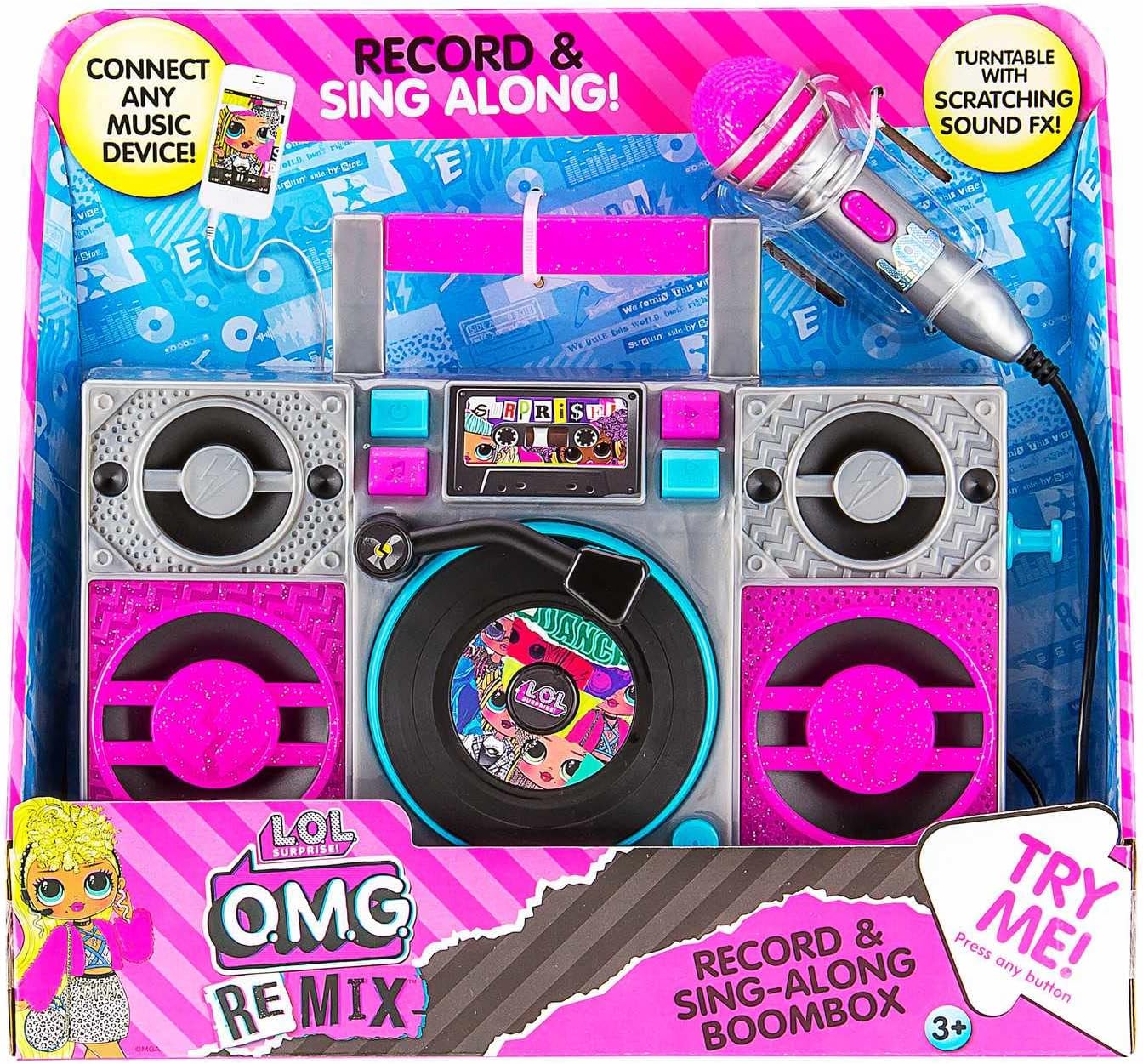
Image: The LOL SURPRISE Karaoke BoomBox as it appears in its retail packaging, highlighting its key features and included microphone.
Producte acabatview
Familiarize yourself with the different parts of your Karaoke BoomBox.

Imatge: Frontal view of the Karaoke BoomBox, illustrating its various components including speakers, central controls, and the attached microphone.
- Mànec: Per a una fàcil portabilitat.
- Ponents: Output audio.
- Panell de control/Pantalla: For selecting modes and viewestat d'ingrés.
- Turntable (Decorative): Features scratching sound effects.
- Entrada de micròfon: Connect the included microphone here.
- Micròfon: For singing along.
- Entrada auxiliar: Connect external audio devices (e.g., MP3 player, smartphone).
- Compartiment de la bateria: Located on the back/bottom of the unit.
Configuració
1. Instal·lació de la bateria
The Karaoke BoomBox requires 3 "AA" batteries (not included).
- Locate the battery compartment on the back or bottom of the unit.
- Amb un tornavís Phillips, desenrosqueu la tapa del compartiment de la bateria.
- Insert 3 "AA" batteries, ensuring the correct polarity (+/-) as indicated inside the compartment.
- Substituïu la tapa del compartiment de la bateria i fixeu-la amb el cargol.
2. Connexió del micròfon
Connect the included microphone to the microphone input jack on the unit.
Instruccions de funcionament
Encès/Apagat
- To turn the unit ON, locate the Power button (usually on the front panel) and press it.
- To turn the unit OFF, press the Power button again.
Playing Built-in Music
- Once powered on, the unit may automatically start playing built-in music.
- Use the control buttons (e.g., Play/Pause, Next, Previous) on the front panel to navigate through the built-in songs.
Connecting an External Audio Device (MP3 Player/Smartphone)
You can connect your own music device to sing along to your favorite songs.

Image: The Karaoke BoomBox, showing the auxiliary input for connecting external audio devices like MP3 players or smartphones.
- Ensure the Karaoke BoomBox is powered on.
- Connect one end of a 3.5mm audio cable (not included) to the Auxiliary Input jack on the BoomBox.
- Connect the other end of the audio cable to the headphone jack or audio output of your MP3 player, smartphone, or other audio device.
- Start playing music on your connected device. The audio will now play through the BoomBox speakers.
- Adjust the volume on both your connected device and the BoomBox for optimal sound.
Ús del micròfon
- Once the microphone is connected, simply speak or sing into it. Your voice will be amplified through the BoomBox speakers.
- Adjust the microphone volume if available on the unit, or control the overall volume.
Llums intermitents LED
The unit features built-in LED flashing lights that activate during operation, adding to the karaoke experience.
Turntable Scratching Sound Effects
The decorative turntable on the front of the unit can be manually spun to produce fun scratching sound effects.
Manteniment
- Neteja: Netegeu la unitat amb un drap suau i sec. No utilitzeu productes de neteja abrasius ni dissolvents.
- Emmagatzematge: Store the unit in a cool, dry place away from direct sunlight when not in use.
- Cura de la bateria: Remove batteries if the unit will not be used for an extended period to prevent battery leakage.
Resolució de problemes
| Problema | Causa possible | Solució |
|---|---|---|
| La unitat no s'encén. | Les piles estan gastades o incorrectament inserides. | Replace with new "AA" batteries, ensuring correct polarity. |
| No hi ha so dels altaveus. | Volume is too low; external device not connected properly or volume too low. | Increase volume on the BoomBox and/or the connected external device. Ensure audio cable is fully inserted. |
| El micròfon no funciona. | Micròfon no completament connectat. | Ensure the microphone cable is securely plugged into the microphone input jack. |
| So distorsionat. | Volume too high; low batteries. | Lower the volume. Replace batteries if they are low. |
Especificacions
- Model: LOL SURPRISE Sing Along Karaoke BoomBox
- Marca: EKIDS
- Dimensions (L x A x A): 30.48 x 8.74 x 27.94 cm (12 x 3.44 x 11 polzades)
- Pes: 750 grams (1.65 lliures)
- Edat recomanada: 3 anys i més
- Font d'alimentació: Funciona amb bateria
- Bateries necessàries: 3 piles "AA" (no incloses)
- Connectivitat: Entrada auxiliar (3.5 mm)
- Nombre de parlants: 1
- Voltage: 4.5 Volts
- UPC: 092298950778
- Components inclosos: Karaoke BoomBox, Microphone
Garantia i Suport
This product is manufactured by eKids. For warranty information or technical support, please refer to the contact information provided on the product packaging or visit the official eKids weblloc web. Conserveu el rebut de compra com a comprovant de compra per a qualsevol reclamació de garantia.
Per a més ajuda, podeu visitar el EKIDS Brand Store on Amazon.


