1. Introducció
The Sandberg USB Office Headset Pro Mono is designed for clear communication in office environments, online meetings, and calls. This manual provides essential instructions for setting up, operating, maintaining, and troubleshooting your headset to ensure optimal performance.
2. Contingut del paquet
Si us plau, verifiqueu que tots els elements siguin presents al vostre paquet:
- Sandberg USB Office Headset Pro Mono (with integrated USB cable)

Image 1: The Sandberg USB Office Headset Pro Mono packaging, showing the headset and its features.
3. Configuració
Follow these steps to connect your headset to your computer:
- Localitzeu un port USB-A disponible al vostre ordinador.
- Plug the USB-A connector of the headset into the USB-A port on your computer.
- Your operating system (Windows, macOS, etc.) should automatically detect and install the necessary drivers. This process typically takes a few moments.
- Once installed, the headset will be ready for use. You may need to select it as the default audio input and output device in your computer's sound settings or within your communication application (e.g., Zoom, Microsoft Teams, Skype).
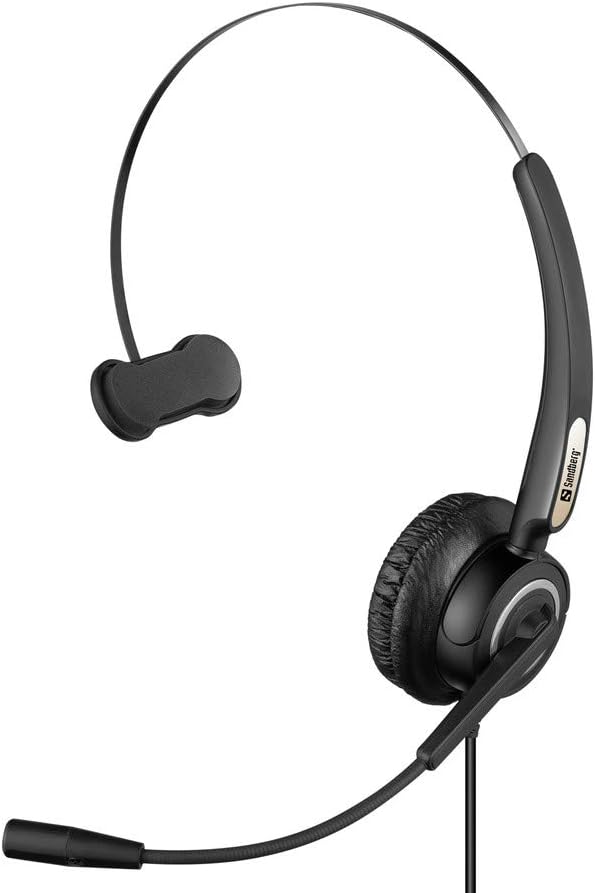
Image 2: The Sandberg USB Office Headset Pro Mono, illustrating its design for single-ear use with an adjustable microphone boom.
4. Instruccions de funcionament
4.1 Com portar els auriculars
- Place the earcup over one ear and adjust the headband for a comfortable fit.
- Position the microphone boom so that the microphone is approximately 1-2 inches (2.5-5 cm) from your mouth for optimal voice pickup.
4.2 Volume Control and Mute
The headset features an inline control unit on the USB cable for easy access to audio functions:
- Pujar el volum: Premeu el botó '+' per augmentar el volum d'escolta.
- Baixar el volum: Premeu el botó '-' per disminuir el volum d'escolta.
- Silència del micròfon: Press the microphone button to mute or unmute your microphone. An indicator light on the control unit typically shows the mute status.
4.3 Making Calls and Using Applications
Once connected and selected as the default audio device, your headset will function with most communication applications. Ensure the headset is selected as the audio input (microphone) and output (speaker) device within the settings of your specific application (e.g., video conferencing software, softphone client).
5. Manteniment
5.1 Neteja
- Gently wipe the headset with a soft, dry cloth.
- Per als coixins de les orelles, utilitzeu una mica de damp drap amb sabó suau si cal i, a continuació, eixugueu-lo immediatament.
- No utilitzeu productes químics agressius, dissolvents ni netejadors abrasius.
- Avoid getting moisture into the earcup or microphone openings.
5.2 Emmagatzematge
- Guardeu els auriculars en un lloc net i sec, allunyat de temperatures extremes i de la llum solar directa.
- Eviteu enredar el cable per evitar danys.
6. Solució De Problemes
6.1 No hi ha so dels auriculars
- Assegureu-vos que el connector USB estigui completament inserit al port USB de l'ordinador.
- Check the volume level on the inline control unit and on your computer's operating system.
- Verify that the Sandberg USB Office Headset Pro Mono is selected as the default playback device in your computer's sound settings.
- Prova de connectar els auriculars a un port USB diferent de l'ordinador.
6.2 El micròfon no funciona
- Assegureu-vos que el micròfon no estigui silenciat mitjançant la unitat de control en línia.
- Check that the Sandberg USB Office Headset Pro Mono is selected as the default recording device in your computer's sound settings.
- Adjust the microphone input level in your computer's sound settings.
- Confirm that the microphone boom is positioned correctly near your mouth.
6.3 Headset Not Detected by Computer
- Unplug the headset and plug it back into a different USB port.
- Reinicieu l'ordinador.
- Check your computer's Device Manager (Windows) or System Information (macOS) to see if the USB device is listed.
7. Especificacions
| Característica | Detall |
|---|---|
| Nom del model | Pro Mono |
| Número de model | 126-14 |
| Connector | 1 x USB A Male Plug |
| Longitud del cable | 6.6 peus (2.0 m) |
| Tipus de control | Volume Control (Inline) |
| Característica especial | Micròfon inclòs |
| Material | Plàstic |
| Pes de l'article | 0.035 unces (aproximadament 1 gram) |
| Dimensions del producte | 6.3 x 4.72 x 6.69 polzades |
8. Garantia i Suport
For warranty information, please refer to the documentation provided with your purchase or visit the official Sandberg website. For technical support or further assistance, please contact Sandberg customer service or your retailer.
Podeu trobar més informació i recursos de suport a Sandberg weblloc.


