1. Introducció
This manual provides comprehensive instructions for the installation, operation, and maintenance of the VIVOTEK IB9371-EHT 3MP Outdoor Network Bullet Camera. Please read this manual thoroughly before installation and retain it for future reference.
The VIVOTEK IB9371-EHT is a professional H.265 high-efficiency outdoor bullet network camera designed for robust surveillance in challenging environments. It offers 3-Megapixel resolution at 30 frames per second, incorporating advanced features such as WDR Pro, SNV, and Smart Stream II technology for optimized image quality and bandwidth efficiency.
2. Característiques clau
- Alta resolució: 3-Megapixel sensor (2048x1536) at 30 frames per second.
- Compressió avançada: H.265 technology for efficient video compression.
- Smart Stream II: Optimizes bandwidth usage by focusing on regions of interest.
- WDR Pro: Ensures clear image visibility in high-contrast lighting conditions.
- SNV (Supreme Night Visibility): Enhances low-light performance.
- Extreme Weather Protection: IP66-rated housing for dust and water resistance.
- Resistència antivandàlica: IK10-rated housing for protection against impacts.
- Suport PoE: Alimentació per Ethernet per a una instal·lació simplificada.
- Amplia temperatura de funcionament: Reliable performance in extreme cold and warm weather.
- Corredor View: Video rotation feature for optimized vertical surveillance areas.
3. Contingut del paquet
Si us plau, comproveu que tots els articles siguin presents i en bon estat en desempaquetar-los.
- VIVOTEK IB9371-EHT Network Camera
- Guia d'instal·lació
- Accessory Pack (screws, wall plugs, waterproof connectors)
- Adhesiu d'alineació

Figure 1: VIVOTEK IB9371-EHT Network Camera. This image displays the main unit of the VIVOTEK IB9371-EHT bullet camera, showing its cylindrical body, lens, and integrated cable harness for power and network connections.
4. Configuració i instal·lació
4.1 Precaucions de seguretat
- Assegureu-vos que l'alimentació estigui desconnectada abans de la instal·lació o el manteniment.
- Installation should be performed by qualified personnel in accordance with local codes.
- No exposeu la càmera a temperatures extremes fora del seu rang de funcionament.
- Use only VIVOTEK-approved accessories.
4.2 Muntatge de la càmera
- Seleccioneu la ubicació: Choose a suitable outdoor location that provides the desired surveillance coverage and is within reach of network cabling.
- Prepara la superfície: Use the provided alignment sticker to mark drilling points on the mounting surface.
- Forats: Drill pilot holes and insert wall plugs if necessary.
- Càmera segura: Attach the camera's mounting bracket to the surface using the supplied screws. Ensure it is securely fastened.
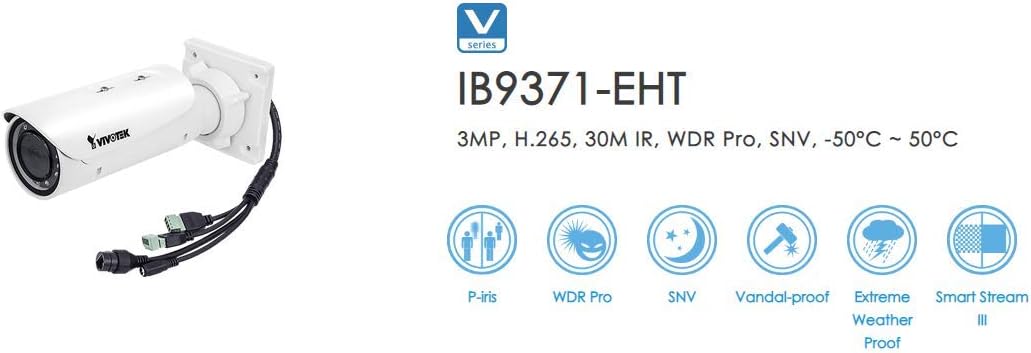
Figure 2: VIVOTEK IB9371-EHT with Feature Icons. This image illustrates the VIVOTEK IB9371-EHT camera alongside graphical icons representing its key features, such as P-iris, WDR Pro, SNV, Vandal-proof (IK10), Extreme Weather Proof (IP66), and Smart Stream III.
4.3 Connexió de xarxa i alimentació
The IB9371-EHT supports Power over Ethernet (PoE) for simplified installation, allowing both power and data to be transmitted over a single Ethernet cable.
- Connecteu el cable Ethernet: Connect a standard RJ45 Ethernet cable from your PoE-enabled network switch or PoE injector to the camera's RJ45 port. Use the provided waterproof connector for outdoor installations to ensure IP66 integrity.
- Alternative Power (if not using PoE): If PoE is not available, connect a 12V DC power adapter (sold separately) to the camera's power input.
- Verifica la connexió: Once connected, the camera's status indicator LED should illuminate, indicating power and network activity.
4.4 Configuració inicial
- Descobreix la càmera: Use VIVOTEK's IP Search utility or a network scanner to find the camera's IP address on your network.
- Accés Web Interfície: Obre a web navegador i introduïu l'adreça IP de la càmera.
- Inici de sessió: Enter the default username and password (refer to the camera's quick installation guide for default credentials, typically "admin" / "password"). Change default credentials immediately for security.
- Configuració bàsica: Follow the on-screen wizard to configure basic settings such as network parameters, date/time, and video resolution.
5. Funcionament
5.1 Viu View
Després d'iniciar sessió a web interfície, navegueu fins a "En directe View" section to see the real-time video feed from the camera. You can adjust various display settings here.
5.2 Enregistrament de vídeo
La càmera admet diverses opcions de gravació:
- Gravació contínua: Records video constantly.
- Enregistrament activat per esdeveniments: Records when motion is detected or an alarm input is triggered.
- Enregistrament programat: Registres durant períodes de temps especificats.
Configure recording settings, including storage location (e.g., network attached storage, local SD card if supported), frame rate, and quality, in the "Recording" or "Storage" section of the web interfície.
5.3 Configuració avançada
Explora el web interface for advanced configurations:
- Configuració de la imatge: Adjust brightness, contrast, saturation, sharpness, WDR Pro, and SNV.
- Configuració de la xarxa: Configure IP address, DNS, port forwarding, and other network parameters.
- Gestió d'esdeveniments: Set up motion detection zones, tamper detection, and alarm actions (e.g., email notifications, FTP upload).
- Gestió d'usuaris: Create and manage user accounts with different access privileges.
6. Manteniment
6.1 Neteja
- Netegeu regularment la lent i la carcassa de la càmera amb un drap suau iamp cloth to remove dust, dirt, or water spots.
- Do not use harsh chemicals or abrasive cleaners, as they may damage the lens coating or housing.
6.2 actualitzacions de microprogramari
Periodically check the VIVOTEK official website for firmware updates. Keeping your camera's firmware up-to-date ensures optimal performance, security enhancements, and access to new features.
- Download the latest firmware from the VIVOTEK support page.
- Accedir a la càmera web interface and navigate to the "System" or "Maintenance" section.
- Follow the instructions to upload and install the firmware. Do not power off the camera during the update process.
6.3 Comprovacions del sistema
- Verify network connectivity and video stream quality regularly.
- Check recording storage capacity and ensure recordings are being saved correctly.
- Inspect physical connections and cabling for any signs of wear or damage.
7. Solució De Problemes
| Problema | Causa possible | Solució |
|---|---|---|
| Sense canal de vídeo | No power; Network issue; Incorrect IP address | Check power connection (PoE or DC adapter); Verify Ethernet cable connection; Ensure camera is on the same network subnet; Use IP Search utility. |
| Mala qualitat d'imatge | Dirty lens; Incorrect focus; Low bandwidth; Lighting issues | Clean the lens; Adjust focus via web interface; Check network bandwidth; Enable WDR Pro/SNV in challenging lighting. |
| No es pot accedir web interfície | Incorrect IP address; Network firewall; Browser compatibility | Verify IP address; Check firewall settings on PC and network; Try a different web browser; Reset camera to factory defaults if necessary. |
| La gravació no funciona | Storage full; Incorrect recording settings; Network storage inaccessible | Check available storage space; Review recording schedules and event triggers; Verify network storage (NAS) connectivity and permissions. |
8. Especificacions
| Característica | Detall |
|---|---|
| Número de model | IB9371-EHT |
| Sensor d'imatge | 1/2.8" Progressive CMOS Sensor |
| Resolució de vídeo | 3 MP (2048 x 1536) |
| Velocitat de fotogrames | 30 fps @ 2048x1536 |
| Compressió de vídeo | H.265, H.264, MJPEG |
| Tecnologia WDR | WDR Pro |
| Tecnologia de poca llum | SNV (Supreme Night Visibility), Day/Night functionality |
| Resistència a la intempèrie | IP66-rated (Dust and Water Proof) |
| Resistència vàndal | IK10-rated (Vandal-proof) |
| Font d'alimentació | PoE (Power over Ethernet) or AC/DC (12V DC) |
| Connectivitat | RJ45 Ethernet, Wi-Fi |
| Temperatura de funcionament | Ampli rang de temperatures de funcionament |
| UPC | 738714004464 |
9. Informació de la garantia
VIVOTEK products are covered by a limited warranty. For detailed warranty terms and conditions, please refer to the official VIVOTEK weblloc web o la targeta de garantia inclosa amb el producte. Conserveu el comprovant de compra per a reclamacions de garantia.
10. Suport tècnic
For technical assistance, troubleshooting, or further inquiries, please contact VIVOTEK customer support through their official website. You can find FAQs, downloads, and contact information on the support section of www.vivotek.com.


