Introducció
This manual provides detailed instructions for the operation and maintenance of your GTMEDIA Z3 Portable DAB+/FM RDS Radio. Please read this manual thoroughly before using the device to ensure proper functionality and to maximize your listening experience.
Informació important de seguretat
- No exposeu el dispositiu a la pluja, la humitat ni a temperatures extremes.
- Eviteu deixar caure o sotmetre el dispositiu a forts impactes.
- No intenteu desmuntar ni reparar la unitat vosaltres mateixos. Encarregueu tot el manteniment a personal qualificat.
- Feu servir només el cable de càrrega i l'adaptador de corrent especificats.
- Mantenir fora de l'abast dels nens.
Contingut del paquet
Assegureu-vos que tots els elements siguin presents al paquet:
- 1 x GTMEDIA Z3 DAB+/FM Radio
- 1 x cable de càrrega USB
- 1 x Manual d'usuari

Image: The GTMEDIA Z3 radio, its retail box, USB charging cable, and user manual.
Producte acabatview
The GTMEDIA Z3 is a portable DAB+/FM RDS radio featuring a 2.4-inch TFT-LCD screen. It supports 60 preset stations for both DAB+ and FM, and includes functions such as clock, alarm, and sleep timer. The device is powered by a rechargeable 18650 lithium battery.
Controls i pantalla del panell frontal
- Botó d'engegada/espera: Turns the radio on/off or puts it in standby mode.
- Botó d'escaneig: Initiates station scanning.
- Botó DAB/FM: Canvia entre els modes DAB+ i FM.
- Botó de menú: Accedeix al menú principal.
- Botó EQ: Ajusta la configuració de l'equalitzador.
- Botó predeterminat: Accesses preset stations.
- Botó de volum/selecció: Adjusts volume and navigates/selects menu options.
- 2.4-inch TFT-LCD Display: Mostra informació de l'estació, l'hora i les opcions del menú.
Rear Panel and Ports
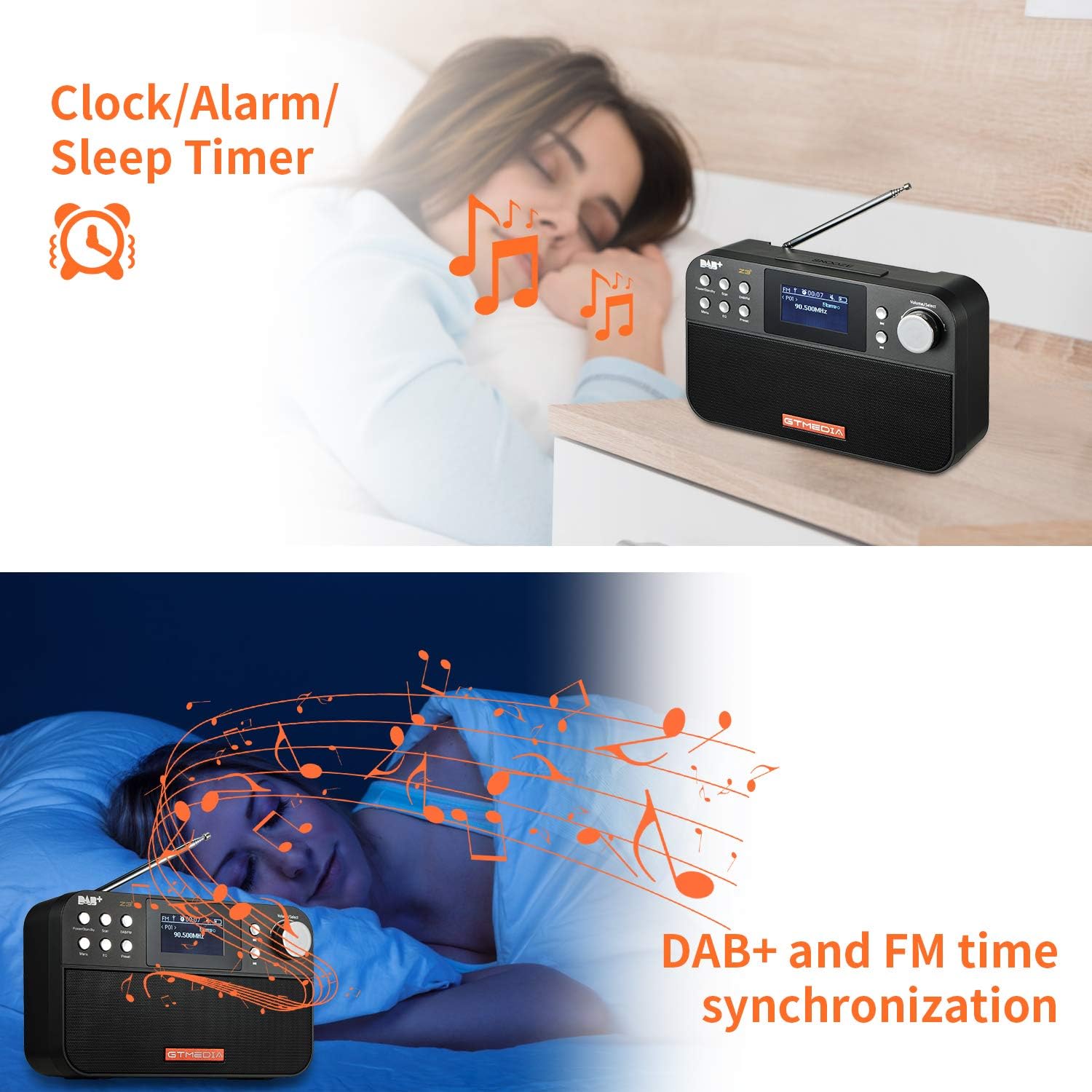
Image: The back of the GTMEDIA Z3 radio, highlighting the 18650 lithium battery compartment and the DC 5V USB charging port.
- 18650 Lithium Battery Compartment: Conté la bateria recarregable.
- DC 5V USB Charging Port: Per carregar el dispositiu.
Guia de configuració
1. Carregant la bateria
- Locate the USB charging port on the rear of the radio.
- Connect the provided USB charging cable to the radio and to a compatible USB power adapter (DC 5V, ≥1500mA) or a computer USB port.
- The battery indicator on the display will show charging status. A full charge typically provides 4-7 hours of operation.
Image: The GTMEDIA Z3 radio's rear panel, illustrating the USB charging port and battery specifications.
2. Engegada inicial i selecció d'idioma
- Manteniu premut el botó Alimentació/espera botó per encendre la ràdio.
- Upon first use, you may be prompted to select a language. Use the Volum/Selecció knob to navigate and press to confirm your choice. English is the default language.
3. Sincronització del temps
The clock can be set manually or synchronized automatically with DAB+ or FM signals.
- Sincronització automàtica: When tuned to a DAB+ or FM station that broadcasts time information, the radio will automatically update its clock.
- Ajust manual: Access the system settings via the Menú button to manually set the time and date.
Instruccions de funcionament
1. Radio Modes (DAB+/FM)
Canvi de modes:
Premeu el botó DAB/FM button to switch between DAB+ and FM radio modes.
Escaneig d'estacions:
- Auto Scan (FM): En mode FM, premeu el botó Escaneja botó per cercar i emmagatzemar automàticament les emissores disponibles.
- Local Scan (DAB+): En mode DAB+, premeu el botó Escaneja button to perform a local scan for DAB+ stations. Manual tuning is also supported.
Estacions preseleccionades:
The radio supports 60 preset stations for both FM and DAB+ (10 quick access presets). To save a station:
- Sintonitza l'emissora desitjada.
- Manteniu premut el botó Preestablert botó.
- Utilitza el Volum/Selecció knob to choose a preset number and press to confirm.
Per recuperar una emissora preestablerta, premeu breument la tecla Preestablert botó i utilitzeu Volum/Selecció botó per seleccionar.
FM RDS Station Name Display:
When tuned to an FM station broadcasting RDS (Radio Data System) information, the 2.4-inch TFT-LCD screen will display the station name and other relevant data.
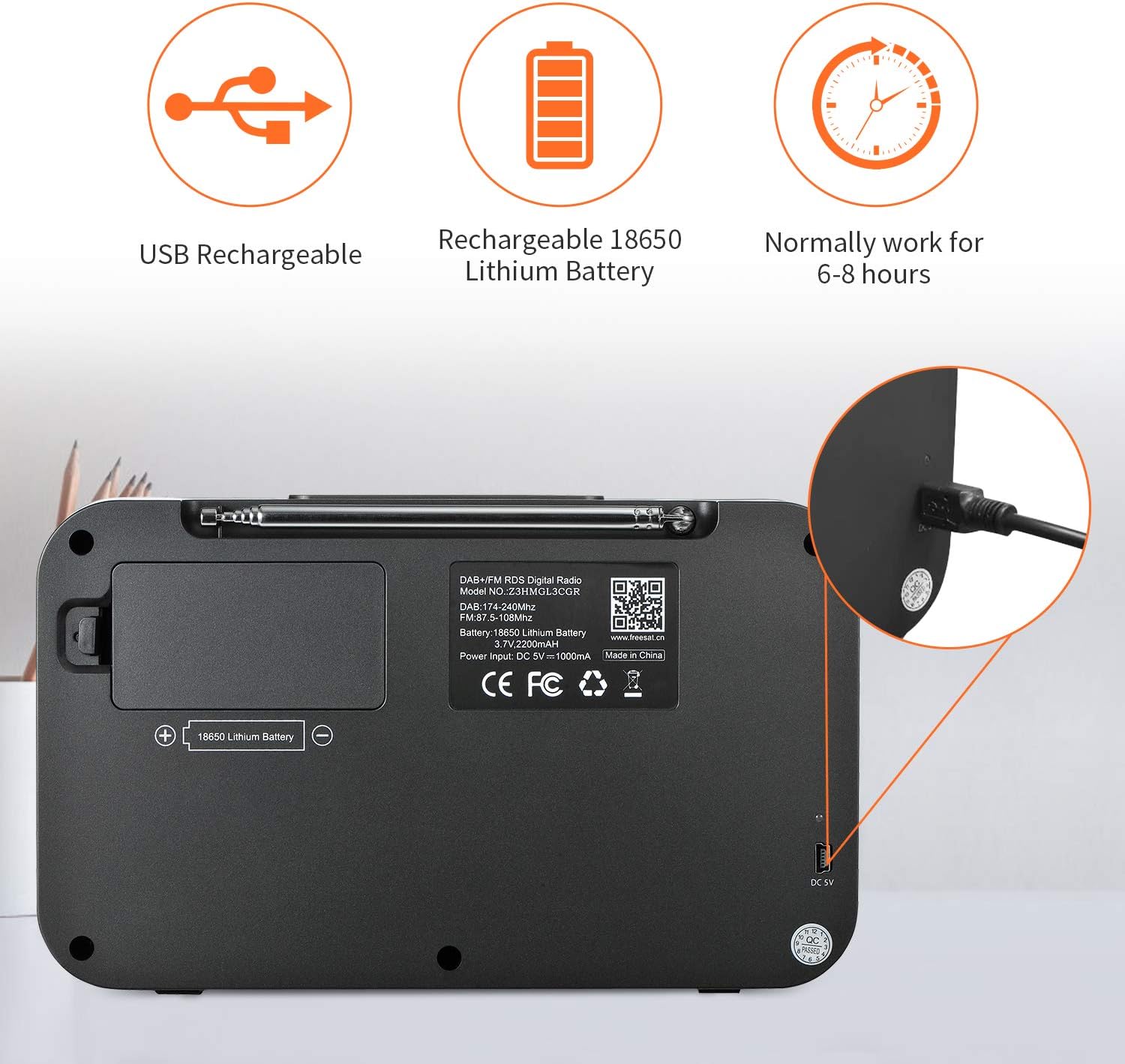
Image: The GTMEDIA Z3 radio's display showing "FM" and "90.500MHz" along with a station name, demonstrating the RDS feature.
2. Clock, Alarm, and Sleep Timer
The GTMEDIA Z3 radio includes integrated clock, alarm, and sleep timer functions for enhanced convenience.

Image: The GTMEDIA Z3 radio with icons representing clock, alarm, and sleep timer functions, depicted in a bedroom setting.
Configuració de l'alarma:
- Premeu el botó Menú button and navigate to the "Alarm" settings.
- Utilitza el Volum/Selecció knob to set the alarm time, duration, and alarm source (e.g., buzzer, DAB+, FM).
- Confirmeu la vostra configuració.
Configuració del temporitzador de repòs:
- Premeu el botó Menú button and navigate to the "Sleep Timer" settings.
- Utilitza el Volum/Selecció knob to choose the desired sleep duration (e.g., 15, 30, 60 minutes).
- La ràdio s'apagarà automàticament després de l'hora establerta.
3. Reproducció de música
The GTMEDIA Z3 supports playback of various music formats including MP3, FLAC, and WAV. Playback modes include single play, repeat, and shuffle. Specific instructions for accessing and controlling music playback are typically found within the device's menu system.
Manteniment
Neteja:
- Netegeu la ràdio amb un drap suau i sec.
- No utilitzeu netejadors líquids ni materials abrasius.
Cura de la bateria:
- Per allargar la durada de la bateria, eviteu descarregar-la completament amb freqüència.
- Carregueu la bateria regularment, fins i tot si la ràdio no s'utilitza amb freqüència.
- Guardeu la ràdio en un lloc fresc i sec quan no la feu servir durant períodes prolongats.
Resolució de problemes
| Problema | Causa possible | Solució |
|---|---|---|
| Sense poder | La bateria està descarregada. | Carregueu la bateria amb el cable USB proporcionat. |
| Mala recepció de ràdio | Senyal feble; antena no estesa. | Extend the telescopic antenna fully. Try repositioning the radio. Perform a new scan for stations. |
| Sense so | Volume too low; Mute activated. | Augmenteu el volum amb el Volum/Selecció knob. Check if mute is active in settings. |
| Pantalla no clara | Brightness setting too low. | Adjust LCD brightness in the system settings. |
Especificacions
| Característica | Detall |
|---|---|
| Marca | GTMEDIA |
| Model | Z3 |
| Tecnologia del sintonitzador | DAB Plus, FM RDS |
| Bandes de ràdio compatibles | DAB+ (174.92-239.20 MHz), FM (87.5-108 MHz) |
| Mostra | 2.4-inch TFT-LCD (240 x 320 pixels) |
| Estacions preseleccionades | 60 FM, 60 DAB+ |
| Font d'alimentació | Funciona amb bateria |
| Tipus de bateria | 18650 Lithium Battery (3.7V 2200mAh) |
| Horari de funcionament | 4-7 hours (typical) |
| Entrada de càrrega | DC 5V, ≥1500mA (via USB) |
| Tecnologia de connectivitat | USB |
| Característica especial | Portable, Clock, Alarm, Sleep Timer, USB Upgradeable |
| Pes de l'article | 620 g |
| Dimensions del producte | 20 x 5 x 12 cm |
| Temperatura de funcionament | 0~+45°C |
| Temperatura d'emmagatzematge | -10~+60°C |
| Formats de música | MP3, FLAC, WAV |

Image: Dimensions of the GTMEDIA Z3 radio, showing approximate measurements of 200mm x 120mm x 50mm.
Actualització del firmware
The GTMEDIA Z3 radio supports firmware upgrades via a USB connection to a PC. For the latest firmware and detailed instructions, please visit the official support weblloc.

Image: The GTMEDIA Z3 radio connected to a laptop via a USB cable, indicating its upgradeable feature.
Garantia i Suport
For technical support, warranty information, or any questions regarding your GTMEDIA Z3 radio, please visit the official GTMEDIA support weblloc: