1. Introducció
The YABER V3 Mini Bluetooth Projector is designed to provide a versatile and high-quality viewing experience for home entertainment and outdoor use. Featuring native 1280x720p resolution with 1080P support, a 6000:1 contrast ratio, and an advanced German LED light source, it delivers clear and accurate images. This projector also includes Bluetooth 5.0 for wireless audio connectivity and supports wireless screen mirroring via Anycast or Chromecast (adapters sold separately).
2. Què hi ha a la caixa
- YABER V3 Mini Bluetooth Projector
- Cable HDMI
- Cable d'alimentació
- Manual d'usuari
- Cable AV
- Drap de neteja de lents
- Comandament a distància (piles no incloses)
3. Característiques del producte
- Native 720P & 1080P Supported: Offers a native resolution of 1280x720 pixels, supporting up to 1080P input for clear images.
- Alta relació de contrast: Features a 6000:1 contrast ratio for enhanced image depth and detail.
- Connectivitat Bluetooth 5.0: Allows wireless connection to Bluetooth headsets, speakers, and Airpods for enhanced audio.
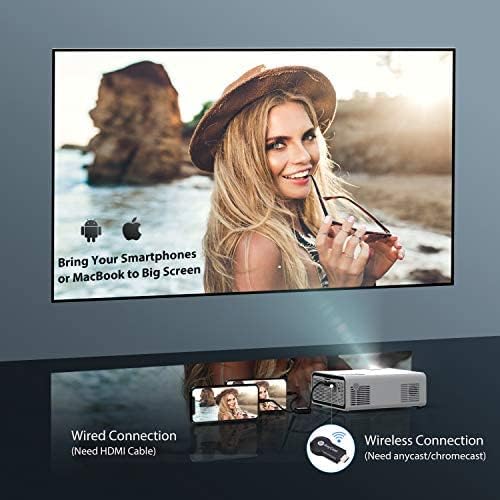
- Mirall de pantalla sense fil: Supports Anycast and Chromecast for mirroring content from smartphones and other devices (adapters required).
- Funció de zoom: Adjusts image size from 100% to 50% using the remote control without moving the projector.
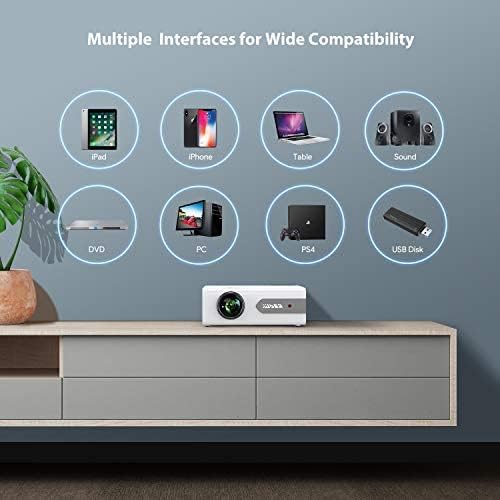
- Múltiples interfícies: Equipped with HDMI, USB, VGA, AV, and Audio ports for wide compatibility with various devices.
- HIFI Stereo Sound: Built-in dual stereo speakers with an SRS sound system provide a good auditory experience.
- Sistema de refrigeració avançat: Designed to minimize lamp power consumption and extend lamp vida útil fins a 100,000 hores.


4. Configuració
4.1 Col·locació inicial
Place the projector on a stable, flat surface or mount it to the ceiling. Ensure there is adequate ventilation around the projector to prevent overheating. The projection distance and screen size can be adjusted based on your viewmedi ambient.

4.2 Connexió d'alimentació
Connect the power cord to the projector's power input and then plug it into a power outlet.
4.3 Encès/Apagat
Premeu el botó d'engegada del projector o del comandament a distància per encendre o apagar la unitat.
5. Instruccions de funcionament
5.1 Correcció de focus i trapezoide
Adjust the focus ring on the projector lens until the image is clear. Use the keystone correction feature (manual or digital, if available) to correct any trapezoidal distortion of the image.
5.2 Selecció de la font d'entrada
Use the 'Source' button on the remote or projector to select the desired input source (HDMI, USB, VGA, AV).
5.3 Connexió Bluetooth
To connect to a Bluetooth audio device:
- Ensure your Bluetooth speaker or headset is in pairing mode.
- Navigate to the Bluetooth settings on the projector.
- Seleccioneu el dispositiu de la llista de dispositius disponibles per emparellar-lo.
- Un cop connectat, l'àudio es reproduirà a través del dispositiu Bluetooth.
Nota: The V3 mini projector supports Bluetooth output devices (speakers, headphones) but does not connect to phones/pads via Bluetooth for mirroring. Turn off Bluetooth when not in use to avoid potential issues.
5.4 Reflex de pantalla sense fil
The YABER V3 supports wireless screen mirroring from iOS and Android devices using an external Anycast or Chromecast dongle (purchased separately). Connect the dongle to an HDMI port and follow the dongle's instructions for mirroring.
5.5 Funció de zoom
To adjust the image size without moving the projector, use the zoom function via the remote control. This allows you to shrink the image from 100% down to 50%.
5.6 Escenaris d'ús
The YABER V3 projector is suitable for various applications:
- Teatre a casa: Enjoy movies and shows on a large screen.
- Jocs: Connect gaming consoles for an immersive experience.
- Outdoor Movies: Perfect for backyard movie nights in dark environments.

6. Manteniment
6.1 Neteja de lents
Regularly clean the projector lens using the provided lens cleaning cloth or a soft, lint-free cloth. Avoid using abrasive cleaners or harsh chemicals.
6.2 Neteja del filtre d'aire
Check and clean the air filter periodically to ensure proper airflow and prevent dust buildup, which can affect performance and lamp vida.
6.3 Lamp La vida
El LED del projector lamp has a lifespan of up to 100,000 hours. Proper maintenance, including adequate ventilation and cleaning, helps maximize its longevity.
7. Solució De Problemes
- Sense imatge:
- Comproveu si el cable d'alimentació està connectat correctament.
- Assegureu-vos que s'ha seleccionat la font d'entrada correcta.
- Verify that the connected device (e.g., TV Stick, PC) is powered on and outputting a signal.
- Adjust focus and keystone.
- Sense so:
- Comproveu la configuració del volum tant al projector com al dispositiu connectat.
- Si feu servir Bluetooth, assegureu-vos que el dispositiu estigui correctament emparellat i connectat.
- If using an external speaker via AUX, ensure the cable is fully inserted.
- Some content (e.g., certain streaming services) may have audio format incompatibilities; try a different source or content.
- Imatge borrosa:
- Ajusteu l'anell d'enfocament de l'objectiu.
- Assegureu-vos que la superfície de projecció sigui plana i que el projector estigui estable.
- Netegeu la lent del projector.
- El control remot no funciona:
- Substituïu les piles del comandament a distància.
- Assegureu-vos que no hi hagi obstacles entre el comandament a distància i el receptor d'infrarojos del projector.
- Sobreescalfament:
- Assegureu-vos que hi hagi una ventilació adequada al voltant del projector.
- Clean the air filter and vents to remove dust.
- Avoid operating in excessively hot environments.
8. Especificacions
| Número de model | V3 |
| Resolució de visualització | Native 1280 x 720 (Supports 1080P) |
| Relació de contrast | 6000:1 |
| Relació d'aspecte | 16:9 / 4:3 |
| Font de llum | LED |
| Lamp La vida | Fins a 100,000 hores |
| Tecnologia de connectivitat | 3.5mm Jack, Bluetooth, HDMI, USB, VGA, AV |
| Versió Bluetooth | 5.0 |
| Dimensions del producte | 8.19 x 6.61 x 3.07 polzades |
| Pes de l'article | 2.2 lliures |
| Usos recomanats | Home Cinema, Gaming, Business (not recommended for professional presentations) |
9. Garantia i Suport
YABER provides a 6-month return policy and 3-year repair service for the V3 Mini Bluetooth Projector. Lifetime professional technical support is also available. For any issues or inquiries, please contact YABER customer service.


