1. Introducció
This user manual provides comprehensive instructions for the setup, operation, and maintenance of your Marantz SR8015 11.2 Channel 8K Ultra HD AV Receiver. Designed for an immersive home theater experience, the SR8015 combines powerful amplification with advanced audio and video technologies.
2. Característiques clau
- Canal 11.2 Amplificació: Delivers 140 Watts per channel for a dynamic and detailed sound experience.
- Suport 8K Ultra HD: Features 8K/60Hz and 4K/120Hz pass-through for stunning visual clarity.
- 3D Audio Formats: Supports Dolby Atmos, DTS:X, IMAX Enhanced, and Auro-3D for immersive surround sound.
- HEOS Built-in: Enables multi-room audio streaming and integration with other HEOS-enabled devices.
- Control de veu: Compatible amb Amazon Alexa i Google Assistant per a un funcionament amb mans lliures.
- Advanced HDMI Connectivity: Equipped with 10 HDMI ports, including a dedicated 8K input and eARC support.
- Auto Eco Mode: Optimizes power consumption without compromising audio quality.
3. Configuració
3.1 Desembalatge
Carefully remove the receiver and all accessories from the packaging. Ensure all components listed in the packing list are present. Retain the packaging for future transport or storage.
3.2 Connexions
Before making any connections, ensure the receiver and all connected devices are powered off and unplugged from the wall outlet.
3.2.1 Connexions d'altaveus
Connect your speakers to the appropriate terminals on the rear panel of the SR8015. Ensure correct polarity (+ to + and - to -) for optimal sound performance. The SR8015 supports an 11.2 channel configuration.
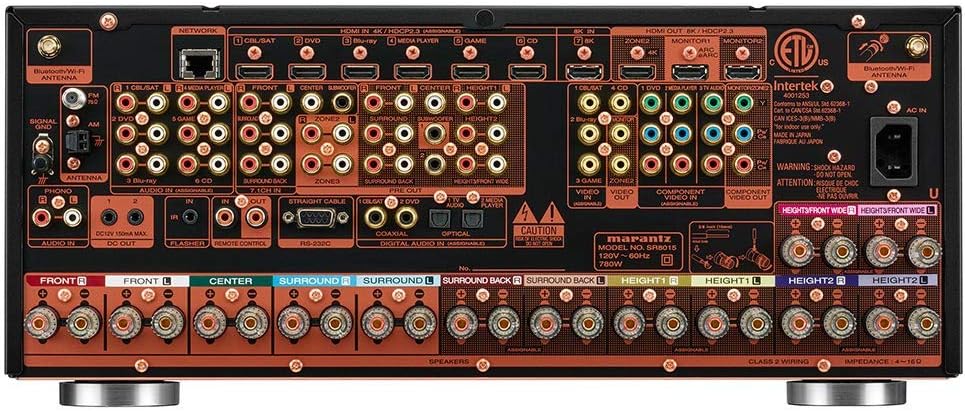
Figure 1: Rear panel connections of the Marantz SR8015, highlighting speaker terminals and various input/output ports.

Figure 2: Detail of the 11 channel speaker terminals, indicating the extensive ampcapacitats de lificació.
3.2.2 Video Connections (HDMI)
Connect your video sources (e.g., Blu-ray player, gaming console, streaming device) to the HDMI input ports on the receiver. Connect the HDMI OUT port to your TV or projector. The SR8015 features a dedicated 8K HDMI input for the latest video formats.

Figure 3: Close-up of the dedicated 8K HDMI input, supporting 8K/60Hz and 4K/120Hz with eARC.
3.2.3 Network and Wireless Connections
For network features and HEOS Built-in functionality, connect the receiver to your home network via an Ethernet cable or Wi-Fi. Ensure the included Wi-Fi/Bluetooth antennas are securely attached to the rear panel.
3.3 Speaker Setup and Calibration
The SR8015 includes Audyssey MultEQ XT32 room correction technology. Use the supplied setup microphone to automatically calibrate your speakers for optimal sound in your listening environment. Follow the on-screen instructions displayed on your TV.
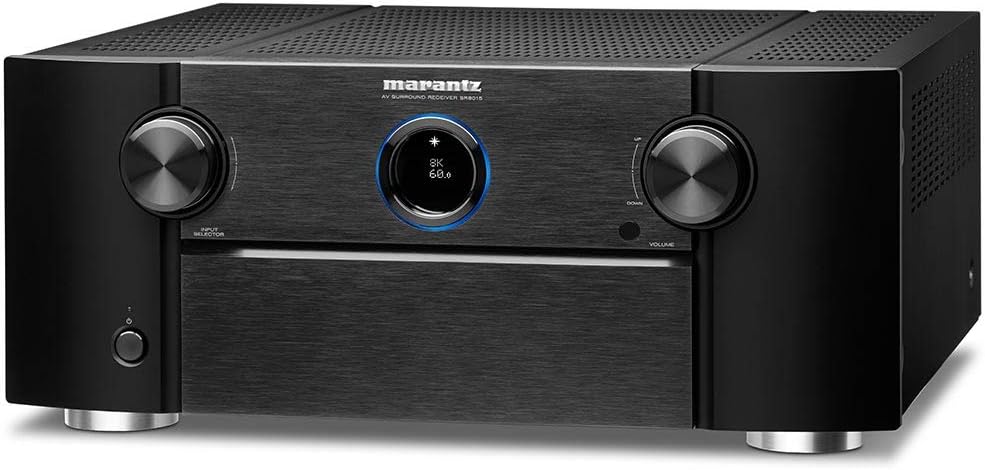
Figura 4: Frontal view of the Marantz SR8015, displaying current video resolution and refresh rate.
4. Instruccions de funcionament
4.1 Funcionament bàsic
Use the front panel controls or the remote control to power on/off the receiver, select input sources, and adjust volume.
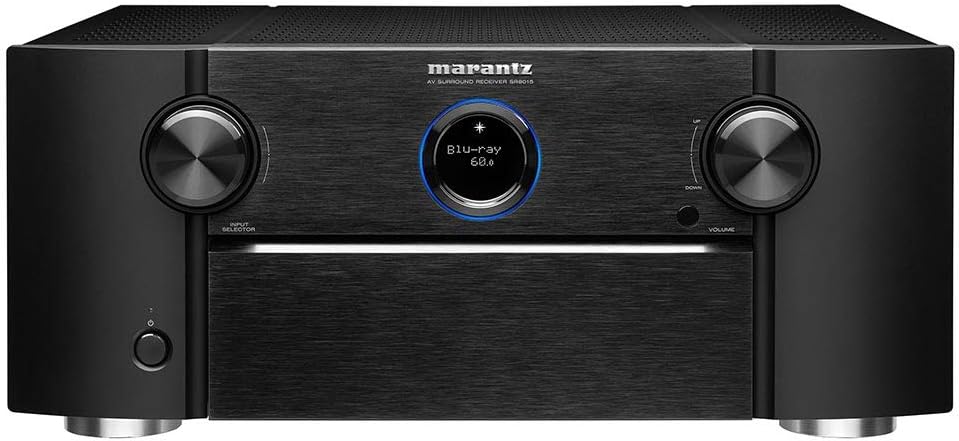
Figure 5: Front panel of the Marantz SR8015, showing input selection and volume knobs, and the display.

Figure 6: Front panel of the Marantz SR8015 with the hidden compartment open, showing additional controls and front inputs.
4.2 Modes i funcions d'àudio
The SR8015 supports various audio modes, including immersive 3D audio formats like Dolby Atmos, DTS:X, IMAX Enhanced, and Auro-3D. These formats provide a multi-dimensional sound experience.

Figure 7: Visual representation of supported 3D audio technologies, enhancing the sound experience.
4.3 Wireless Multi-Room Music Streaming (HEOS Built-in)
Utilize HEOS Built-in to stream music from various online services or your local network to the SR8015 and other HEOS-enabled devices throughout your home. Control HEOS features via the dedicated HEOS app on your smartphone or tablet.

Figure 8: The Marantz SR8015 supports various wireless music streaming services and voice control platforms.
4.4 Control de veu
The SR8015 is compatible with Amazon Alexa and Google Assistant. Connect your preferred voice assistant device to control basic functions like power, volume, and input selection using voice commands.
4.5 Auto Eco Mode
The Auto Eco Mode automatically adjusts power output based on the volume level, optimizing energy consumption without compromising the audio quality. This feature is enabled by default.
5. Manteniment
5.1 Neteja
To clean the receiver, use a soft, dry cloth. Do not use abrasive cleaners or solvents, as they may damage the finish. For stubborn marks, lightly dampen el drap amb aigua i netejar suaument.
5.2 Ventilació
Ensure adequate ventilation around the receiver to prevent overheating. Do not block the ventilation openings on the top, sides, or bottom of the unit. Allow at least 8 inches of clearance above the unit for proper airflow.
6. Solució De Problemes
- Sense so: Check all speaker connections for correct polarity. Ensure the correct input source is selected. Verify that the volume is not muted or set too low.
- Sense imatge: Confirm all HDMI connections are secure. Ensure the correct HDMI input is selected on both the receiver and your display.
- Problemes de connexió de xarxa: Verify your Ethernet cable is properly connected or that Wi-Fi settings are correct. Restart your router and the receiver.
- El control remot no funciona: Comproveu les piles del comandament a distància. Assegureu-vos que no hi hagi cap obstrucció entre el comandament a distància i el sensor d'infrarojos del receptor.
7. Especificacions
| Característica | Detall |
|---|---|
| Número de model | SR8015 |
| Canals | 11.2 |
| Potència de sortida | 140 Watts per channel (8 ohms, 20Hz-20kHz, 0.05% THD, 2ch driven) |
| Suport en vídeo | 8K/60Hz, 4K/120Hz, HDR10+, Dolby Vision, HLG, VRR, ALLM, QFT |
| Formats d'àudio | Dolby Atmos, DTS:X, IMAX Enhanced, Auro-3D, DTS Neural:X, Dolby Surround |
| Entrades/sortides HDMI | 7 In / 3 Out (1 dedicated 8K input) |
| Connectivitat | Wi-Fi, Bluetooth, Ethernet, HEOS Built-in, Apple AirPlay 2 |
| Control de veu | Amazon Alexa, Google Assistant |
| Dimensions (L x P x A) | 18.11 x 17.32 x 7.48 polzades |
| Pes | 34.3 lliures |
8. Vídeos oficials de productes
Marantz SR8015 11.2 Channel AV Receiver Overview
Aquest vídeo ofereix una visió concisaview of the Marantz SR8015 AV Receiver, highlighting its premium 11.2 channel amplification, masterful 8K HDMI connectivity, immersive 3D audio support, wireless multi-room music streaming capabilities, and effortless voice control features.
9. Garantia i Suport
For warranty information and technical support, please refer to the official Marantz website or contact Marantz customer service. Keep your proof of purchase for warranty claims.