Introducció
Thank you for choosing the SENTRY HPXKX50 RGB Gaming Mouse. This high-performance wired gaming mouse is designed to enhance your gaming and computing experience with its precise optical sensor, customizable RGB lighting, and ergonomic design. This manual provides detailed instructions on setting up, operating, maintaining, and troubleshooting your new mouse.
Contingut del paquet
- SENTRY HPXKX50 RGB Gaming Mouse
- Manual d'usuari (aquest document)

Image: The retail packaging for the SENTRY HPXKX50 RGB Gaming Mouse, showing the mouse inside the box with its features highlighted.
Configuració
Follow these simple steps to set up your SENTRY HPXKX50 RGB Gaming Mouse:
- Desempaqueta el ratolí: Carefully remove the mouse and its USB cable from the packaging.
- Connecteu-vos al vostre dispositiu: Locate an available USB port on your computer (PC, Laptop, Mac) or compatible gaming console (PS4/PS5). Insert the USB connector of the mouse into the USB port.
- Instal·lació del controlador: The SENTRY HPXKX50 is a plug-and-play device. Your operating system (Windows, macOS) will automatically detect and install the necessary drivers. No additional software installation is required for basic functionality.
- Verifica la connexió: Once connected, the mouse's RGB lighting will illuminate, indicating a successful connection. You can now move the mouse to test cursor movement.

Imatge: Un primer pla view of the USB connector of the SENTRY HPXKX50 RGB Gaming Mouse, which is used for connecting to a computer.

Image: Icons illustrating the compatibility of the SENTRY HPXKX50 RGB Gaming Mouse with various devices, including laptops, desktop computers, HDTVs, PS4/PS5 consoles, and Mac computers.
En funcionament
The SENTRY HPXKX50 RGB Gaming Mouse offers intuitive operation with its standard buttons and advanced features.
Funcions bàsiques
- Clic esquerre: Botó d'acció principal.
- Clic dret: Botó d'acció secundària, normalment per a menús contextuals.
- Roda de desplaçament: Desplaça el contingut amunt o avall. També es pot prémer per a la funcionalitat de clic amb el botó central.
- Botó DPI: Located behind the scroll wheel, this button allows you to cycle through different DPI (Dots Per Inch) sensitivity settings.
Il·luminació RGB
The mouse features dynamic RGB lighting that illuminates the edges and scroll wheel. The lighting effects are pre-programmed and will cycle automatically, adding an aesthetic appeal to your setup.
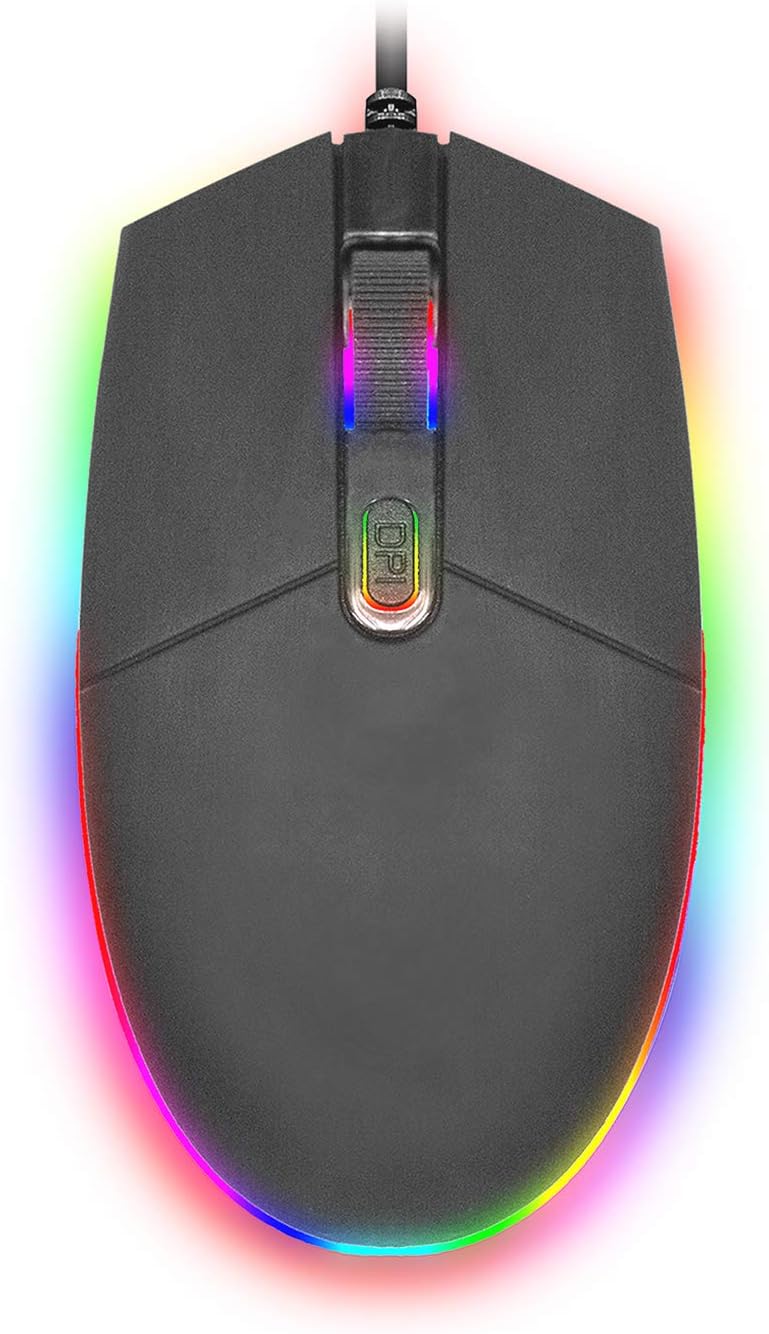
Imatge: Vista de dalt a baix view of the SENTRY HPXKX50 RGB Gaming Mouse, showcasing its vibrant, multi-color RGB lighting along the base and around the scroll wheel.

Imatge: Un professional lateralfile view of the SENTRY HPXKX50 RGB Gaming Mouse, highlighting the illuminated RGB strip along its bottom edge in a dark environment.
Sensibilitat DPI
The HPXKX50 mouse is equipped with a high-precision optical sensor, offering up to 7200 DPI. This allows for highly sensitive and accurate cursor movements, ideal for fast-paced gaming or precise graphic design work. Press the DPI button to switch between sensitivity levels. The mouse is designed for smooth tracking and ultra-high sensitivity.

Image: The SENTRY HPXKX50 RGB Gaming Mouse with an overlay indicating its 7200 DPI high-precision optical sensor, emphasizing its accuracy for gaming.
Manteniment
To ensure the longevity and optimal performance of your SENTRY HPXKX50 RGB Gaming Mouse, follow these maintenance guidelines:
- Neteja: Feu servir un drap suau, sec i sense borrissol per netejar la superfície del ratolí. Per a la brutícia persistent, netegeu lleugeramentampRenta el drap amb aigua. Evita fer servir productes químics agressius, dissolvents o netejadors abrasius.
- Cura del sensor: Keep the optical sensor on the bottom of the mouse clean and free from dust or debris. Use a cotton swab or compressed air to gently clean the sensor area.
- Gestió de cables: Avoid sharp bends or kinks in the USB cable. Store the mouse in a way that prevents the cable from being tangled or stressed. The braided cable is designed for durability.
- Emmagatzematge: Quan no l'utilitzeu durant períodes prolongats, guardeu el ratolí en un lloc fresc i sec, allunyat de la llum solar directa i de temperatures extremes.
Resolució de problemes
If you encounter issues with your SENTRY HPXKX50 RGB Gaming Mouse, refer to the table below for common problems and solutions:
| Problema | Causa possible | Solució |
|---|---|---|
| El ratolí no respon | Connexió USB fluixa, port USB defectuós, problema amb el controlador. | Ensure USB cable is firmly plugged in. Try a different USB port. Restart your computer. |
| El moviment del cursor és erràtic o brusc | Sensor òptic brut, superfície inadequada del coixinet del ratolí. | Clean the optical sensor. Use a clean, uniform mouse pad surface. |
| RGB lighting is off or flickering | Insufficient power from USB port, internal fault. | Try a different USB port, preferably a direct port on the motherboard (for desktops). If the issue persists, contact support. |
| El botó DPI no canvia la sensibilitat | Conflicte de programari, mal funcionament del botó. | Ensure no conflicting mouse software is running. Restart your computer. |
Especificacions
| Característica | Detall |
|---|---|
| Marca | SENTIR |
| Número de model | 50M1-05000 |
| Tecnologia de connectivitat | Cable USB |
| Tecnologia de detecció de moviment | Òptic |
| DPI (punts per polzada) | Fins a 7200 DPI |
| Il·luminació | RGB |
| Color | Negre |
| Plataforma de maquinari | PC |
| Compatibilitat de sistemes operatius | Windows, macOS (Plug & Play) |
| Pes de l'article | 6.4 unces (aprox. 181 g) |
| Dimensions del producte (LxWxH) | 4.75 x 2 x 7.25 polzades (aprox. 12.07 x 5.08 x 18.42 cm) |
| Característica especial | Disseny ergonòmic |
| Fabricant | Venda a l'engròs de cables |
Garantia i Suport
For warranty information and customer support, please refer to the documentation provided with your purchase or visit the official SENTRY or CableWholesale weblloc web. Conserveu el comprovant de compra per a reclamacions de garantia.
For additional assistance, you may contact the manufacturer directly through their official support channels.


