1. Introducció
The Cudy GS1010PE is an 8-Port Gigabit PoE+ Switch designed for reliable network connectivity and power delivery. It features 8 Gigabit PoE+ ports with a total power budget of 120 Watts, capable of delivering up to 30W per port. Additionally, it includes 2 Gigabit uplink ports for data transfer. This switch supports IEEE802.3af and IEEE802.3at standards, ensuring compatibility with a wide range of PoE devices such as IP phones, wired surveillance cameras, and wireless access points. Its plug-and-play design requires no software configuration, making setup simple and efficient.
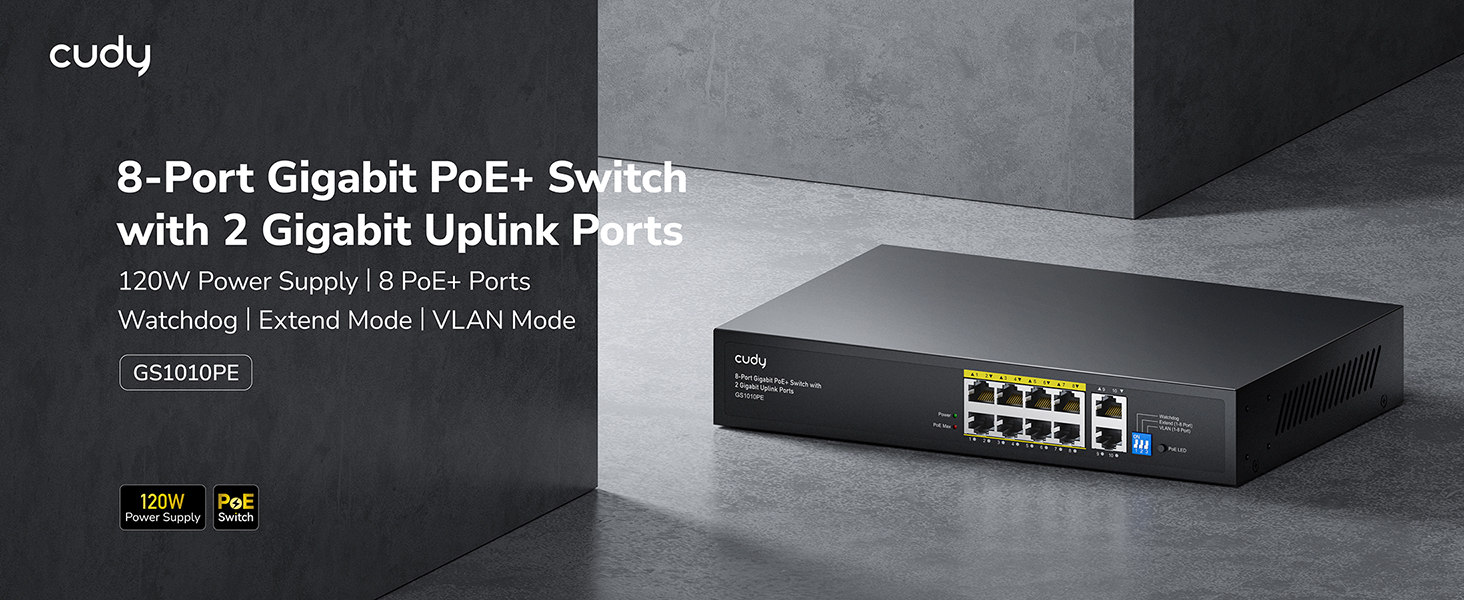
Figure 1: Cudy GS1010PE 8-Port Gigabit PoE+ Switch overview.
2. Què hi ha a la caixa
Verifiqueu que tots els elements siguin presents al paquet:
- Cudy GS1010PE 8-Port Gigabit PoE+ Switch
- Power Adapter (built-in power supply)
- Guia d'instal·lació ràpida

Figure 2: Package contents for the Cudy GS1010PE switch.
3. Configuració
The Cudy GS1010PE switch is designed for plug-and-play operation, requiring no complex software configuration. Follow these steps for basic setup:
- Connectar l'alimentació: Plug the power cable into the switch's power input and then into a standard electrical outlet. The Power LED on the switch should illuminate.
- Connecteu-vos a la xarxa: Connect your router or main network device to one of the 2 Gigabit uplink ports (ports 9-10) using a standard Ethernet cable.
- Connecteu els dispositius PoE: Connect your PoE-compatible devices (e.g., IP cameras, VoIP phones, wireless access points) to any of the 8 PoE+ ports (ports 1-8) using Ethernet cables. The corresponding port LEDs will indicate connectivity and PoE status.

Figure 3: Basic network setup with the Cudy GS1010PE switch.
4. Modes de funcionament i característiques
4.1. Watchdog Function
The Watchdog function continuously monitors the status of connected Power over Ethernet (PoE) devices. If an abnormality is detected on a port, the switch will automatically reset power to that specific port, helping to restore functionality without manual intervention. This ensures stable operation of your PoE devices.
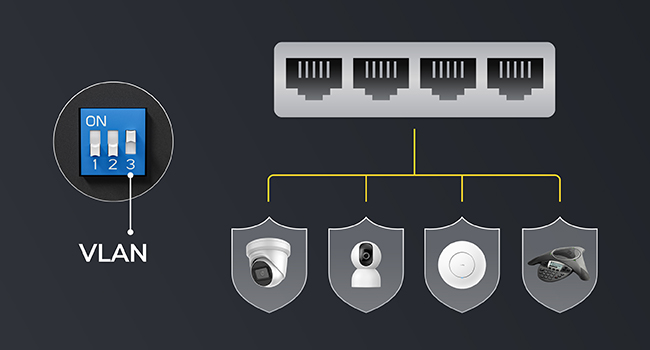
Figure 4: Watchdog function for automatic port restart.
4.2. Mode d'ampliació
Extend Mode allows for longer PoE transmission distances. When enabled, it can extend the maximum distance for PoE devices up to 250 meters (820 feet) at a speed of 10 Mbps per port. When Extend Mode is off, the standard transmission distance is 100 meters at 10/100/1000 Mbps per port. This mode is useful for deployments where devices are located far from the switch.
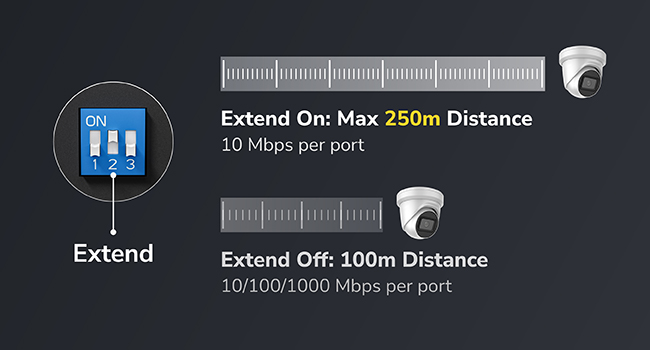
Figure 5: Extend Mode functionality for increased PoE distance.
4.3. Mode VLAN
VLAN Mode allows for the isolation of client devices connected to the switch, enhancing network security. This feature can segment the network traffic, preventing devices on one VLAN from communicating directly with devices on another, which is beneficial for separating surveillance cameras from general network traffic.

Figure 6: VLAN Mode for network segmentation and security.
4.4. PoE+ Compatibility and Power Management
The switch is compatible with both IEEE802.3af PoE (15.4 watts) and IEEE802.3at PoE+ (30 watts) devices. Its auto-sensing technology automatically detects and delivers the appropriate power to connected devices. The total PoE budget is 120 Watts across 8 ports. The intelligent power management system can detect when the power budget is nearing its limit and will automatically remove the least prioritized powered devices to maintain system stability.

Figure 7: PoE Management features including budget warning and intelligent power distribution.

Figure 8: Devices compatible with PoE+ and PoE standards.
5. Especificacions
| Característica | Descripció |
|---|---|
| Número de model | GS1010PE |
| Nombre de Ports | 10 (8 PoE+ ports, 2 Gigabit Uplink ports) |
| Ports PoE+ | 8 (10/100/1000Mbps, IEEE802.3at/af) |
| Ports d'enllaç ascendent | 2 (Gigabit Ethernet, data only) |
| Pressupost PoE total | 120 watts |
| Max Power per PoE Port | 30 watts |
| Velocitat de transferència de dades | 1000 megabits per segon (gigabit) |
| Tipus d'interfície | PoE, RJ45 |
| Material de la caixa | Metall |
| Disseny sense ventiladors | Sí |
| Dimensions del producte | 8.74 x 3.15 x 1.81 polzades |
| Pes de l'article | 0.19 quilograms (6.7 unces) |
| Classificació de temperatura superior | 40 graus centígrads |
6. Manteniment
To ensure optimal performance and longevity of your Cudy GS1010PE switch, consider the following maintenance tips:
- Mantenir net: Regularly clean the exterior of the switch with a soft, dry cloth. Ensure ventilation openings are free from dust and debris to prevent overheating.
- Gestió de cables: Organize network cables to prevent strain on ports and ensure proper airflow around the device.
- Actualitzacions de firmware: Consulteu periòdicament l'oficial de Cudy website for any available firmware updates. Keeping the firmware up-to-date can improve performance, add new features, and enhance security.
- Condicions ambientals: Operate the switch within its specified temperature and humidity ranges to avoid damage.
7. Solució De Problemes
If you encounter issues with your Cudy GS1010PE switch, try the following troubleshooting steps:
- Sense energia: Ensure the power cable is securely connected to both the switch and the electrical outlet. Check if the Power LED is illuminated. If not, try a different outlet.
- Cap enllaç/activitat al port: Verify that the Ethernet cable is securely connected to both the switch port and the connected device. Check the cable for any damage. Ensure the connected device is powered on and functioning correctly.
- El dispositiu PoE no rep alimentació: Confirm that the connected device is PoE-compatible (IEEE802.3af or IEEE802.3at). Check the PoE LED for the specific port; a solid green usually indicates power delivery. If the PoE budget is exceeded, some devices may not receive power (refer to Intelligent Power Management).
- Velocitat de xarxa lenta: Ensure all connected devices and cables support Gigabit speeds for optimal performance. Check if Extend Mode is accidentally enabled, as it limits speed to 10 Mbps.
- Connectivitat intermitent: Check for loose cable connections. The Watchdog function should automatically restart ports with issues, but if problems persist, manually restart the switch by unplugging and replugging the power.
8. Informació de seguretat
Please read and follow these safety guidelines to prevent damage to the device or injury:
- No exposeu el dispositiu a l'aigua ni a una humitat excessiva.
- No intenteu obrir ni reparar el dispositiu vosaltres mateixos. Encarregueu totes les tasques de manteniment a personal qualificat.
- Ensure proper ventilation to prevent overheating. Do not block any ventilation openings.
- Feu servir només l'adaptador de corrent proporcionat o un de recanvi compatible.
- Protegiu el dispositiu de temperatures extremes i de la llum solar directa.

Figure 9: The switch features robust EMC design for surge and ESD protection.
9. Garantia i Suport
This Cudy product is manufactured by Shenzhen Cudy Technology Co., Ltd. For technical support, warranty information, or service inquiries, please visit the official Cudy website or contact their customer support. The product is sold by Cudy and fulfilled by Amazon, ensuring reliable service. While optional protection plans are available for purchase, please refer to the manufacturer's official documentation for standard warranty terms.
10. Vídeos de productes
Cudy GS1010PE Specifications
Aquest vídeo ofereix una visió detalladaview of the specifications for the Cudy GS1010PE 8-Port Gigabit PoE+ Switch.
Need Power? Cudy 10-Port PoE Switch
This video demonstrates the power capabilities and features of a Cudy 10-Port PoE Switch, relevant to understanding the GS1010PE's power delivery.


