1. Producte acabatview
The Kolink KLM-003 is a compact Micro-Tower computer case designed to house Micro ATX motherboards and essential PC components. It features a durable alloy steel construction and is optimized for air cooling. This manual provides detailed instructions for assembly, operation, and maintenance.

Figura 1: Frontal esquerre view of the Kolink KLM-003 Micro-Tower Case, showcasing its minimalist design and front panel ventilation.

Figura 2: Múltiple views of the Kolink KLM-003 case, illustrating the front panel, rear panel with I/O cutouts, and top panel layout.
2. Contingut del paquet
Verifiqueu que tots els elements siguin presents al paquet abans de continuar amb la instal·lació.
- Kolink KLM-003 Micro-Tower Case (1 unit)
- Accessory kit (screws, standoffs, cable ties)
- Manual d'usuari (Aquest document)
3. Configuració i instal·lació
This section guides you through the process of installing your computer components into the Kolink KLM-003 case. Ensure your workspace is clean and static-free. It is recommended to wear an anti-static wrist strap during installation.
3.1 Obertura del cas
- Col·loqueu la caixa sobre una superfície plana i estable.
- Locate the thumbscrews on the rear panel of the case.
- Unscrew the thumbscrews and carefully slide off the side panel(s).

Figura 3: Interior view of the case with the side panel removed, showing the motherboard tray and internal layout.
3.2 Instal·lació de la placa base
The KLM-003 supports Micro ATX motherboards.
- Install the I/O shield provided with your motherboard into the cutout on the rear of the case.
- Align your Micro ATX motherboard with the pre-installed standoffs inside the case.
- Fixeu la placa base amb els cargols adequats del kit d'accessoris.
3.3 Instal·lació de la font d'alimentació
The power supply mounts at the rear of the case.
- Position your ATX power supply in the designated area at the rear of the case.
- Secure it with screws from the accessory kit, ensuring the fan faces the correct direction for optimal airflow (usually downwards or outwards).
3.4 Drive Installation (HDD/SSD)
The case provides bays for storage drives.
- Identify the 3.5-inch and 2.5-inch drive bays.
- Slide your hard drives (HDDs) or solid-state drives (SSDs) into the appropriate bays.
- Secure the drives using screws.

Figure 4: Close-up of the interior, highlighting the drive mounting areas and cable routing options.
3.5 Connexions del panell frontal
Connect the front panel cables to your motherboard. Refer to your motherboard manual for exact pin layouts.
- Botó d'encesa: Connect the "POWER SW" cable.
- Botó de restabliment: Connect the "RESET SW" cable.
- LED d'alimentació: Connect the "POWER LED" cables (+/-).
- LED HDD: Connect the "HDD LED" cable.
- USB 2.0: Connect the USB 2.0 header cable.
- USB 3.0: Connect the USB 3.0 header cable (if available on case and motherboard).
- Àudio: Connect the "HD AUDIO" cable.
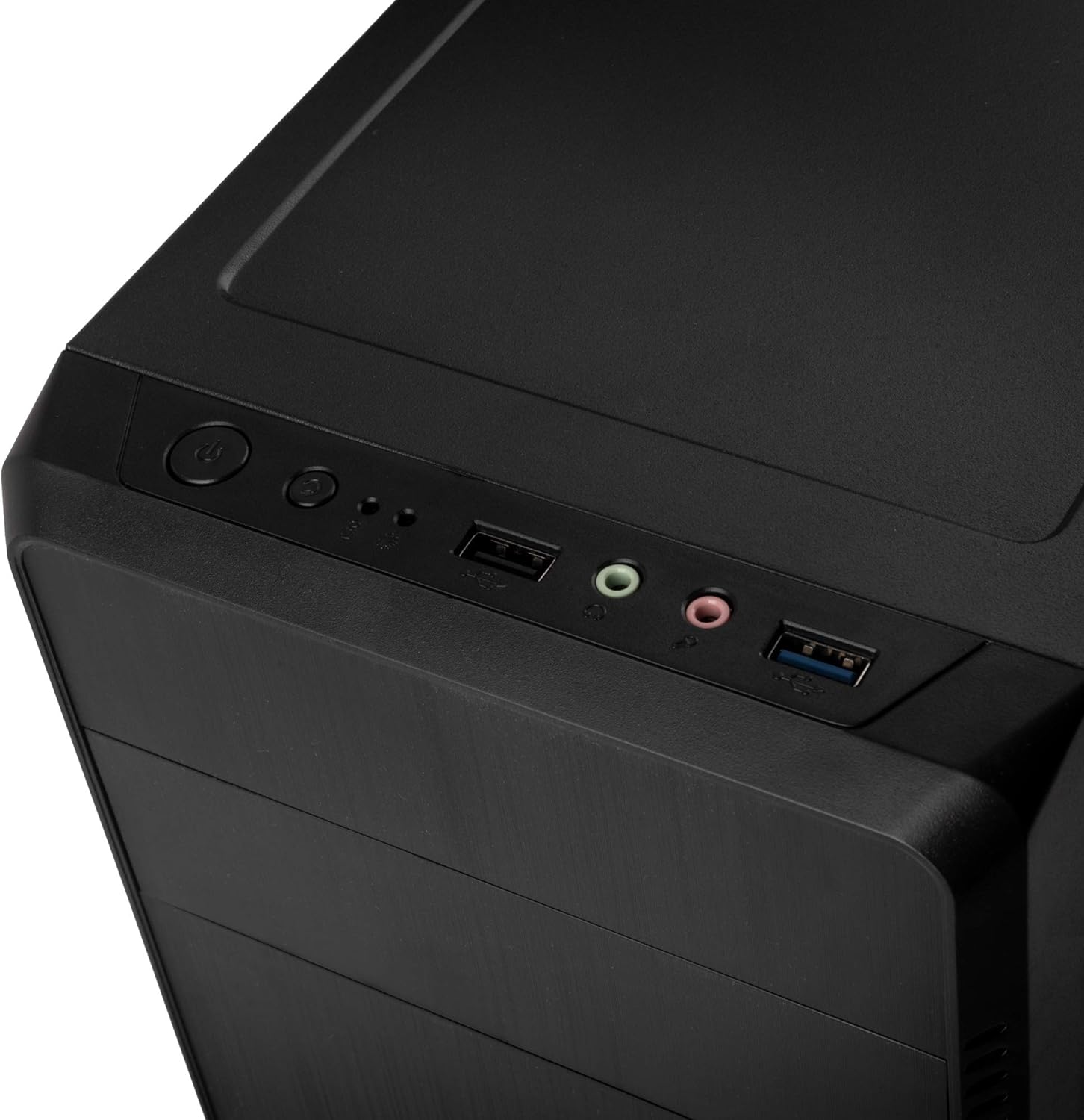
Figure 5: Top front panel with power button, reset button, USB 2.0, USB 3.0, and audio ports for easy access.
4. Instruccions de funcionament
Un cop instal·lats i connectats tots els components, podeu engegar el sistema.
- Ensure all cables are securely connected, both internally and externally (monitor, keyboard, mouse, power cord).
- Connect the power cord to the power supply unit and a wall outlet.
- Press the power button located on the front panel of the case.
- The power LED should illuminate, and your system should begin to boot.
5. Manteniment
Regular maintenance helps ensure optimal performance and longevity of your computer components.
- Neteja de pols: Periodically clean dust from inside the case, especially from fans and heatsinks, using compressed air or a soft brush. Ensure the system is powered off and unplugged before cleaning.
- Neteja exterior: Netegeu l'exterior de la carcassa amb un drap suau iamp drap. Eviteu productes químics agressius o netejadors abrasius.
- Flux d'aire: Ensure adequate airflow around the case. Do not block ventilation openings.
6. Solució De Problemes
Si teniu problemes, tingueu en compte els passos habituals següents per resoldre'ls:
- El sistema no s'encén:
- Comproveu si el cable d'alimentació està connectat correctament tant a la font d'alimentació com a la presa de corrent.
- Ensure the power switch on the power supply unit is in the "ON" position.
- Verifiqueu que el cable del botó d'engegada del panell frontal estigui connectat correctament a la placa base.
- Sense sortida de pantalla:
- Ensure your monitor is connected to the correct video output port on your graphics card or motherboard.
- Check that the graphics card is properly seated in its PCIe slot and has all necessary power cables connected.
- Sobreescalfament:
- Ensure all case fans and CPU cooler fans are spinning correctly.
- Clean any dust buildup from fans and heatsinks.
- Verify that the case has sufficient ventilation.
7. Especificacions
| Nom del model | KLM-003 |
| Marca | ESTIC TRUCANT |
| Tipus de cas | Micro-Tower |
| Compatibilitat amb la placa base | Micro ATX |
| Material | Acer d'aliatge |
| Color | Negre |
| Dimensions (LxWxH) | 14.37 x 7.24 x 13.58 polzades (36.5 x 18.4 x 34.5 cm) |
| Pes de l'article | 5.7 lliures (2.59 kg) |
| Mètode de refrigeració | Aire |
| Fan Size (Rear) | 80 Millimeters (if included/supported) |
| Ports d'E / S frontals | 1x USB 2.0, Audio In/Out, 1x USB 3.0 |
| Muntatge de la font d'alimentació | Muntatge posterior |
Nota: les especificacions estan subjectes a canvis sense previ avís.
8. Informació de seguretat
- Always disconnect the power cord from the wall outlet before opening the case or performing any maintenance.
- Avoid exposing the case to extreme temperatures, humidity, or direct sunlight.
- Keep the case away from liquids and sources of heat.
- Handle internal components with care to prevent damage from electrostatic discharge. Use an anti-static wrist strap if possible.
- Do not attempt to modify the case in ways not described in this manual.
9. Garantia i Suport
For warranty information and technical support, please refer to the official KOLINK weblloc web o poseu-vos en contacte amb el vostre distribuïdor. Conserveu el comprovant de compra per a reclamacions de garantia.
KOLINK Official Weblloc: www.kolink.eu


