Introducció
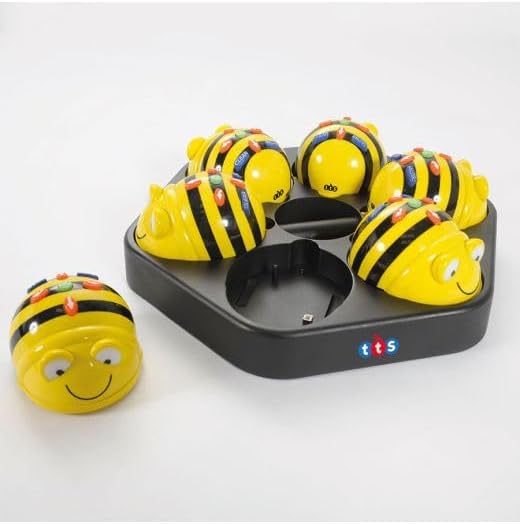
The TTS Bee-Bot & Blue-Bot Rechargeable Docking Station is designed to keep your coding robots powered and organized. This solution is ideal for classrooms, coding clubs, and STEM enthusiasts, allowing you to charge and store up to six Bee-Bots or Blue-Bots simultaneously. Its lightweight and wall-mountable design offers flexibility in placement, while the upgraded USB charging system provides convenient power-ups without requiring a mains cable.
Què hi ha a la caixa
- 1 x Estació d'acoblament
- 1 x cable USB
Note: Bee-Bots and Blue-Bots are NOT included.
Instruccions de configuració
- Connecteu el cable USB: Insert the included USB cable into the designated USB port on the docking station.
- Connecteu-vos a la font d'alimentació: Connecteu l'altre extrem del cable USB a un adaptador de corrent USB compatible (no inclòs) o al port USB d'un ordinador.
- Place Robots for Charging: Gently place your rechargeable Bee-Bots or Blue-Bots into the individual charging slots on the docking station. Ensure each robot is correctly seated for proper contact and charging.


Instruccions de funcionament
- Càrrega automàtica: Once placed correctly in the slots, your rechargeable Bee-Bots or Blue-Bots will begin charging automatically.
- Temps de càrrega: A full charge typically takes approximately half a day (around 4 hours).
- Durada de la bateria: A fully charged robot provides up to 4 hours of continuous use.
- Emmagatzematge: The docking station serves as an organized storage solution for up to six robots, keeping them tidy and ready for use.
- Muntatge a la paret: The lightweight design allows for easy wall-mounting, helping to save desk space and improve convenience.

Manteniment
To ensure optimal performance and longevity of your docking station, keep it clean and free from dust. Use a soft, dry cloth to wipe down the surface. Avoid using abrasive cleaners or solvents, as these may damage the finish. Ensure the charging contacts are free from debris for efficient charging.
Troubleshooting (FAQs)
- Can I charge non-rechargeable Bee-Bots with this docking station?
No, this docking station is designed only for rechargeable Bee-Bots and Blue-Bots. Non-rechargeable versions will not be compatible. - How long does it take to charge the bots fully?
The docking station can fully charge your bots in half a day (approximately 4 hours of charging time). - Does the docking station come with a mains cable?
No, the latest version has been upgraded to USB charging, making it more convenient and versatile. A USB cable is included in the package, but the robots themselves are sold separately.
Especificacions
| Característica | Detall |
|---|---|
| Marca | TTS |
| Model | EL00358 |
| Dispositius compatibles | Rechargeable Bee-Bot and Blue-Bot robots |
| Capacitat de càrrega | Up to 6 robots simultaneously |
| Interfície de càrrega | USB |
| Temps de càrrega complet | Approximately 4 hours (half a day) |
| Usage Time (per charge) | Fins a 4 hores d'ús continu |
| Disseny | Portable, lightweight, wall-mountable |
| Color | Negre |
Garantia i Suport
For warranty information, technical support, or any product-related inquiries, please refer to the documentation provided with your purchase or contact TTS directly through their official weblloc web o canals d'atenció al client. Conserveu el comprovant de compra per a reclamacions de garantia.


