Introducció
This manual provides comprehensive instructions for the NETUM NT-1698W Wireless Barcode Scanner. It covers setup, operation, maintenance, and troubleshooting to ensure optimal performance of your device. The NT-1698W offers both 2.4G wireless and USB wired connectivity for versatile use with computers and laptops.
Contingut del paquet
Si us plau, verifiqueu que tots els elements siguin presents al paquet:
- NETUM NT-1698W Barcode Scanner
- Suport ajustable
- Càrrega USB/Cable de dades
- 2.4G Wireless USB Receiver
- Manual d'usuari (aquest document)

Imatge: The NETUM NT-1698W barcode scanner assembled with its adjustable stand, alongside the USB charging/data cable and the 2.4G wireless USB receiver.

Imatge: The NETUM NT-1698W barcode scanner in handheld mode, with the USB cable and 2.4G wireless receiver displayed.
Configuració
1. Càrrega de l'escàner
Before first use, fully charge the scanner. Connect the USB charging cable to the scanner's charging port and the other end to a USB power adapter or a computer's USB port. The indicator light will show charging status.
2. Modes de connexió
The NT-1698W supports two connection modes: 2.4G Wireless and USB Wired.

Imatge: Illustration of the two connection methods: wireless via a 2.4GHz USB receiver and wired via a USB cable.
2.1. Connexió sense fil 2.4G
- Insert the 2.4G wireless USB receiver into an available USB port on your computer.
- Turn on the barcode scanner. It will automatically attempt to pair with the receiver.
- A successful connection is indicated by a specific sound or light pattern on the scanner.

Imatge: Visual representation of the scanner's wireless range, showing effective distances for indoor and outdoor use.
2.2. Connexió amb cable USB
- Connect the USB cable directly from the scanner to a USB port on your computer.
- The scanner will be recognized as a HID keyboard device and will function immediately without driver installation.
3. Muntatge del suport
The adjustable stand allows for hands-free scanning. Attach the scanner to the flexible arm of the stand, ensuring it is securely fastened. Adjust the angle as needed for comfortable operation.

Imatge: The adjustable stand component, designed to hold the barcode scanner for hands-free operation.
Instruccions de funcionament
1. Escaneig bàsic
Point the scanner's laser beam at the barcode you wish to scan. Press the trigger button. A successful scan will typically be indicated by a beep and the data appearing in your active application (e.g., a text editor, spreadsheet, or POS software).
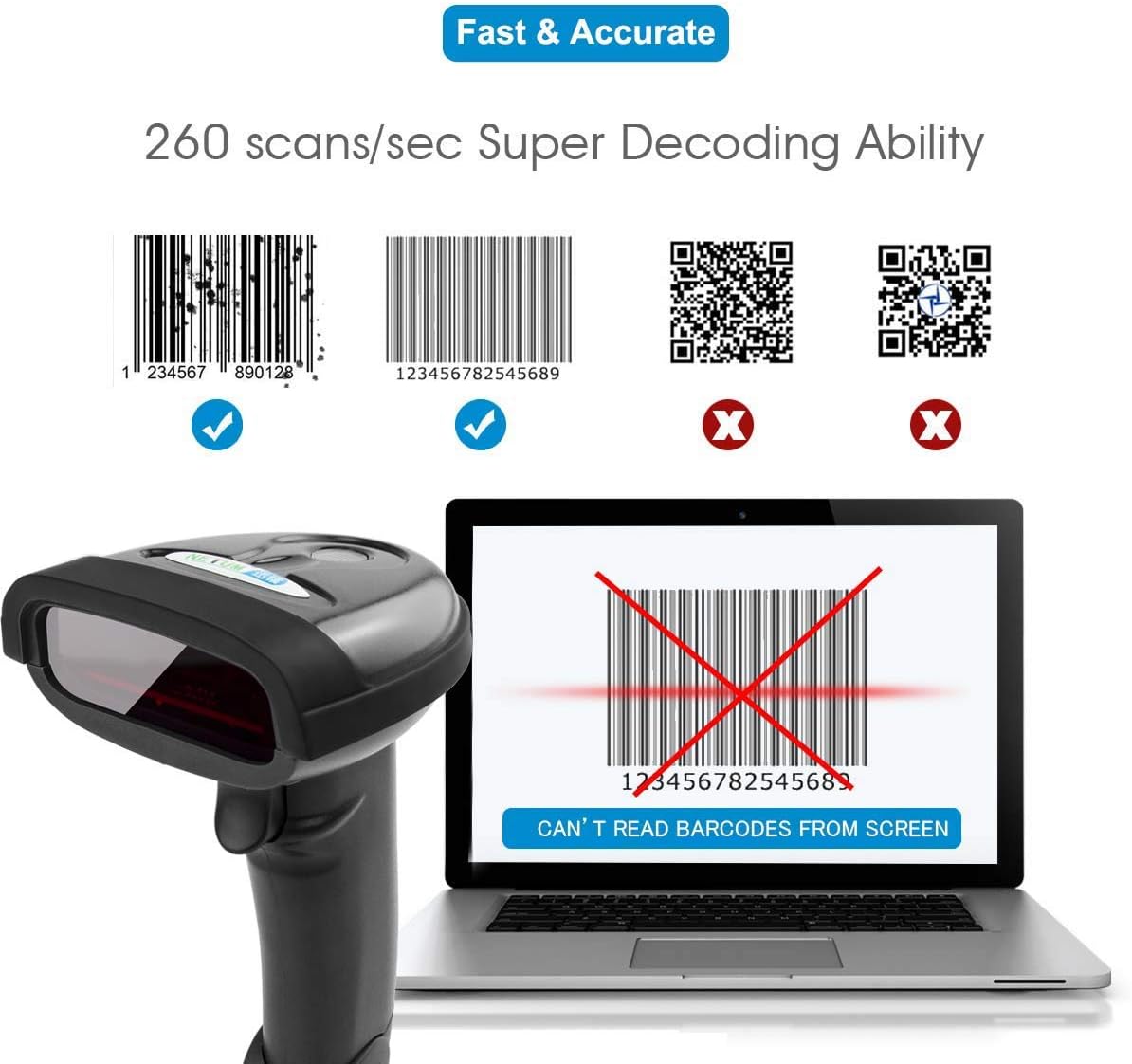
Imatge: This scanner is designed for 1D barcodes, demonstrating its capability to read common 1D formats like Code 128 and EAN-13 at a high speed. It does not support 2D barcodes such as QR codes or Data Matrix.
2. Upload Modes
The NT-1698W supports two data upload modes:
- Mode de càrrega instantània: Scanned data is transmitted to the connected device immediately. This is the default mode.
- Collection Upload Mode (Storage Mode): Scanned data is stored in the scanner's internal memory. You can upload the collected data in batches later by scanning a specific command barcode (refer to the full programming guide for details).

Imatge: Explanation of the scanner's two data upload modes: storing data for batch upload or transmitting it instantly, highlighting the wireless range for instant uploads.
3. Advanced Barcode Programming
The scanner can be configured using special programming barcodes to customize its behavior, including:
- Prefix & Suffix Settings: Add custom characters before or after scanned data.
- Insert/Delete Characters: Modify the scanned data by inserting or deleting specific characters at designated positions.
- Other settings such as volume, sleep time, and symbology enablement/disablement.
Refer to the complete programming manual (usually a separate document or available online) for a full list of configuration barcodes and instructions.

Imatge: The scanner in use, demonstrating its advanced programming capabilities such as adding prefixes/suffixes and modifying characters within scanned data.
Manteniment
- Neteja: Use a soft, dry cloth to clean the scanner's exterior. For the scanning window, use a lens cleaning cloth to avoid scratches. Do not use abrasive cleaners or solvents.
- Emmagatzematge: Guardeu l'escàner en un lloc fresc i sec, allunyat de la llum solar directa i de temperatures extremes.
- Cura de la bateria: To prolong battery life, avoid fully discharging the battery frequently. Charge the scanner regularly, even if not in constant use.
Resolució de problemes
| Problema | Causa possible | Solució |
|---|---|---|
| L'escàner no llegeix codis de barres. |
|
|
| No data transmitted to computer. |
|
|
| Scanner beeps but no data appears. |
|
|
Especificacions
| Característica | Detall |
|---|---|
| Model | NT-1698W |
| Connectivitat | 2.4G sense fil, USB per cable |
| Tipus d'escaneig | 1D Laser Barcode Reader |
| Velocitat d'escaneig | Fins a 260 escanejos/segon |
| Dispositius compatibles | Desktop, Laptop (Windows, macOS) |
| Font d'alimentació | Rechargeable Battery, Corded Electric (via USB) |
| abast sense fils | Up to 50m (164ft) indoors, 100m (330ft) outdoors (barrier-free) |
| ASIN | B08DCXLXTR |
Garantia i Suport
NETUM products typically come with a standard manufacturer's warranty. Please refer to the warranty card included with your product or visit the official NETUM weblloc web per obtenir informació detallada sobre els termes i condicions de la garantia.
For technical support, troubleshooting assistance, or inquiries regarding your NETUM NT-1698W barcode scanner, please contact NETUM customer service through their official weblloc web o la informació de contacte que es proporciona a l'embalatge del producte.


