1. Introducció
Thank you for choosing the Walfront Q1 True-RMS Digital Multimeter. This device is designed for accurate measurement of various electrical parameters, including AC/DC voltage, AC/DC current, resistance, and temperature. It also features continuity and diode test functions. This manual provides essential information for safe and effective operation of your multimeter.
2. Informació de seguretat
Please read all safety warnings and operating instructions carefully before using this product. Failure to follow these instructions may result in electric shock, fire, or serious injury.
- Do NOT exceed the maximum input values stated in the specifications for any measurement function.
- In current mode, diode mode, continuity mode, or temperature mode, DO NOT apply power to the circuit being tested.
- DO NOT use the product if the batteries or battery cover are not properly installed.
- Turn the product off and remove the test leads from the test points before changing batteries or fuses.
- El volum d’entradatage must NOT exceed 36 V DC or 25 V AC when in the current measurement setting.
- Always ensure the correct function and range are selected before making a measurement.
- Tingueu precaució quan treballeu amb voltagper sobre de 30 V CA RMS, 42 V pic o 60 V CC. Aquests voltagsuposen un risc de xoc.
3. Producte acabatview
The Walfront Q1 Digital Multimeter is a compact and versatile tool for electrical measurements. It features a large digital display with an analog bar graph, auto-ranging capabilities, and various measurement functions.

Figura 3.1: Davant view of the Walfront Q1 True-RMS Digital Multimeter, showing the display, function buttons, and input jacks.

Figura 3.2: The Walfront Q1 Digital Multimeter accompanied by its various accessories, including test leads, temperature probe, and storage case.
3.1 Components
- Pantalla digital: Shows measurement values, units, and function indicators. Includes an analog bar graph.
- Botons de funció: For selecting measurement modes, range, data hold, and other features.
- Preses d'entrada: Terminals for connecting test leads (COM, VΩHz, mA, µA).
- Cables de prova: Red and black leads for connecting to circuits.
- Sonda de temperatura: For temperature measurements.
- Estoig d'emmagatzematge: For protecting and carrying the multimeter and its accessories.
4. Configuració
4.1 Instal·lació de la bateria
The multimeter requires batteries for operation. Ensure the device is powered off and test leads are disconnected before proceeding.
- Localitzeu el compartiment de la bateria a la part posterior del multímetre.
- Utilitzeu un tornavís per obrir la tapa de la bateria.
- Insert the required batteries, observing correct polarity (+ and -).
- Substituïu la tapa de la bateria i fixeu-la amb el cargol.

Figura 4.1: View of the battery compartment on the back of the multimeter, showing where batteries are inserted.
5. Instruccions de funcionament
5.1 Encès/Apagat
- To power on the multimeter, press the red power button.
- To power off, press and hold the red power button for more than 2 seconds. The device also features an auto-power-off function to conserve battery life.
5.2 General Measurement Steps
- Connect the black test lead to the 'COM' input jack.
- Connect the red test lead to the appropriate input jack for your measurement (e.g., 'VΩHz' for voltage/resistance, 'mA' or 'µA' for current).
- Select the desired measurement function using the function buttons. The multimeter features auto-ranging, which automatically selects the correct measurement range.
- Connecteu els cables de prova al circuit o component que voleu mesurar.
- Read the measurement value on the digital display.
5.3 Funcions de mesura específiques
- VoltagMesura (CA/CC): Seleccioneu el voltage function. Connect leads in parallel with the circuit. The multimeter can accurately measure AC and DC voltage.
- Mesura de corrent (CA/CC): Select the current function (mA or µA). Connect leads in series with the circuit. Precaució: Ensure the circuit is de-energized before connecting leads for current measurement.
- Mesura de la resistència: Select the resistance function. Connect leads across the component. Ensure the component is isolated from power.
- Mesura de la temperatura: Select the temperature function (often labeled °C/°F). Connect the temperature probe to the appropriate input jacks. Place the probe in contact with the object whose temperature is to be measured.
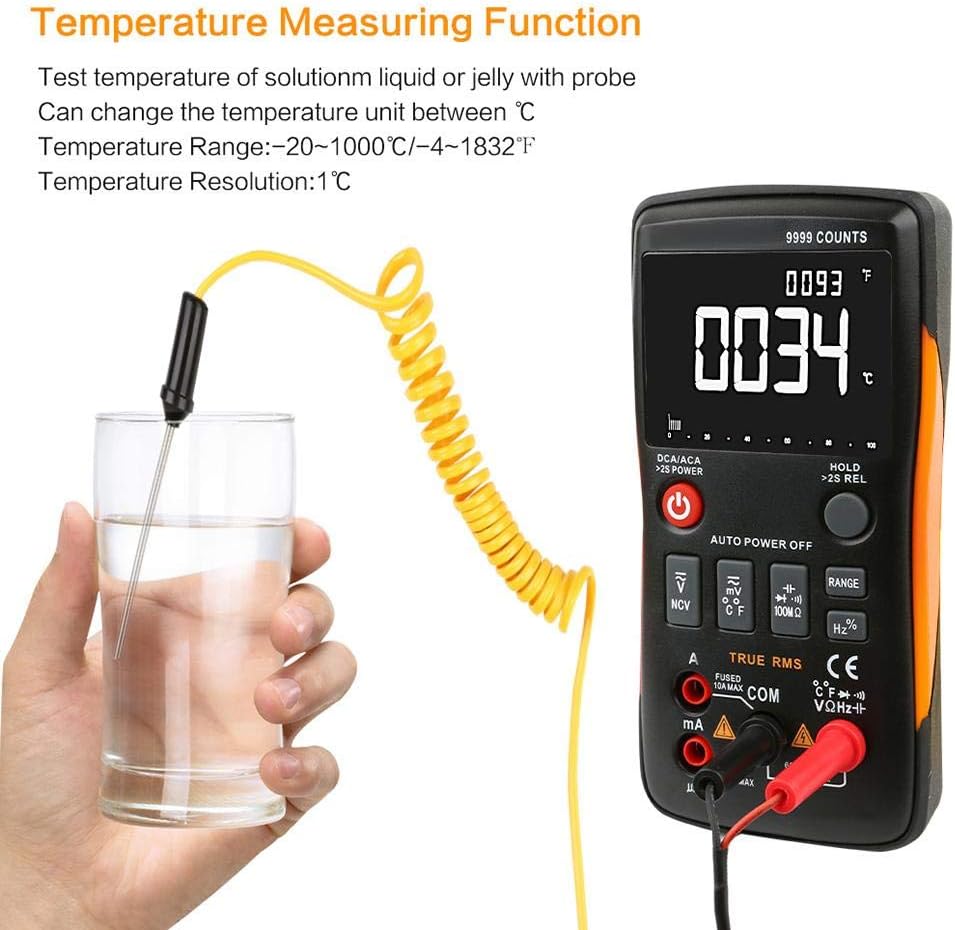
Figura 5.1: The multimeter displaying a temperature reading while the probe is immersed in a liquid, demonstrating its temperature measurement capability.
- Prova de continuïtat: Select the continuity function. The multimeter will emit an audible tone if a continuous path exists (low resistance).
- Prova de díode: Select the diode function. Connect leads across the diode to measure its forward voltage gota.

Figura 5.2: A technician using the Walfront Q1 Digital Multimeter to test an electrical component, highlighting its practical application.
5.4 característiques addicionals
- Conservació de dades: Premeu el botó «HOLD» per congelar la lectura actual de la pantalla. Premeu-lo de nou per alliberar-lo.
- Retenció màxima: Some models may offer a maximum hold function to capture the highest reading. Refer to the specific button labels on your device.
- Il·luminació de fons: The display backlight can be activated for better visibility in low-light conditions.
6. Manteniment
6.1 Neteja
Netegeu el multímetre casing amb anunciamp cloth and mild detergent. Do not use abrasives or solvents. Ensure the device is dry before use.
6.2 Substitució de la bateria
When the low battery indicator appears on the display, replace the batteries as described in Section 4.1. Always use the specified battery type.
6.3 Canvi de fusibles
If the current measurement function stops working, the fuse may need replacement. Refer to the safety warnings regarding fuse replacement. Only replace with a fuse of the specified type and rating.
7. Solució De Problemes
- Sense pantalla: Comproveu la instal·lació de la bateria i el nivell de càrrega. Canvieu les bateries si cal.
- Lectures incorrectes: Ensure test leads are properly connected to the correct input jacks and the correct function is selected. Verify the circuit is properly connected.
- Sense mesura de corrent: Check the fuse. Replace if blown.
- 'OL' or 'OVERLOAD' on Display: The measured value exceeds the selected range. The auto-ranging feature should typically handle this, but if it persists, ensure the input is within the device's maximum specifications.
8. Especificacions
| Especificació | Valor |
|---|---|
| Marca | Walfront |
| Número de model | Walfrontq0gb3sz4rt |
| Font d'alimentació | Funciona amb bateria |
| Estil | Digital |
| Pes de l'article | 400 grams (14.1 unces) |
| Dimensions de l'article (L x A x A) | 5.71 x 2.87 x 1.18 polzades |
| Tipus de mesura | Multimeter (True-RMS) |
| Classificació de temperatura superior | 40 Degrees Celsius (approx.) |
| Mostra els recomptes | 9999 recomptes |
| Rang automàtic | Sí |
| Retenció de dades | Sí |
| Llum de fons | Sí |
9. Garantia i Suport
For warranty information and technical support, please refer to the documentation included with your purchase or contact Walfront customer service directly. Keep your purchase receipt for warranty claims.
