Introducció
This manual provides comprehensive instructions for setting up, operating, maintaining, and troubleshooting your Mercusys MR50G AC1900 Dual-Band Wi-Fi 5 Router. The MR50G is designed to deliver high-speed wireless connectivity with AC1900 speeds, Gigabit Ethernet ports, and advanced features like MU-MIMO and Beamforming.

Imatge: Frontal view of the Mercusys MR50G router, illustrating its dual-band capabilities with 5GHz (1300 Mbps) and 2.4GHz (600 Mbps) speeds.
Guia de configuració
1. Contingut del paquet
Comproveu que el vostre paquet contingui els elements següents:
- Mercusys MR50G AC1900 Dual-Band Wi-Fi 5 Router
- Adaptador d'alimentació
- Cable Ethernet
- Quick Installation Guide (User Guide)
2. Connexió física
Seguiu aquests passos per connectar el vostre encaminador:
- Apagar: Desconnecteu l'alimentació del mòdem i del router (si escau).
- Connect Modem to Router: Connect one end of the provided Ethernet cable to the WAN port (usually blue) on your MR50G router and the other end to your modem's Ethernet port.
- Connectar dispositius (opcional): For wired connections, connect your computer or other devices to the LAN ports (yellow) on the MR50G router using Ethernet cables.
- Encès: Connect the power adapter to the router's power port and plug it into a power outlet. Power on your modem, then power on the MR50G router.
- Wait for Indicators: Wait for the router's LED indicators to stabilize. The Power LED should be solid green.
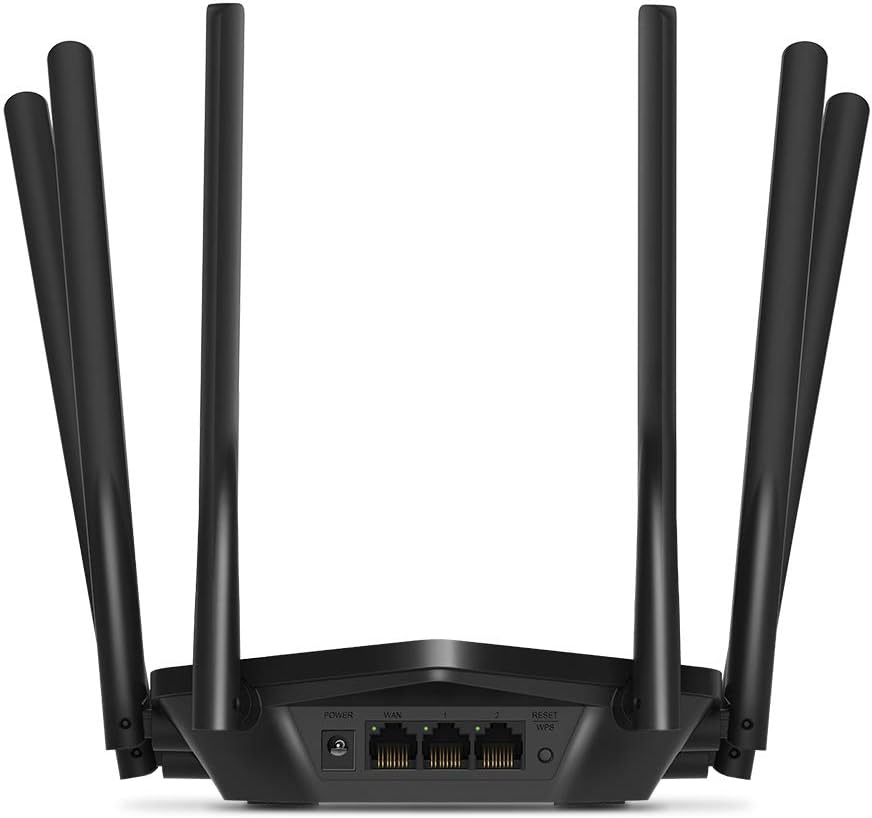
Imatge: Part posterior view of the Mercusys MR50G router, illustrating the power input, WAN port (blue), and three LAN ports (yellow) for wired connections, along with the Reset/WPS button.
3. Configuració Inicial
Per configurar el vostre encaminador per primera vegada:
- Connecta't a Wi-Fi: Connect your computer or mobile device to the router's default Wi-Fi network (SSID and password are typically printed on a label on the bottom of the router).
- Accés Web Interfície: Obre a web navegador i tipus
mwlogin.netor192.168.1.1a la barra d'adreces. - Crea una contrasenya d'inici de sessió: Follow the on-screen instructions to create a login password for the router's management page.
- Segueix la configuració ràpida: The Quick Setup wizard will guide you through basic internet and wireless settings.
Instruccions de funcionament
1. Configuració bàsica del Wi-Fi
Després d'iniciar sessió a web interfície:
- Nom de la xarxa (SSID): Navigate to the Wireless settings to change your Wi-Fi network names (SSIDs) for both 2.4 GHz and 5 GHz bands.
- Contrasenya: Set a strong, unique password for your Wi-Fi networks. The MR50G supports WPA3 for enhanced security.
- Tipus de seguretat: It is recommended to use WPA2-PSK/WPA3-Personal for optimal security.
2. Dual-Band Operation
The MR50G operates on two frequency bands:
- 2.4 GHz: Proporciona una cobertura més àmplia i una millor penetració a través de les parets, adequada per a l'ús general d'Internet i dispositius més antics.
- 5 GHz: Offers faster speeds and less interference, ideal for bandwidth-intensive activities like 4K streaming and online gaming, but with a shorter range.
You can configure separate SSIDs for each band or use Smart Connect to combine them into a single SSID, allowing the router to automatically assign devices to the optimal band.
3. Access Point Mode
To use the MR50G as an Access Point (AP) to extend an existing wired network:
- Connectar: Connect an Ethernet cable from your existing router's LAN port to one of the MR50G's LAN ports (not the WAN port).
- Configurar: Log into the MR50G's web interface, navigate to the Operation Mode settings, and select "Access Point Mode". Follow the prompts to complete the setup.
4. Funcions avançades
- MU-MIMO: Multi-User, Multiple-Input, Multiple-Output technology allows the router to communicate with multiple devices simultaneously, improving network efficiency.
- Formació de feixos: Focuses Wi-Fi signals towards connected devices, enhancing signal strength and range.
- Suport VPN: The router supports VPN functionality, allowing for secure remote access or connection to VPN services. Refer to the router's web interface for specific VPN client/server configurations.
- Controls parentals: Manage and restrict internet access for specific devices or users.
- Xarxa de convidats: Crea una xarxa Wi-Fi separada per als convidats, mantenint la teva xarxa principal segura.
Manteniment
1. Actualitzacions de firmware
Regularly check for and install firmware updates to ensure optimal performance, security, and access to new features. Firmware updates can typically be found in the router's web interface under System Tools or Advanced settings.
2. Restabliment del router
If you encounter persistent issues or forget your login password, you may need to reset the router to its factory default settings:
- With the router powered on, press and hold the Reset/WPS button on the back panel for approximately 5-10 seconds until the LED indicators flash.
- Release the button and wait for the router to restart. All settings will be restored to factory defaults.
3. Col·locació òptima
For the best Wi-Fi coverage and performance:
- Place the router in a central location in your home or office.
- Avoid placing it near obstructions like thick walls, metal objects, or large appliances (microwaves, refrigerators) that can interfere with Wi-Fi signals.
- Elevate the router if possible, as Wi-Fi signals tend to spread downwards.

Image: Mercusys MR50G router positioned on a table, demonstrating a typical placement for optimal signal distribution within a living space.
Resolució de problemes
1. Sense accés a Internet
- Comproveu les connexions: Assegureu-vos que tots els cables Ethernet estiguin connectats correctament als ports correctes (WAN a mòdem, LAN a dispositius).
- Reinicieu els dispositius: Apagueu i reinicieu el mòdem, després l'encaminador i, finalment, els dispositius connectats.
- Comproveu el LED de la WAN: Verify that the WAN LED on the router is lit, indicating a connection to the modem.
- Estat del proveïdor d'Internet: Poseu-vos en contacte amb el vostre proveïdor de serveis d'Internet (ISP) per confirmar que no hi ha cap servei fora de servei.tagés a la teva zona.
2. Velocitats Wi-Fi lentes
- Col·locació del router: Ensure the router is placed optimally (refer to "Optimal Placement" section).
- Interferència: Allunyeu el router d'altres dispositius electrònics que puguin causar interferències.
- Selecció de la banda: For speed-critical applications, ensure your device is connected to the 5 GHz band.
- Optimització de canals: En el router web interface, try changing the Wi-Fi channel for both 2.4 GHz and 5 GHz bands to a less congested one.
- Firmware: Assegureu-vos que el firmware del vostre encaminador estigui actualitzat.
3. Cannot Access Router Management Page
- Adreça IP: Assegureu-vos que esteu utilitzant l'adreça correcta (
mwlogin.netor192.168.1.1). - Connexió per cable: Try accessing the page from a computer connected directly to the router via an Ethernet cable.
- Esborra la memòria cau del navegador: Esborra el teu web la memòria cau i les galetes del navegador o proveu un altre navegador.
- Tallafocs/Antivirus: Desactiveu temporalment qualsevol tallafocs o programari antivirus de l'ordinador que pugui estar bloquejant l'accés.
- Restableix l'encaminador: If all else fails, perform a factory reset (refer to "Resetting the Router" section).
Especificacions
| Model | MR50G (EU) |
| Estàndards sense fil | IEEE 802.11a / b / g / n / ac |
| Freqüència | 2.4 GHz i 5 GHz (doble banda) |
| Velocitat de dades | AC1900 (600 Mbps a 2.4 GHz, 1300 Mbps a 5 GHz) |
| Ports Ethernet | 1 port WAN Gigabit, 3 ports LAN Gigabit |
| Antenes | 6x Fixed Omni-Directional Antennas |
| Seguretat | WPA-PSK / WPA2-PSK / WPA3-Personal |
| Dimensions (L x P x A) | 15.72 x 17.56 x 4.5 cm |
| Pes | 450 g |
| Característiques especials | MU-MIMO, Beamforming, Access Point Mode, VPN Support, Parental Controls, Guest Network |
| Entrada de potència | 100-240V ~ 50/60Hz |
Garantia i Suport
Mercusys products come with a limited warranty. For detailed warranty information, please refer to the warranty card included with your product or visit the official Mercusys weblloc.
For technical support, firmware updates, and additional resources, please visit the Mercusys support weblloc web. Normalment hi podeu trobar informació de contacte i preguntes freqüents.
Official Mercusys Weblloc: www.mercusys.com