Introducció i mésview
The Technical Pro H502URBT is a versatile digital hybrid amplifier designed to deliver powerful and clear audio performance. It integrates a preamp tuner, USB and SD card playback, Bluetooth connectivity, and FM radio, making it suitable for a wide range of audio applications from home entertainment to professional setups. This manual provides detailed instructions for setting up, operating, and maintaining your amplificador per garantir un rendiment i una longevitat òptims.

Figura 1: Frontal view of the H502URBT Ampmés viu.

Figura 2: posterior view of the H502URBT Amplifier, showing connections.
Característiques clau
The H502URBT amplifier is equipped with a comprehensive set of features to enhance your audio experience:
- Sortida d'alta potència: Potència màxima de 3500 watts per a un so potent.
- Múltiples entrades d'àudio: RCA (2 audio sources), USB, SD Card, MP3 (3.5mm) for diverse connectivity.
- Sortides versàtils: Banana binding post (4 speakers), push button (surround sound speakers), RCA (record line, preamp, 2 mono to subwoofer), Headphone (3.5mm).
- Digital Media Playback: Reproducció .mp3, .wav, .wma files from USB drives and SD Cards (max 32GB).
- iPod/iPhone Compatibility: USB input allows direct connection for iPods.
- Funció d'enregistrament: Registres .wav files onto USB Flash Drive or SD Card from Tuner & RCA inputs (128 kbps / 44.1 KHz samptaxa de ling).
- Connectivitat Bluetooth: Features Bluetooth v2.0 with EDR (2.4 GHz) for wireless connection to A2DP stereo Bluetooth devices, with a range of 30 feet.
- Integrated Tuner: AM/FM digital tuner.
- Entrades de micròfon: Dual 1/4'' mic inputs with independent volume, echo, bass, and treble controls.
- Controls d'àudio: Bass, treble, and balance controls, separate gain control for preamp and subwoofer outputs.
- Visualització: Digital FL readout with spectrum display.
- Comoditat: Built-in Speaker selector, cooling speed fan, removable rack-mount brackets, wireless remote included.
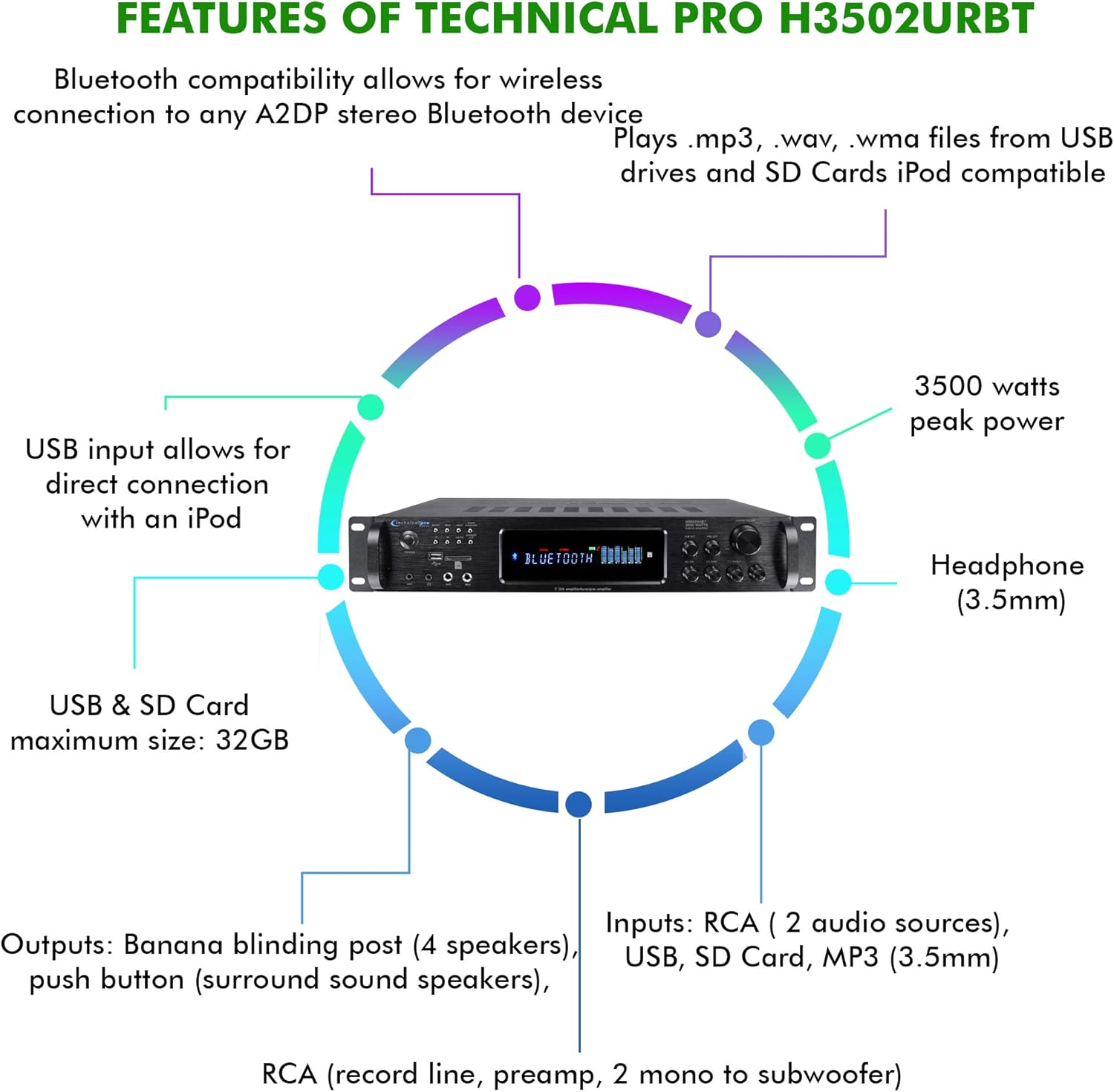
Figure 3: Key features and connectivity options.
Físic acabatview
Controls i indicadors del panell frontal
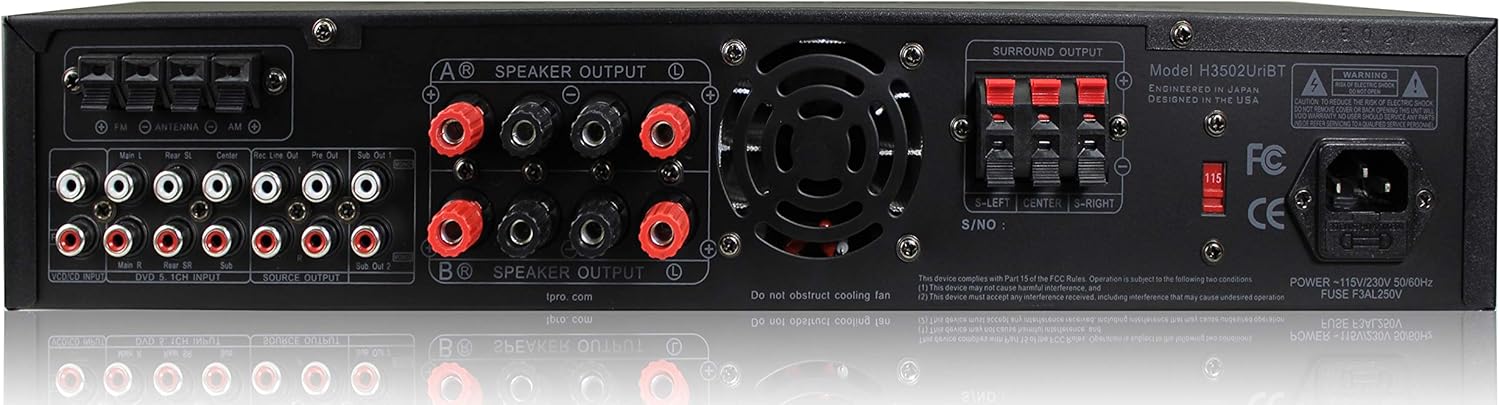
Figure 4: Front Panel Layout.
- Botó d'encesa: Encén o apaga la unitat.
- Selector d'entrada: Cycles through RCA, USB, SD, MP3, Bluetooth, and FM inputs.
- Ranures per a targetes USB/SD: Per reproduir mitjans files from USB drives and SD cards.
- Entrada MP3 (3.5 mm): Connecteu dispositius d'àudio externs.
- Sortida d'auriculars (3.5 mm): Per a una escolta privada.
- Microphone Inputs (1/4''): Connecteu fins a dos micròfons.
- Mic Volume/Echo/Bass/Treble Controls: Adjust microphone audio.
- Volum mestre: Controla el volum de sortida general.
- Bass/Treble/Balance Controls: Adjust audio tone and channel balance.
- Lectura digital FL: Displays current status, track information, and spectrum analysis.
Connexions del panell posterior
Figura 5: Connexions del panell posterior.
- RCA Audio Inputs (L/R): Connect external audio sources like CD players, DVD players, or other audio devices.
- Sortides d'altaveu (connector banana): Connect main speakers.
- Surround Sound Speaker Outputs (Push Button): Connecteu els altaveus de so envoltant.
- RCA Record Line Output: Per connectar-se a un dispositiu de gravació.
- RCA Preamp Sortida: Per connectar-se a una alimentació externa ampmés viu.
- RCA Subwoofer Outputs (Mono): Connect to powered subwoofers.
- Entrada d'antena FM: Connecteu l'antena FM inclosa per a la recepció de ràdio.
- Entrada d'alimentació: Connecteu el cable d'alimentació de CA.
Configuració
1. Connexió dels altaveus
- Assegureu-vos el ampl'amplificador està apagat i desendollat de la presa de corrent.
- Connect your main speakers to the "SPEAKER OUTPUT" banana binding posts on the rear panel. Ensure correct polarity (red to red, black to black).
- If using surround sound speakers, connect them to the "SURROUND OUTPUT" push button terminals, observing polarity.
- For powered subwoofers, connect them to the "SUB OUT" RCA outputs.
2. Connexió de fonts d'àudio
- For external audio devices (e.g., CD player, TV), connect their RCA audio outputs to the "RCA INPUT" jacks on the rear panel.
- For portable devices, use the 3.5mm MP3 input on the front panel.
- Per a unitats USB o targetes SD, inseriu-les a les ranures respectives del panell frontal.
- Connect the FM antenna to the "FM ANTENNA" terminal for radio reception.
3. Connexió d'alimentació
- Un cop fetes totes les connexions d'àudio i altaveus, connecteu amplifier's power cord into a standard AC power outlet.
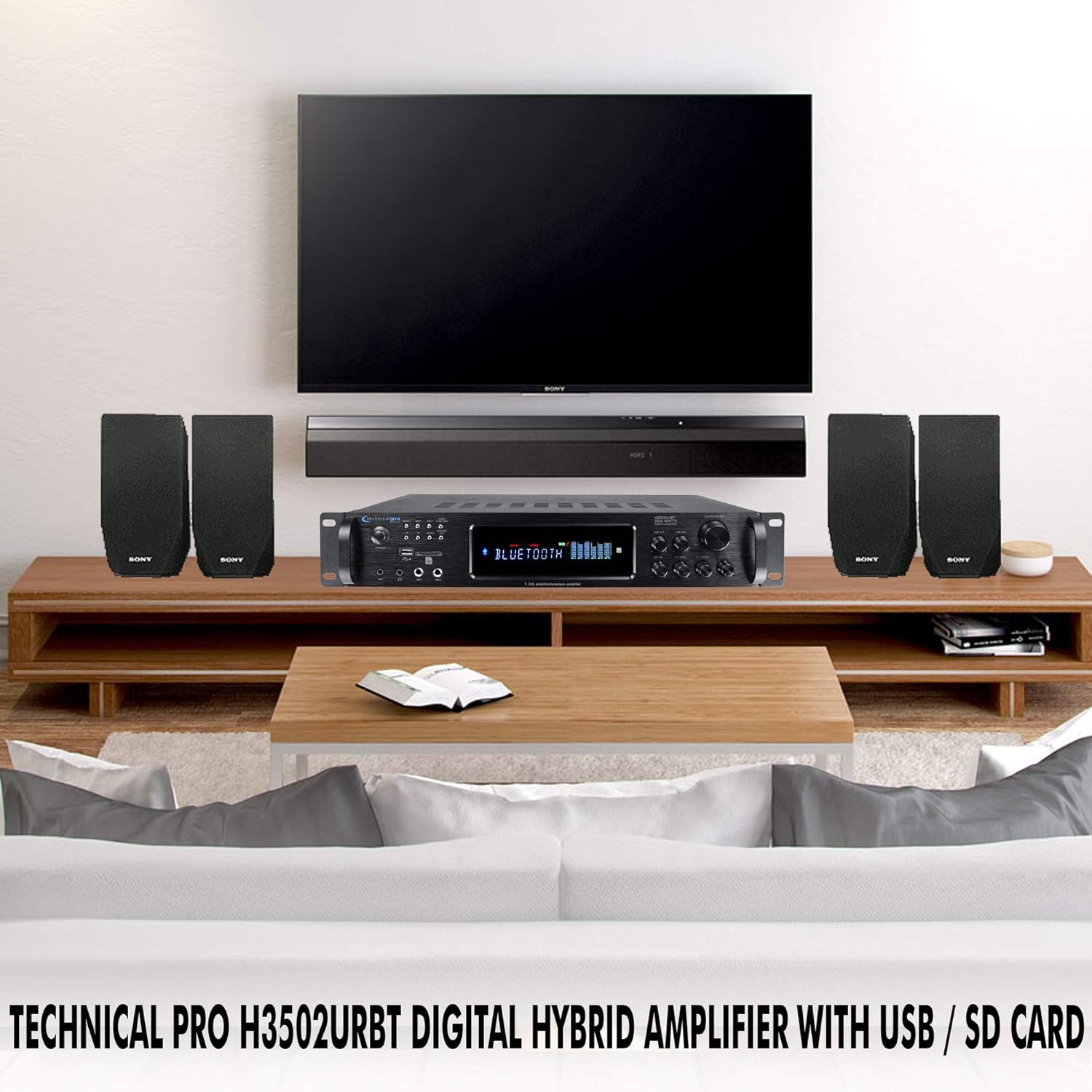
Figura 6: Example of a typical home audio setup.
Instruccions de funcionament
1. Encendre/apagar
Premeu el botó PODER button on the front panel or the remote control to turn the ampactivar o desactivar el lificador. La pantalla digital s'il·luminarà quan la unitat estigui engegada.
2. Selecció d'entrada
Premeu el botó ENTRADA button on the front panel or the remote control to cycle through the available audio sources: RCA, USB, SD, MP3, Bluetooth, and FM. The selected input will be displayed on the digital readout.
3. Funcionament Bluetooth
- Seleccioneu el Bluetooth input using the Input Selector.
- Al dispositiu amb Bluetooth (per exemple, un telèfon intel·ligent o una tauleta), activeu el Bluetooth i cerqueu els dispositius disponibles.
- Select "Technical Pro H502URBT" from the list of devices to pair.
- Once paired, you can stream audio wirelessly from your device to the ampmés viu.
4. Reproducció USB/SD
- Insert a USB flash drive or SD card (up to 32GB) containing .mp3, .wav, or .wma files a la ranura corresponent del panell frontal.
- Seleccioneu el USB or SD entrada.
- El amplifier will automatically begin playing the media. Use the playback controls (Play/Pause, Next/Previous Track) on the front panel or remote. Track title, number, and elapsed time will be displayed.
5. Ús del micròfon
- Plug 1/4'' microphones into the MIC1 or MIC2 inputs on the front panel.
- Ajusteu el MIC VOL, MIC ECO, MIC BASS, i MIC TREBLE knobs to achieve the desired sound.
6. Funció d'enregistrament
El amplifier can record audio from the Tuner or RCA inputs directly to a connected USB flash drive or SD card as .wav files. To record, ensure a USB drive or SD card is inserted, select the desired input source, and initiate recording via the appropriate control (refer to the full manual for specific recording button location if not explicitly labeled).
7. Tone and Volume Controls
Utilitza el MÀSTER VOLUM knob to adjust the overall sound level. The BASS, AGUTS, i EQUILIBRI knobs allow you to fine-tune the audio output to your preference.
Manteniment
Un manteniment adequat garanteix la longevitat i el rendiment òptim del vostre ampmés viu.
- Neteja: Disconnect the power before cleaning. Use a soft, dry cloth to wipe the exterior of the unit. Do not use liquid cleaners or aerosol sprays, as they may damage the finish or internal components.
- Ventilació: Assegureu-vos que les obertures de ventilació de la amplifier are not blocked. Adequate airflow is crucial to prevent overheating.
- Emmagatzematge: Si guardeu la unitat durant un període prolongat, guardeu-la en un lloc fresc i sec, allunyat de la llum solar directa i de temperatures extremes.
Resolució de problemes
Si teniu problemes amb el vostre amplifier, consulteu els següents problemes i solucions habituals:
| Problema | Causa possible | Solució |
|---|---|---|
| Sense poder | Power cord not securely connected; Power outlet not active; Unit fuse blown. | Check power cord connection; Test outlet with another device; Consult a qualified technician for fuse replacement. |
| Sense sortida de so | Entrada incorrecta seleccionada; cables d'altaveu solts o connectats incorrectament; volum massa baix; funció de silenci activa. | Select correct input; Check all speaker connections and polarity; Increase Master Volume; Ensure unit is not muted. |
| Bluetooth no connectat | Amplifier not in Bluetooth mode; Device too far; Device already paired with another unit. | Assegureu-vos amplifier is on Bluetooth input; Move device closer; Disconnect device from other Bluetooth connections and try again. |
| Problemes de reproducció amb USB/SD | Sense suport file format; USB/SD card corrupted; Card size exceeds 32GB. | Assegureu-vos files are .mp3, .wav, or .wma; Try a different USB/SD card; Use a card within the 32GB limit. |
| So distorsionat | Volume too high; Speaker impedance mismatch; Poor cable connection. | Reduce volume; Ensure speakers match amplifier impedance; Check all audio cable connections. |
Especificacions
Detailed technical specifications for the Technical Pro H502URBT Digital Hybrid Ampmés viu:
| Característica | Detall |
|---|---|
| Potència màxima | 3500 watts |
| Dimensions del producte | 19.1 x 14 x 18 polzades |
| Pes de l'article | 14.9 lliures |
| Número de model | H502URBT |
| Tecnologia de connectivitat | RCA, Bluetooth, USB |
| Tipus de controlador | Android (compatible) |
| Dispositius compatibles | Speaker, iPod, iPhone |
| Mode de sortida d'àudio | Mono (for subwoofer), Stereo |
| Configuració del canal de so envoltant | 7.2 Channel up conversion |
| Mida màxima de la targeta USB i SD | 32 GB |
| Format d'enregistrament | .wav (128 kbps / 44.1 KHz) |
| Versió Bluetooth | v2.0 with EDR |
| Interval Bluetooth | 30 peus |
| Color | Negre |
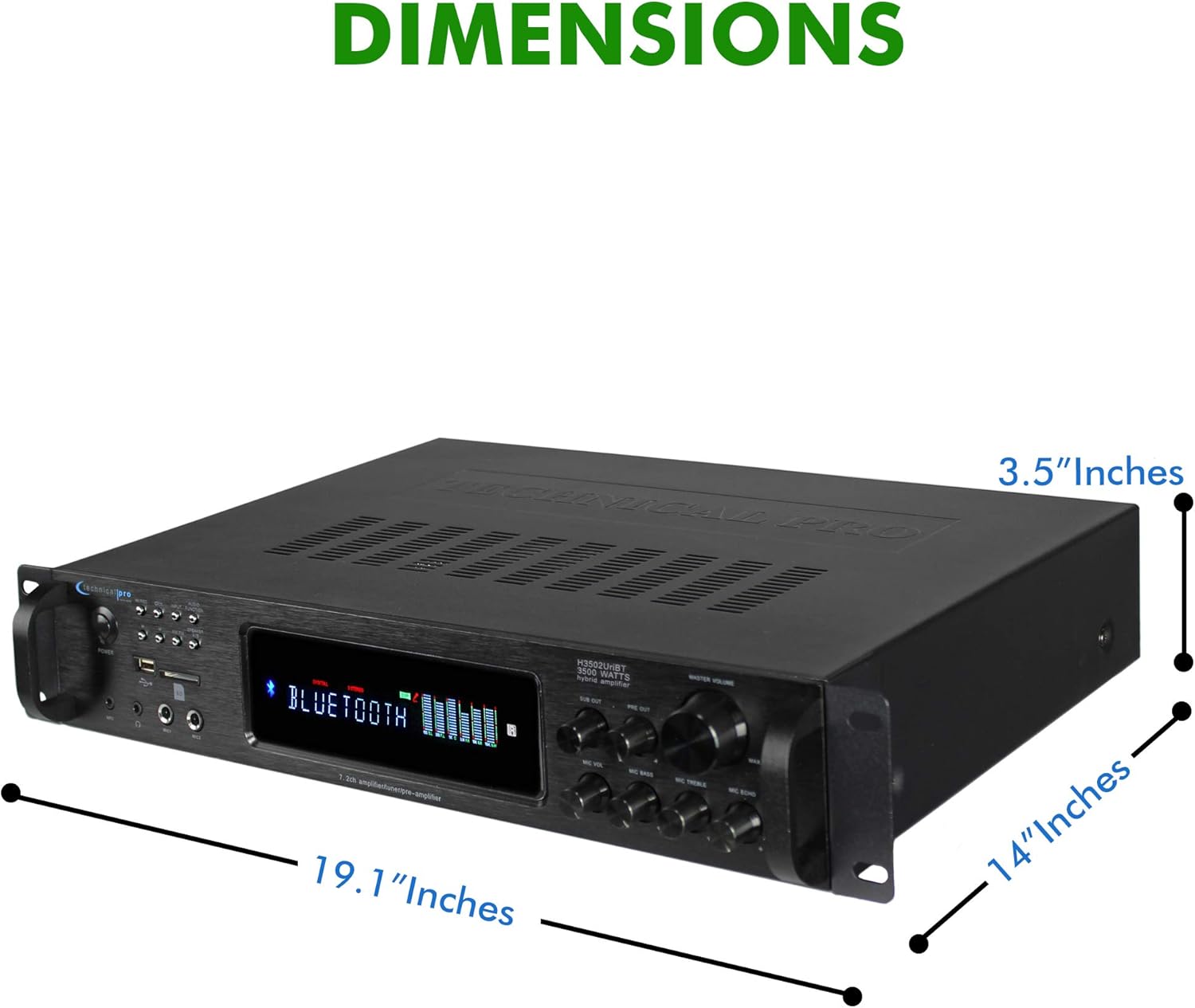
Figura 7: Dimensions del producte.
Garantia i Suport
Technical Pro products are manufactured with high standards and undergo rigorous quality control. This product is covered by a manufacturer's warranty against defects in materials and workmanship. For specific warranty terms and conditions, please refer to the warranty card included with your purchase or visit the official Technical Pro weblloc.
For technical support, troubleshooting assistance, or service inquiries, please contact Technical Pro customer service. Contact information can typically be found on the Technical Pro weblloc web o a l'embalatge del producte.


