Introducció
The MAIDeSITe T1 Pro Electric Height Adjustable Desk Frame is designed to provide a versatile and ergonomic workspace. This frame features an all-steel structure and a robust support system, ensuring stability and durability. Its powerful motor system allows for smooth and quiet height adjustments, promoting a healthier work environment by enabling seamless transitions between sitting and standing postures.
This manual provides essential information for the proper assembly, operation, and maintenance of your MAIDeSITe T1 Pro desk frame. Please read it thoroughly before use to ensure safe and efficient operation.

Image: The MAIDeSITe T1 Pro desk frame integrated into a modern workspace.
Advertències de seguretat
Informació important de seguretat:
- Do not exceed the total authorized weight capacity of 80 kg (176 lbs). Overloading can cause damage to the desk frame and potential injury.
- Ensure the desk frame is properly assembled according to the instructions to guarantee stability and safety during use.
- The desk frame is designed to be water-resistant, but it is not waterproof. Avoid exposing the electrical components or the frame to direct water or excessive moisture.
- Keep children and pets away from the desk during height adjustments to prevent accidents.
- Before adjusting the height, ensure there are no obstacles above or below the desk that could impede its movement.
Muntatge i muntatge
The MAIDeSITe T1 Pro desk frame is designed for straightforward assembly. It is recommended to have two people for certain steps, especially when positioning the desktop and flipping the assembled desk.
Contingut del paquet:
- Desk Frame Components (legs, crossbar, feet)
- Caixa de control
- Tauler de control amb pantalla LED
- Adaptador d'alimentació i cable
- Maquinari de muntatge (cargols, perns, clau Allen)
- Manual d'instruccions
Passos de muntatge:
- Desempaquetar components: Traieu amb cura totes les peces de l'embalatge i verifiqueu-les amb la llista de peces del manual inclòs.
- Assemble Legs and Feet: Attach the feet to the bottom of each leg using the provided screws.
- Connecta la barra transversal: Secure the crossbar between the two leg assemblies. Ensure all connections are tight.
- Instal·leu el motor i la caixa de control: Mount the motor and control box to the designated positions on the frame using the appropriate hardware.
- Adjunta el tauler de control: Secure the control panel to the underside of the desktop (desktop sold separately) in an easily accessible location.
- Munta l'escriptori: Carefully place your chosen desktop (recommended size: 120-140 cm long, 60-70 cm wide) onto the assembled frame. Align and secure it using screws.
- Connectar els cables: Connect all motor and control panel cables to the control box, and then connect the power adapter.
- Calibració inicial: Follow the specific calibration instructions in the included manual for first-time use. This typically involves lowering the desk to its lowest point and holding the down button for a few seconds.

Image: Detail of the desk frame assembly process, highlighting ease of installation.
Instruccions de funcionament
The MAIDeSITe T1 Pro features an intuitive control panel for easy height adjustment and memory functions.
Funcions del tauler de control:

Image: The advanced touchscreen control panel with its various functions.
- Pantalla LCD: Displays the current desk height in centimeters.
- Fletxes amunt/avall (▲ / ▼): Press and hold to manually adjust the desk height up or down. Release to stop.
- Preajustos de memòria (1, 2, 3, 4): These buttons allow you to save and recall up to four preferred desk heights.
- Memory Set Button (M): Used to program a desired height into a memory slot.
- Pany de seguretat infantil: Activates or deactivates the control panel to prevent accidental adjustments.
- Port USB: Provides a convenient charging point for mobile devices.
Configuració de preajustos de memòria:
- Ajusteu l'escriptori a l'alçada desitjada amb les fletxes amunt/avall.
- Press the 'M' button. The LCD display will flash 'S-'.
- Within 3 seconds, press the desired memory button (1, 2, 3, or 4). The display will show 'S-1', 'S-2', etc., indicating the height is saved.
Recuperació de preajustos de memòria:
Simply press the corresponding memory button (1, 2, 3, or 4). The desk will automatically move to the saved height.
Funció anticol·lisió:
The desk frame is equipped with a highly sensitive anti-collision system. If the desk encounters an obstacle during adjustment, it will automatically stop and reverse slightly to prevent damage. This feature is adjustable for sensitivity.
Manteniment
Regular maintenance ensures the longevity and optimal performance of your MAIDeSITe T1 Pro desk frame.
- Neteja: Netegeu el marc de l'escriptori amb un drap suauamp cloth. Avoid using abrasive cleaners or solvents that could damage the powder-coated finish.
- Gestió de cables: Periodically check all cables for any signs of wear or damage. Ensure cables are neatly routed and not pinched or tangled.
- Comprovació de fixació: Every few months, inspect all screws and bolts to ensure they are tight. Re-tighten if necessary.
- Distribució de pes: Distribute weight evenly across the desktop. Avoid placing heavy items predominantly on one side.
- Condicions ambientals: Operate the desk in a dry environment. Avoid extreme temperatures or high humidity.
Resolució de problemes
If you encounter issues with your MAIDeSITe T1 Pro desk frame, refer to the following common problems and solutions:
| Problema | Causa possible | Solució |
|---|---|---|
| L'escriptori no es mou | Power cable disconnected; Control panel locked; Overload; Motor error. | Check power connections; Unlock control panel; Reduce weight on desk; Perform reset (see manual). |
| L'escriptori es mou de manera desigual | Uneven weight distribution; Loose connections. | Distribute weight evenly; Check and tighten all assembly screws. |
| Anti-collision feature triggers frequently | High sensitivity setting; Obstacles. | Adjust anti-collision sensitivity (refer to full manual); Clear any potential obstacles. |
| Soroll durant el funcionament | Normal motor sound; Loose components. | A slight motor sound is normal (<45 dB); Check for any loose screws or components and tighten. |
If the problem persists after attempting these solutions, please refer to the comprehensive troubleshooting guide in your full product manual or contact customer support.
Especificacions
Detailed technical specifications for the MAIDeSITe T1 Pro Electric Height Adjustable Desk Frame.
- Marca: MAIDESITE
- Número de model: T1 Pro
- Material: Acer amb recobriment en pols
- Interval d'ajust d'alçada: 72 cm a 120 cm (de 28.3 polzades a 47.2 polzades)
- Width Adjustment Range: 96 cm a 160 cm (de 37.8 polzades a 63 polzades)
- Velocitat d'elevació: 30 - 60 mm/sec
- Capacitat de càrrega màxima: 80 kg (176 lliures)
- Nivell de soroll: <45 dB
- Lifting Column: 2-stage
- Recommended Desktop Size: 100-180 cm (length) x 50-80 cm (depth)
- Característiques: Electric height adjustment, 4 programmable memory presets, anti-collision system, child safety lock, USB charging port.

Image: Visual representation of the desk's height adjustment capabilities.
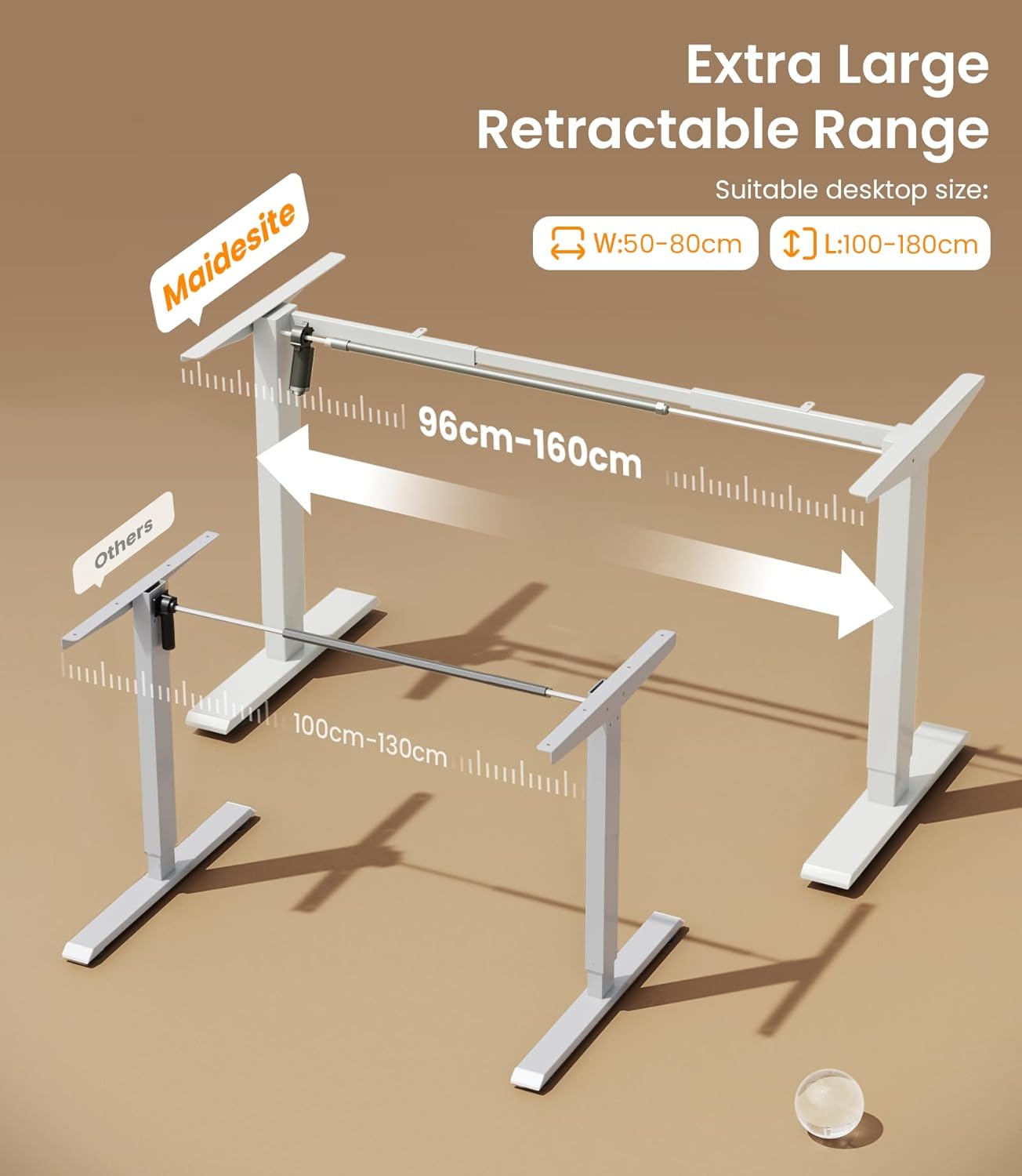
Image: Illustration of the adjustable width range for various desktop sizes.

Image: The desk frame supporting a significant load, highlighting its 80 kg capacity.
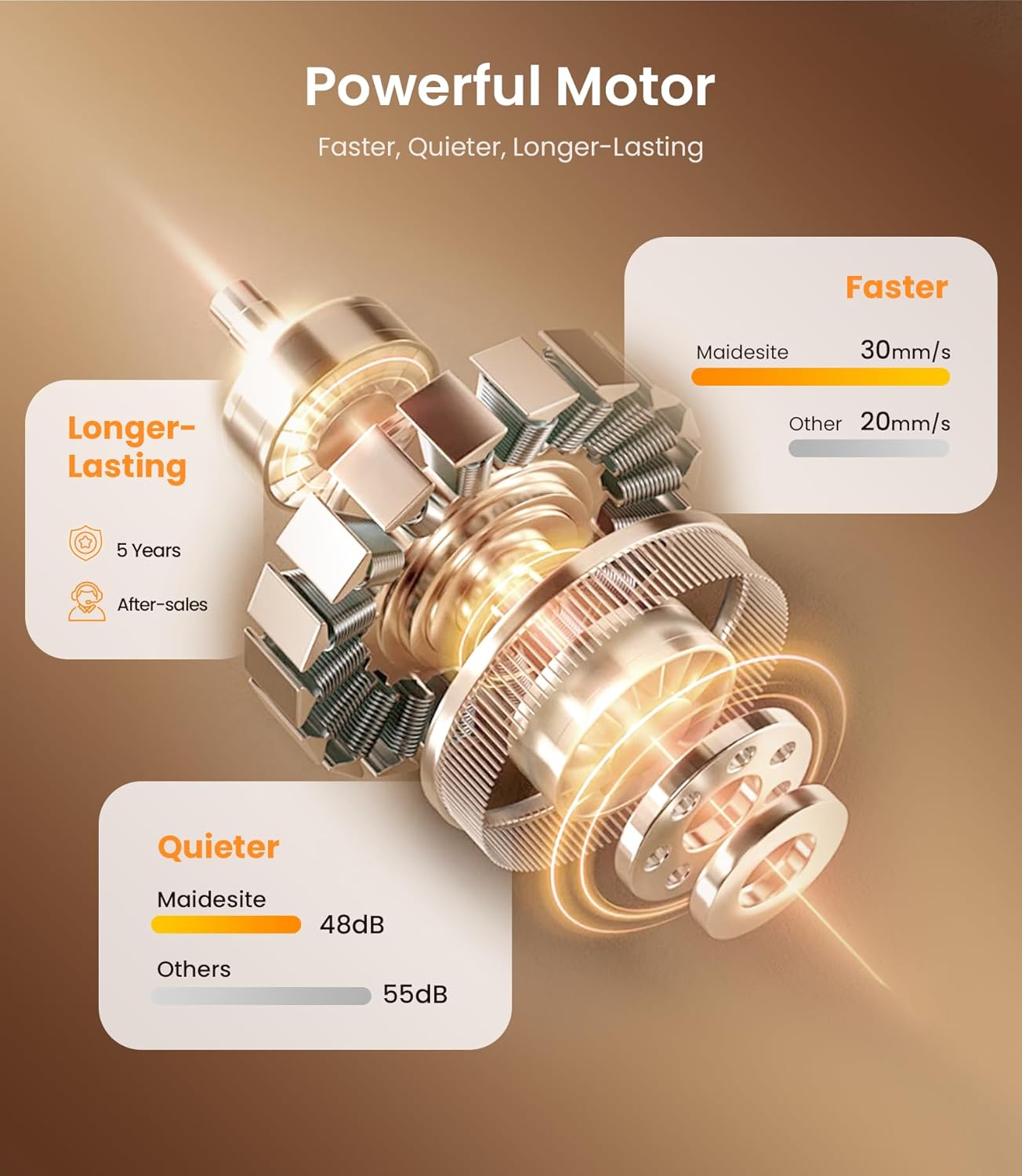
Image: Infographic detailing the powerful and quiet motor system.
Garantia i Suport
Informació de la garantia:
The MAIDeSITe T1 Pro Electric Height Adjustable Desk Frame comes with a 5 any de garantia completa. This warranty covers manufacturing defects and ensures reliable performance under normal use conditions. Please retain your proof of purchase for warranty claims.
Atenció al client:
For any questions, technical assistance, or warranty claims, please contact MAIDeSITe customer support. Refer to the contact information provided in your product packaging or visit the official MAIDeSITe weblloc web per obtenir els detalls d'assistència més actualitzats.
Our support team is available to assist you with any issues you may encounter during the setup or operation of your desk frame.


