1. Introducció
The GOBOOST Cell Phone Signal Booster is designed to enhance 2G, 3G, 4G LTE, and 5G cellular signals within your home or office. It operates on Band 2 (1900MHz) and Band 5 (850MHz), supporting major U.S. carriers such as AT&T, Verizon, T-Mobile, and Straight Talk. This device aims to provide stable reception, improve voice quality, and enable faster data and streaming by amplificant senyals febles.

Figure 1: GOBOOST Cell Phone Signal Booster highlighting key features like wide coverage and LCD display.
2. Informació de seguretat
- Assegureu-vos que totes les connexions estiguin segures abans d'encendre el dispositiu.
- Do not operate the booster near water or in excessively humid environments.
- Utilitzeu només l'adaptador d'alimentació subministrat.
- Avoid placing the booster in direct sunlight or near heat sources.
- Maintain a minimum separation distance of 20cm (8 inches) between the booster and any person.
- This device must be operated only in a fixed location for in-building use.
- Register the device with your wireless provider and have your provider's consent.
3. Què hi ha a la caixa
Verifiqueu que tots els components siguin presents al vostre paquet:

Figura 2: Detallada view of all included packaging accessories, such as the signal booster, antennas, and cables.
- Signal Booster (Band 2 & Band 5)
- Outdoor Yagi Antenna (13dBi)
- Indoor Panel Antenna (9dBi)
- Coaxial Cable (43ft / 13 meters)
- Font d'alimentació
- Manual d'usuari
- U Type Installation Accessories
- Panel Antenna Holder
- Cinta
4. Pre-Installation Check: Test Your Band
Before installation, it is crucial to verify that your cell phone operates on Band 2 (1900MHz) or Band 5 (850MHz), as the booster is designed for these specific bands. Using a compatible band ensures proper functionality.

Figure 3: Steps to check your phone's operating band for iOS and Android devices.
Per a dispositius iOS:
- Disconnect from Wi-Fi, turn on cellular data.
- Dial *3001#12345#* and press the call button.
- Click 'Serving Cell Info'.
- Check 'Freq Band Indicator'.
Per a dispositius Android:
- Download an app like "Network Cell Info Lite".
- Disconnect from Wi-Fi, turn on cellular data.
- Click 'Gauge'.
- Check the signal band in the right section of the app.
5. Configuració i instal·lació
Follow these steps for a quick and easy setup. For optimal performance, ensure the outdoor antenna is placed where it receives a strong signal (stronger than -80dB or at least 3 bars) without obstructions.
5.1. Find a Good Signal Location
Identify an outdoor location, typically on the roof or an elevated area, that has a strong and stable cellular signal. This location should be free from obstructions that could block the signal from the nearest cell tower.

Figure 4: Illustration of the signal booster system, showing outdoor antenna, signal repeater, and indoor antenna placement.
5.2. Install the Outdoor Antenna
Mount the outdoor Yagi antenna securely in the chosen location. Ensure it is pointed towards the nearest cell tower for maximum signal reception. Use the provided U-type installation accessories to secure it to a pole or mast.
5.3. Install the Indoor Antenna
Place the indoor panel antenna on a wall or ceiling within the area where you want to improve signal. The indoor antenna should be at least 33 feet (10 meters) away from the outdoor antenna, ideally separated by a brick wall or other physical barrier, to prevent oscillation.
5.4. Connect the Booster System
- Connect the coaxial cable from the outdoor antenna to the "BTS" (Base Transceiver Station) port on the signal booster.
- Connect the coaxial cable from the indoor antenna to the "MS" (Mobile Station) port on the signal booster.
- Assegureu-vos que totes les connexions estiguin ben ajustades.
- Plug in the power supply to the booster and then into a power outlet.
5.5. Guia de vídeo d'instal·lació
For a visual guide on the installation process, please watch the official GOBOOST installation video:
Video 1: How to Install the Band 2 Band 5 Signal Booster Kit. This video provides a step-by-step demonstration of the installation process for the GOBOOST signal booster, including antenna placement and cable connections.
6. Operating the Booster
Once powered on, the GOBOOST signal booster will automatically begin to amplify the cellular signal. The intelligent LCD display provides real-time feedback on signal strength for both Band 2 (1900MHz) and Band 5 (850MHz).

Figure 5: The intelligent LCD display shows signal strength for Band 5 (850MHz) and Band 2 (1900MHz).
The display allows you to monitor the signal status and adjust the outdoor antenna direction if needed to optimize performance. A strong signal on the display indicates effective boosting.
7. Manteniment
The GOBOOST signal booster requires minimal maintenance. Keep the unit clean and free from dust. Periodically check all cable connections to ensure they remain secure and free from damage. Ensure the outdoor antenna is clear of debris and obstructions.
8. Solució De Problemes
| Problema | Causa possible | Solució |
|---|---|---|
| Sense millora del senyal |
|
|
| Booster display shows low signal |
|
|
| Intermittent signal or dropped calls |
|
|
9. Especificacions
| Característica | Detall |
|---|---|
| Marca | GOBOOST |
| Model | B08DXYM6K2 |
| Bandes suportades | Band 2 (1900MHz), Band 5 (850MHz) |
| Àrea de cobertura | Up to 2000-3500 sq. ft. |
| Guany màxim | 70 dB |
| Aprovació FCC | Aprovat per la FCC |
| Característiques especials | Intelligent LCD Display, Quick Setup, Large Coverage, Carrier Compatibility, Reliable Warranty |
| Dimensions del paquet | 19.1 x 6.9 x 6.8 polzades |
| Pes de l'article | 4.54 lliures |
| Data de primera disponibilitat | 30 de juliol de 2020 |
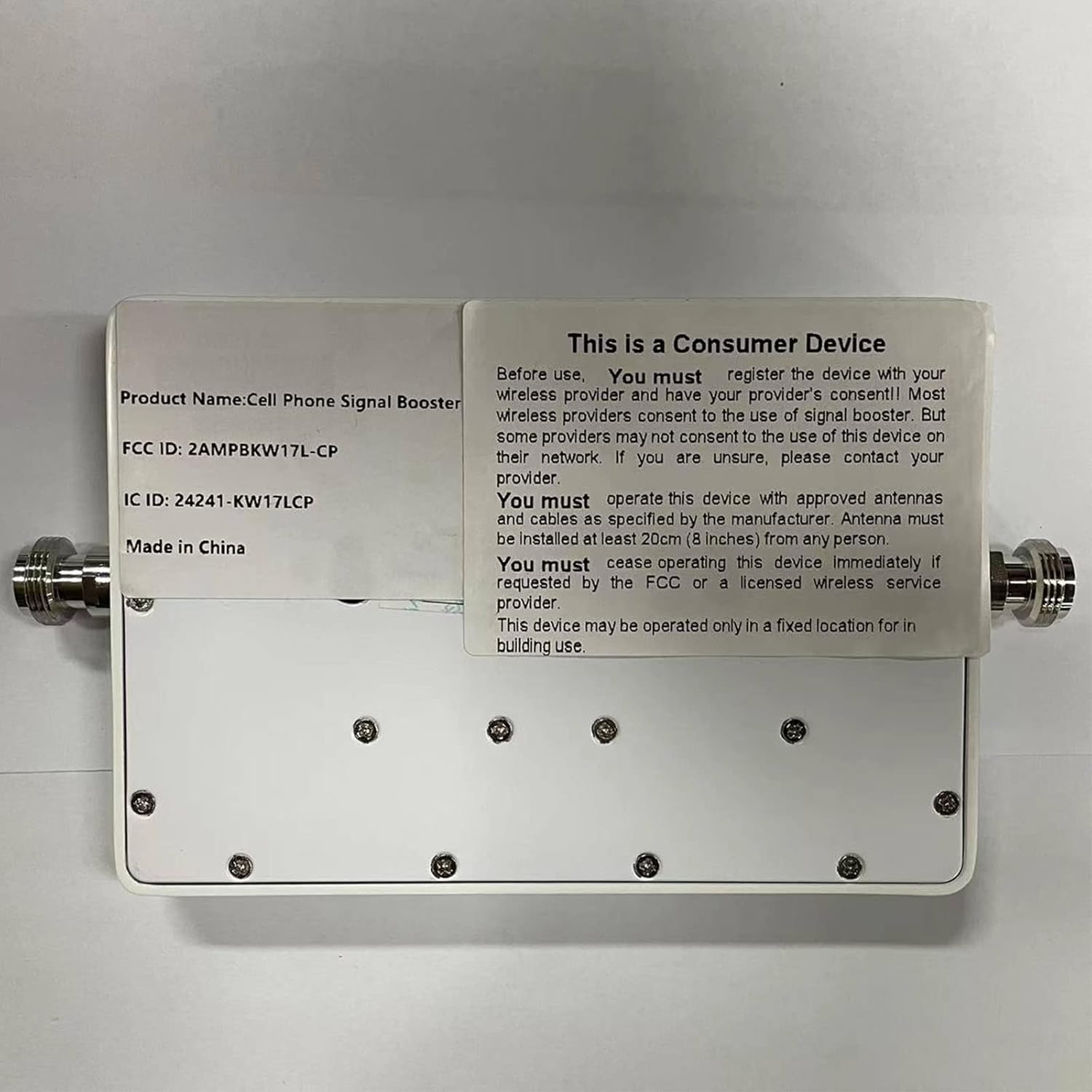
Figura 6: posterior view of the signal booster, displaying FCC and IC IDs for compliance.
10. Garantia i Suport
GOBOOST provides a reliable service warranty, including FCC certification and free maintenance for life. If you encounter any signal problems or require assistance, please do not hesitate to contact GOBOOST customer support. Our team of professional and qualified technicians is dedicated to resolving your issues.
For support, please refer to the contact information provided in your product packaging or visit the official GOBOOST store on Amazon: GOBOOST Amazon Store.


