1. Introducció
This manual provides essential instructions for the safe and effective use of your Wellue Bluetooth Blood Pressure Monitor BP2A. This device is designed for home use to measure systolic blood pressure (SYS), diastolic blood pressure (DIA), mean arterial pressure (MAP), pulse rate, and pulse pressure. It also features an ECG function for additional heart health monitoring. Please read this manual thoroughly before first use and retain it for future reference.
2. Informació important de seguretat
- Consult your physician before using this device for any medical condition. Self-diagnosis and treatment based on measurements can be dangerous.
- This device is intended for adult home use only. It is not intended for use on infants, children, or pregnant women.
- Do not use this device in conjunction with high-frequency surgical equipment.
- Mantingueu el dispositiu fora de l'abast dels nens i les mascotes.
- No desmunteu ni intenteu reparar el dispositiu. Envieu totes les tasques de manteniment a personal qualificat.
- Avoid strong electromagnetic fields during use, as they may interfere with the device's operation.
- Les declaracions sobre suplements dietètics no han estat avaluades per la FDA i no tenen la intenció de diagnosticar, tractar, curar o prevenir cap malaltia o afecció de salut.
3. Contingut del paquet
Verifiqueu que hi hagi tots els elements presents en obrir el paquet:
- Wellue Bluetooth Blood Pressure Monitor BP2A (integrated with cuff)
- Cable de càrrega USB
- Manual d'usuari
4. Dispositiu acabatview
The Wellue BP2A monitor features a compact, one-piece design for ease of use and portability. It includes an integrated arm cuff, a digital display, and control buttons.

Figure 4.1: Wellue BP2A Blood Pressure Monitor and ViHealth App Interface.

Figure 4.2: Key features of the Wellue BP2A monitor, including Bluetooth connectivity, FDA clearance, rechargeable battery, and built-in memory for 50 readings.
5. Configuració
5.1 Càrrega del dispositiu
Before initial use, fully charge the device using the provided USB cable. Connect the cable to the monitor's charging port and a standard USB power adapter (not included). A full charge can provide power for up to 300 measurements.
5.2 Installing the ViHealth App
The Wellue BP2A works with the free ViHealth app, available for iOS and Android devices. Cerca "ViHealth" in your device's app store and install it.

Figure 5.1: The ViHealth app for Android and iOS, used to track blood pressure and heart measurements.
5.3 Vinculació Bluetooth
Ensure Bluetooth is enabled on your smartphone. Open the ViHealth app. Turn on the Wellue BP2A monitor. The device should automatically connect to the app. Follow any on-screen prompts within the app to complete the pairing process.
6. Instruccions de funcionament
6.1 Col·locació correcta del maneguet
Accurate measurement depends on correct cuff placement. Ensure the cuff is placed directly on your bare upper arm, 1-2 cm above the elbow joint. The air tube (if applicable, though this is a one-piece design, the sensor area should be aligned) should be positioned over the brachial artery. The cuff should fit snugly but not too tightly. Refer to the diagram below for guidance.

Figure 6.1: Correct cuff placement for accurate blood pressure measurement.
6.2 Prendre una mesura de la pressió arterial
- Seieu còmodament amb l'esquena recolzada i els peus ben plans a terra. Recolzeu el braç sobre una taula de manera que el maneguet quedi a l'alçada del cor.
- Ensure the device is powered on and, if desired, connected to the ViHealth app.
- Premeu el botó Inici/Parada button on the device. The cuff will begin to inflate.
- Romandre quiet i en silenci durant la mesura.
- Once complete, your blood pressure readings (SYS, DIA, MAP, Pulse Rate, Pulse Pressure) will be displayed on the device screen and automatically uploaded to the ViHealth app if connected.

Figure 6.2: User taking a blood pressure measurement with the Wellue BP2A monitor.
6.3 Taking an ECG Measurement
The device also supports ECG measurements. To take an ECG:
- Ensure the device is powered on and connected to the ViHealth app.
- Hold the device with both hands, placing your thumbs on the designated electrodes (usually the metal strips on the sides or top of the device).
- Remain still and relaxed for the duration of the measurement (typically 30 seconds).
- The ECG waveform and heart rate will be displayed on the device and recorded in the app.
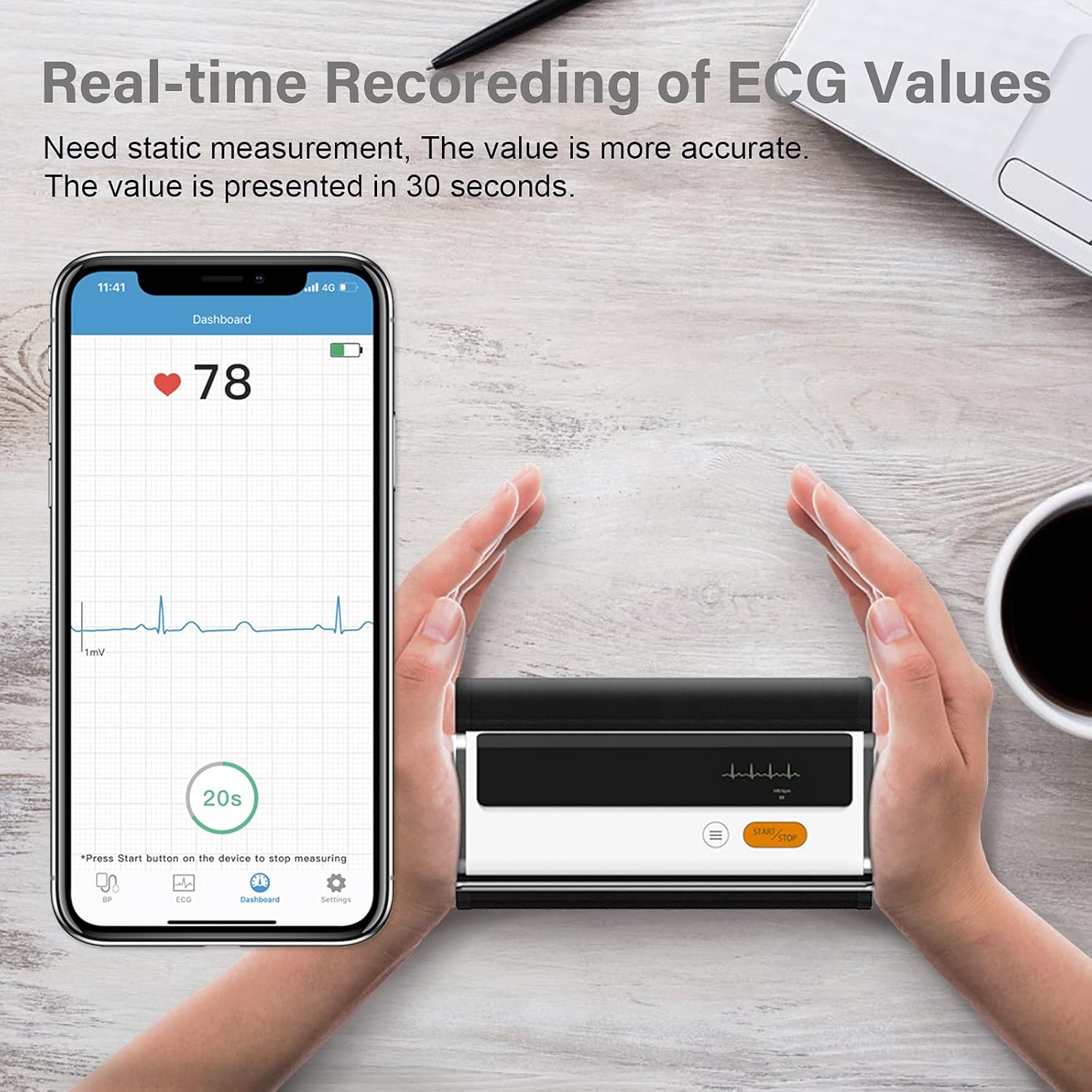
Figure 6.3: Real-time recording of ECG values using the Wellue BP2A monitor.
6.4 Using the ViHealth App for Data Management
The ViHealth app allows you to:
- View real-time readings during measurement.
- Access historical data and trends for multiple users.
- Generate and share PDF/CSV reports with healthcare providers.
- Track both blood pressure and ECG data in one place.
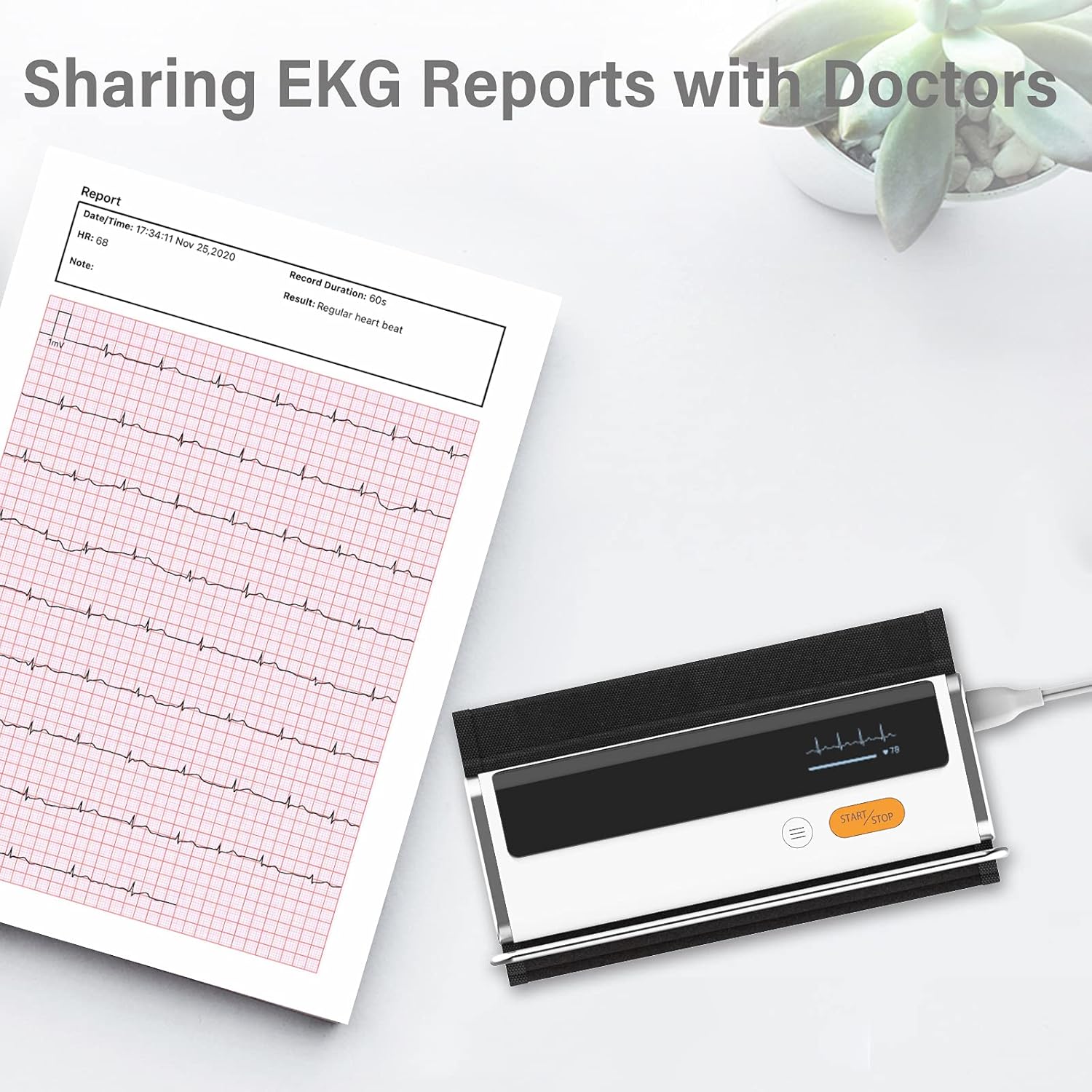
Figure 6.4: Sharing EKG reports generated by the ViHealth app.
Video 6.1: Demonstration of the Wellue blood pressure monitor's features and its integration with the ViHealth app for real-time readings and data sharing.
7. Manteniment
7.1 Neteja
Netegeu el dispositiu i el braçalet amb un drap suau i sec. Si cal, utilitzeu un drap lleugerament humit.ampened with water or a mild disinfectant. Do not immerse the device in water or use abrasive cleaners.
7.2 Emmagatzematge
Guardeu el dispositiu en un lloc fresc i sec, allunyat de la llum solar directa i de temperatures extremes. Guardeu-lo en el seu embalatge original o en una funda protectora quan no l'utilitzeu.
7.3 Cura de la bateria
Per allargar la durada de la bateria, carregueu el dispositiu regularment, fins i tot si no l'utilitzeu amb freqüència. Eviteu descarregar completament la bateria durant períodes prolongats.
8. Solució De Problemes
| Problema | Causa possible | Solució |
|---|---|---|
| El dispositiu no s'encén | Bateria baixa | Carregueu el dispositiu amb el cable USB. |
| No es pot connectar a l'aplicació | Bluetooth off, app not open, device not in pairing mode | Ensure Bluetooth is on, open ViHealth app, restart device. |
| Lectures inexactes | Incorrect cuff placement, movement during measurement, speaking during measurement | Re-position cuff correctly, remain still and silent during measurement. |
| El maneguet no s'infla | Cuff not properly attached, air leak | Check cuff connection, ensure no leaks. |
9. Especificacions
- Nom del model: Armfit Plus
- Número de model de l'article: BP2A
- Marca: Wellue
- Mida del puny: 8.7-16.5 polzades (22-42 cm)
- Font d'alimentació: Alimentat per bateria (1 bateria de ions de liti, inclosa)
- Tipus de visualització: Digital
- Dimensions del producte: 1.9 cm de llargada x 5.9 cm d'amplada x 1.18 cm de gruix
- Pes: Aproximadament 15.84 unces
- Connectivitat: Bluetooth
- Memòria: Built-in memory for 50 sets of readings
10. Garantia i Suport
For warranty information and technical support, please refer to the official Wellue weblloc web o contacteu directament amb el servei d'atenció al client. Conserveu el rebut de compra com a comprovant de compra per a reclamacions de garantia.


