1. Introducció
Welcome to the Surfans Kids Tablet T57 user manual. This guide provides detailed instructions on how to set up, operate, maintain, and troubleshoot your new 7-inch Android tablet. Designed specifically for children, this tablet features a durable kid-proof case, parental control functions, and pre-installed educational and entertainment applications.
2. Què hi ha a la caixa
Si us plau, comproveu el contingut del paquet per assegurar-vos que hi hagi tots els elements:
- 1x Surfans Kids Tablet
- 1x Tablet Stand
- 1x cable USB
- 1x Kids Tablet User Manual (this document)
3. Producte acabatview i Característiques
The Surfans Kids Tablet T57 is built with a robust design and features tailored for young users. Below is an overview of its components and key functionalities.
3.1 Tablet Components
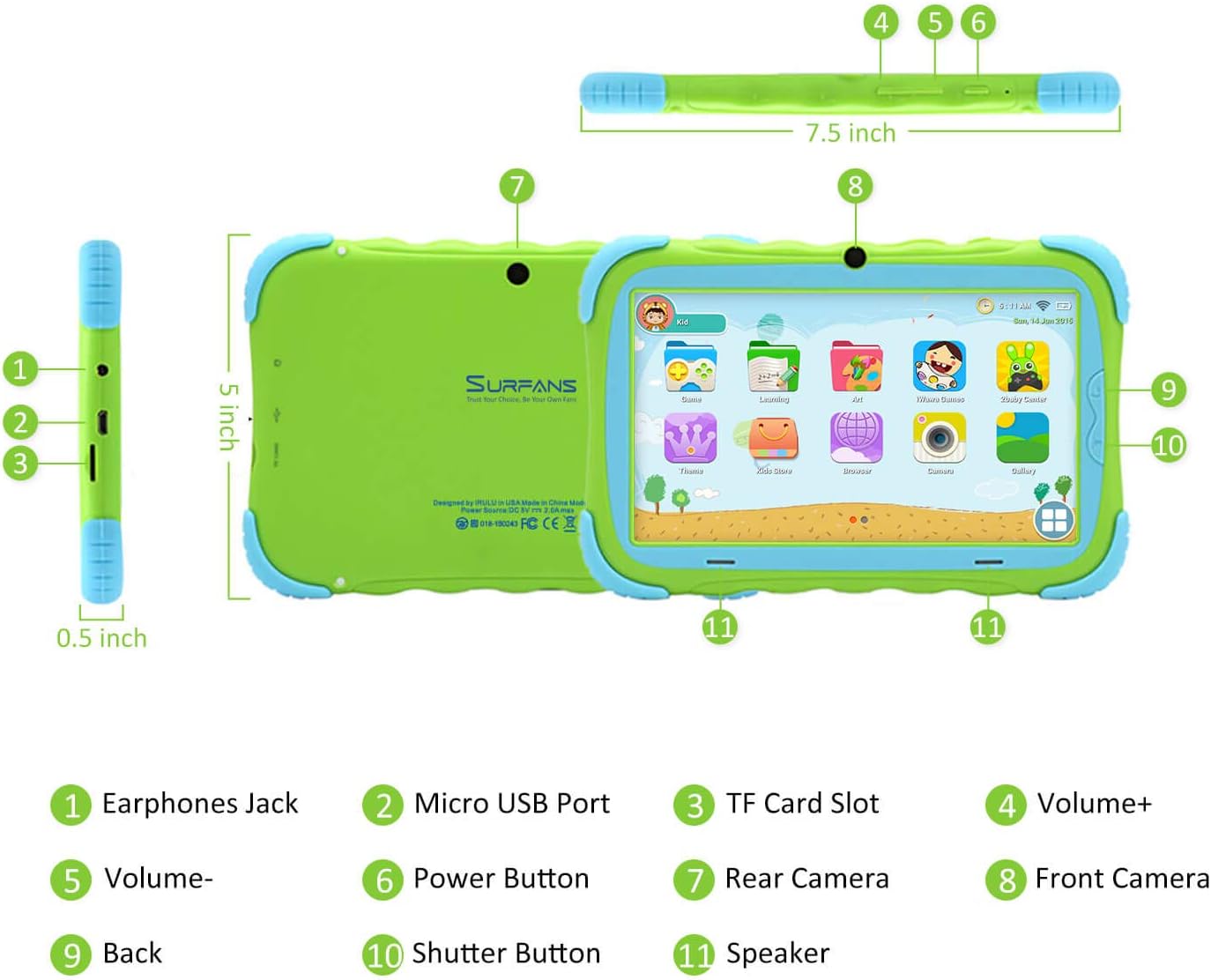
- Presa d'auriculars: Per connectar auriculars o dispositius d'àudio externs.
- Port micro USB: Used for charging the tablet and connecting to a computer for data transfer.
- Ranura per a targetes TF: For inserting a Micro SD card to expand storage capacity (up to 32GB).
- Volum+: Increases the tablet's audio volume.
- Volum: Decreases the tablet's audio volume.
- Botó d'encesa: Press and hold to turn the tablet on/off or restart. Press briefly to turn the screen on/off.
- Càmera posterior: The primary camera located on the back of the tablet.
- Càmera frontal: The camera located on the front, typically used for video calls or selfies.
- Botó enrere: Navigates back to the previous screen or closes the current application.
- Botó de l'obturador: Used to capture photos or start/stop video recording in the camera application.
- Ponent: Provides audio output from the tablet.
3.2 Característiques clau
- Kid-Proof Design: Comes with a durable, lightweight, and skin-friendly case designed to protect against drops and bumps.
- 7-inch IPS HD Eye Protection Display: Provides clear visuals while minimizing eye strain.
- Sistema operatiu Android 9.0: Runs on the latest Google Android 9.0 Pie operating system for smooth performance.
- Processador de quatre nuclis: Ensures responsive performance for apps, games, and videos.
- 1GB RAM & 16GB ROM: Sufficient memory for basic operations and storage, expandable up to 32GB via Micro SD card.
- Parental Control Mode: Allows parents to manage content, set time limits, and configure user settings for a safe digital environment.
- Pre-installed Kids Apps: Includes a variety of educational and entertaining apps, with access to the Google Play Store for more content.
- Connectivitat Wi-Fi: Supports 802.11g for fast browsing, streaming, and video calls.
- Llarga vida útil de la bateria: 3000mAh Li-ion Battery provides 3-5 hours of working time, or up to 8 hours of mixed use on a single charge.


4. Guia de configuració
Follow these steps to set up your Surfans Kids Tablet for the first time.
4.1 Càrrec inicial
Before first use, fully charge the tablet. Connect the included USB cable to the Micro USB Port (2) on the tablet and plug the other end into a compatible USB power adapter (not included) or a computer USB port. The charging indicator will show the charging status.
4.2 Encès/Apagat
- Per encendre: Press and hold the Power Button (6) until the screen lights up.
- Per apagar: Press and hold the Power Button (6) until a power-off menu appears. Select "Power off" and confirm.
- Per reiniciar: Press and hold the Power Button (6) until the power-off menu appears. Select "Restart" and confirm.
- Pantalla activada/desactivada: Briefly press the Power Button (6) to turn the screen on or off without powering down the tablet.
4.3 Connexió Wi-Fi
To access online content and download apps, connect your tablet to a Wi-Fi network:
- Des de la pantalla d'inici, llisqueu el dit cap avall des de la part superior per obrir el tauler Configuració ràpida.
- Tap and hold the Wi-Fi icon to go to Wi-Fi settings.
- Toggle Wi-Fi ON if it's off.
- Seleccioneu la xarxa Wi-Fi que vulgueu de la llista.
- Introduïu la contrasenya de xarxa si se us demana i, a continuació, toqueu "Connecta".
4.4 Setting Up Parental Control
The Parental Control mode is a key feature for managing your child's tablet usage. This allows you to filter website content, set time limits, and control app access.

Specific steps for setting up parental controls will be available within the tablet's pre-installed Kids app or settings menu. Look for an icon or section labeled "Parental Control" or "Kids Mode" to configure user profiles, allowed applications, and usage schedules.
5. Funcionament de la tauleta
This section covers basic operations and how to use the tablet's features.
5.1 Navegació bàsica
- Touch and Tap: To open apps, select items, or type.
- Llisca: To scroll through screens, menus, or web pàgines.
- Pessiga per fer zoom: Per ampliar o reduir imatges o web pàgines.
- Pantalla d'inici: La pantalla principal on podeu accedir a aplicacions i widgets.
- Barra de navegació: Located at the bottom of the screen, typically includes Back, Home, and Recent Apps buttons.
5.2 Using Kids Mode and Apps
The tablet comes with a dedicated Kids Mode interface, providing a safe and engaging environment for children. This mode typically features a simplified layout and access to pre-approved content.

- Accessing Kids Mode: Usually, there's a specific app icon or a setting to switch to Kids Mode.
- Aplicacions preinstal·lades: Explore the various educational games, books, music, and art learning applications.
- Google Play Store: For additional apps, exit Kids Mode (if applicable) and access the Google Play Store. Ensure parental supervision for downloads.


5.3 Media Playback and Camera
- Videos and Music: Use pre-installed media players or download others from the Play Store to enjoy videos and music.
- Càmera: Open the Camera app to use the Front (8) or Rear (7) cameras. Tap the Shutter Button (10) to take photos or record videos.
5.4 Expandable Storage
To expand the tablet's storage, insert a Micro SD card (up to 32GB, not included) into the TF Card Slot (3). This allows for more space for photos, music, movies, and apps.
6. Manteniment
Un manteniment adequat garanteix la longevitat i el rendiment òptim de la teva tauleta.
- Neteja: Use a soft, lint-free cloth to clean the screen and tablet body. Avoid abrasive cleaners or solvents.
- Cura de la bateria:
- Eviteu descarregar completament la bateria amb freqüència.
- No exposeu la tauleta a temperatures extremes.
- Utilitzeu només el cable USB proporcionat per carregar.
- Actualitzacions de programari: Periodically check for system updates in the tablet's settings to ensure you have the latest features and security patches.
- Gestió d'emmagatzematge: Netegeu regularment innecessaris files and uninstall unused apps to free up storage space and maintain performance.
7. Solució De Problemes
If you encounter issues with your tablet, refer to the following common problems and solutions.
| Problema | Possible solució |
|---|---|
| La tauleta no s'encén. | Ensure the battery is charged. Connect the charger and wait a few minutes before attempting to power on again. If unresponsive, press and hold the Power Button for 10-15 seconds to force a restart. |
| Problemes de connexió Wi-Fi. | Comprova si el Wi-Fi està activat a la configuració. Reinicia el teu encaminador Wi-Fi. Oblida't de la xarxa i torna a connectar-te. Assegura't que estàs dins de l'abast del senyal Wi-Fi. |
| Slow performance or apps crashing. | Close unused apps. Clear app caches. Free up storage space by deleting unnecessary files or uninstalling unused apps. Restart the tablet. |
| La pantalla no respon. | Restart the tablet by holding the Power Button. Ensure the screen is clean and dry. |
| Cannot download apps from Google Play Store. | Check your Wi-Fi connection. Ensure sufficient storage space. Verify parental control settings are not blocking downloads. Clear cache and data for Google Play Store app. |
| La tauleta no es carrega. | Check the USB cable and charger for damage. Try a different USB port or power adapter. Ensure the Micro USB Port is clean and free of debris. |
If the problem persists after trying these solutions, please contact Surfans customer support for further assistance.
8. Especificacions
Detailed technical specifications for the Surfans Kids Tablet T57:
| Característica | Detall |
|---|---|
| Nom del model | T57 |
| Sistema operatiu | Android 9 Pie |
| Mida de la pantalla | 7 polzades |
| Resolució de pantalla | 1024x600 IPS HD |
| Processador | 1.5 GHz Quad-core Cortex-X7 (ARM) |
| RAM | 1 GB |
| Emmagatzematge intern (ROM) | 16 GB |
| Emmagatzematge ampliable | Admet targetes Micro SD de fins a 32 GB |
| Tipus sense fil | Wi-Fi 802.11g |
| Càmeres | Front Camera, Rear Camera (2 MP) |
| Bateria | Bateria Li-ion de 3000 mAh |
| Durada mitjana de la bateria | 3-5 hours (working time), 8 hours (mixed use) |
| Dimensions (LxWxH) | 7.5 x 5 x 0.5 polzades |
| Pes de l'article | 1.22 lliures |
| Color | Verd |
9. Garantia i Suport
For warranty information, technical support, or any inquiries regarding your Surfans Kids Tablet T57, please refer to the contact details provided on the product packaging or the official Surfans website. Surfans is committed to providing fast response and technical assistance for any issues encountered during use.


