Introducció
This manual provides detailed instructions for the installation, operation, and maintenance of your XTRONS Android 10 Car Stereo, Model PST90NCV_L. This unit is specifically designed for Honda Civic sedan models manufactured between 2013 and 2017, for left-hand drive vehicles only. Please read this manual thoroughly before installation and use to ensure proper functionality and to maximize your experience.
Producte acabatview
The XTRONS Android 10 Car Stereo is an advanced head unit featuring a 9-inch IPS touch screen, built-in DSP, GPS navigation, and Bluetooth connectivity. It offers a responsive user experience with its Quad Core CPU, 2GB RAM, and 16GB ROM. The unit supports various functionalities including Android Auto, split screen, and integration with backup cameras, OBD2, DVR, and TPMS systems.

Figura 1: Frontal view of the XTRONS Android 10 Car Stereo unit.
Key Features at a Glance:
- Sistema operatiu Android 10.0
- Quad Core CPU with 2GB RAM & 16GB ROM
- 9-inch IPS Touch Screen (1024x600 HD Resolution)
- Processador de so digital (DSP) integrat
- Bluetooth 5.0 for hands-free calls and music streaming
- Built-in GPS and WiFi
- Supports 1080p FHD Video
- Full RCA Output
- Supports external accessories like OBD2, DVR, TPMS, DAB+, and Car Auto Play dongles.
Vídeo de demostració del producte
Vídeo 1: Un overview of the XTRONS Android 10 Car Stereo's features and functionalities.
Compatibilitat i instal·lació
Notes importants de compatibilitat:

Figure 2: Compatibility details for the XTRONS unit.
- This unit is compatible with Honda Civic Sedan models ONLY.
- This unit is compatible with Left Hand Drive Vehicles ONLY.
- This unit is NOT compatible with factory-installed monitors or navigation systems.
- This unit is NOT compatible with original digital ampsistemes de filtració.
Before proceeding with installation, verify your vehicle's year, dimensions, and the shape of the center console to ensure proper fitment. Professional installation is recommended.
Unit Dimensions and Accessories:
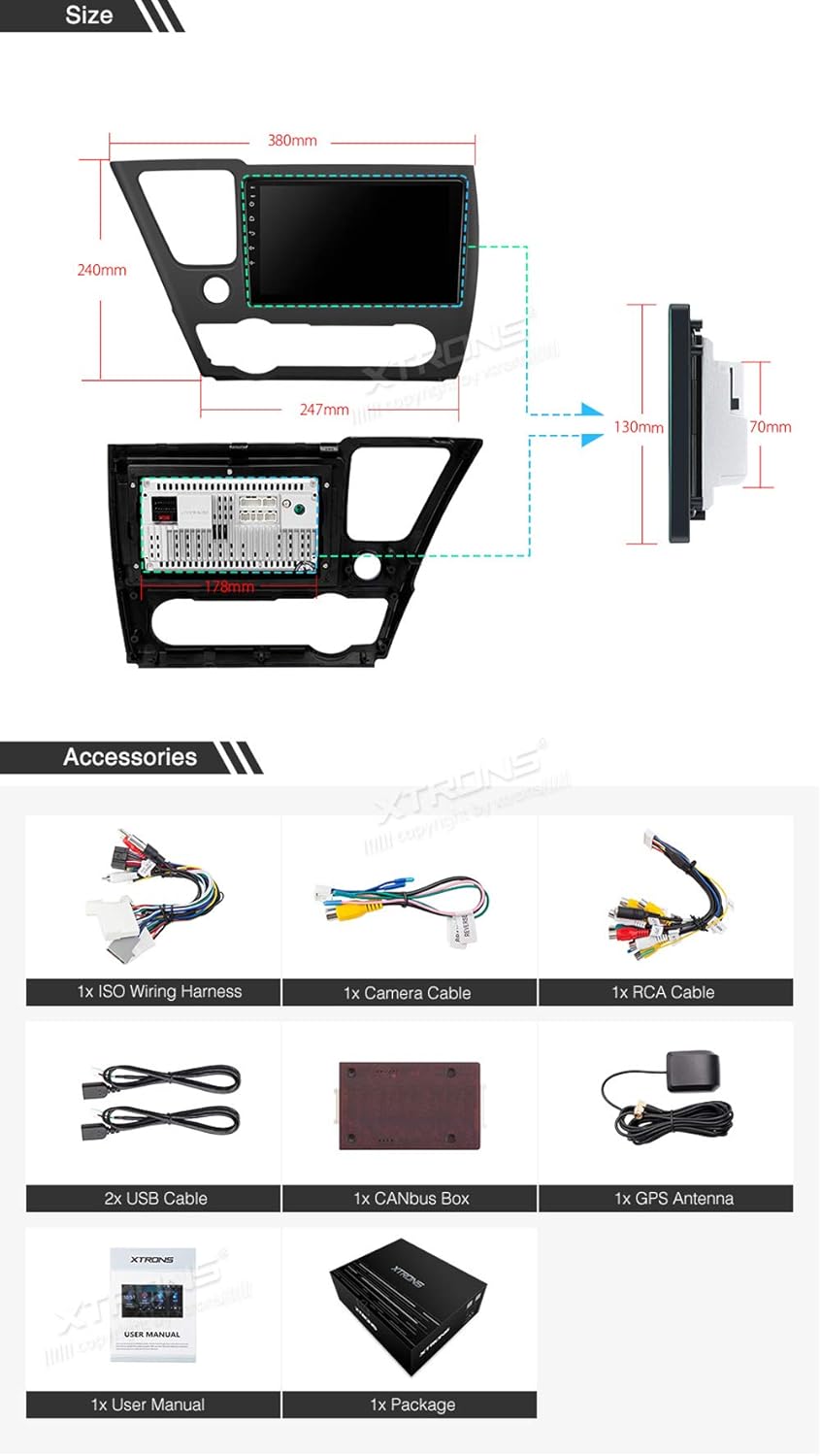
Figure 3: Unit dimensions and included accessories.
The unit's face panel measures approximately 380mm (top length) / 247mm (bottom length) x 240mm. Refer to the diagram for detailed measurements. The package includes essential accessories such as an ISO wiring harness, camera cable, RCA cable, USB cables, CANbus box, GPS antenna, and a user manual.

Figure 4: The XTRONS car stereo unit after installation in a Honda Civic dashboard.
Instruccions de funcionament
9-inch IPS Touch Screen Display
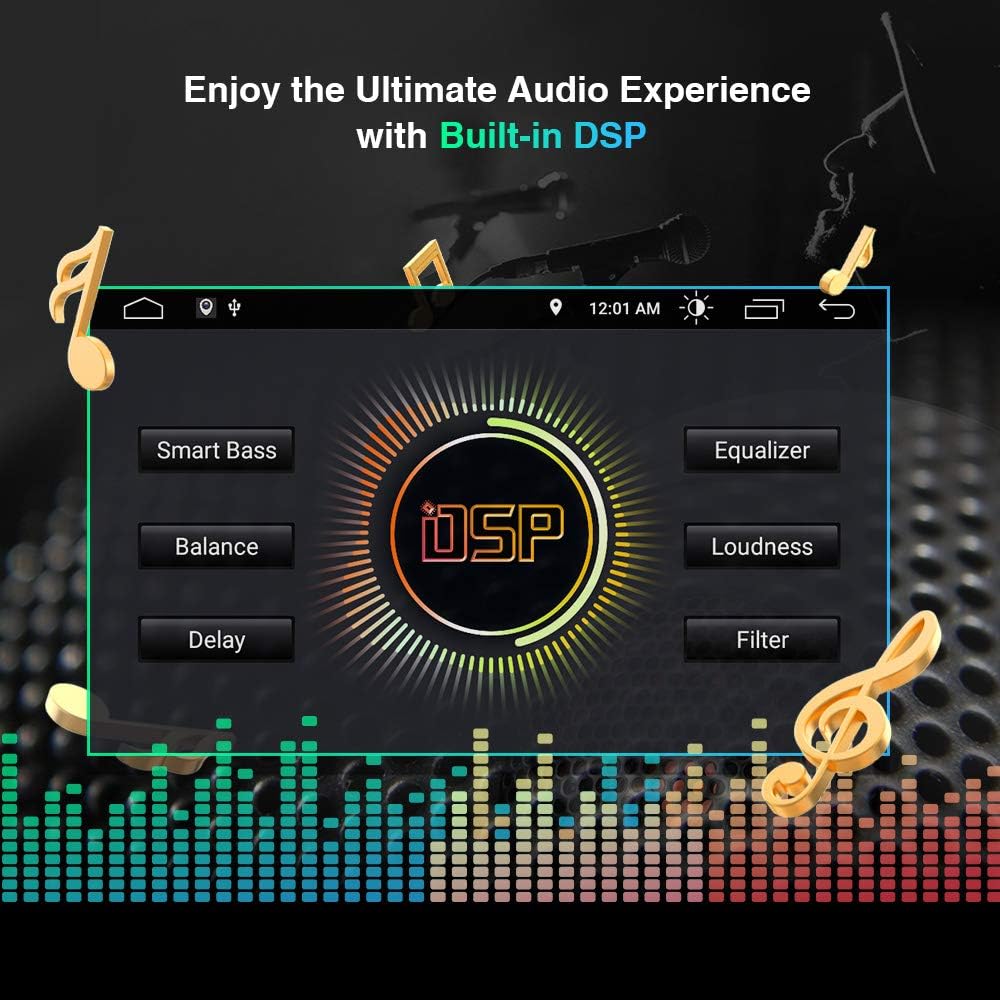
Figure 5: Illustration of the wide viewing angles provided by the IPS panel.
The unit features a 9-inch IPS (In-Plane Switching) touch screen with a 178-degree viewing angle, ensuring clear visibility from various positions. The high-resolution display (1024x600 HD) provides sharp images and supports 1080p Full HD video playback. Navigate the interface by tapping, swiping, and pinching on the screen.
Connectivitat Bluetooth 5.0
The built-in Bluetooth 5.0 module allows for hands-free calling and audio streaming. Pair your mobile phone to make and receive calls directly from the head unit. You can also access your phone book, view call logs, search contacts, and play music wirelessly from your device. (Refer to Video 1, timestamp 0:38 for a demonstration).
Navegació GPS
The unit includes built-in GPS functionality, supporting various Android navigation software such as IGO, Google Maps, and other compatible applications. Ensure your GPS antenna is properly installed for optimal signal reception. (Refer to Video 1, timestamp 1:01 for a demonstration).
Mirall de pantalla
Utilize the screen mirroring feature to display content from your smartphone directly onto the head unit's screen. This allows you to access your phone's applications and media on a larger display. (Refer to Video 1, timestamp 1:10 for a demonstration).
Processador de so digital (DSP) integrat

Figure 6: The DSP interface for audio adjustments.
The integrated DSP allows for precise audio customization. Adjust settings such as Smart Bass, Balance, Delay, Equalizer, Loudness, and Filter to enhance your music listening experience. (Refer to Video 1, timestamp 1:42 for a demonstration).
Internet Connectivity (WiFi & 3G/4G Dongle Support)
The unit features built-in WiFi for faster LTE download speeds. It also supports external 3G/4G dongles (sold separately) for mobile internet access, allowing you to browse online, stream content, and use internet-dependent applications. (Refer to Video 1, timestamp 1:21 for a demonstration).
Suport OBD2
Connect an optional OBD2 diagnostic tool (sold separately) to monitor your vehicle's performance data, read fault codes, and access real-time information directly on the head unit. (Refer to Video 1, timestamp 1:34 for a demonstration).
Preparat per DAB+
The unit is DAB+ ready, allowing you to enjoy high-quality digital audio broadcasting with an optional DAB+ tuner (sold separately). (Refer to Video 1, timestamp 2:07 for a demonstration).
Full RCA Output
With the full RCA output function, you can share all features simultaneously with passengers in the rear seats, connecting to external monitors or amplifiers. (Refer to Video 1, timestamp 1:50 for a demonstration).
Other Supported Accessories

Figure 7: Optional accessories that can be integrated with the head unit.
The XTRONS head unit supports a range of optional accessories (sold separately) to expand its functionality:
- Microphone (MIC001/MIC002/MIC003/MIC004): For improved hands-free call quality.
- DVR (DVR019S/DVR023S/DVR025S/DVR027S/DVR028): For recording your journey.
- Camera (CAM005/CAM006/CAM007/CAM009/CAM001F): For backup assistance and enhanced safety.
- Keyboard (AMK003): For easier text input.
- TPMS (TPMS07): To monitor tire pressure and temperature.
- Car Auto Play (CP02/CP03): Dongles for Android Auto and Apple CarPlay integration.
Especificacions
| Característica | Descripció |
|---|---|
| Marca | XTRONS |
| Sistema operatiu | Android 10.0 |
| Processador | Quad Core |
| RAM | 2 GB |
| ROM | 16 GB |
| Mida de la pantalla | 9 polzades |
| Tipus de visualització | Pantalla tàctil IPS |
| Resolució | 1024 x 600 HD |
| Versió Bluetooth | 5.0 |
| Tecnologia de connectivitat | USB, WiFi |
| Tipus de controlador | Android, iOS (via compatible dongles) |
| Mode de sortida d'àudio | estèreo |
| Nombre de canals | 4 |
| Serveis d'Internet compatibles | Pandora, Spotify, iHeartRadio |
| Mètode de control | Toca |
Resolució de problemes
If you encounter issues with your XTRONS car stereo, please consider the following general troubleshooting steps:
- Sense energia: Comproveu totes les connexions d'alimentació i els fusibles. Assegureu-vos que el vehicle estigui engegat.
- Sense so: Verify speaker connections. Check volume levels and audio settings (including DSP). Ensure the correct audio source is selected.
- Problemes amb el senyal GPS: Assegureu-vos que l'antena GPS estigui instal·lada correctament i que tingui una vista clara view of the sky. Check GPS settings within the unit.
- Problemes de connexió Bluetooth: Ensure Bluetooth is enabled on both the head unit and your mobile device. Try unpairing and re-pairing the devices.
- La pantalla tàctil no respon: Prova de reiniciar la unitat. Si el problema persisteix, pot ser necessari restablir les dades de fàbrica (nota: això esborrarà les dades de l'usuari).
- Alentiment del sistema: Close unnecessary applications. Clear cache if available in system settings.
For persistent issues or specific error codes, refer to the detailed troubleshooting section in the included user manual or contact XTRONS customer support.
Garantia i Suport
XTRONS proporciona una 1 any de garantia for this unit. This warranty covers manufacturing defects and ensures the product meets its specified performance. For warranty claims or technical assistance, please contact XTRONS customer support through the Amazon platform or visit the official XTRONS weblloc per obtenir informació de contacte.
When contacting support, please have your product model (PST90NCV_L) and purchase details readily available to facilitate a quicker resolution.


