1. Introducció
This manual provides essential instructions for the safe operation, setup, and maintenance of your Syma D350WH WiFi FPV Drone. Please read this manual thoroughly before operating the drone to ensure proper function and to prevent damage or injury.
The Syma D350WH is a WiFi FPV (First Person View) drone designed for both indoor and outdoor flight. It features live streaming video capabilities, auto hover, auto take-off, app control, flight plan functionality, 360-degree stunt flips, and two speed modes.

Image 1.1: The Syma D350WH WiFi FPV Drone, featuring a black body with red propellers and propeller guards.
2. Precaucions de seguretat
- Edat recomanada: This product is recommended for users 14 months and up. Adult supervision is advised for younger users.
- Entorn de vol: Operate the drone in open areas, away from people, animals, buildings, and power lines. Avoid flying in strong winds or adverse weather conditions.
- Seguretat de la bateria: Use only the provided charger and batteries. Do not overcharge or short-circuit batteries. Discontinue use if batteries show signs of damage or swelling.
- Seguretat de l'hèlix: Keep hands, face, and loose clothing away from rotating propellers. Ensure propellers are securely attached before flight.
- Exposició a l'aigua: The drone is not waterproof. Avoid contact with water or moisture.
- Línia de visió visual: Mantingueu sempre la línia de visió amb el dron durant el vol.
3. Contingut del paquet
En desembalar, comproveu que hi hagi tots els components:
- Syma D350WH WiFi FPV Drone
- Transmissor de control remot
- Drone Battery (rechargeable)
- Cable de càrrega USB
- Hélices de recanvi
- Guàrdies d'hèlix
- Manual d'instruccions
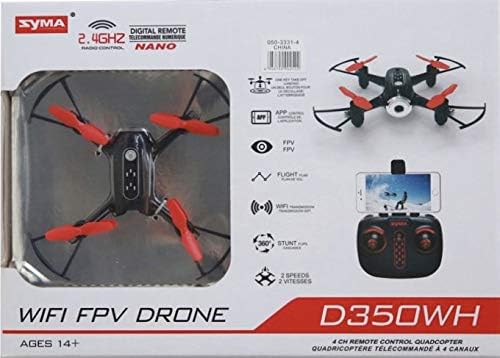
Image 3.1: The Syma D350WH Drone shown in its retail packaging, highlighting key features and components.
4. Configuració
4.1 Muntatge del dron
- Attach Propeller Guards: Carefully snap the propeller guards onto the drone's arms. Ensure they are securely fastened.
- Instal·lar hèlixs: If not pre-installed, attach the propellers to the motor shafts. Match the 'A' and 'B' marked propellers to their corresponding motor shafts as indicated in the drone's markings.
4.2 Instal·lació i càrrega de la bateria
- Drone Bateria: Insert the fully charged drone battery into the battery compartment on the drone's underside. Connect the battery connector firmly.
- Bateries de control remot: Open the battery compartment on the back of the remote control. Insert the required batteries (typically AA, not always included) according to the polarity markings. Close the compartment.
- Càrrega: Connect the drone battery to the USB charging cable, then plug the USB cable into a suitable USB power source (e.g., computer, USB wall adapter). The indicator light on the USB cable will show charging status (e.g., red for charging, off for fully charged).
4.3 App Installation (for FPV and Advanced Features)
To utilize the WiFi FPV and advanced features like Flight Plan, download the official Syma FPV app from your smartphone's app store (iOS App Store or Android Google Play Store). Cerca "Syma FPV" or refer to the QR code provided in the quick start guide (if applicable).
4.4 Emparellar el dron i el comandament a distància
- Col·loqueu el drone sobre una superfície plana i plana.
- Engegueu l'interruptor d'encesa del dron. Els llums indicadors del dron parpellejaran.
- Engegueu el comandament a distància.
- Push the left joystick (throttle) all the way up, then all the way down. The drone's indicator lights will stop flashing and remain solid, indicating successful pairing.
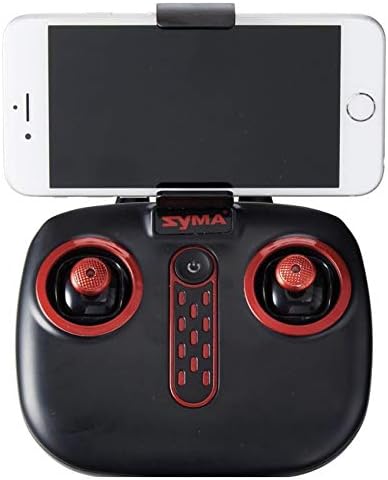
Image 4.1: The Syma D350WH remote control with a smartphone mounted, ready for FPV operation.
5. Instruccions de funcionament
5.1 Controls bàsics de vol
Familiaritzeu-vos amb la disposició del comandament a distància:

Image 5.1: The Syma D350WH remote control, showing the two joysticks and various control buttons.
- Joystick esquerre (accelerador/guinyada):
- Amunt/Avall: Controla l'altitud (ascens/descens).
- Left/Right: Controls yaw (rotate left/right).
- Joystick dret (Pitch/Roll):
- Up/Down: Controls pitch (move forward/backward).
- Left/Right: Controls roll (move left/right).
- One-Key Take-off/Landing Button: Premeu per enlairar-vos o aterrar automàticament.
- Botó de canvi de velocitat: Toggles between two available speed modes (low/high).
- Auto Hover: The drone automatically maintains its altitude when the throttle joystick is released to the center position.
5.2 WiFi FPV Functionality
- Ensure the Syma FPV app is installed on your smartphone.
- Turn on the drone and pair it with the remote control.
- On your smartphone, go to Wi-Fi settings and connect to the drone's Wi-Fi network (e.g., "Syma_FPV_XXXX").
- Open the Syma FPV app. You should see the live video feed from the drone's camera.
5.3 Característiques especials
- 360 Stunt Flips: While flying, press the stunt button (refer to remote control diagram in app or quick start guide) and then push the right joystick in any direction to perform a flip.
- Flight Plan (App Control): Within the Syma FPV app, you can draw a flight path on your screen, and the drone will follow the designated route.
6. Manteniment
- Neteja: Use a soft, dry cloth to clean the drone. Avoid using water or solvents.
- Substitució de l'hèlix: If propellers are damaged, replace them with new ones, ensuring correct 'A' and 'B' propeller placement.
- Cura de la bateria: Store batteries in a cool, dry place. Do not leave batteries fully charged or fully discharged for extended periods.
- Emmagatzematge: When not in use, store the drone and remote control in a safe, dry environment, away from direct sunlight and extreme temperatures.
7. Solució De Problemes
| Problema | Causa possible | Solució |
|---|---|---|
| El dron no respon al comandament a distància. | No emparellat; bateria baixa al comandament a distància o al dron. | Re-pair the drone and remote. Charge drone battery. Replace remote control batteries. |
| El dron vola de manera erràtica o a la deriva. | Not calibrated; damaged propeller; strong wind. | Perform gyroscope calibration (refer to quick start guide). Replace damaged propellers. Fly in calm conditions. |
| Sense transmissió de vídeo FPV. | Not connected to drone's Wi-Fi; app not open. | Ensure smartphone is connected to the drone's Wi-Fi network. Open the Syma FPV app. |
| Temps de vol curt. | Bateria no completament carregada; bateria envellida. | Ensure battery is fully charged before flight. Consider replacing old batteries. |
8. Especificacions
- Marca: Syma
- Nom del model: D350WH
- Número de model: X22SW-RED
- Dimensions: 36 x 26 x 8 cm
- Pes: 500 g
- Material: Fibra de carboni, plàstic
- Tipus de comandament a distància: Wi-Fi
- Característiques especials: Adjustable, Integrated Camera, Portable
- Bateries: Included (for drone)
- Edat recomanada: 14 mesos i més
- Primer disponible: 11 d'agost de 2020
9. Garantia i Suport
For warranty information, technical support, or replacement parts, please contact Syma customer service. Refer to the packaging or the official Syma weblloc web per obtenir les dades de contacte més actualitzades.
Fabricant: Syma


