1. Introducció
This manual provides essential information for setting up, operating, maintaining, and troubleshooting your Samsung Galaxy A71 smartphone. Please read this manual thoroughly to ensure proper use and to maximize the device's capabilities.
The Samsung Galaxy A71 (Model A715F) features a 6.7-inch Super AMOLED Plus display, a 64MP Quad Camera system, a 4500 mAh battery with 25W fast charging, and runs on Android 10.0 with One UI 2. It is an international model designed for GSM carriers.
2. Disseny del dispositiu
Familiaritzeu-vos amb els components físics del vostre Galaxy A71.

Imatge 2.1: Frontal view of the Samsung Galaxy A71, showing the display and front camera.
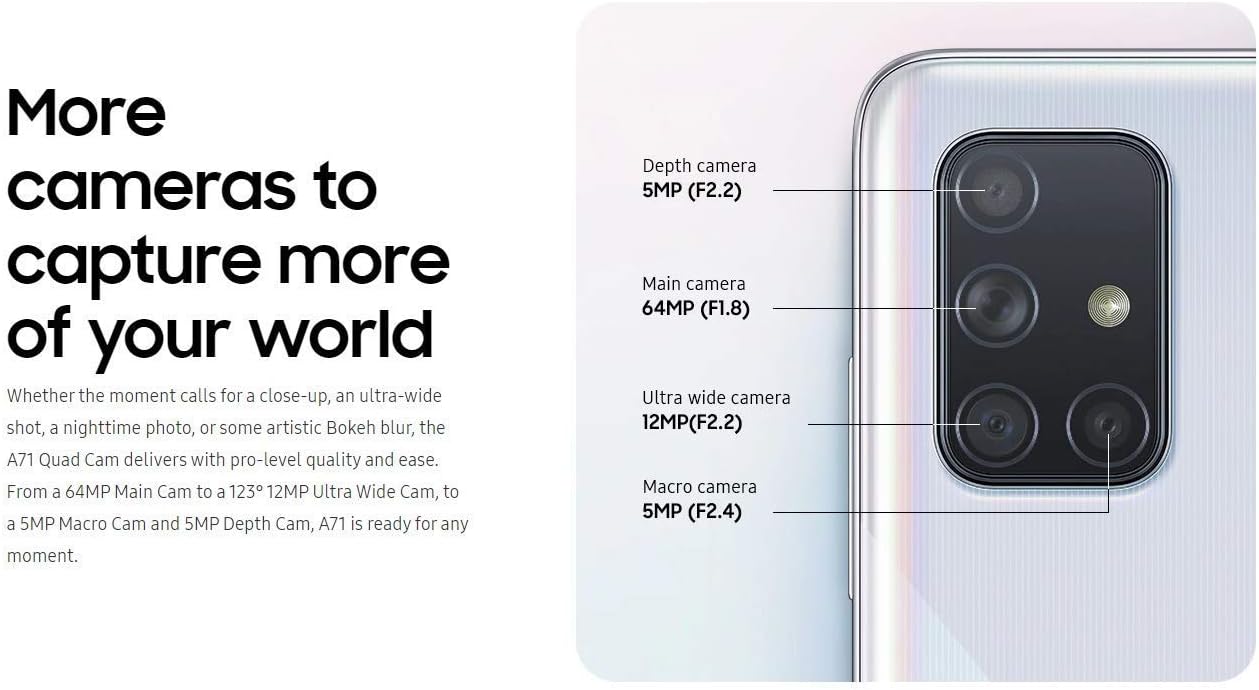
Imatge 2.2: Darrere view of the Samsung Galaxy A71, highlighting the quad camera module and Samsung branding.
3. Configuració
3.1. Inserció de la targeta SIM
The Galaxy A71 uses a single Nano-SIM card. Ensure the device is powered off before inserting or removing the SIM card.
- Localitza la safata de la targeta SIM al lateral del dispositiu.
- Insert the ejection pin into the hole on the SIM card tray to open it.
- Col·loca la targeta Nano-SIM a la safata amb els contactes daurats cap avall.
- Empenyeu suaument la safata cap enrere a la ranura fins que quedi alineada amb el dispositiu.
3.2. Engegada i configuració inicials
- Premeu i manteniu premuda la tecla d'engegada fins que aparegui el logotip de Samsung.
- Segueix les instruccions que apareixen a la pantalla per seleccionar l'idioma, connectar-te a una xarxa Wi-Fi i configurar el teu compte de Google.
3.3. Configuració del sensor d'empremtes dactilars
The Galaxy A71 features an in-display optical fingerprint sensor for secure unlocking.
- Navega a Configuració > Biometria i seguretat > Empremtes dactilars.
- Follow the on-screen instructions to register your fingerprint. You will be prompted to lift and press your finger multiple times on the designated area of the screen.
- Ensure your finger is clean and dry for accurate recognition.

Image 3.1: Illustration of the in-display fingerprint sensor for unlocking the device.
4. Funcionament del vostre dispositiu
4.1. Pantalla i navegació
The 6.7-inch Super AMOLED Plus display offers vibrant colors and deep blacks. Navigate the interface using touch gestures, including tap, swipe, pinch-to-zoom, and long press.
4.2. Ús de la càmera
El Galaxy A71 està equipat amb un sistema versàtil de quatre càmeres a la part posterior i una càmera frontal d'alta resolució.
- Càmera posterior: 64 MP (F1.8) Main, 12 MP (F2.2) Ultra Wide, 5 MP (F2.4) Macro, 5 MP (F2.2) Depth.
- Càmera frontal: 32 MP (F2.2).
To open the camera, tap the Camera icon on the home screen or double-press the Power key. Select different modes like Photo, Video, Pro, Panorama, Food, Night, Macro, and Live Focus from the camera interface.

Imatge 4.1: Detallada view of the Galaxy A71's quad camera system, indicating the function of each lens.
4.3. Bateria i càrrega
The device is powered by a 4500 mAh battery and supports 25W Super Fast Charging.
- Use the included 25W fast charger for optimal charging speeds.
- To charge, connect the USB-C cable to the phone's charging port and the adapter to a power outlet.
- Avoid using damaged chargers or cables, as this can harm the device and void the warranty.

Image 4.2: Information on the 4500mAh battery and 25W Super Fast Charging capability.
4.4. Emmagatzematge i memòria
The Galaxy A71 comes with 128GB of internal storage and 6GB of RAM. Storage can be expanded up to 512GB using a MicroSD card (sold separately).
4.5. Connectivitat
El dispositiu admet diverses opcions de connectivitat:
- Cel·lular: GSM, HSDPA, and 4G LTE bands (refer to specifications for detailed band information).
- Wi-Fi: Connecteu-vos a xarxes sense fil per accedir a Internet.
- Bluetooth: Per connectar accessoris sense fil.
- USB-C: Per a càrrega i transferència de dades.
- Jack d'àudio: 3.5mm port for wired headphones.
5. Manteniment
5.1. Cura de la bateria
- Eviteu les temperatures extremes, ja que poden reduir la durada de la bateria.
- No deixeu el dispositiu carregant-se durant períodes prolongats després que hagi arribat al 100%.
- For long-term storage, charge the battery to around 50% and power off the device.
5.2. Actualitzacions de programari
Comproveu i instal·leu regularment si hi ha actualitzacions de programari per garantir un rendiment òptim, seguretat i accés a noves funcions. Aneu a Configuració > Actualització de programari > Descarrega i instal·la.
5.3. Neteja del dispositiu
- Feu servir un drap suau i sense borrissol per netejar la pantalla i la carcassa.
- Eviteu productes químics agressius, materials abrasius o humitat excessiva.
- Per a taques difícils, fregueu lleugeramentampel drap amb aigua destil·lada.
6. Solució De Problemes
6.1. El dispositiu no s'encén
- Assegureu-vos que la bateria estigui carregada. Connecteu el carregador i espereu uns minuts abans d'intentar engegar-lo.
- Press and hold the Power key for at least 10 seconds to perform a forced restart.
6.2. Problemes de connectivitat de xarxa
- Verify that your SIM card is correctly inserted and activated with a compatible GSM carrier.
- Check your network settings: Configuració > Connexions > Xarxes mòbils.
- Reinicieu el dispositiu.
- Note: This is an international model and may not be compatible with all carriers, especially CDMA networks like Verizon, Sprint, or Boost in the US.
6.3. El sensor d'empremtes dactilars no funciona
- Assegureu-vos que el dit i la pantalla estiguin nets i secs.
- Re-register your fingerprint if issues persist.
- Ensure you are pressing firmly on the correct area of the screen.
7. Especificacions
| Nom del model | Galaxy A71 |
| Número de model | A715F |
| Mostra | 6.7 inches Super AMOLED Plus, FHD+ (1080 x 2400 pixels) |
| Processador | Qualcomm SDM730 Snapdragon 730 (8 nm), Octa-core (2x2.2 GHz + 6x1.8 GHz) |
| RAM | 6 GB |
| Emmagatzematge intern | 128 GB |
| Emmagatzematge ampliable | MicroSD (up to 512 GB) |
| Càmera posterior | 64 MP (F1.8) Main + 12 MP (F2.2) Ultra Wide + 5 MP (F2.4) Macro + 5 MP (F2.2) Depth |
| Càmera frontal | 32 MP (F2.2) |
| Capacitat de la bateria | 4500 mAh |
| Carregant | Càrrega súper ràpida de 25 W |
| Sistema operatiu | Android 10.0, One UI 2 |
| Tipus de SIM | Nano-SIM única |
| Connectivitat | 4G LTE, Wi-Fi, Bluetooth, GPS, USB-C |
| Jack d'àudio | 3.5 mm |
| Dimensions (aprox.) | 163.6 x 76.0 x 7.7 mm (6.44 x 2.99 x 0.30 polzades) |
| Pes (aprox.) | 179 g (6.31 oz) |
8. Garantia i Suport
Tingueu en compte que això és un Versió internacional of the Samsung Galaxy A71 (Model A715F). As such, there is No Warranty in the US provided by the manufacturer for this specific model.
This international model is compatible with most GSM carriers, including T-Mobile, AT&T, and MetroPCS. It will NO work with CDMA carriers such as Verizon, Sprint, or Boost.
For further support or detailed product information, please refer to the official Samsung support website for international models or contact your point of purchase.
For general information about Samsung products, you may visit: www.samsung.com


